Bildübergang als Shader für Pixel Art: ein geditherter Wischer
Ein Bildübergang bringt den Spieler von einem Bild zum nächsten: aus dem Schnee ins Gewächshaus, von der Karte in ein Level. Die Regel dieser Lektion macht das mit einem Wischer. Eine Kante wandert über den Bildschirm, während progress von 0 auf 100 geht, und an der Kante werden die beiden Bilder Pixel für Pixel nach dem 4-mal-4-Muster gemischt. So wirkt die Kante weich, ohne dass auch nur eine Farbe gemischt wird.
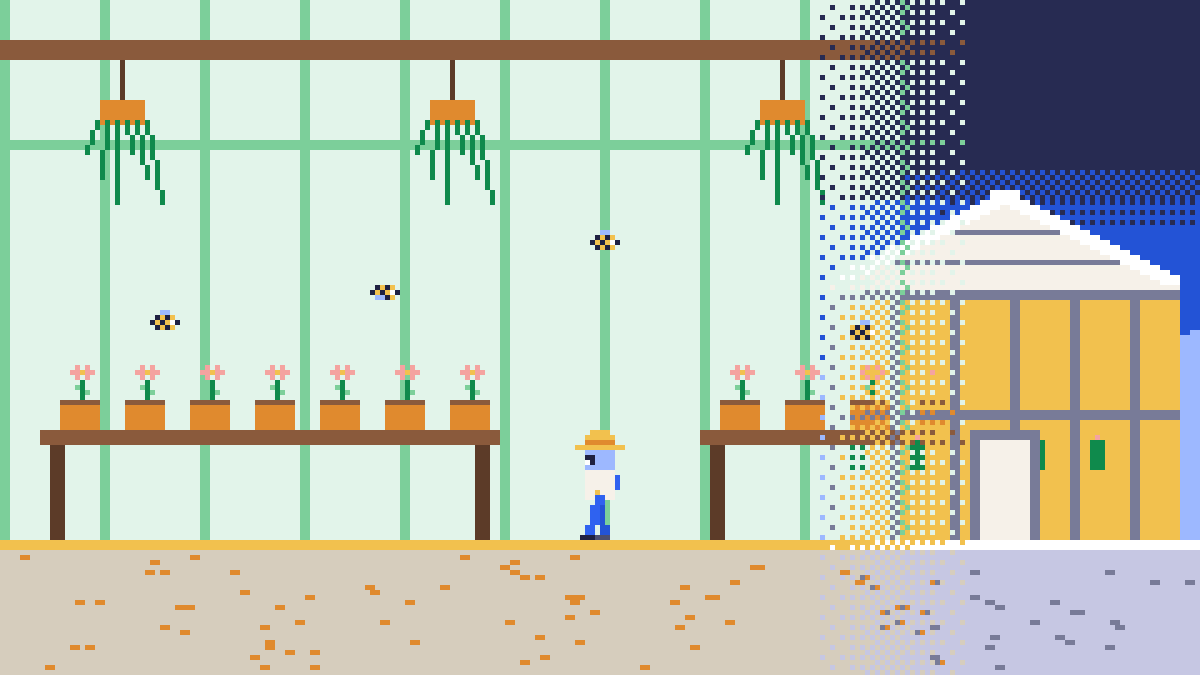
Der Winterhof ist das alte Bild, das Gewächshaus das neue. Eine Kante wandert hinüber, während progress von 0 auf 100 geht; in der weichen Kante dahinter kommt jeder Pixel ganz aus dem einen oder dem anderen Bild, nach dem 4-mal-4-Muster. Bei 100 ist kein einziger Pixel Schnee übrig.
Auch in dieser Lektion 4 Lesetipps zum Vertiefen 3 Fragen zum Selbsttest
Die Idee
Übergänge begegnen einem Spieler an Türen, am Anfang eines Kampfes und auf dem Weg in ein Menü. Sie verdecken den Moment, in dem eine Szene gegen eine andere getauscht wird, und ein guter Übergang sagt dem Spieler auch, in welche Richtung er gegangen ist.
Pixel Art kann ein Bild nicht einfach ins andere überblenden. Auf halbem Weg zwischen dem tiefen Blau des Winterabends und dem blassen Grün des Gewächshauses liegt eine Farbe, die nicht in der Palette ist; ein Überblenden erfindet also Farben. Ein Dither erledigt dieselbe Aufgabe mit ganzen Pixeln: Jeder Pixel kommt ganz aus dem einen oder ganz aus dem anderen Bild, und quer über die Kante wächst der Anteil der neuen Pixel. Aus ein wenig Abstand mischt das Auge sie selbst.
Die Regel weiß nichts von der Zeit. Das Spiel gibt ihr progress und schiebt diese Zahl weiter, im Bild oben in 120 Ticks von 0 auf 100. So bestimmt das Spiel, wie schnell der Wischer läuft, kann ihn auf halbem Weg anhalten oder rückwärts laufen lassen.
So funktioniert es
Für jeden Pixel rechnet die Regel drei Dinge aus.
Wo ist die Kante? Sie liegt bei progress mal der Breite des Bildes plus der weichen Kante, geteilt durch 100. Bei 0 steht die Kante am linken Rand. Bei 100 ist sie um die Breite der weichen Kante über den rechten Rand hinaus.
Wie weit ist die Kante schon über diesen Pixel hinaus? Das ist der Platz der Kante minus die Spalte des Pixels. Bei 0 oder darunter hat die Kante den Pixel noch nicht erreicht, und das alte Bild bleibt.
Ist sie weit genug für diesen Pixel? Jeder Pixel hat eine Zahl von 0 bis 15 aus dem 4-mal-4-Muster, gewählt nach seiner Spalte und seiner Reihe. Der Pixel wechselt ins neue Bild, wenn der Abstand mal 16 größer ist als seine Zahl mal die Breite der weichen Kante. Ein Pixel mit 0 wechselt, sobald die Kante ihn erreicht, einer mit 15 erst, wenn die Kante fast eine ganze weiche Kante weiter ist. Ist sie eine ganze weiche Kante weiter, hat jeder Pixel gewechselt.
Der Moment jedes Pixels steht durch seinen Platz fest, also wechselt er einmal und bleibt dabei. Geht progress wieder zurück, wechseln die Pixel in umgekehrter Reihenfolge zurück.
Die Regler sind progress, von 0 für das alte Bild bis 100 für das neue (50, solange niemand ihn anfasst; das Bild bleibt eine Sekunde bei 0, wischt zwei Sekunden hinüber, bleibt zwei Sekunden bei 100 und wischt in einer zurück), und soft, wie viele Pixel breit die Kante ist (32; bei 1 ist die Kante hart).
Was schiefgeht
Bei 100 bleibt am rechten Rand ein Streifen des alten Bildes übrig. Die KI schiebt die Kante von 0 bis zur Breite des Bildes, denn so klingt „Fortschritt“, und vergisst, dass die weiche Kante ihr hinterherläuft. Bei 100 steht die Kante am rechten Rand, und die weiche Kante dahinter ist noch auf dem Bildschirm, halb alt und halb neu. Das ist der naheliegende Weg, einen weichen Wischer zu schreiben, und man übersieht den Fehler leicht, denn auf halbem Weg sieht alles richtig aus.
Im Spiel ist das ein ausgefranster Streifen des alten Raums, der am Bildrand hängen bleibt und erst wegspringt, wenn der Übergang abgeschaltet wird.
Schalte das Bild auf „Mit dem Fehler“ und warte auf das Gewächshaus. Ein geditherter Streifen des Winterabends bleibt am rechten Rand stehen, dunkler Himmel über dem gelben Leuchten der Gewächshausfront, solange das Bild bei 100 bleibt.
Zwei Tests fangen das. „At 100 every pixel is the new picture, however wide the soft edge“ findet am rechten Rand einen Pixel, der noch aus dem alten Bild kommt. „Every pixel turns once on the way from 0 to 100 and never turns back“ findet einen Pixel, der nie gewechselt hat.
Der Fehler, Zeile für Zeile
- /* A screen transition, with the mistake: the edge sweeps only across the picture's width and forgets
-    that the soft edge trails behind it. At 100 the edge stands at the right side of the screen, and the
-    soft edge, still on the screen, leaves a dithered strip of the old picture there. Everything else is
-    the same as in shader.ts.
+ /* A screen transition: a wipe from one picture to the next, with a dithered edge. An edge sweeps
+    across the screen from left to right as `progress` goes from 0 to 100. Behind it the new picture
+    stands, ahead of it the old one, and in between, for `soft` pixels, the two are mixed by the 4 by 4
+    pattern: a pixel turns once the edge has passed it by its number in the pattern, in sixteenths of
+    the soft edge.

+    The pixel art way: a picture is a grid of whole numbers, 0 where nothing is and 1 to 25 for the
+    palette's colours. The rule is asked for every pixel and answers with a number. It takes each pixel
+    whole from one picture or the other and never blends them.
+
     From the course "Shaders for pixel art" on spielerando.com.
     SPDX-License-Identifier: MIT */
…
  }

- /** The rule, wrong: the new picture where the edge has passed far enough, but the edge stops one soft edge short. */
+ /** The rule: the new picture where the edge has passed far enough, the old one everywhere else. */
  export function shade(x: number, y: number, _tick: number, src: Frame, p: Params = DEFAULTS, other: Frame = src): number {
-   // the mistake: the edge comes only as far as the picture's width at 100, and the soft edge is still on it
-   const edge = Math.floor((p.progress * src.width) / 100);
+   // how far the edge has come: from 0 at the start to the picture's width and the soft edge's own at 100
+   const edge = Math.floor((p.progress * (src.width + p.soft)) / 100);
    // how far the edge is past this pixel: below 0 it has not come yet
    const past = edge - x;
Was der Test zum Fehler sagt
✔ at 0 every pixel is the old picture
✖ at 100 every pixel is the new picture, however wide the soft edge
    at 11, 0, soft 4: still the old picture
    got 2, expected 4
✖ every pixel turns once on the way from 0 to 100 and never turns back
    at 11, 0, soft 4: turned 0 times
    got 0, expected 1
✔ every pixel is taken whole from one picture or the other
✔ the wipe runs from left to right: going right, each strip 4 pixels wide holds no more of the new picture
✔ in the soft edge a column holds both pictures, pixel by pixel; with a soft edge of 1 none does
6 tests: 4 passed, 2 failed
Das sagst du deiner KI
Schreib einen Shader für einen Bildübergang in meinem Pixel-Art-Spiel: einen Wischer von links nach rechts, vom alten Bildschirm zum neuen, mit einer geditherten Kante.

- Nur ganze Pixel und kein Mischen: Jeder Pixel kommt ganz aus dem alten oder ganz aus dem neuen Bild.
- Mein Spiel setzt progress, eine ganze Zahl von 0 (alles alt) bis 100 (alles neu). Die Kante ist [32] Pixel breit.
- Nimm das 4-mal-4-Dithermuster 0, 8, 2, 10 / 12, 4, 14, 6 / 3, 11, 1, 9 / 15, 7, 13, 5, gewählt nach Spalte und Reihe des Pixels, jeweils modulo 4.
- Die Kante muss die Breite des Bildschirms plus ihre eigene Breite zurücklegen, damit bei 100 kein einziger Pixel des alten Bildes übrig ist und bei 0 keiner des neuen.

Bevor du den Shader schreibst, schreib dieselbe Regel als kleine, einfache Funktion, die einen Platz und progress bekommt und zurückgibt, welches Bild dort zu sehen ist. Teste sie: Bei 0 ist jeder Pixel alt, bei 100 ist jeder Pixel neu, für eine Kante von 1, [32] und 80 Pixeln, und jeder Pixel wechselt einmal und nie zurück. Zeig mir die Ausgabe der Tests. Schreib dann den Shader so, dass er genau das tut, was die Funktion tut.
Der Code
Dreimal dieselbe Regel. Die erste ist die, die wir testen; die beiden Shader sind diese Regel in einer Shader-Sprache, und die läuft in deinem Spiel.
Die Regel, getestet: shader.ts
/* A screen transition: a wipe from one picture to the next, with a dithered edge. An edge sweeps
   across the screen from left to right as `progress` goes from 0 to 100. Behind it the new picture
   stands, ahead of it the old one, and in between, for `soft` pixels, the two are mixed by the 4 by 4
   pattern: a pixel turns once the edge has passed it by its number in the pattern, in sixteenths of
   the soft edge.

   The pixel art way: a picture is a grid of whole numbers, 0 where nothing is and 1 to 25 for the
   palette's colours. The rule is asked for every pixel and answers with a number. It takes each pixel
   whole from one picture or the other and never blends them.

   From the course "Shaders for pixel art" on spielerando.com.
   SPDX-License-Identifier: MIT */

export interface Frame {
  width: number;
  height: number;
  index: Uint8Array;
}

export const DEFAULTS = {
  /** How far the change has come: 0 is the old picture, 100 the new one. */
  progress: 50,
  /** How many pixels wide the dithered edge is. */
  soft: 32,
};
export type Params = typeof DEFAULTS;

/** The 4 by 4 pattern for dithering: 0 to 15, each once. */
const BAYER = [0, 8, 2, 10, 12, 4, 14, 6, 3, 11, 1, 9, 15, 7, 13, 5];

/** The number at a place of the picture; outside the picture nothing is. */
export function at(src: Frame, x: number, y: number): number {
  if (x < 0 || y < 0 || x >= src.width || y >= src.height) return 0;
  return src.index[y * src.width + x];
}

/** The rule: the new picture where the edge has passed far enough, the old one everywhere else. */
export function shade(x: number, y: number, _tick: number, src: Frame, p: Params = DEFAULTS, other: Frame = src): number {
  // how far the edge has come: from 0 at the start to the picture's width and the soft edge's own at 100
  const edge = Math.floor((p.progress * (src.width + p.soft)) / 100);
  // how far the edge is past this pixel: below 0 it has not come yet
  const past = edge - x;
  // the pixel turns once the edge is past it by its number in the pattern, counted in sixteenths of the soft edge
  return past * 16 > BAYER[(y & 3) * 4 + (x & 3)] * p.soft ? at(other, x, y) : at(src, x, y);
}
Dieselbe Regel als Shader: GLSL
#version 300 es
// A shader the pixel art way: a pixel is a whole number, 0 where nothing is, 1 to 25 for the
// palette's colours. The rule is shade(): it is asked for every pixel and answers with a number.
// Everything outside the marked part is the same for every rule. Put your own palette in PALETTE.
precision highp float;
precision highp int;

uniform sampler2D SRC;   // the picture, sampled without smoothing (nearest)
uniform sampler2D OTHER; // a second picture, where the rule uses one
uniform int TICK;        // the time in ticks, 60 a second, counted by the game

const vec3 PALETTE[26] = vec3[26](
  vec3(0.0),
  vec3(31.0, 33.0, 66.0) / 255.0, // 1: k
  vec3(75.0, 78.0, 112.0) / 255.0, // 2: n
  vec3(120.0, 123.0, 152.0) / 255.0, // 3: m
  vec3(198.0, 199.0, 227.0) / 255.0, // 4: e
  vec3(255.0, 255.0, 255.0) / 255.0, // 5: w
  vec3(246.0, 241.0, 233.0) / 255.0, // 6: c
  vec3(214.0, 205.0, 189.0) / 255.0, // 7: d
  vec3(242.0, 193.0, 78.0) / 255.0, // 8: y
  vec3(224.0, 138.0, 46.0) / 255.0, // 9: o
  vec3(194.0, 65.0, 45.0) / 255.0, // 10: r
  vec3(244.0, 163.0, 160.0) / 255.0, // 11: p
  vec3(47.0, 98.0, 240.0) / 255.0, // 12: b
  vec3(35.0, 83.0, 214.0) / 255.0, // 13: u
  vec3(157.0, 184.0, 255.0) / 255.0, // 14: s
  vec3(234.0, 240.0, 255.0) / 255.0, // 15: a
  vec3(207.0, 224.0, 255.0) / 255.0, // 16: i
  vec3(15.0, 138.0, 76.0) / 255.0, // 17: g
  vec3(124.0, 207.0, 154.0) / 255.0, // 18: l
  vec3(226.0, 244.0, 234.0) / 255.0, // 19: f
  vec3(138.0, 90.0, 60.0) / 255.0, // 20: t
  vec3(92.0, 59.0, 40.0) / 255.0, // 21: h
  vec3(109.0, 76.0, 230.0) / 255.0, // 22: v
  vec3(201.0, 187.0, 255.0) / 255.0, // 23: q
  vec3(18.0, 20.0, 43.0) / 255.0, // 24: x
  vec3(39.0, 43.0, 82.0) / 255.0 // 25: z
);

// Which colour of the palette is this? 0 where nothing is drawn.
int number(vec4 c) {
  if (c.a < 0.5) return 0;
  int best = 1;
  float least = 9.0;
  for (int i = 1; i <= 25; i++) {
    vec3 d = c.rgb - PALETTE[i];
    float away = dot(d, d);
    if (away < least) {
      least = away;
      best = i;
    }
  }
  return best;
}

// The number at a place of the picture; outside the picture nothing is.
int at(ivec2 p) {
  ivec2 size = textureSize(SRC, 0);
  if (p.x < 0 || p.y < 0 || p.x >= size.x || p.y >= size.y) return 0;
  return number(texelFetch(SRC, p, 0));
}

// The same for the second picture.
int otherAt(ivec2 p) {
  ivec2 size = textureSize(OTHER, 0);
  if (p.x < 0 || p.y < 0 || p.x >= size.x || p.y >= size.y) return 0;
  return number(texelFetch(OTHER, p, 0));
}

// a wrapped into 0 .. n-1, also for a below zero (the % sign is not safe there)
int wrap(int a, int n) {
  return a - n * int(floor(float(a) / float(n)));
}

// ---- the rule ----
uniform int progress; // how far the change has come: 0 is the old picture, 100 the new one
uniform int soft;     // how many pixels wide the dithered edge is

// the 4 by 4 pattern for dithering: 0 to 15, each once
const int BAYER[16] = int[16](0, 8, 2, 10, 12, 4, 14, 6, 3, 11, 1, 9, 15, 7, 13, 5);

// the new picture where the edge has passed far enough, the old one everywhere else
int shade(ivec2 p) {
  // how far the edge has come: from 0 at the start to the picture's width and the soft edge's own at 100
  int edge = (progress * (textureSize(SRC, 0).x + soft)) / 100;
  // how far the edge is past this pixel: below 0 it has not come yet
  int past = edge - p.x;
  // the pixel turns once the edge is past it by its number in the pattern, counted in sixteenths of the soft edge
  return past * 16 > BAYER[(p.y & 3) * 4 + (p.x & 3)] * soft ? otherAt(p) : at(p);
}
// ---- end of the rule ----

out vec4 FRAGMENT;

void main() {
  // the pixel's place, counted from the top left as in the picture
  ivec2 p = ivec2(int(gl_FragCoord.x), textureSize(SRC, 0).y - 1 - int(gl_FragCoord.y));
  int n = shade(p);
  FRAGMENT = n == 0 ? vec4(0.0) : vec4(PALETTE[n], 1.0);
}
Dieselbe Regel für Godot 4
shader_type canvas_item;
// A shader the pixel art way: a pixel is a whole number, 0 where nothing is, 1 to 25 for the
// palette's colours. The rule is shade(): it is asked for every pixel and answers with a number.
// Everything outside the marked part is the same for every rule. Put your own palette in PALETTE.
//
// Put this on a ColorRect that covers the screen, above everything it should change.
// The rule counts pixels as this shader sees them. Let the game draw at the size of its art and
// enlarge the finished picture (the project's stretch mode "viewport"), or it counts window pixels.
uniform sampler2D SRC : hint_screen_texture, filter_nearest; // what is on the screen behind it
uniform sampler2D OTHER : filter_nearest; // a second picture, where the rule uses one
// The time in ticks, 60 a second. The game counts it itself: add 1 in the _physics_process of a
// node that pauses with the game, and set it there, so a paused game pauses its shaders:
//   tick += 1
//   material.set_shader_parameter("TICK", tick)
uniform int TICK;

const vec3 PALETTE[26] = vec3[26](
  vec3(0.0),
  vec3(31.0, 33.0, 66.0) / 255.0, // 1: k
  vec3(75.0, 78.0, 112.0) / 255.0, // 2: n
  vec3(120.0, 123.0, 152.0) / 255.0, // 3: m
  vec3(198.0, 199.0, 227.0) / 255.0, // 4: e
  vec3(255.0, 255.0, 255.0) / 255.0, // 5: w
  vec3(246.0, 241.0, 233.0) / 255.0, // 6: c
  vec3(214.0, 205.0, 189.0) / 255.0, // 7: d
  vec3(242.0, 193.0, 78.0) / 255.0, // 8: y
  vec3(224.0, 138.0, 46.0) / 255.0, // 9: o
  vec3(194.0, 65.0, 45.0) / 255.0, // 10: r
  vec3(244.0, 163.0, 160.0) / 255.0, // 11: p
  vec3(47.0, 98.0, 240.0) / 255.0, // 12: b
  vec3(35.0, 83.0, 214.0) / 255.0, // 13: u
  vec3(157.0, 184.0, 255.0) / 255.0, // 14: s
  vec3(234.0, 240.0, 255.0) / 255.0, // 15: a
  vec3(207.0, 224.0, 255.0) / 255.0, // 16: i
  vec3(15.0, 138.0, 76.0) / 255.0, // 17: g
  vec3(124.0, 207.0, 154.0) / 255.0, // 18: l
  vec3(226.0, 244.0, 234.0) / 255.0, // 19: f
  vec3(138.0, 90.0, 60.0) / 255.0, // 20: t
  vec3(92.0, 59.0, 40.0) / 255.0, // 21: h
  vec3(109.0, 76.0, 230.0) / 255.0, // 22: v
  vec3(201.0, 187.0, 255.0) / 255.0, // 23: q
  vec3(18.0, 20.0, 43.0) / 255.0, // 24: x
  vec3(39.0, 43.0, 82.0) / 255.0 // 25: z
);

// Which colour of the palette is this? 0 where nothing is drawn.
int number(vec4 c) {
  if (c.a < 0.5) return 0;
  int best = 1;
  float least = 9.0;
  for (int i = 1; i <= 25; i++) {
    vec3 d = c.rgb - PALETTE[i];
    float away = dot(d, d);
    if (away < least) {
      least = away;
      best = i;
    }
  }
  return best;
}

// The number at a place of the picture; outside the picture nothing is.
int at(ivec2 p) {
  ivec2 size = textureSize(SRC, 0);
  if (p.x < 0 || p.y < 0 || p.x >= size.x || p.y >= size.y) return 0;
  return number(texelFetch(SRC, p, 0));
}

// The same for the second picture.
int otherAt(ivec2 p) {
  ivec2 size = textureSize(OTHER, 0);
  if (p.x < 0 || p.y < 0 || p.x >= size.x || p.y >= size.y) return 0;
  return number(texelFetch(OTHER, p, 0));
}

// a wrapped into 0 .. n-1, also for a below zero (the % sign is not safe there)
int wrap(int a, int n) {
  return a - n * int(floor(float(a) / float(n)));
}

// ---- the rule ----
uniform int progress; // how far the change has come: 0 is the old picture, 100 the new one
uniform int soft;     // how many pixels wide the dithered edge is

// the 4 by 4 pattern for dithering: 0 to 15, each once
const int BAYER[16] = int[16](0, 8, 2, 10, 12, 4, 14, 6, 3, 11, 1, 9, 15, 7, 13, 5);

// the new picture where the edge has passed far enough, the old one everywhere else
int shade(ivec2 p) {
  // how far the edge has come: from 0 at the start to the picture's width and the soft edge's own at 100
  int edge = (progress * (textureSize(SRC, 0).x + soft)) / 100;
  // how far the edge is past this pixel: below 0 it has not come yet
  int past = edge - p.x;
  // the pixel turns once the edge is past it by its number in the pattern, counted in sixteenths of the soft edge
  return past * 16 > BAYER[(p.y & 3) * 4 + (p.x & 3)] * soft ? otherAt(p) : at(p);
}
// ---- end of the rule ----

void fragment() {
  ivec2 p = ivec2(SCREEN_UV * vec2(textureSize(SRC, 0)));
  int n = shade(p);
  COLOR = n == 0 ? vec4(0.0) : vec4(PALETTE[n], 1.0);
}
Der Test: shader.test.ts
import assert from "node:assert/strict";
import { test } from "node:test";
import { DEFAULTS, type Frame, shade } from "./shader.ts";

/** A tiny picture from rows of digits: 0 is nothing, 1 to 9 are colours. */
function picture(rows: string[]): Frame {
  return { width: rows[0].length, height: rows.length, index: Uint8Array.from(rows.join(""), Number) };
}

/** The old picture has only 1 and 2 in it, the new one only 3 and 4, so every pixel tells where it came from. */
const OLD = picture(["121212121212", "212121212121", "121212121212", "212121212121", "121212121212", "212121212121", "121212121212", "212121212121"]);
const NEW = picture(["343434343434", "343434343434", "434343434343", "434343434343", "343434343434", "343434343434", "434343434343", "434343434343"]);
const SOFTS = [1, 4, 8, 32, 80];

const isNew = (x: number, y: number, progress: number, soft = 4) => shade(x, y, 0, OLD, { progress, soft }, NEW) >= 3;
const everyPixel = (check: (x: number, y: number) => void) => {
  for (let y = 0; y < OLD.height; y++) for (let x = 0; x < OLD.width; x++) check(x, y);
};

test("at 0 every pixel is the old picture", () => {
  for (const soft of SOFTS) everyPixel((x, y) => assert.equal(shade(x, y, 0, OLD, { progress: 0, soft }, NEW), OLD.index[y * OLD.width + x], `at ${x}, ${y}, soft ${soft}`));
});

test("at 100 every pixel is the new picture, however wide the soft edge", () => {
  for (const soft of SOFTS) everyPixel((x, y) => assert.equal(shade(x, y, 0, OLD, { progress: 100, soft }, NEW), NEW.index[y * NEW.width + x], `at ${x}, ${y}, soft ${soft}: still the old picture`));
});

test("every pixel turns once on the way from 0 to 100 and never turns back", () => {
  for (const soft of SOFTS) {
    everyPixel((x, y) => {
      let turns = 0;
      for (let progress = 1; progress <= 100; progress++) {
        const was = isNew(x, y, progress - 1, soft);
        const now = isNew(x, y, progress, soft);
        assert.ok(!(was && !now), `at ${x}, ${y}, soft ${soft}: back to the old picture at ${progress}`);
        if (!was && now) turns++;
      }
      assert.equal(turns, 1, `at ${x}, ${y}, soft ${soft}: turned ${turns} times`);
    });
  }
});

test("every pixel is taken whole from one picture or the other", () => {
  for (let progress = 0; progress <= 100; progress += 5) {
    everyPixel((x, y) => {
      const n = shade(x, y, 0, OLD, { ...DEFAULTS, progress, soft: 8 }, NEW);
      assert.ok(n === OLD.index[y * OLD.width + x] || n === NEW.index[y * NEW.width + x], `${n} at ${x}, ${y}`);
    });
  }
});

test("the wipe runs from left to right: going right, each strip 4 pixels wide holds no more of the new picture", () => {
  for (const soft of [4, 8, 32]) {
    for (let progress = 0; progress <= 100; progress++) {
      const strips = [0, 1, 2].map((s) => {
        let count = 0;
        for (let y = 0; y < OLD.height; y++) for (let x = s * 4; x < s * 4 + 4; x++) if (isNew(x, y, progress, soft)) count++;
        return count;
      });
      assert.ok(strips[0] >= strips[1] && strips[1] >= strips[2], `soft ${soft}, progress ${progress}: new pixels in the strips ${strips.join(", ")}`);
    }
  }
});

test("in the soft edge a column holds both pictures, pixel by pixel; with a soft edge of 1 none does", () => {
  const mixedColumns = (soft: number) => {
    let mixed = 0;
    for (let progress = 0; progress <= 100; progress++) {
      for (let x = 0; x < OLD.width; x++) {
        const column = Array.from({ length: OLD.height }, (_, y) => isNew(x, y, progress, soft));
        if (column.some(Boolean) && !column.every(Boolean)) mixed++;
      }
    }
    return mixed;
  };
  assert.ok(mixedColumns(32) > 0, "with a soft edge of 32 no column ever held both pictures");
  assert.equal(mixedColumns(1), 0, "with a soft edge of 1 the edge should be hard");
});
- 6 Tests bestehen mit der Regel.
- Mit dem eingebauten Fehler schlagen 2 davon fehl: "at 100 every pixel is the new picture, however wide the soft edge", "every pixel turns once on the way from 0 to 100 and never turns back".
- Der Fehler ist im Bild oben zu sehen: Schalte auf „Mit dem Fehler“.
- Der Shader lief in einem Browser (Chrome/158.0.8127.37) auf 12 Bildern und ergab in 388.800 von 388.800 Pixeln das Bild der Regel.
Probier es aus
- Stell
softauf 1 und bewegeprogress: Eine harte Linie läuft über den Bildschirm. Stellsoftdann auf 80: Die Kante deckt ein Drittel des Bildschirms ab, und die beiden Orte verschmelzen in einem feinen Muster. - Halte
progressin der Mitte an und sieh dir die weiche Kante genau an. Neben dem alten Bild sind erst ein paar einzelne Pixel neu; zum neuen Bild hin sind nur noch ein paar alt. - Schalte auf „Mit dem Fehler“, zieh
progressauf 100 und sieh dir den Streifen am rechten Rand an. Stell jetztsoftauf 1: Der Streifen ist weg. Mit einer harten Kante versteckt sich der Fehler, und so rutscht er durch, solange niemand eine weiche ausprobiert.
Zum Nachlesen
Wo es tiefer geht: unsere Seiten, auf denen diese Lektion aufbaut, und was andere zu ihrem Punkt geschrieben haben.
Dithering im Pixel-Art-Shader: zwei Farben in 16 Stufen
Das 4-mal-4-Muster, das dieser Wischer nimmt, der Name, unter dem deine KI es kennt, und warum ein Pixel, der gewechselt hat, dabei bleibt, während der Anteil wächst: Das hält den Wischer davon ab, unterwegs zurückzuflackern.
Wann ein Spiel überhaupt einen Übergang braucht: Eine Raumkamera gleitet in fester Zeit in den nächsten Raum und blendet aus, springt und blendet ein, wenn die Figur weit weg landet. An die Stelle dieser Blende kann ein Wischer treten.
Kurven dafür, wie das Spiel progress bewegt, damit der Wischer langsam anläuft und weich ankommt oder für einen Retro-Look in Stufen springt. Jede endet genau an ihrem Ende, also kommt der Wischer wirklich an.
Wie ein Spiel in Godot 4 eine Zahl wie progress dieser Lektion laufen lassen kann: Ein Tween bewegt einen Wert in fester Zeit an sein Ende, wartet eine Pause ab, hält mit dem Spiel an und meldet, wenn er fertig ist.
Teste dich: drei Fragen
Jede Antwort wird sofort geprüft und erklärt. Die Fragen gehören zum Quiz und zählen für deinen Game Coder IQ wie jede andere.
Warum mischt dieser Wischer das alte und das neue Bild mit einem Dithermuster, statt das eine ins andere überzublenden?
Nächste Lektion Scanlines-Shader für Pixel Art, und wann du ihn weglässt
Gib deiner KI die ganze Lektion
Der Knopf kopiert, was du ihr sagst, zusammen mit der getesteten Regel, ihrem Test und beiden Shadern. So hat deine KI alles, um das in dein Spiel zu bauen und dir zu zeigen, dass es funktioniert.
Das ist eine Lektion aus dem Kurs „Shader für Pixel Art“ auf spielerando.com: https://spielerando.com/de/courses/pixel-shaders/transitions

Schreib einen Shader für einen Bildübergang in meinem Pixel-Art-Spiel: einen Wischer von links nach rechts, vom alten Bildschirm zum neuen, mit einer geditherten Kante.

- Nur ganze Pixel und kein Mischen: Jeder Pixel kommt ganz aus dem alten oder ganz aus dem neuen Bild.
- Mein Spiel setzt progress, eine ganze Zahl von 0 (alles alt) bis 100 (alles neu). Die Kante ist [32] Pixel breit.
- Nimm das 4-mal-4-Dithermuster 0, 8, 2, 10 / 12, 4, 14, 6 / 3, 11, 1, 9 / 15, 7, 13, 5, gewählt nach Spalte und Reihe des Pixels, jeweils modulo 4.
- Die Kante muss die Breite des Bildschirms plus ihre eigene Breite zurücklegen, damit bei 100 kein einziger Pixel des alten Bildes übrig ist und bei 0 keiner des neuen.

Bevor du den Shader schreibst, schreib dieselbe Regel als kleine, einfache Funktion, die einen Platz und progress bekommt und zurückgibt, welches Bild dort zu sehen ist. Teste sie: Bei 0 ist jeder Pixel alt, bei 100 ist jeder Pixel neu, für eine Kante von 1, [32] und 80 Pixeln, und jeder Pixel wechselt einmal und nie zurück. Zeig mir die Ausgabe der Tests. Schreib dann den Shader so, dass er genau das tut, was die Funktion tut.

Die Regel, getestet (shader.ts):
```ts
/* A screen transition: a wipe from one picture to the next, with a dithered edge. An edge sweeps
   across the screen from left to right as `progress` goes from 0 to 100. Behind it the new picture
   stands, ahead of it the old one, and in between, for `soft` pixels, the two are mixed by the 4 by 4
   pattern: a pixel turns once the edge has passed it by its number in the pattern, in sixteenths of
   the soft edge.

   The pixel art way: a picture is a grid of whole numbers, 0 where nothing is and 1 to 25 for the
   palette's colours. The rule is asked for every pixel and answers with a number. It takes each pixel
   whole from one picture or the other and never blends them.

   From the course "Shaders for pixel art" on spielerando.com.
   SPDX-License-Identifier: MIT */

export interface Frame {
  width: number;
  height: number;
  index: Uint8Array;
}

export const DEFAULTS = {
  /** How far the change has come: 0 is the old picture, 100 the new one. */
  progress: 50,
  /** How many pixels wide the dithered edge is. */
  soft: 32,
};
export type Params = typeof DEFAULTS;

/** The 4 by 4 pattern for dithering: 0 to 15, each once. */
const BAYER = [0, 8, 2, 10, 12, 4, 14, 6, 3, 11, 1, 9, 15, 7, 13, 5];

/** The number at a place of the picture; outside the picture nothing is. */
export function at(src: Frame, x: number, y: number): number {
  if (x < 0 || y < 0 || x >= src.width || y >= src.height) return 0;
  return src.index[y * src.width + x];
}

/** The rule: the new picture where the edge has passed far enough, the old one everywhere else. */
export function shade(x: number, y: number, _tick: number, src: Frame, p: Params = DEFAULTS, other: Frame = src): number {
  // how far the edge has come: from 0 at the start to the picture's width and the soft edge's own at 100
  const edge = Math.floor((p.progress * (src.width + p.soft)) / 100);
  // how far the edge is past this pixel: below 0 it has not come yet
  const past = edge - x;
  // the pixel turns once the edge is past it by its number in the pattern, counted in sixteenths of the soft edge
  return past * 16 > BAYER[(y & 3) * 4 + (x & 3)] * p.soft ? at(other, x, y) : at(src, x, y);
}
```

Ihr Test (shader.test.ts):
```ts
import assert from "node:assert/strict";
import { test } from "node:test";
import { DEFAULTS, type Frame, shade } from "./shader.ts";

/** A tiny picture from rows of digits: 0 is nothing, 1 to 9 are colours. */
function picture(rows: string[]): Frame {
  return { width: rows[0].length, height: rows.length, index: Uint8Array.from(rows.join(""), Number) };
}

/** The old picture has only 1 and 2 in it, the new one only 3 and 4, so every pixel tells where it came from. */
const OLD = picture(["121212121212", "212121212121", "121212121212", "212121212121", "121212121212", "212121212121", "121212121212", "212121212121"]);
const NEW = picture(["343434343434", "343434343434", "434343434343", "434343434343", "343434343434", "343434343434", "434343434343", "434343434343"]);
const SOFTS = [1, 4, 8, 32, 80];

const isNew = (x: number, y: number, progress: number, soft = 4) => shade(x, y, 0, OLD, { progress, soft }, NEW) >= 3;
const everyPixel = (check: (x: number, y: number) => void) => {
  for (let y = 0; y < OLD.height; y++) for (let x = 0; x < OLD.width; x++) check(x, y);
};

test("at 0 every pixel is the old picture", () => {
  for (const soft of SOFTS) everyPixel((x, y) => assert.equal(shade(x, y, 0, OLD, { progress: 0, soft }, NEW), OLD.index[y * OLD.width + x], `at ${x}, ${y}, soft ${soft}`));
});

test("at 100 every pixel is the new picture, however wide the soft edge", () => {
  for (const soft of SOFTS) everyPixel((x, y) => assert.equal(shade(x, y, 0, OLD, { progress: 100, soft }, NEW), NEW.index[y * NEW.width + x], `at ${x}, ${y}, soft ${soft}: still the old picture`));
});

test("every pixel turns once on the way from 0 to 100 and never turns back", () => {
  for (const soft of SOFTS) {
    everyPixel((x, y) => {
      let turns = 0;
      for (let progress = 1; progress <= 100; progress++) {
        const was = isNew(x, y, progress - 1, soft);
        const now = isNew(x, y, progress, soft);
        assert.ok(!(was && !now), `at ${x}, ${y}, soft ${soft}: back to the old picture at ${progress}`);
        if (!was && now) turns++;
      }
      assert.equal(turns, 1, `at ${x}, ${y}, soft ${soft}: turned ${turns} times`);
    });
  }
});

test("every pixel is taken whole from one picture or the other", () => {
  for (let progress = 0; progress <= 100; progress += 5) {
    everyPixel((x, y) => {
      const n = shade(x, y, 0, OLD, { ...DEFAULTS, progress, soft: 8 }, NEW);
      assert.ok(n === OLD.index[y * OLD.width + x] || n === NEW.index[y * NEW.width + x], `${n} at ${x}, ${y}`);
    });
  }
});

test("the wipe runs from left to right: going right, each strip 4 pixels wide holds no more of the new picture", () => {
  for (const soft of [4, 8, 32]) {
    for (let progress = 0; progress <= 100; progress++) {
      const strips = [0, 1, 2].map((s) => {
        let count = 0;
        for (let y = 0; y < OLD.height; y++) for (let x = s * 4; x < s * 4 + 4; x++) if (isNew(x, y, progress, soft)) count++;
        return count;
      });
      assert.ok(strips[0] >= strips[1] && strips[1] >= strips[2], `soft ${soft}, progress ${progress}: new pixels in the strips ${strips.join(", ")}`);
    }
  }
});

test("in the soft edge a column holds both pictures, pixel by pixel; with a soft edge of 1 none does", () => {
  const mixedColumns = (soft: number) => {
    let mixed = 0;
    for (let progress = 0; progress <= 100; progress++) {
      for (let x = 0; x < OLD.width; x++) {
        const column = Array.from({ length: OLD.height }, (_, y) => isNew(x, y, progress, soft));
        if (column.some(Boolean) && !column.every(Boolean)) mixed++;
      }
    }
    return mixed;
  };
  assert.ok(mixedColumns(32) > 0, "with a soft edge of 32 no column ever held both pictures");
  assert.equal(mixedColumns(1), 0, "with a soft edge of 1 the edge should be hard");
});
```

Dieselbe Regel als GLSL-Shader (WebGL 2, OpenGL ES 3.0), Pixel für Pixel gegen die Regel geprüft:
```glsl
#version 300 es
// A shader the pixel art way: a pixel is a whole number, 0 where nothing is, 1 to 25 for the
// palette's colours. The rule is shade(): it is asked for every pixel and answers with a number.
// Everything outside the marked part is the same for every rule. Put your own palette in PALETTE.
precision highp float;
precision highp int;

uniform sampler2D SRC;   // the picture, sampled without smoothing (nearest)
uniform sampler2D OTHER; // a second picture, where the rule uses one
uniform int TICK;        // the time in ticks, 60 a second, counted by the game

const vec3 PALETTE[26] = vec3[26](
  vec3(0.0),
  vec3(31.0, 33.0, 66.0) / 255.0, // 1: k
  vec3(75.0, 78.0, 112.0) / 255.0, // 2: n
  vec3(120.0, 123.0, 152.0) / 255.0, // 3: m
  vec3(198.0, 199.0, 227.0) / 255.0, // 4: e
  vec3(255.0, 255.0, 255.0) / 255.0, // 5: w
  vec3(246.0, 241.0, 233.0) / 255.0, // 6: c
  vec3(214.0, 205.0, 189.0) / 255.0, // 7: d
  vec3(242.0, 193.0, 78.0) / 255.0, // 8: y
  vec3(224.0, 138.0, 46.0) / 255.0, // 9: o
  vec3(194.0, 65.0, 45.0) / 255.0, // 10: r
  vec3(244.0, 163.0, 160.0) / 255.0, // 11: p
  vec3(47.0, 98.0, 240.0) / 255.0, // 12: b
  vec3(35.0, 83.0, 214.0) / 255.0, // 13: u
  vec3(157.0, 184.0, 255.0) / 255.0, // 14: s
  vec3(234.0, 240.0, 255.0) / 255.0, // 15: a
  vec3(207.0, 224.0, 255.0) / 255.0, // 16: i
  vec3(15.0, 138.0, 76.0) / 255.0, // 17: g
  vec3(124.0, 207.0, 154.0) / 255.0, // 18: l
  vec3(226.0, 244.0, 234.0) / 255.0, // 19: f
  vec3(138.0, 90.0, 60.0) / 255.0, // 20: t
  vec3(92.0, 59.0, 40.0) / 255.0, // 21: h
  vec3(109.0, 76.0, 230.0) / 255.0, // 22: v
  vec3(201.0, 187.0, 255.0) / 255.0, // 23: q
  vec3(18.0, 20.0, 43.0) / 255.0, // 24: x
  vec3(39.0, 43.0, 82.0) / 255.0 // 25: z
);

// Which colour of the palette is this? 0 where nothing is drawn.
int number(vec4 c) {
  if (c.a < 0.5) return 0;
  int best = 1;
  float least = 9.0;
  for (int i = 1; i <= 25; i++) {
    vec3 d = c.rgb - PALETTE[i];
    float away = dot(d, d);
    if (away < least) {
      least = away;
      best = i;
    }
  }
  return best;
}

// The number at a place of the picture; outside the picture nothing is.
int at(ivec2 p) {
  ivec2 size = textureSize(SRC, 0);
  if (p.x < 0 || p.y < 0 || p.x >= size.x || p.y >= size.y) return 0;
  return number(texelFetch(SRC, p, 0));
}

// The same for the second picture.
int otherAt(ivec2 p) {
  ivec2 size = textureSize(OTHER, 0);
  if (p.x < 0 || p.y < 0 || p.x >= size.x || p.y >= size.y) return 0;
  return number(texelFetch(OTHER, p, 0));
}

// a wrapped into 0 .. n-1, also for a below zero (the % sign is not safe there)
int wrap(int a, int n) {
  return a - n * int(floor(float(a) / float(n)));
}

// ---- the rule ----
uniform int progress; // how far the change has come: 0 is the old picture, 100 the new one
uniform int soft;     // how many pixels wide the dithered edge is

// the 4 by 4 pattern for dithering: 0 to 15, each once
const int BAYER[16] = int[16](0, 8, 2, 10, 12, 4, 14, 6, 3, 11, 1, 9, 15, 7, 13, 5);

// the new picture where the edge has passed far enough, the old one everywhere else
int shade(ivec2 p) {
  // how far the edge has come: from 0 at the start to the picture's width and the soft edge's own at 100
  int edge = (progress * (textureSize(SRC, 0).x + soft)) / 100;
  // how far the edge is past this pixel: below 0 it has not come yet
  int past = edge - p.x;
  // the pixel turns once the edge is past it by its number in the pattern, counted in sixteenths of the soft edge
  return past * 16 > BAYER[(p.y & 3) * 4 + (p.x & 3)] * soft ? otherAt(p) : at(p);
}
// ---- end of the rule ----

out vec4 FRAGMENT;

void main() {
  // the pixel's place, counted from the top left as in the picture
  ivec2 p = ivec2(int(gl_FragCoord.x), textureSize(SRC, 0).y - 1 - int(gl_FragCoord.y));
  int n = shade(p);
  FRAGMENT = n == 0 ? vec4(0.0) : vec4(PALETTE[n], 1.0);
}
```

Dieselbe Regel für Godot 4 (von den Autoren nicht ausgeführt):
```gdshader
shader_type canvas_item;
// A shader the pixel art way: a pixel is a whole number, 0 where nothing is, 1 to 25 for the
// palette's colours. The rule is shade(): it is asked for every pixel and answers with a number.
// Everything outside the marked part is the same for every rule. Put your own palette in PALETTE.
//
// Put this on a ColorRect that covers the screen, above everything it should change.
// The rule counts pixels as this shader sees them. Let the game draw at the size of its art and
// enlarge the finished picture (the project's stretch mode "viewport"), or it counts window pixels.
uniform sampler2D SRC : hint_screen_texture, filter_nearest; // what is on the screen behind it
uniform sampler2D OTHER : filter_nearest; // a second picture, where the rule uses one
// The time in ticks, 60 a second. The game counts it itself: add 1 in the _physics_process of a
// node that pauses with the game, and set it there, so a paused game pauses its shaders:
//   tick += 1
//   material.set_shader_parameter("TICK", tick)
uniform int TICK;

const vec3 PALETTE[26] = vec3[26](
  vec3(0.0),
  vec3(31.0, 33.0, 66.0) / 255.0, // 1: k
  vec3(75.0, 78.0, 112.0) / 255.0, // 2: n
  vec3(120.0, 123.0, 152.0) / 255.0, // 3: m
  vec3(198.0, 199.0, 227.0) / 255.0, // 4: e
  vec3(255.0, 255.0, 255.0) / 255.0, // 5: w
  vec3(246.0, 241.0, 233.0) / 255.0, // 6: c
  vec3(214.0, 205.0, 189.0) / 255.0, // 7: d
  vec3(242.0, 193.0, 78.0) / 255.0, // 8: y
  vec3(224.0, 138.0, 46.0) / 255.0, // 9: o
  vec3(194.0, 65.0, 45.0) / 255.0, // 10: r
  vec3(244.0, 163.0, 160.0) / 255.0, // 11: p
  vec3(47.0, 98.0, 240.0) / 255.0, // 12: b
  vec3(35.0, 83.0, 214.0) / 255.0, // 13: u
  vec3(157.0, 184.0, 255.0) / 255.0, // 14: s
  vec3(234.0, 240.0, 255.0) / 255.0, // 15: a
  vec3(207.0, 224.0, 255.0) / 255.0, // 16: i
  vec3(15.0, 138.0, 76.0) / 255.0, // 17: g
  vec3(124.0, 207.0, 154.0) / 255.0, // 18: l
  vec3(226.0, 244.0, 234.0) / 255.0, // 19: f
  vec3(138.0, 90.0, 60.0) / 255.0, // 20: t
  vec3(92.0, 59.0, 40.0) / 255.0, // 21: h
  vec3(109.0, 76.0, 230.0) / 255.0, // 22: v
  vec3(201.0, 187.0, 255.0) / 255.0, // 23: q
  vec3(18.0, 20.0, 43.0) / 255.0, // 24: x
  vec3(39.0, 43.0, 82.0) / 255.0 // 25: z
);

// Which colour of the palette is this? 0 where nothing is drawn.
int number(vec4 c) {
  if (c.a < 0.5) return 0;
  int best = 1;
  float least = 9.0;
  for (int i = 1; i <= 25; i++) {
    vec3 d = c.rgb - PALETTE[i];
    float away = dot(d, d);
    if (away < least) {
      least = away;
      best = i;
    }
  }
  return best;
}

// The number at a place of the picture; outside the picture nothing is.
int at(ivec2 p) {
  ivec2 size = textureSize(SRC, 0);
  if (p.x < 0 || p.y < 0 || p.x >= size.x || p.y >= size.y) return 0;
  return number(texelFetch(SRC, p, 0));
}

// The same for the second picture.
int otherAt(ivec2 p) {
  ivec2 size = textureSize(OTHER, 0);
  if (p.x < 0 || p.y < 0 || p.x >= size.x || p.y >= size.y) return 0;
  return number(texelFetch(OTHER, p, 0));
}

// a wrapped into 0 .. n-1, also for a below zero (the % sign is not safe there)
int wrap(int a, int n) {
  return a - n * int(floor(float(a) / float(n)));
}

// ---- the rule ----
uniform int progress; // how far the change has come: 0 is the old picture, 100 the new one
uniform int soft;     // how many pixels wide the dithered edge is

// the 4 by 4 pattern for dithering: 0 to 15, each once
const int BAYER[16] = int[16](0, 8, 2, 10, 12, 4, 14, 6, 3, 11, 1, 9, 15, 7, 13, 5);

// the new picture where the edge has passed far enough, the old one everywhere else
int shade(ivec2 p) {
  // how far the edge has come: from 0 at the start to the picture's width and the soft edge's own at 100
  int edge = (progress * (textureSize(SRC, 0).x + soft)) / 100;
  // how far the edge is past this pixel: below 0 it has not come yet
  int past = edge - p.x;
  // the pixel turns once the edge is past it by its number in the pattern, counted in sixteenths of the soft edge
  return past * 16 > BAYER[(p.y & 3) * 4 + (p.x & 3)] * soft ? otherAt(p) : at(p);
}
// ---- end of the rule ----

void fragment() {
  ivec2 p = ivec2(SCREEN_UV * vec2(textureSize(SRC, 0)));
  int n = shade(p);
  COLOR = n == 0 ? vec4(0.0) : vec4(PALETTE[n], 1.0);
}
```
Wie hilfreich war diese Seite?
Diese Seite hat noch niemand bewertet.