Dithering im Pixel-Art-Shader: zwei Farben in 16 Stufen
Mit Dithering zeigt Pixel Art einen Farbton, den die Palette nicht hat: Ein paar Pixel eines kleinen Blocks nehmen die dunklere Farbe, die anderen behalten ihre, und mit etwas Abstand mischt das Auge sie. Diese Lektion mischt jede Farbe in 16 Stufen mit ihrem dunkleren Nachbarn aus der Lektion über Farbrampen, nach einem festen Muster aus 4 mal 4 Pixeln. So wird aus der harten Kante eines Schattens ein weiches Band.
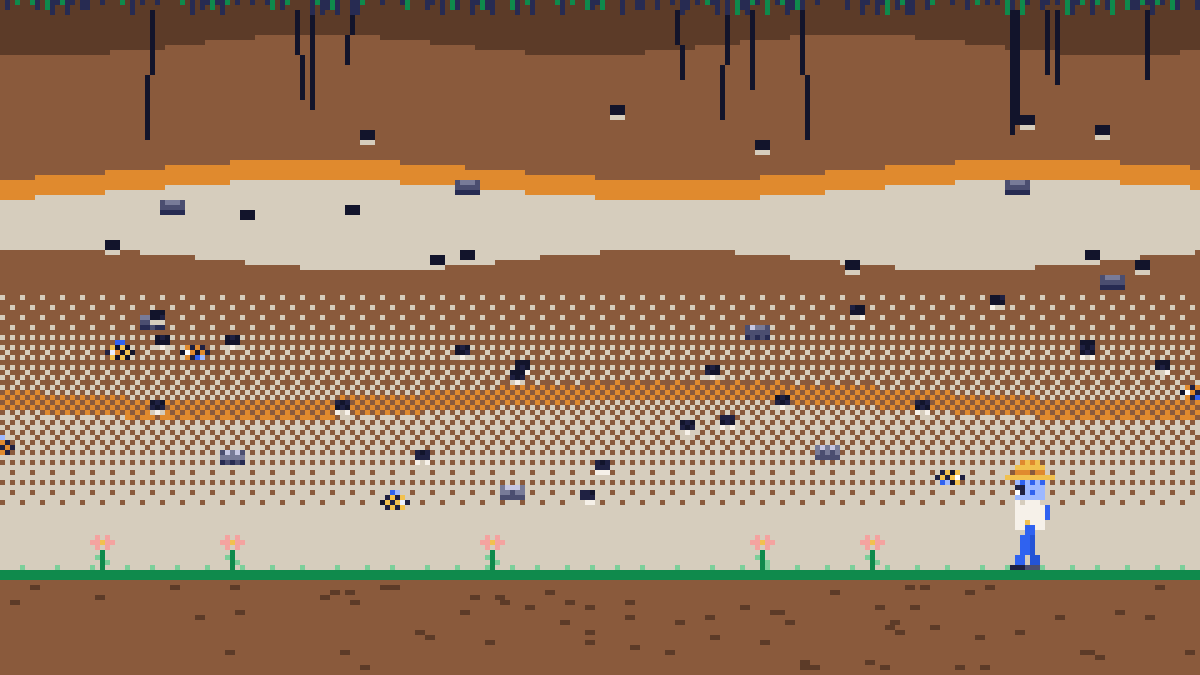
Der ganze Hang wird der Regel gegeben. Über dem Rand wird jede Farbe in 16 Stufen mit ihrem dunkleren Nachbarn gemischt, nach einem festen Muster aus 4 mal 4 Pixeln. So blendet der Schatten ein, ohne eine Farbe, die nicht in der Palette ist. Wenn der Rand wandert, kippen die Pixel einer nach dem anderen und bleiben, wo sie sind.
Auch in dieser Lektion 3 Lesetipps zum Vertiefen 3 Fragen zum Selbsttest
Die Idee
Zwischen Sand und Holz, seinem dunkleren Nachbarn, hat die Palette keine Farbe. Setz die beiden in einem feinen Geflecht nebeneinander, erst ein Holzpixel von vier, dann halb und halb, dann drei von vier, und das Auge liest Töne dazwischen. Das ist Dithering, und es gehört zum Aussehen von Pixel Art: ein Himmel, der von einer Farbe in die nächste übergeht, der weiche Rand eines Schattens, Licht, das sich im Dunkeln verliert, Nebel.
Im Bild siehst du von der Seite einen sandigen Hang, in dem Wildbienen nisten. Der Überhang oben wirft einen Schatten, der den Hang hinunterreicht und sich wieder zurückzieht, während die Sonne wandert; Dithering macht aus seinem Rand statt einer harten Linie ein Band aus 16 Stufen.
So funktioniert es
Das Muster sind 16 Zahlen, 0 bis 15, in einem Block aus 4 mal 4 Pixeln, wie Kacheln über den ganzen Bildschirm gelegt. Jeder Pixel liest die Zahl an seinem eigenen Platz in der Kachel: seine Spalte und seine Zeile, jeweils von 0 bis 3 im Kreis gezählt. Dann braucht die Regel noch eine Zahl, den Anteil: wie viele von je 16 Pixeln dunkler sein sollen, von 0 bis 16. Ein Pixel nimmt die dunklere Farbe, wenn seine Zahl im Muster kleiner ist als der Anteil. Bei einem Anteil von 1 ist in jedem Block ein Pixel dunkel, bei 8 die Hälfte in einem gleichmäßigen Geflecht, bei 16 alle.
Die Zahlen im Muster stehen so, dass die dunklen Pixel bei jedem Anteil verteilt liegen, nie in Klumpen, und ein Pixel, der dunkel geworden ist, dunkel bleibt, während der Anteil wächst. Diese Art heißt geordnetes Dithering (ordered dithering), und die Tabelle aus 4 mal 4 Zahlen ist als Bayer-Matrix bekannt: Unter diesem Namen kennt deine KI sie.
Hier kommt der Anteil aus der Zeile. Vom Rand des Schattens aufwärts wächst er alle paar Zeilen um eine Stufe, bis 16, voller Schatten. Die dunklere Farbe kommt aus der Tabelle DARKER der Lektion über Farbrampen, also mischt sich Sand mit Holz, Honig mit Bernstein, Creme mit Sand.
Die Regler: „Rand des Schattens“ ist die Zeile, an der der Schatten endet, am Anfang 64. „Weichheit“ sagt, wie viele Zeilen jede der 16 Stufen braucht, am Anfang 3. Bei 1 ist das Band 16 Zeilen hoch, bei 6 sind es 96.
Was schiefgeht
Bittest du eine KI um einen Schatten, der „weich und ohne Stufen“ sein soll, greift sie oft zu Rauschen: eine Zufallszahl für jeden Pixel, in jedem Bild neu. Bei glatter Grafik in hoher Auflösung klappt das, weil das Korn feiner ist, als das Auge sieht. In Pixel Art ist jeder Pixel groß. Das Korn klumpt, ein Block bekommt mehr oder weniger dunkle Pixel, als der Anteil sagt, und sechzigmal in der Sekunde wird alles neu geworfen: Der Schatten brodelt.
Schalte das Bild auf „Mit dem Fehler“. Das Band wird zu Korn, und das Korn bewegt sich weiter, auch wo der Rand stillsteht. Zwei Tests fangen das. „At each of the 16 steps, exactly that many pixels of every 4 by 4 block are darker“ fand vier dunkle Pixel in einem Block, in dem der Anteil eins war. „The same pixel gives the same answer at every tick“ fand einen Pixel, der sich änderte, während sich nichts bewegte.
Daneben gibt es einen leiseren Fehler: das Muster vom wandernden Rand aus zu zählen statt vom Bildschirm. Dann kippt jeder Pixel des Bandes, sobald der Rand eine Zeile weiterrückt, und das Band schwimmt. Davor schützt der Test „moving the edge changes only the pixels whose step changed: the pattern belongs to the screen“. Scrollt deine Kamera, zähl stattdessen vom Platz in der Welt aus, damit das Muster mit dem Boden wandert und nicht über ihn hinweg.
Der Fehler, Zeile für Zeile
- /* Dithering, with the mistake: instead of the fixed 4 by 4 pattern the rule asks a scrambled number
-    from 0 to 15 for the place and the tick, so the dark pixels are spread by chance and spread anew
-    sixty times a second. The soft edge turns to grain that boils, and the same share of shade gives a
-    different count of dark pixels in every block.
+ /* Dithering: two colours mixed without a third. Between a colour and its darker neighbour there is no
+    colour in the palette, so the rule makes some pixels of every 4 by 4 block darker and leaves the
+    others: 0 of 16 is the colour, 16 of 16 its neighbour, and the 15 steps between look like shades
+    that are not there. A fixed pattern says which pixel turns first, so the mix is even and stays put.
+    Here it softens the edge of a shade that moves over a sandy bank.

+    The pixel art way: a picture is a grid of whole numbers, 0 where nothing is and 1 to 25 for the
+    palette's colours. The rule is asked for every pixel and answers with a number.
+
     From the course "Shaders for pixel art" on spielerando.com.
     SPDX-License-Identifier: MIT */
…
  export type Params = typeof DEFAULTS;

+ /** The 4 by 4 pattern for dithering: 0 to 15, each once.  BAYER[(y & 3) * 4 + (x & 3)] */
+ const BAYER = [0, 8, 2, 10, 12, 4, 14, 6, 3, 11, 1, 9, 15, 7, 13, 5];
  /** The next darker colour of the palette for each number. [0] is nothing. */
  const DARKER = [0, 24, 25, 2, 3, 15, 7, 20, 9, 20, 21, 10, 13, 25, 12, 16, 14, 25, 17, 18, 21, 24, 25, 22, 24, 24];

- /** A whole number scrambled into another, the same on every machine. */
- function hash(n: number): number {
-   n = Math.imul(n ^ (n >>> 16), 0x7feb352d);
-   n = Math.imul(n ^ (n >>> 15), 0x846ca68b);
-   return (n ^ (n >>> 16)) >>> 0;
- }
-
  /** The number at a place of the picture; outside the picture nothing is. */
  export function at(src: Frame, x: number, y: number): number {
…
  }

- /** A colour mixed with its darker neighbour, wrong: a new scrambled number for every place at every tick. */
- export function mixDarker(n: number, x: number, y: number, tick: number, share: number): number {
-   return hash(x + y * 4099 + tick * 65537) % 16 < share ? DARKER[n] : n;
+ /** A colour mixed with its darker neighbour: of the 16 pixels of every 4 by 4 block, `share` are darker.
+     The pattern is the screen's own place, never the time: a pixel turns when the share passes its number. */
+ export function mixDarker(n: number, x: number, y: number, _tick: number, share: number): number {
+   return BAYER[(y & 3) * 4 + (x & 3)] < share ? DARKER[n] : n;
  }
Was der Test zum Fehler sagt
✔ in the sun nothing changes, and in full shade every pixel is its darker neighbour
✔ the darker colour is the one the ramp's table names
✖ at each of the 16 steps, exactly that many pixels of every 4 by 4 block are darker
    share 1, block at 0, 0, tick 0
    got 4, expected 1
✖ the same pixel gives the same answer at every tick
    pixel 0, 17 changed at tick 52
    got 7, expected 20
✔ as the shade deepens, a pixel that has turned dark stays dark
✔ the soft edge has 16 steps, each as many rows tall as the soft setting says
✖ moving the edge changes only the pixels whose step changed: the pattern belongs to the screen
    pixel 8, 14
    got 20, expected 7
7 tests: 4 passed, 3 failed
Das sagst du deiner KI
Bau Dithering in mein Pixel-Art-Spiel ein: Wo eine Farbe nur zum Teil dunkler sein soll, misch sie in 16 Stufen mit ihrem dunkleren Nachbarn, nach einem festen Muster aus 4 mal 4 Pixeln (ordered dithering mit einer Bayer-Matrix aus 4 mal 4). Misch nie Farben ineinander und nimm nie zufälliges Rauschen.

- Meine Palette und der dunklere Nachbar jeder Farbe: [meine Tabelle, oder "mach eine und zeig sie mir"].
- Das Muster sind diese Zahlen, Zeile für Zeile: 0, 8, 2, 10 / 12, 4, 14, 6 / 3, 11, 1, 9 / 15, 7, 13, 5. Ein Pixel liest die Zahl bei (x mod 4, y mod 4) seines Platzes [auf dem Bildschirm / in der Welt, weil meine Kamera scrollt].
- Ein Pixel nimmt die dunklere Farbe, wenn seine Zahl kleiner ist als der Anteil, von 0 (keiner) bis 16 (alle). Der Anteil kommt aus [dem Abstand zum Rand eines Schattens / einer Überblendung / einer Einstellung].
- Das Muster hängt nie von der Zeit ab und nie vom Platz des Dings, das sich bewegt.
- Nur ganze Pixel: Filter auf nearest, kein Glätten.

Bevor du den Shader schreibst, schreib dieselbe Regel als kleine, einfache Funktion auf einem Raster aus ganzen Zahlen und teste sie: Bei jedem Anteil von 0 bis 16 sind in jedem Block aus 4 mal 4 Pixeln genau so viele dunkler; derselbe Pixel gibt in jedem Bild dieselbe Antwort; ein Pixel, der bei einem Anteil dunkel ist, bleibt bei jedem höheren Anteil dunkel. Zeig mir die Ausgabe des Tests. Schreib dann den Shader so, dass er genau das tut, was die Funktion tut.
Der Code
Dreimal dieselbe Regel. Die erste ist die, die wir testen; die beiden Shader sind diese Regel in einer Shader-Sprache, und die läuft in deinem Spiel.
Die Regel, getestet: shader.ts
/* Dithering: two colours mixed without a third. Between a colour and its darker neighbour there is no
   colour in the palette, so the rule makes some pixels of every 4 by 4 block darker and leaves the
   others: 0 of 16 is the colour, 16 of 16 its neighbour, and the 15 steps between look like shades
   that are not there. A fixed pattern says which pixel turns first, so the mix is even and stays put.
   Here it softens the edge of a shade that moves over a sandy bank.

   The pixel art way: a picture is a grid of whole numbers, 0 where nothing is and 1 to 25 for the
   palette's colours. The rule is asked for every pixel and answers with a number.

   From the course "Shaders for pixel art" on spielerando.com.
   SPDX-License-Identifier: MIT */

export interface Frame {
  width: number;
  height: number;
  index: Uint8Array;
}

export const DEFAULTS = {
  /** The row where the shade ends: above it the shade, below it the sun. */
  edge: 64,
  /** How many rows each of the 16 steps of the soft edge takes. */
  soft: 3,
};
export type Params = typeof DEFAULTS;

/** The 4 by 4 pattern for dithering: 0 to 15, each once.  BAYER[(y & 3) * 4 + (x & 3)] */
const BAYER = [0, 8, 2, 10, 12, 4, 14, 6, 3, 11, 1, 9, 15, 7, 13, 5];
/** The next darker colour of the palette for each number. [0] is nothing. */
const DARKER = [0, 24, 25, 2, 3, 15, 7, 20, 9, 20, 21, 10, 13, 25, 12, 16, 14, 25, 17, 18, 21, 24, 25, 22, 24, 24];

/** The number at a place of the picture; outside the picture nothing is. */
export function at(src: Frame, x: number, y: number): number {
  if (x < 0 || y < 0 || x >= src.width || y >= src.height) return 0;
  return src.index[y * src.width + x];
}

/** How deep a row lies in the shade: 0 in the sun, 16 in full shade, one step every `soft` rows. */
export function depth(y: number, p: Params): number {
  const d = p.edge - y;
  if (d <= 0) return 0;
  return Math.min(16, Math.floor(d / Math.max(1, p.soft)));
}

/** A colour mixed with its darker neighbour: of the 16 pixels of every 4 by 4 block, `share` are darker.
    The pattern is the screen's own place, never the time: a pixel turns when the share passes its number. */
export function mixDarker(n: number, x: number, y: number, _tick: number, share: number): number {
  return BAYER[(y & 3) * 4 + (x & 3)] < share ? DARKER[n] : n;
}

/** The rule: every pixel is mixed with its darker neighbour as deep as its row lies in the shade. */
export function shade(x: number, y: number, tick: number, src: Frame, p: Params = DEFAULTS): number {
  return mixDarker(at(src, x, y), x, y, tick, depth(y, p));
}
Dieselbe Regel als Shader: GLSL
#version 300 es
// A shader the pixel art way: a pixel is a whole number, 0 where nothing is, 1 to 25 for the
// palette's colours. The rule is shade(): it is asked for every pixel and answers with a number.
// Everything outside the marked part is the same for every rule. Put your own palette in PALETTE.
precision highp float;
precision highp int;

uniform sampler2D SRC;   // the picture, sampled without smoothing (nearest)
uniform sampler2D OTHER; // a second picture, where the rule uses one
uniform int TICK;        // the time in ticks, 60 a second, counted by the game

const vec3 PALETTE[26] = vec3[26](
  vec3(0.0),
  vec3(31.0, 33.0, 66.0) / 255.0, // 1: k
  vec3(75.0, 78.0, 112.0) / 255.0, // 2: n
  vec3(120.0, 123.0, 152.0) / 255.0, // 3: m
  vec3(198.0, 199.0, 227.0) / 255.0, // 4: e
  vec3(255.0, 255.0, 255.0) / 255.0, // 5: w
  vec3(246.0, 241.0, 233.0) / 255.0, // 6: c
  vec3(214.0, 205.0, 189.0) / 255.0, // 7: d
  vec3(242.0, 193.0, 78.0) / 255.0, // 8: y
  vec3(224.0, 138.0, 46.0) / 255.0, // 9: o
  vec3(194.0, 65.0, 45.0) / 255.0, // 10: r
  vec3(244.0, 163.0, 160.0) / 255.0, // 11: p
  vec3(47.0, 98.0, 240.0) / 255.0, // 12: b
  vec3(35.0, 83.0, 214.0) / 255.0, // 13: u
  vec3(157.0, 184.0, 255.0) / 255.0, // 14: s
  vec3(234.0, 240.0, 255.0) / 255.0, // 15: a
  vec3(207.0, 224.0, 255.0) / 255.0, // 16: i
  vec3(15.0, 138.0, 76.0) / 255.0, // 17: g
  vec3(124.0, 207.0, 154.0) / 255.0, // 18: l
  vec3(226.0, 244.0, 234.0) / 255.0, // 19: f
  vec3(138.0, 90.0, 60.0) / 255.0, // 20: t
  vec3(92.0, 59.0, 40.0) / 255.0, // 21: h
  vec3(109.0, 76.0, 230.0) / 255.0, // 22: v
  vec3(201.0, 187.0, 255.0) / 255.0, // 23: q
  vec3(18.0, 20.0, 43.0) / 255.0, // 24: x
  vec3(39.0, 43.0, 82.0) / 255.0 // 25: z
);

// Which colour of the palette is this? 0 where nothing is drawn.
int number(vec4 c) {
  if (c.a < 0.5) return 0;
  int best = 1;
  float least = 9.0;
  for (int i = 1; i <= 25; i++) {
    vec3 d = c.rgb - PALETTE[i];
    float away = dot(d, d);
    if (away < least) {
      least = away;
      best = i;
    }
  }
  return best;
}

// The number at a place of the picture; outside the picture nothing is.
int at(ivec2 p) {
  ivec2 size = textureSize(SRC, 0);
  if (p.x < 0 || p.y < 0 || p.x >= size.x || p.y >= size.y) return 0;
  return number(texelFetch(SRC, p, 0));
}

// The same for the second picture.
int otherAt(ivec2 p) {
  ivec2 size = textureSize(OTHER, 0);
  if (p.x < 0 || p.y < 0 || p.x >= size.x || p.y >= size.y) return 0;
  return number(texelFetch(OTHER, p, 0));
}

// a wrapped into 0 .. n-1, also for a below zero (the % sign is not safe there)
int wrap(int a, int n) {
  return a - n * int(floor(float(a) / float(n)));
}

// ---- the rule ----
uniform int edge; // the row where the shade ends: above it the shade, below it the sun
uniform int soft; // how many rows each of the 16 steps of the soft edge takes

// the 4 by 4 pattern for dithering: 0 to 15, each once.  BAYER[(y & 3) * 4 + (x & 3)]
const int BAYER[16] = int[16](0, 8, 2, 10, 12, 4, 14, 6, 3, 11, 1, 9, 15, 7, 13, 5);
// the next darker colour of the palette for each number; [0] is nothing
const int DARKER[26] = int[26](0, 24, 25, 2, 3, 15, 7, 20, 9, 20, 21, 10, 13, 25, 12, 16, 14, 25, 17, 18, 21, 24, 25, 22, 24, 24);

// how deep a row lies in the shade: 0 in the sun, 16 in full shade, one step every `soft` rows
int depth(int y) {
  int d = edge - y;
  if (d <= 0) return 0;
  return min(16, d / max(1, soft));
}

// a colour mixed with its darker neighbour: of the 16 pixels of every 4 by 4 block, `share` are darker.
// The pattern is the screen's own place, never the time: a pixel turns when the share passes its number.
int mixDarker(int n, ivec2 p, int share) {
  return BAYER[(p.y & 3) * 4 + (p.x & 3)] < share ? DARKER[n] : n;
}

// every pixel is mixed with its darker neighbour as deep as its row lies in the shade
int shade(ivec2 p) {
  return mixDarker(at(p), p, depth(p.y));
}
// ---- end of the rule ----

out vec4 FRAGMENT;

void main() {
  // the pixel's place, counted from the top left as in the picture
  ivec2 p = ivec2(int(gl_FragCoord.x), textureSize(SRC, 0).y - 1 - int(gl_FragCoord.y));
  int n = shade(p);
  FRAGMENT = n == 0 ? vec4(0.0) : vec4(PALETTE[n], 1.0);
}
Dieselbe Regel für Godot 4
shader_type canvas_item;
// A shader the pixel art way: a pixel is a whole number, 0 where nothing is, 1 to 25 for the
// palette's colours. The rule is shade(): it is asked for every pixel and answers with a number.
// Everything outside the marked part is the same for every rule. Put your own palette in PALETTE.
//
// Put this on a ColorRect that covers the screen, above everything it should change.
// The rule counts pixels as this shader sees them. Let the game draw at the size of its art and
// enlarge the finished picture (the project's stretch mode "viewport"), or it counts window pixels.
uniform sampler2D SRC : hint_screen_texture, filter_nearest; // what is on the screen behind it
uniform sampler2D OTHER : filter_nearest; // a second picture, where the rule uses one
// The time in ticks, 60 a second. The game counts it itself: add 1 in the _physics_process of a
// node that pauses with the game, and set it there, so a paused game pauses its shaders:
//   tick += 1
//   material.set_shader_parameter("TICK", tick)
uniform int TICK;

const vec3 PALETTE[26] = vec3[26](
  vec3(0.0),
  vec3(31.0, 33.0, 66.0) / 255.0, // 1: k
  vec3(75.0, 78.0, 112.0) / 255.0, // 2: n
  vec3(120.0, 123.0, 152.0) / 255.0, // 3: m
  vec3(198.0, 199.0, 227.0) / 255.0, // 4: e
  vec3(255.0, 255.0, 255.0) / 255.0, // 5: w
  vec3(246.0, 241.0, 233.0) / 255.0, // 6: c
  vec3(214.0, 205.0, 189.0) / 255.0, // 7: d
  vec3(242.0, 193.0, 78.0) / 255.0, // 8: y
  vec3(224.0, 138.0, 46.0) / 255.0, // 9: o
  vec3(194.0, 65.0, 45.0) / 255.0, // 10: r
  vec3(244.0, 163.0, 160.0) / 255.0, // 11: p
  vec3(47.0, 98.0, 240.0) / 255.0, // 12: b
  vec3(35.0, 83.0, 214.0) / 255.0, // 13: u
  vec3(157.0, 184.0, 255.0) / 255.0, // 14: s
  vec3(234.0, 240.0, 255.0) / 255.0, // 15: a
  vec3(207.0, 224.0, 255.0) / 255.0, // 16: i
  vec3(15.0, 138.0, 76.0) / 255.0, // 17: g
  vec3(124.0, 207.0, 154.0) / 255.0, // 18: l
  vec3(226.0, 244.0, 234.0) / 255.0, // 19: f
  vec3(138.0, 90.0, 60.0) / 255.0, // 20: t
  vec3(92.0, 59.0, 40.0) / 255.0, // 21: h
  vec3(109.0, 76.0, 230.0) / 255.0, // 22: v
  vec3(201.0, 187.0, 255.0) / 255.0, // 23: q
  vec3(18.0, 20.0, 43.0) / 255.0, // 24: x
  vec3(39.0, 43.0, 82.0) / 255.0 // 25: z
);

// Which colour of the palette is this? 0 where nothing is drawn.
int number(vec4 c) {
  if (c.a < 0.5) return 0;
  int best = 1;
  float least = 9.0;
  for (int i = 1; i <= 25; i++) {
    vec3 d = c.rgb - PALETTE[i];
    float away = dot(d, d);
    if (away < least) {
      least = away;
      best = i;
    }
  }
  return best;
}

// The number at a place of the picture; outside the picture nothing is.
int at(ivec2 p) {
  ivec2 size = textureSize(SRC, 0);
  if (p.x < 0 || p.y < 0 || p.x >= size.x || p.y >= size.y) return 0;
  return number(texelFetch(SRC, p, 0));
}

// The same for the second picture.
int otherAt(ivec2 p) {
  ivec2 size = textureSize(OTHER, 0);
  if (p.x < 0 || p.y < 0 || p.x >= size.x || p.y >= size.y) return 0;
  return number(texelFetch(OTHER, p, 0));
}

// a wrapped into 0 .. n-1, also for a below zero (the % sign is not safe there)
int wrap(int a, int n) {
  return a - n * int(floor(float(a) / float(n)));
}

// ---- the rule ----
uniform int edge; // the row where the shade ends: above it the shade, below it the sun
uniform int soft; // how many rows each of the 16 steps of the soft edge takes

// the 4 by 4 pattern for dithering: 0 to 15, each once.  BAYER[(y & 3) * 4 + (x & 3)]
const int BAYER[16] = int[16](0, 8, 2, 10, 12, 4, 14, 6, 3, 11, 1, 9, 15, 7, 13, 5);
// the next darker colour of the palette for each number; [0] is nothing
const int DARKER[26] = int[26](0, 24, 25, 2, 3, 15, 7, 20, 9, 20, 21, 10, 13, 25, 12, 16, 14, 25, 17, 18, 21, 24, 25, 22, 24, 24);

// how deep a row lies in the shade: 0 in the sun, 16 in full shade, one step every `soft` rows
int depth(int y) {
  int d = edge - y;
  if (d <= 0) return 0;
  return min(16, d / max(1, soft));
}

// a colour mixed with its darker neighbour: of the 16 pixels of every 4 by 4 block, `share` are darker.
// The pattern is the screen's own place, never the time: a pixel turns when the share passes its number.
int mixDarker(int n, ivec2 p, int share) {
  return BAYER[(p.y & 3) * 4 + (p.x & 3)] < share ? DARKER[n] : n;
}

// every pixel is mixed with its darker neighbour as deep as its row lies in the shade
int shade(ivec2 p) {
  return mixDarker(at(p), p, depth(p.y));
}
// ---- end of the rule ----

void fragment() {
  ivec2 p = ivec2(SCREEN_UV * vec2(textureSize(SRC, 0)));
  int n = shade(p);
  COLOR = n == 0 ? vec4(0.0) : vec4(PALETTE[n], 1.0);
}
Der Test: shader.test.ts
import assert from "node:assert/strict";
import { test } from "node:test";
import { DEFAULTS, type Frame, depth, mixDarker, shade } from "./shader.ts";

/** A tiny picture from rows of numbers: 0 is nothing, 1 to 25 are the palette's colours. */
function picture(rows: string[]): Frame {
  const cells = rows.map((r) => r.trim().split(/\s+/).map(Number));
  return { width: cells[0].length, height: cells.length, index: Uint8Array.from(cells.flat()) };
}

/** A picture of one colour: sand, 7, whose darker neighbour is wood, 20. */
function sand(width: number, height: number): Frame {
  return { width, height, index: new Uint8Array(width * height).fill(7) };
}

/** How many pixels of the 4 by 4 block at (left, top) come out darker at this share and tick. */
function darkInBlock(left: number, top: number, share: number, tick: number): number {
  let dark = 0;
  for (let y = top; y < top + 4; y++) for (let x = left; x < left + 4; x++) if (mixDarker(7, x, y, tick, share) === 20) dark++;
  return dark;
}

test("in the sun nothing changes, and in full shade every pixel is its darker neighbour", () => {
  const src = sand(8, 80);
  const p = { edge: 70, soft: 3 };
  for (let x = 0; x < 8; x++) {
    assert.equal(shade(x, 75, 0, src, p), 7, "below the edge is sun");
    assert.equal(shade(x, 2, 0, src, p), 20, "far above the edge is full shade");
  }
});

test("the darker colour is the one the ramp's table names", () => {
  // honey, coral, sky in full shade: amber, dark wood, light blue
  const src = picture(["8 10 16"]);
  assert.deepEqual([0, 1, 2].map((x) => shade(x, 0, 0, src, { edge: 60, soft: 1 })), [9, 21, 14]);
});

test("at each of the 16 steps, exactly that many pixels of every 4 by 4 block are darker", () => {
  for (let share = 0; share <= 16; share++) {
    for (const [left, top, tick] of [[0, 0, 0], [4, 8, 1], [100, 36, 7], [236, 128, 59]]) {
      assert.equal(darkInBlock(left, top, share, tick), share, `share ${share}, block at ${left}, ${top}, tick ${tick}`);
    }
  }
});

test("the same pixel gives the same answer at every tick", () => {
  const src = sand(16, 60);
  for (let y = 10; y < 60; y += 7) {
    for (let x = 0; x < 16; x++) {
      const first = shade(x, y, 0, src);
      for (let tick = 1; tick < 60; tick++) assert.equal(shade(x, y, tick, src), first, `pixel ${x}, ${y} changed at tick ${tick}`);
    }
  }
});

test("as the shade deepens, a pixel that has turned dark stays dark", () => {
  for (let y = 0; y < 4; y++) {
    for (let x = 0; x < 4; x++) {
      for (let share = 0; share < 16; share++) {
        if (mixDarker(7, x, y, 0, share) === 20) assert.equal(mixDarker(7, x, y, 0, share + 1), 20, `pixel ${x}, ${y} turned back at ${share + 1}`);
      }
    }
  }
});

test("the soft edge has 16 steps, each as many rows tall as the soft setting says", () => {
  const p = { edge: 64, soft: 3 };
  assert.equal(depth(64, p), 0, "on the edge is sun");
  assert.equal(depth(62, p), 0, "two rows above it still is");
  assert.equal(depth(61, p), 1);
  assert.equal(depth(64 - 8 * 3, p), 8);
  assert.equal(depth(64 - 16 * 3, p), 16);
  assert.equal(depth(0, p), 16, "deeper than full shade is full shade");
  assert.equal(depth(64 - 10, { edge: 64, soft: 1 }), 10);
});

test("moving the edge changes only the pixels whose step changed: the pattern belongs to the screen", () => {
  const src = sand(12, 70);
  const before = { ...DEFAULTS, edge: 60 };
  const after = { ...DEFAULTS, edge: 61 };
  for (let y = 0; y < 70; y++) {
    if (depth(y, before) !== depth(y, after)) continue;
    for (let x = 0; x < 12; x++) assert.equal(shade(x, y, 5, src, after), shade(x, y, 4, src, before), `pixel ${x}, ${y}`);
  }
});
- 7 Tests bestehen mit der Regel.
- Mit dem eingebauten Fehler schlagen 3 davon fehl: "at each of the 16 steps, exactly that many pixels of every 4 by 4 block are darker", "the same pixel gives the same answer at every tick", "moving the edge changes only the pixels whose step changed: the pattern belongs to the screen".
- Der Fehler ist im Bild oben zu sehen: Schalte auf „Mit dem Fehler“.
- Der Shader lief in einem Browser (Chrome/158.0.8127.37) auf 12 Bildern und ergab in 388.800 von 388.800 Pixeln das Bild der Regel.
Probier es aus
- Stell „Weichheit“ auf 1 und schieb „Rand des Schattens“ Zeile für Zeile. Das Band ist 16 Zeilen hoch, eine Zeile pro Stufe. Mit jedem Schritt werden ein paar Pixel dunkel, und keiner kippt zurück.
- Stell „Weichheit“ auf 6. Das Band wächst auf 96 Zeilen, und der Schatten blendet über den größten Teil des Hangs ein.
- Schalte auf „Mit dem Fehler“ und berühr einen Regler, damit der Rand stehen bleibt. Das Korn brodelt weiter, obwohl sich nichts bewegt. Schalte zurück auf „Mit der Regel“: Das Muster steht still.
Zum Nachlesen
Wo es tiefer geht: unsere Seiten, auf denen diese Lektion aufbaut, und was andere zu ihrem Punkt geschrieben haben.
Dunkler und heller in Pixel Art: Farbrampen im Shader
Wie die Tabelle der dunkleren Nachbarn, mit der diese Lektion mischt, für deine eigene Palette entsteht, nach Auge, und die zwei Prüfungen, die sie ehrlich halten: Jeder Schritt ist dunkler, keine Rampe läuft im Kreis.
Bildübergang als Shader für Pixel Art: ein geditherter Wischer
Dasselbe Muster an einem Rand, der von einer Szene zur nächsten über den ganzen Bildschirm wischt, fest am Bildschirm, während der Rand wandert, und der Streifen der alten Szene, wenn der Rand zu früh hält.
Ditherpunk — The article I wish I had about monochrome image dithering
Zufällige Schwellen, das Bayer-Muster, blaues Rauschen und Fehlerverteilung, jedes an denselben Testbildern in Schwarz und Weiß gezeigt, dazu wie ein größeres Bayer-Muster aus einem kleineren wächst.
Teste dich: drei Fragen
Jede Antwort wird sofort geprüft und erklärt. Die Fragen gehören zum Quiz und zählen für deinen Game Coder IQ wie jede andere.
Der Anteil sagt, wie viele von je sechzehn Pixeln die dunklere Farbe nehmen sollen. Bei der Hälfte: Wie sieht dann jeder Block aus vier mal vier Pixeln aus?
Nächste Lektion Laternenlicht in Pixel Art: ein Shader mit runden, gerasterten Ringen
Gib deiner KI die ganze Lektion
Der Knopf kopiert, was du ihr sagst, zusammen mit der getesteten Regel, ihrem Test und beiden Shadern. So hat deine KI alles, um das in dein Spiel zu bauen und dir zu zeigen, dass es funktioniert.
Das ist eine Lektion aus dem Kurs „Shader für Pixel Art“ auf spielerando.com: https://spielerando.com/de/courses/pixel-shaders/dithering

Bau Dithering in mein Pixel-Art-Spiel ein: Wo eine Farbe nur zum Teil dunkler sein soll, misch sie in 16 Stufen mit ihrem dunkleren Nachbarn, nach einem festen Muster aus 4 mal 4 Pixeln (ordered dithering mit einer Bayer-Matrix aus 4 mal 4). Misch nie Farben ineinander und nimm nie zufälliges Rauschen.

- Meine Palette und der dunklere Nachbar jeder Farbe: [meine Tabelle, oder "mach eine und zeig sie mir"].
- Das Muster sind diese Zahlen, Zeile für Zeile: 0, 8, 2, 10 / 12, 4, 14, 6 / 3, 11, 1, 9 / 15, 7, 13, 5. Ein Pixel liest die Zahl bei (x mod 4, y mod 4) seines Platzes [auf dem Bildschirm / in der Welt, weil meine Kamera scrollt].
- Ein Pixel nimmt die dunklere Farbe, wenn seine Zahl kleiner ist als der Anteil, von 0 (keiner) bis 16 (alle). Der Anteil kommt aus [dem Abstand zum Rand eines Schattens / einer Überblendung / einer Einstellung].
- Das Muster hängt nie von der Zeit ab und nie vom Platz des Dings, das sich bewegt.
- Nur ganze Pixel: Filter auf nearest, kein Glätten.

Bevor du den Shader schreibst, schreib dieselbe Regel als kleine, einfache Funktion auf einem Raster aus ganzen Zahlen und teste sie: Bei jedem Anteil von 0 bis 16 sind in jedem Block aus 4 mal 4 Pixeln genau so viele dunkler; derselbe Pixel gibt in jedem Bild dieselbe Antwort; ein Pixel, der bei einem Anteil dunkel ist, bleibt bei jedem höheren Anteil dunkel. Zeig mir die Ausgabe des Tests. Schreib dann den Shader so, dass er genau das tut, was die Funktion tut.

Die Regel, getestet (shader.ts):
```ts
/* Dithering: two colours mixed without a third. Between a colour and its darker neighbour there is no
   colour in the palette, so the rule makes some pixels of every 4 by 4 block darker and leaves the
   others: 0 of 16 is the colour, 16 of 16 its neighbour, and the 15 steps between look like shades
   that are not there. A fixed pattern says which pixel turns first, so the mix is even and stays put.
   Here it softens the edge of a shade that moves over a sandy bank.

   The pixel art way: a picture is a grid of whole numbers, 0 where nothing is and 1 to 25 for the
   palette's colours. The rule is asked for every pixel and answers with a number.

   From the course "Shaders for pixel art" on spielerando.com.
   SPDX-License-Identifier: MIT */

export interface Frame {
  width: number;
  height: number;
  index: Uint8Array;
}

export const DEFAULTS = {
  /** The row where the shade ends: above it the shade, below it the sun. */
  edge: 64,
  /** How many rows each of the 16 steps of the soft edge takes. */
  soft: 3,
};
export type Params = typeof DEFAULTS;

/** The 4 by 4 pattern for dithering: 0 to 15, each once.  BAYER[(y & 3) * 4 + (x & 3)] */
const BAYER = [0, 8, 2, 10, 12, 4, 14, 6, 3, 11, 1, 9, 15, 7, 13, 5];
/** The next darker colour of the palette for each number. [0] is nothing. */
const DARKER = [0, 24, 25, 2, 3, 15, 7, 20, 9, 20, 21, 10, 13, 25, 12, 16, 14, 25, 17, 18, 21, 24, 25, 22, 24, 24];

/** The number at a place of the picture; outside the picture nothing is. */
export function at(src: Frame, x: number, y: number): number {
  if (x < 0 || y < 0 || x >= src.width || y >= src.height) return 0;
  return src.index[y * src.width + x];
}

/** How deep a row lies in the shade: 0 in the sun, 16 in full shade, one step every `soft` rows. */
export function depth(y: number, p: Params): number {
  const d = p.edge - y;
  if (d <= 0) return 0;
  return Math.min(16, Math.floor(d / Math.max(1, p.soft)));
}

/** A colour mixed with its darker neighbour: of the 16 pixels of every 4 by 4 block, `share` are darker.
    The pattern is the screen's own place, never the time: a pixel turns when the share passes its number. */
export function mixDarker(n: number, x: number, y: number, _tick: number, share: number): number {
  return BAYER[(y & 3) * 4 + (x & 3)] < share ? DARKER[n] : n;
}

/** The rule: every pixel is mixed with its darker neighbour as deep as its row lies in the shade. */
export function shade(x: number, y: number, tick: number, src: Frame, p: Params = DEFAULTS): number {
  return mixDarker(at(src, x, y), x, y, tick, depth(y, p));
}
```

Ihr Test (shader.test.ts):
```ts
import assert from "node:assert/strict";
import { test } from "node:test";
import { DEFAULTS, type Frame, depth, mixDarker, shade } from "./shader.ts";

/** A tiny picture from rows of numbers: 0 is nothing, 1 to 25 are the palette's colours. */
function picture(rows: string[]): Frame {
  const cells = rows.map((r) => r.trim().split(/\s+/).map(Number));
  return { width: cells[0].length, height: cells.length, index: Uint8Array.from(cells.flat()) };
}

/** A picture of one colour: sand, 7, whose darker neighbour is wood, 20. */
function sand(width: number, height: number): Frame {
  return { width, height, index: new Uint8Array(width * height).fill(7) };
}

/** How many pixels of the 4 by 4 block at (left, top) come out darker at this share and tick. */
function darkInBlock(left: number, top: number, share: number, tick: number): number {
  let dark = 0;
  for (let y = top; y < top + 4; y++) for (let x = left; x < left + 4; x++) if (mixDarker(7, x, y, tick, share) === 20) dark++;
  return dark;
}

test("in the sun nothing changes, and in full shade every pixel is its darker neighbour", () => {
  const src = sand(8, 80);
  const p = { edge: 70, soft: 3 };
  for (let x = 0; x < 8; x++) {
    assert.equal(shade(x, 75, 0, src, p), 7, "below the edge is sun");
    assert.equal(shade(x, 2, 0, src, p), 20, "far above the edge is full shade");
  }
});

test("the darker colour is the one the ramp's table names", () => {
  // honey, coral, sky in full shade: amber, dark wood, light blue
  const src = picture(["8 10 16"]);
  assert.deepEqual([0, 1, 2].map((x) => shade(x, 0, 0, src, { edge: 60, soft: 1 })), [9, 21, 14]);
});

test("at each of the 16 steps, exactly that many pixels of every 4 by 4 block are darker", () => {
  for (let share = 0; share <= 16; share++) {
    for (const [left, top, tick] of [[0, 0, 0], [4, 8, 1], [100, 36, 7], [236, 128, 59]]) {
      assert.equal(darkInBlock(left, top, share, tick), share, `share ${share}, block at ${left}, ${top}, tick ${tick}`);
    }
  }
});

test("the same pixel gives the same answer at every tick", () => {
  const src = sand(16, 60);
  for (let y = 10; y < 60; y += 7) {
    for (let x = 0; x < 16; x++) {
      const first = shade(x, y, 0, src);
      for (let tick = 1; tick < 60; tick++) assert.equal(shade(x, y, tick, src), first, `pixel ${x}, ${y} changed at tick ${tick}`);
    }
  }
});

test("as the shade deepens, a pixel that has turned dark stays dark", () => {
  for (let y = 0; y < 4; y++) {
    for (let x = 0; x < 4; x++) {
      for (let share = 0; share < 16; share++) {
        if (mixDarker(7, x, y, 0, share) === 20) assert.equal(mixDarker(7, x, y, 0, share + 1), 20, `pixel ${x}, ${y} turned back at ${share + 1}`);
      }
    }
  }
});

test("the soft edge has 16 steps, each as many rows tall as the soft setting says", () => {
  const p = { edge: 64, soft: 3 };
  assert.equal(depth(64, p), 0, "on the edge is sun");
  assert.equal(depth(62, p), 0, "two rows above it still is");
  assert.equal(depth(61, p), 1);
  assert.equal(depth(64 - 8 * 3, p), 8);
  assert.equal(depth(64 - 16 * 3, p), 16);
  assert.equal(depth(0, p), 16, "deeper than full shade is full shade");
  assert.equal(depth(64 - 10, { edge: 64, soft: 1 }), 10);
});

test("moving the edge changes only the pixels whose step changed: the pattern belongs to the screen", () => {
  const src = sand(12, 70);
  const before = { ...DEFAULTS, edge: 60 };
  const after = { ...DEFAULTS, edge: 61 };
  for (let y = 0; y < 70; y++) {
    if (depth(y, before) !== depth(y, after)) continue;
    for (let x = 0; x < 12; x++) assert.equal(shade(x, y, 5, src, after), shade(x, y, 4, src, before), `pixel ${x}, ${y}`);
  }
});
```

Dieselbe Regel als GLSL-Shader (WebGL 2, OpenGL ES 3.0), Pixel für Pixel gegen die Regel geprüft:
```glsl
#version 300 es
// A shader the pixel art way: a pixel is a whole number, 0 where nothing is, 1 to 25 for the
// palette's colours. The rule is shade(): it is asked for every pixel and answers with a number.
// Everything outside the marked part is the same for every rule. Put your own palette in PALETTE.
precision highp float;
precision highp int;

uniform sampler2D SRC;   // the picture, sampled without smoothing (nearest)
uniform sampler2D OTHER; // a second picture, where the rule uses one
uniform int TICK;        // the time in ticks, 60 a second, counted by the game

const vec3 PALETTE[26] = vec3[26](
  vec3(0.0),
  vec3(31.0, 33.0, 66.0) / 255.0, // 1: k
  vec3(75.0, 78.0, 112.0) / 255.0, // 2: n
  vec3(120.0, 123.0, 152.0) / 255.0, // 3: m
  vec3(198.0, 199.0, 227.0) / 255.0, // 4: e
  vec3(255.0, 255.0, 255.0) / 255.0, // 5: w
  vec3(246.0, 241.0, 233.0) / 255.0, // 6: c
  vec3(214.0, 205.0, 189.0) / 255.0, // 7: d
  vec3(242.0, 193.0, 78.0) / 255.0, // 8: y
  vec3(224.0, 138.0, 46.0) / 255.0, // 9: o
  vec3(194.0, 65.0, 45.0) / 255.0, // 10: r
  vec3(244.0, 163.0, 160.0) / 255.0, // 11: p
  vec3(47.0, 98.0, 240.0) / 255.0, // 12: b
  vec3(35.0, 83.0, 214.0) / 255.0, // 13: u
  vec3(157.0, 184.0, 255.0) / 255.0, // 14: s
  vec3(234.0, 240.0, 255.0) / 255.0, // 15: a
  vec3(207.0, 224.0, 255.0) / 255.0, // 16: i
  vec3(15.0, 138.0, 76.0) / 255.0, // 17: g
  vec3(124.0, 207.0, 154.0) / 255.0, // 18: l
  vec3(226.0, 244.0, 234.0) / 255.0, // 19: f
  vec3(138.0, 90.0, 60.0) / 255.0, // 20: t
  vec3(92.0, 59.0, 40.0) / 255.0, // 21: h
  vec3(109.0, 76.0, 230.0) / 255.0, // 22: v
  vec3(201.0, 187.0, 255.0) / 255.0, // 23: q
  vec3(18.0, 20.0, 43.0) / 255.0, // 24: x
  vec3(39.0, 43.0, 82.0) / 255.0 // 25: z
);

// Which colour of the palette is this? 0 where nothing is drawn.
int number(vec4 c) {
  if (c.a < 0.5) return 0;
  int best = 1;
  float least = 9.0;
  for (int i = 1; i <= 25; i++) {
    vec3 d = c.rgb - PALETTE[i];
    float away = dot(d, d);
    if (away < least) {
      least = away;
      best = i;
    }
  }
  return best;
}

// The number at a place of the picture; outside the picture nothing is.
int at(ivec2 p) {
  ivec2 size = textureSize(SRC, 0);
  if (p.x < 0 || p.y < 0 || p.x >= size.x || p.y >= size.y) return 0;
  return number(texelFetch(SRC, p, 0));
}

// The same for the second picture.
int otherAt(ivec2 p) {
  ivec2 size = textureSize(OTHER, 0);
  if (p.x < 0 || p.y < 0 || p.x >= size.x || p.y >= size.y) return 0;
  return number(texelFetch(OTHER, p, 0));
}

// a wrapped into 0 .. n-1, also for a below zero (the % sign is not safe there)
int wrap(int a, int n) {
  return a - n * int(floor(float(a) / float(n)));
}

// ---- the rule ----
uniform int edge; // the row where the shade ends: above it the shade, below it the sun
uniform int soft; // how many rows each of the 16 steps of the soft edge takes

// the 4 by 4 pattern for dithering: 0 to 15, each once.  BAYER[(y & 3) * 4 + (x & 3)]
const int BAYER[16] = int[16](0, 8, 2, 10, 12, 4, 14, 6, 3, 11, 1, 9, 15, 7, 13, 5);
// the next darker colour of the palette for each number; [0] is nothing
const int DARKER[26] = int[26](0, 24, 25, 2, 3, 15, 7, 20, 9, 20, 21, 10, 13, 25, 12, 16, 14, 25, 17, 18, 21, 24, 25, 22, 24, 24);

// how deep a row lies in the shade: 0 in the sun, 16 in full shade, one step every `soft` rows
int depth(int y) {
  int d = edge - y;
  if (d <= 0) return 0;
  return min(16, d / max(1, soft));
}

// a colour mixed with its darker neighbour: of the 16 pixels of every 4 by 4 block, `share` are darker.
// The pattern is the screen's own place, never the time: a pixel turns when the share passes its number.
int mixDarker(int n, ivec2 p, int share) {
  return BAYER[(p.y & 3) * 4 + (p.x & 3)] < share ? DARKER[n] : n;
}

// every pixel is mixed with its darker neighbour as deep as its row lies in the shade
int shade(ivec2 p) {
  return mixDarker(at(p), p, depth(p.y));
}
// ---- end of the rule ----

out vec4 FRAGMENT;

void main() {
  // the pixel's place, counted from the top left as in the picture
  ivec2 p = ivec2(int(gl_FragCoord.x), textureSize(SRC, 0).y - 1 - int(gl_FragCoord.y));
  int n = shade(p);
  FRAGMENT = n == 0 ? vec4(0.0) : vec4(PALETTE[n], 1.0);
}
```

Dieselbe Regel für Godot 4 (von den Autoren nicht ausgeführt):
```gdshader
shader_type canvas_item;
// A shader the pixel art way: a pixel is a whole number, 0 where nothing is, 1 to 25 for the
// palette's colours. The rule is shade(): it is asked for every pixel and answers with a number.
// Everything outside the marked part is the same for every rule. Put your own palette in PALETTE.
//
// Put this on a ColorRect that covers the screen, above everything it should change.
// The rule counts pixels as this shader sees them. Let the game draw at the size of its art and
// enlarge the finished picture (the project's stretch mode "viewport"), or it counts window pixels.
uniform sampler2D SRC : hint_screen_texture, filter_nearest; // what is on the screen behind it
uniform sampler2D OTHER : filter_nearest; // a second picture, where the rule uses one
// The time in ticks, 60 a second. The game counts it itself: add 1 in the _physics_process of a
// node that pauses with the game, and set it there, so a paused game pauses its shaders:
//   tick += 1
//   material.set_shader_parameter("TICK", tick)
uniform int TICK;

const vec3 PALETTE[26] = vec3[26](
  vec3(0.0),
  vec3(31.0, 33.0, 66.0) / 255.0, // 1: k
  vec3(75.0, 78.0, 112.0) / 255.0, // 2: n
  vec3(120.0, 123.0, 152.0) / 255.0, // 3: m
  vec3(198.0, 199.0, 227.0) / 255.0, // 4: e
  vec3(255.0, 255.0, 255.0) / 255.0, // 5: w
  vec3(246.0, 241.0, 233.0) / 255.0, // 6: c
  vec3(214.0, 205.0, 189.0) / 255.0, // 7: d
  vec3(242.0, 193.0, 78.0) / 255.0, // 8: y
  vec3(224.0, 138.0, 46.0) / 255.0, // 9: o
  vec3(194.0, 65.0, 45.0) / 255.0, // 10: r
  vec3(244.0, 163.0, 160.0) / 255.0, // 11: p
  vec3(47.0, 98.0, 240.0) / 255.0, // 12: b
  vec3(35.0, 83.0, 214.0) / 255.0, // 13: u
  vec3(157.0, 184.0, 255.0) / 255.0, // 14: s
  vec3(234.0, 240.0, 255.0) / 255.0, // 15: a
  vec3(207.0, 224.0, 255.0) / 255.0, // 16: i
  vec3(15.0, 138.0, 76.0) / 255.0, // 17: g
  vec3(124.0, 207.0, 154.0) / 255.0, // 18: l
  vec3(226.0, 244.0, 234.0) / 255.0, // 19: f
  vec3(138.0, 90.0, 60.0) / 255.0, // 20: t
  vec3(92.0, 59.0, 40.0) / 255.0, // 21: h
  vec3(109.0, 76.0, 230.0) / 255.0, // 22: v
  vec3(201.0, 187.0, 255.0) / 255.0, // 23: q
  vec3(18.0, 20.0, 43.0) / 255.0, // 24: x
  vec3(39.0, 43.0, 82.0) / 255.0 // 25: z
);

// Which colour of the palette is this? 0 where nothing is drawn.
int number(vec4 c) {
  if (c.a < 0.5) return 0;
  int best = 1;
  float least = 9.0;
  for (int i = 1; i <= 25; i++) {
    vec3 d = c.rgb - PALETTE[i];
    float away = dot(d, d);
    if (away < least) {
      least = away;
      best = i;
    }
  }
  return best;
}

// The number at a place of the picture; outside the picture nothing is.
int at(ivec2 p) {
  ivec2 size = textureSize(SRC, 0);
  if (p.x < 0 || p.y < 0 || p.x >= size.x || p.y >= size.y) return 0;
  return number(texelFetch(SRC, p, 0));
}

// The same for the second picture.
int otherAt(ivec2 p) {
  ivec2 size = textureSize(OTHER, 0);
  if (p.x < 0 || p.y < 0 || p.x >= size.x || p.y >= size.y) return 0;
  return number(texelFetch(OTHER, p, 0));
}

// a wrapped into 0 .. n-1, also for a below zero (the % sign is not safe there)
int wrap(int a, int n) {
  return a - n * int(floor(float(a) / float(n)));
}

// ---- the rule ----
uniform int edge; // the row where the shade ends: above it the shade, below it the sun
uniform int soft; // how many rows each of the 16 steps of the soft edge takes

// the 4 by 4 pattern for dithering: 0 to 15, each once.  BAYER[(y & 3) * 4 + (x & 3)]
const int BAYER[16] = int[16](0, 8, 2, 10, 12, 4, 14, 6, 3, 11, 1, 9, 15, 7, 13, 5);
// the next darker colour of the palette for each number; [0] is nothing
const int DARKER[26] = int[26](0, 24, 25, 2, 3, 15, 7, 20, 9, 20, 21, 10, 13, 25, 12, 16, 14, 25, 17, 18, 21, 24, 25, 22, 24, 24);

// how deep a row lies in the shade: 0 in the sun, 16 in full shade, one step every `soft` rows
int depth(int y) {
  int d = edge - y;
  if (d <= 0) return 0;
  return min(16, d / max(1, soft));
}

// a colour mixed with its darker neighbour: of the 16 pixels of every 4 by 4 block, `share` are darker.
// The pattern is the screen's own place, never the time: a pixel turns when the share passes its number.
int mixDarker(int n, ivec2 p, int share) {
  return BAYER[(p.y & 3) * 4 + (p.x & 3)] < share ? DARKER[n] : n;
}

// every pixel is mixed with its darker neighbour as deep as its row lies in the shade
int shade(ivec2 p) {
  return mixDarker(at(p), p, depth(p.y));
}
// ---- end of the rule ----

void fragment() {
  ivec2 p = ivec2(SCREEN_UV * vec2(textureSize(SRC, 0)));
  int n = shade(p);
  COLOR = n == 0 ? vec4(0.0) : vec4(PALETTE[n], 1.0);
}
```
Wie hilfreich war diese Seite?
Diese Seite hat noch niemand bewertet.