Dunkler und heller in Pixel Art: Farbrampen im Shader
Eine Farbrampe ist eine Reihe von Farben von dunkel nach hell, und in Pixel Art schattierst du, indem du auf ihr einen Schritt gehst: Honig im Schatten ist Bernstein, kein trüberer Honig. Diese Lektion schreibt für jede Farbe den dunkleren und den helleren Nachbarn in zwei kleine Tabellen, zeigt, wie du sie für deine eigene Palette machst, und lässt einen Shader durch sie hindurchgehen.
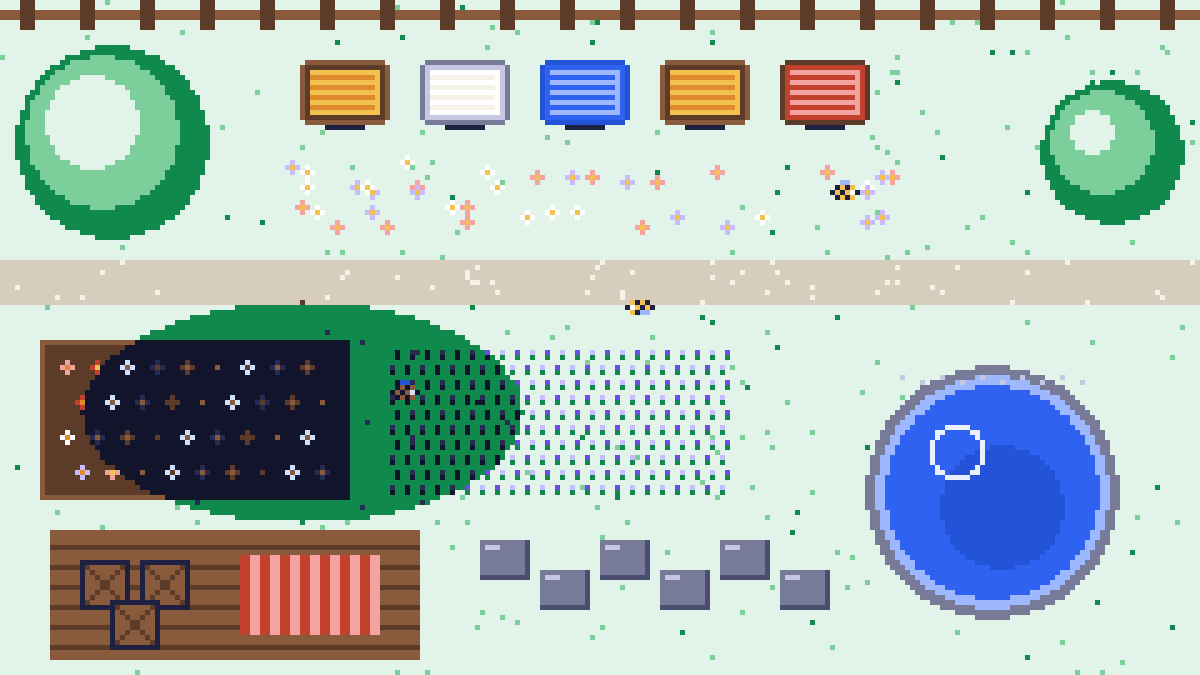
Der ganze Garten wird der Regel gegeben. Im Fleck geht jede Farbe zu dem Nachbarn, den ihre Tabelle nennt: der helle Rasen zu Hellgrün, Honig zu Bernstein, das Blau des Teichs zu Tiefblau. Unter 0 Schritten ist der Fleck der Schatten einer Wolke, über 0 ein Fleck Sonne.
Auch in dieser Lektion 3 Lesetipps zum Vertiefen 3 Fragen zum Selbsttest
Die Idee
Eine Palette hat nichts zwischen ihren Farben. Dunkelst du ab, indem du Rot, Grün und Blau herunterdrehst, bekommst du schlammige Farben, die nicht in der Palette sind. Wer Pixel Art von Hand zeichnet, schattiert anders: Für jede Farbe sucht er die Farbe der Palette aus, die im Schatten so aussähe. Schreib diese Wahl auf, folge ihr von einer Farbe zur nächsten, und du hast Rampen: Honig, Bernstein, Holz, dunkles Holz, Nacht. Weiß, blassestes Blau, Himmelblau, Hellblau, Blau.
Spieler sehen Rampen überall: den Schatten einer Wolke, die über ein Feld zieht, das Innere einer Scheune, eine Kachel, die unter dem Mauszeiger aufleuchtet. Die Laternen und die Nacht der nächsten Lektionen nehmen dieselben zwei Tabellen.
Im Bild zieht ein Fleck über einen Bienengarten, den du von oben siehst: unter 0 Schritten der Schatten einer Wolke, über 0 ein Fleck Sonne.
So funktioniert es
Die Regel hat zwei Tabellen mit einem Eintrag für jede Farbnummer. DARKER nennt den dunkleren Nachbarn, LIGHTER den helleren. Für Honig (8) sagt DARKER Bernstein (9); für Bernstein Holz (20); für Holz dunkles Holz (21); für dunkles Holz Nacht (24). Der dunklere Nachbar der Nacht ist die Nacht selbst, und der hellere Nachbar von Weiß ist Weiß: Das sind die beiden Enden.
Für jeden Pixel fragt die Regel, ob er im Fleck liegt, einem Oval, doppelt so breit wie hoch, gemessen mit Quadraten. Draußen bleibt die Farbe. Drinnen schlägt die Regel sie für jeden Schritt einmal in einer Tabelle nach.
Die Regler: „Schritte auf der Rampe“ geht von -4 bis 4 und steht am Anfang auf -2. Die anderen beiden schieben den Fleck nach rechts und nach unten durch den Garten.
Die Tabellen für deine eigene Palette. Leg deine Farben nebeneinander. Frag dich bei jeder: Wenn sie im Schatten stünde, welche meiner Farben wäre sie dann? Wähl nach Auge, aus derselben Familie, wo es geht; hat eine Familie keine dunklere Farbe, nimm eine kühlere, so wie Schatten kühler ist. Hier wird Grün zum dunklen Nachtblau. Dann dasselbe zum Licht hin. Zwei Prüfungen halten die Tabellen ehrlich, und die Tests machen beide: Jeder Schritt nach unten muss wirklich dunkler sein, nach der Helligkeit, die das Auge sieht (Rot, Grün und Blau gewogen mit 2126, 7152 und 722), und wer der Tabelle folgt, muss bei der dunkelsten Farbe ankommen, nie im Kreis. Mit diesen Tabellen machen sieben Schritte nach unten aus jeder Farbe Nacht und fünf Schritte nach oben aus jeder Farbe Weiß.
Was schiefgeht
Bittest du eine KI in einem Paletten-Shader um „eine Stufe dunkler“, zieht sie oft eins von der Nummer der Farbe ab, als liefe die Palette von dunkel nach hell. So sind Paletten selten sortiert. Diese hier ist nach Familien geordnet: Grautöne, warme Farben, Blautöne, Grüntöne, Holz, Violett, Nacht. Honig ist 8, und 7 ist Sand, und Sand ist heller. Der Test, der die Helligkeit jeder Farbe wiegt, zählt 13 der 25 Farben auf, deren Schritt nach unten nicht dunkler ist.
Schalte das Bild auf „Mit dem Fehler“. Im Schatten der Wolke wird der Weg erst creme und dann weiß, das Blau des Teichs erst rosa und dann korallrot, und die Honigstöcke werden erst zu Sand und dann creme. Im Fleck Sonne wird der Rasen braun. Der Rasen im Schatten sieht anfangs sogar richtig aus, weil seine drei Grüntöne zufällig in der Reihenfolge der Palette stehen (19, 18, 17). Bei drei Schritten wird er himmelblau. Deshalb rutscht der Fehler bei einem schnellen Blick durch.
Drei Tests fangen ihn. Der deutlichste wiegt die Helligkeit jeder Farbe: „every step darker looks darker, and every step lighter looks lighter“, also jeder Schritt dunkler sieht dunkler aus und jeder hellere heller. Die anderen beiden prüfen Honig, Korallrot und Himmelblau einzeln und folgen den Rampen bis zur Nacht und bis Weiß.
Der Fehler, Zeile für Zeile
- /* Colour ramps, with the mistake: the rule counts the palette's number down for darker and up for
-    lighter, as if the numbers ran from dark to light. They do not: they are the palette's order, and
-    the number below honey is sand, which is lighter. So the cloud's shadow comes out in wrong colours,
-    some of them lighter than what was there.
+ /* Colour ramps: a colour made darker or lighter by stepping to its neighbour in the palette, the way
+    a pixel artist shades by hand. Every colour has one darker neighbour and one lighter one, chosen by
+    eye and written down in two tables. Following a table step by step is a ramp: from white down to
+    night, from honey down through amber and wood. Here the steps are taken inside a patch: below 0 it
+    is the shadow of a cloud, above 0 a patch of sun.

+    The pixel art way: a picture is a grid of whole numbers, 0 where nothing is and 1 to 25 for the
+    palette's colours. The rule is asked for every pixel and answers with a number.
+
     From the course "Shaders for pixel art" on spielerando.com.
     SPDX-License-Identifier: MIT */
…
  export type Params = typeof DEFAULTS;

+ /** The next darker colour of the palette for each number, and the next lighter one. [0] is nothing. */
+ const DARKER = [0, 24, 25, 2, 3, 15, 7, 20, 9, 20, 21, 10, 13, 25, 12, 16, 14, 25, 17, 18, 21, 24, 25, 22, 24, 24];
+ const LIGHTER = [0, 2, 3, 4, 5, 5, 5, 6, 6, 8, 11, 6, 14, 12, 16, 5, 15, 18, 19, 5, 9, 20, 23, 15, 25, 2];
+
  /** The number at a place of the picture; outside the picture nothing is. */
  export function at(src: Frame, x: number, y: number): number {
…
  }

- /** A colour moved along its ramp, wrong: the steps are added to the number, kept between 1 and 25. */
+ /** A colour moved along its ramp: one table look-up for every step, never a sum on the number. */
  export function ramp(n: number, steps: number): number {
-   if (n === 0) return 0;
-   return Math.min(25, Math.max(1, n + steps));
+   for (let i = 0; i < steps; i++) n = LIGHTER[n];
+   for (let i = 0; i < -steps; i++) n = DARKER[n];
+   return n;
  }
Was der Test zum Fehler sagt
✖ one step darker is the colour the table names, not the next lower number
    got [ 7, 9, 15 ], expected [ 9, 21, 14 ]
✖ every step darker looks darker, and every step lighter looks lighter
    these steps down are not darker
    got [
  '1 to 1',   '6 to 5',
  '7 to 6',   '8 to 7',
  '9 to 8',   '10 to 9',
  '12 to 11', '13 to 12',
  '16 to 15', '17 to 16',
  '20 to 19', '21 to 20',
  '24 to 23'
], expected []
✖ seven steps down make every colour night, and five steps up make every colour white
    got [
   1,  1,  1,  1,  1,  1,  1,  1,
   2,  3,  4,  5,  6,  7,  8,  9,
  10, 11, 12, 13, 14, 15, 16, 17,
  18
], expected [
  24, 24, 24, 24, 24, 24, 24, 24,
  24, 24, 24, 24, 24, 24, 24, 24,
  24, 24, 24, 24, 24, 24, 24, 24,
  24
]
✖ the patch is twice as wide as it is tall, and outside it nothing changes
    four pixels to the left is still inside
    got 7, expected 9
✔ no steps leave every colour as it was
✔ every answer is a colour of the palette, for every step from -4 to 4
6 tests: 2 passed, 4 failed
Das sagst du deiner KI
Bau Farbrampen in mein Pixel-Art-Spiel ein: einen Shader, der Farben dunkler oder heller macht, indem er zu einer Nachbarfarbe meiner Palette springt, nie durch Multiplizieren, Abdunkeln oder Mischen von Farben.

- Meine Palette: [die Farben in ihrer Reihenfolge, oder die Datei, in der sie stehen].
- Mach zwei Tabellen mit einem Eintrag für jede Farbe: ihren dunkleren und ihren helleren Nachbarn, beide Farben meiner Palette. Schlag sie mir als Liste vor, die ich lesen kann, etwa "Honig -> Bernstein", und lass mich jeden Eintrag nach Auge ändern. Der dunklere Nachbar der dunkelsten Farbe ist sie selbst; der hellere Nachbar der hellsten Farbe ist sie selbst.
- Zähl die Nummer einer Farbe nie hoch oder herunter: Die Reihenfolge meiner Palette ist nicht ihre Helligkeit.
- Der Shader schlägt eine Farbe für jeden Schritt einmal in der Tabelle nach. Eine Einstellung sagt, wie viele Schritte, unter 0 dunkler und über 0 heller, und wo es gilt: [der ganze Bildschirm, oder eine Form wie der Schatten einer Wolke].
- Nur ganze Pixel: Filter auf nearest, kein Glätten.

Bevor du den Shader schreibst, schreib dieselbe Regel als kleine, einfache Funktion auf einem Raster aus ganzen Zahlen (0 = leer, 1 bis N = die Farben meiner Palette) und teste sie: Ein Schritt dunkler gibt die Farbe aus der Tabelle; jeder Schritt nach unten ist dunkler und jeder nach oben heller, nach Helligkeit (Rot, Grün und Blau gewogen mit 2126, 7152 und 722); wer der Tabelle von irgendeiner Farbe aus nach unten folgt, kommt bei der dunkelsten Farbe an, ohne im Kreis zu laufen. Zeig mir die Ausgabe des Tests. Schreib dann den Shader so, dass er genau das tut, was die Funktion tut.
Der Code
Dreimal dieselbe Regel. Die erste ist die, die wir testen; die beiden Shader sind diese Regel in einer Shader-Sprache, und die läuft in deinem Spiel.
Die Regel, getestet: shader.ts
/* Colour ramps: a colour made darker or lighter by stepping to its neighbour in the palette, the way
   a pixel artist shades by hand. Every colour has one darker neighbour and one lighter one, chosen by
   eye and written down in two tables. Following a table step by step is a ramp: from white down to
   night, from honey down through amber and wood. Here the steps are taken inside a patch: below 0 it
   is the shadow of a cloud, above 0 a patch of sun.

   The pixel art way: a picture is a grid of whole numbers, 0 where nothing is and 1 to 25 for the
   palette's colours. The rule is asked for every pixel and answers with a number.

   From the course "Shaders for pixel art" on spielerando.com.
   SPDX-License-Identifier: MIT */

export interface Frame {
  width: number;
  height: number;
  index: Uint8Array;
}

export const DEFAULTS = {
  /** How many steps along the ramp: below 0 darker, above 0 lighter, 0 leaves the colours. */
  steps: -2,
  /** The middle of the patch, in pixels from the left and from the top. */
  patchX: 120,
  patchY: 64,
  /** Half the patch's width in pixels. It is half as tall as it is wide. */
  reach: 44,
};
export type Params = typeof DEFAULTS;

/** The next darker colour of the palette for each number, and the next lighter one. [0] is nothing. */
const DARKER = [0, 24, 25, 2, 3, 15, 7, 20, 9, 20, 21, 10, 13, 25, 12, 16, 14, 25, 17, 18, 21, 24, 25, 22, 24, 24];
const LIGHTER = [0, 2, 3, 4, 5, 5, 5, 6, 6, 8, 11, 6, 14, 12, 16, 5, 15, 18, 19, 5, 9, 20, 23, 15, 25, 2];

/** The number at a place of the picture; outside the picture nothing is. */
export function at(src: Frame, x: number, y: number): number {
  if (x < 0 || y < 0 || x >= src.width || y >= src.height) return 0;
  return src.index[y * src.width + x];
}

/** A colour moved along its ramp: one table look-up for every step, never a sum on the number. */
export function ramp(n: number, steps: number): number {
  for (let i = 0; i < steps; i++) n = LIGHTER[n];
  for (let i = 0; i < -steps; i++) n = DARKER[n];
  return n;
}

/** The rule: inside the patch every colour goes its steps along the ramp, outside it stays. */
export function shade(x: number, y: number, _tick: number, src: Frame, p: Params = DEFAULTS): number {
  const n = at(src, x, y);
  // the patch is twice as wide as it is tall; its edge is measured with squares, in whole pixels
  const dx = x - p.patchX;
  const dy = y - p.patchY;
  if (dx * dx + 4 * dy * dy > p.reach * p.reach) return n;
  return ramp(n, p.steps);
}
Dieselbe Regel als Shader: GLSL
#version 300 es
// A shader the pixel art way: a pixel is a whole number, 0 where nothing is, 1 to 25 for the
// palette's colours. The rule is shade(): it is asked for every pixel and answers with a number.
// Everything outside the marked part is the same for every rule. Put your own palette in PALETTE.
precision highp float;
precision highp int;

uniform sampler2D SRC;   // the picture, sampled without smoothing (nearest)
uniform sampler2D OTHER; // a second picture, where the rule uses one
uniform int TICK;        // the time in ticks, 60 a second, counted by the game

const vec3 PALETTE[26] = vec3[26](
  vec3(0.0),
  vec3(31.0, 33.0, 66.0) / 255.0, // 1: k
  vec3(75.0, 78.0, 112.0) / 255.0, // 2: n
  vec3(120.0, 123.0, 152.0) / 255.0, // 3: m
  vec3(198.0, 199.0, 227.0) / 255.0, // 4: e
  vec3(255.0, 255.0, 255.0) / 255.0, // 5: w
  vec3(246.0, 241.0, 233.0) / 255.0, // 6: c
  vec3(214.0, 205.0, 189.0) / 255.0, // 7: d
  vec3(242.0, 193.0, 78.0) / 255.0, // 8: y
  vec3(224.0, 138.0, 46.0) / 255.0, // 9: o
  vec3(194.0, 65.0, 45.0) / 255.0, // 10: r
  vec3(244.0, 163.0, 160.0) / 255.0, // 11: p
  vec3(47.0, 98.0, 240.0) / 255.0, // 12: b
  vec3(35.0, 83.0, 214.0) / 255.0, // 13: u
  vec3(157.0, 184.0, 255.0) / 255.0, // 14: s
  vec3(234.0, 240.0, 255.0) / 255.0, // 15: a
  vec3(207.0, 224.0, 255.0) / 255.0, // 16: i
  vec3(15.0, 138.0, 76.0) / 255.0, // 17: g
  vec3(124.0, 207.0, 154.0) / 255.0, // 18: l
  vec3(226.0, 244.0, 234.0) / 255.0, // 19: f
  vec3(138.0, 90.0, 60.0) / 255.0, // 20: t
  vec3(92.0, 59.0, 40.0) / 255.0, // 21: h
  vec3(109.0, 76.0, 230.0) / 255.0, // 22: v
  vec3(201.0, 187.0, 255.0) / 255.0, // 23: q
  vec3(18.0, 20.0, 43.0) / 255.0, // 24: x
  vec3(39.0, 43.0, 82.0) / 255.0 // 25: z
);

// Which colour of the palette is this? 0 where nothing is drawn.
int number(vec4 c) {
  if (c.a < 0.5) return 0;
  int best = 1;
  float least = 9.0;
  for (int i = 1; i <= 25; i++) {
    vec3 d = c.rgb - PALETTE[i];
    float away = dot(d, d);
    if (away < least) {
      least = away;
      best = i;
    }
  }
  return best;
}

// The number at a place of the picture; outside the picture nothing is.
int at(ivec2 p) {
  ivec2 size = textureSize(SRC, 0);
  if (p.x < 0 || p.y < 0 || p.x >= size.x || p.y >= size.y) return 0;
  return number(texelFetch(SRC, p, 0));
}

// The same for the second picture.
int otherAt(ivec2 p) {
  ivec2 size = textureSize(OTHER, 0);
  if (p.x < 0 || p.y < 0 || p.x >= size.x || p.y >= size.y) return 0;
  return number(texelFetch(OTHER, p, 0));
}

// a wrapped into 0 .. n-1, also for a below zero (the % sign is not safe there)
int wrap(int a, int n) {
  return a - n * int(floor(float(a) / float(n)));
}

// ---- the rule ----
uniform int steps;  // how many steps along the ramp: below 0 darker, above 0 lighter, 0 leaves the colours
uniform int patchX; // the middle of the patch, in pixels from the left
uniform int patchY; // and from the top
uniform int reach;  // half the patch's width in pixels; it is half as tall as it is wide

// the next darker colour of the palette for each number, and the next lighter one; [0] is nothing
const int DARKER[26] = int[26](0, 24, 25, 2, 3, 15, 7, 20, 9, 20, 21, 10, 13, 25, 12, 16, 14, 25, 17, 18, 21, 24, 25, 22, 24, 24);
const int LIGHTER[26] = int[26](0, 2, 3, 4, 5, 5, 5, 6, 6, 8, 11, 6, 14, 12, 16, 5, 15, 18, 19, 5, 9, 20, 23, 15, 25, 2);

// a colour moved along its ramp: one table look-up for every step, never a sum on the number
int ramp(int n, int k) {
  for (int i = 0; i < k; i++) n = LIGHTER[n];
  for (int i = 0; i < -k; i++) n = DARKER[n];
  return n;
}

// inside the patch every colour goes its steps along the ramp, outside it stays
int shade(ivec2 p) {
  int n = at(p);
  // the patch is twice as wide as it is tall; its edge is measured with squares, in whole pixels
  int dx = p.x - patchX;
  int dy = p.y - patchY;
  if (dx * dx + 4 * dy * dy > reach * reach) return n;
  return ramp(n, steps);
}
// ---- end of the rule ----

out vec4 FRAGMENT;

void main() {
  // the pixel's place, counted from the top left as in the picture
  ivec2 p = ivec2(int(gl_FragCoord.x), textureSize(SRC, 0).y - 1 - int(gl_FragCoord.y));
  int n = shade(p);
  FRAGMENT = n == 0 ? vec4(0.0) : vec4(PALETTE[n], 1.0);
}
Dieselbe Regel für Godot 4
shader_type canvas_item;
// A shader the pixel art way: a pixel is a whole number, 0 where nothing is, 1 to 25 for the
// palette's colours. The rule is shade(): it is asked for every pixel and answers with a number.
// Everything outside the marked part is the same for every rule. Put your own palette in PALETTE.
//
// Put this on a ColorRect that covers the screen, above everything it should change.
// The rule counts pixels as this shader sees them. Let the game draw at the size of its art and
// enlarge the finished picture (the project's stretch mode "viewport"), or it counts window pixels.
uniform sampler2D SRC : hint_screen_texture, filter_nearest; // what is on the screen behind it
uniform sampler2D OTHER : filter_nearest; // a second picture, where the rule uses one
// The time in ticks, 60 a second. The game counts it itself: add 1 in the _physics_process of a
// node that pauses with the game, and set it there, so a paused game pauses its shaders:
//   tick += 1
//   material.set_shader_parameter("TICK", tick)
uniform int TICK;

const vec3 PALETTE[26] = vec3[26](
  vec3(0.0),
  vec3(31.0, 33.0, 66.0) / 255.0, // 1: k
  vec3(75.0, 78.0, 112.0) / 255.0, // 2: n
  vec3(120.0, 123.0, 152.0) / 255.0, // 3: m
  vec3(198.0, 199.0, 227.0) / 255.0, // 4: e
  vec3(255.0, 255.0, 255.0) / 255.0, // 5: w
  vec3(246.0, 241.0, 233.0) / 255.0, // 6: c
  vec3(214.0, 205.0, 189.0) / 255.0, // 7: d
  vec3(242.0, 193.0, 78.0) / 255.0, // 8: y
  vec3(224.0, 138.0, 46.0) / 255.0, // 9: o
  vec3(194.0, 65.0, 45.0) / 255.0, // 10: r
  vec3(244.0, 163.0, 160.0) / 255.0, // 11: p
  vec3(47.0, 98.0, 240.0) / 255.0, // 12: b
  vec3(35.0, 83.0, 214.0) / 255.0, // 13: u
  vec3(157.0, 184.0, 255.0) / 255.0, // 14: s
  vec3(234.0, 240.0, 255.0) / 255.0, // 15: a
  vec3(207.0, 224.0, 255.0) / 255.0, // 16: i
  vec3(15.0, 138.0, 76.0) / 255.0, // 17: g
  vec3(124.0, 207.0, 154.0) / 255.0, // 18: l
  vec3(226.0, 244.0, 234.0) / 255.0, // 19: f
  vec3(138.0, 90.0, 60.0) / 255.0, // 20: t
  vec3(92.0, 59.0, 40.0) / 255.0, // 21: h
  vec3(109.0, 76.0, 230.0) / 255.0, // 22: v
  vec3(201.0, 187.0, 255.0) / 255.0, // 23: q
  vec3(18.0, 20.0, 43.0) / 255.0, // 24: x
  vec3(39.0, 43.0, 82.0) / 255.0 // 25: z
);

// Which colour of the palette is this? 0 where nothing is drawn.
int number(vec4 c) {
  if (c.a < 0.5) return 0;
  int best = 1;
  float least = 9.0;
  for (int i = 1; i <= 25; i++) {
    vec3 d = c.rgb - PALETTE[i];
    float away = dot(d, d);
    if (away < least) {
      least = away;
      best = i;
    }
  }
  return best;
}

// The number at a place of the picture; outside the picture nothing is.
int at(ivec2 p) {
  ivec2 size = textureSize(SRC, 0);
  if (p.x < 0 || p.y < 0 || p.x >= size.x || p.y >= size.y) return 0;
  return number(texelFetch(SRC, p, 0));
}

// The same for the second picture.
int otherAt(ivec2 p) {
  ivec2 size = textureSize(OTHER, 0);
  if (p.x < 0 || p.y < 0 || p.x >= size.x || p.y >= size.y) return 0;
  return number(texelFetch(OTHER, p, 0));
}

// a wrapped into 0 .. n-1, also for a below zero (the % sign is not safe there)
int wrap(int a, int n) {
  return a - n * int(floor(float(a) / float(n)));
}

// ---- the rule ----
uniform int steps;  // how many steps along the ramp: below 0 darker, above 0 lighter, 0 leaves the colours
uniform int patchX; // the middle of the patch, in pixels from the left
uniform int patchY; // and from the top
uniform int reach;  // half the patch's width in pixels; it is half as tall as it is wide

// the next darker colour of the palette for each number, and the next lighter one; [0] is nothing
const int DARKER[26] = int[26](0, 24, 25, 2, 3, 15, 7, 20, 9, 20, 21, 10, 13, 25, 12, 16, 14, 25, 17, 18, 21, 24, 25, 22, 24, 24);
const int LIGHTER[26] = int[26](0, 2, 3, 4, 5, 5, 5, 6, 6, 8, 11, 6, 14, 12, 16, 5, 15, 18, 19, 5, 9, 20, 23, 15, 25, 2);

// a colour moved along its ramp: one table look-up for every step, never a sum on the number
int ramp(int n, int k) {
  for (int i = 0; i < k; i++) n = LIGHTER[n];
  for (int i = 0; i < -k; i++) n = DARKER[n];
  return n;
}

// inside the patch every colour goes its steps along the ramp, outside it stays
int shade(ivec2 p) {
  int n = at(p);
  // the patch is twice as wide as it is tall; its edge is measured with squares, in whole pixels
  int dx = p.x - patchX;
  int dy = p.y - patchY;
  if (dx * dx + 4 * dy * dy > reach * reach) return n;
  return ramp(n, steps);
}
// ---- end of the rule ----

void fragment() {
  ivec2 p = ivec2(SCREEN_UV * vec2(textureSize(SRC, 0)));
  int n = shade(p);
  COLOR = n == 0 ? vec4(0.0) : vec4(PALETTE[n], 1.0);
}
Der Test: shader.test.ts
import assert from "node:assert/strict";
import { test } from "node:test";
import { DEFAULTS, type Frame, shade } from "./shader.ts";

/** A tiny picture from rows of numbers: 0 is nothing, 1 to 25 are the palette's colours. */
function picture(rows: string[]): Frame {
  const cells = rows.map((r) => r.trim().split(/\s+/).map(Number));
  return { width: cells[0].length, height: cells.length, index: Uint8Array.from(cells.flat()) };
}

function whole(src: Frame, params = DEFAULTS): number[] {
  const out: number[] = [];
  for (let y = 0; y < src.height; y++) for (let x = 0; x < src.width; x++) out.push(shade(x, y, 0, src, params));
  return out;
}

/** The palette's colours in its order, to see how light each number really is. */
const PALETTE = [
  "#1f2142", "#4b4e70", "#787b98", "#c6c7e3", "#ffffff", "#f6f1e9", "#d6cdbd", "#f2c14e", "#e08a2e", "#c2412d",
  "#f4a3a0", "#2f62f0", "#2353d6", "#9db8ff", "#eaf0ff", "#cfe0ff", "#0f8a4c", "#7ccf9a", "#e2f4ea", "#8a5a3c",
  "#5c3b28", "#6d4ce6", "#c9bbff", "#12142b", "#272b52",
];
/** How light a colour looks: red, green and blue weighed the way the eye weighs them (2126, 7152, 722). */
function lightness(n: number): number {
  const hex = PALETTE[n - 1];
  return 2126 * parseInt(hex.slice(1, 3), 16) + 7152 * parseInt(hex.slice(3, 5), 16) + 722 * parseInt(hex.slice(5, 7), 16);
}

/** Every colour of the palette once, in one row, and a patch that covers all of it. */
const ALL = picture([Array.from({ length: 25 }, (_, i) => i + 1).join(" ")]);
const OVER_ALL = { ...DEFAULTS, patchX: 12, patchY: 0, reach: 13 };

test("one step darker is the colour the table names, not the next lower number", () => {
  // honey, coral, sky
  const src = picture(["8 10 16"]);
  const over = { ...DEFAULTS, patchX: 1, patchY: 0, reach: 4 };
  assert.deepEqual(whole(src, { ...over, steps: -1 }), [9, 21, 14]); // amber, dark wood, light blue
  assert.deepEqual(whole(src, { ...over, steps: 1 }), [6, 11, 15]); // cream, pink, palest blue
});

test("every step darker looks darker, and every step lighter looks lighter", () => {
  const down = whole(ALL, { ...OVER_ALL, steps: -1 });
  const up = whole(ALL, { ...OVER_ALL, steps: 1 });
  // night (24) is the darkest colour and stays night; white (5) is the lightest and stays white
  const notDarker = down.map((to, i) => [i + 1, to]).filter(([n, to]) => (n === 24 ? to !== 24 : lightness(to) >= lightness(n)));
  const notLighter = up.map((to, i) => [i + 1, to]).filter(([n, to]) => (n === 5 ? to !== 5 : lightness(to) <= lightness(n)));
  assert.deepEqual(notDarker.map(([n, to]) => `${n} to ${to}`), [], "these steps down are not darker");
  assert.deepEqual(notLighter.map(([n, to]) => `${n} to ${to}`), [], "these steps up are not lighter");
});

test("seven steps down make every colour night, and five steps up make every colour white", () => {
  // the longest ramp down starts at white: palest blue, sky, light blue, blue, deep blue, the lighter night, night
  assert.deepEqual(whole(ALL, { ...OVER_ALL, steps: -7 }), Array(25).fill(24));
  assert.deepEqual(whole(ALL, { ...OVER_ALL, steps: 5 }), Array(25).fill(5));
});

test("the patch is twice as wide as it is tall, and outside it nothing changes", () => {
  const src = picture(["8 8 8 8 8 8 8 8 8", "8 8 8 8 8 8 8 8 8", "8 8 8 8 8 8 8 8 8", "8 8 8 8 8 8 8 8 8", "8 8 8 8 8 8 8 8 8"]);
  const p = { ...DEFAULTS, steps: -1, patchX: 4, patchY: 2, reach: 4 };
  assert.equal(shade(0, 2, 0, src, p), 9, "four pixels to the left is still inside");
  assert.equal(shade(4, 0, 0, src, p), 9, "two pixels up is still inside");
  assert.equal(shade(0, 0, 0, src, p), 8, "the corner is outside");
  assert.equal(shade(8, 4, 0, src, p), 8, "the other corner is outside");
});

test("no steps leave every colour as it was", () => {
  assert.deepEqual(whole(ALL, { ...OVER_ALL, steps: 0 }), [...ALL.index]);
});

test("every answer is a colour of the palette, for every step from -4 to 4", () => {
  for (let steps = -4; steps <= 4; steps++) {
    for (const n of whole(ALL, { ...OVER_ALL, steps })) assert.ok(n >= 1 && n <= 25, `${n} at ${steps} steps`);
  }
});
- 6 Tests bestehen mit der Regel.
- Mit dem eingebauten Fehler schlagen 4 davon fehl: "one step darker is the colour the table names, not the next lower number", "every step darker looks darker, and every step lighter looks lighter", "seven steps down make every colour night, and five steps up make every colour white", "the patch is twice as wide as it is tall, and outside it nothing changes".
- Der Fehler ist im Bild oben zu sehen: Schalte auf „Mit dem Fehler“.
- Der Shader lief in einem Browser (Chrome/158.0.8127.37) auf 14 Bildern und ergab in 453.600 von 453.600 Pixeln das Bild der Regel.
Probier es aus
- Stell die Schritte auf -1 und parke den Fleck auf den Bienenstöcken. Honig wird Bernstein, der blaue Stock Tiefblau, und der weiße Stock wird blassestes Blau, weil das der dunklere Nachbar von Weiß ist.
- Zieh die Schritte auf -4, dann auf 4. Bei -4 ist fast der ganze Garten beinahe Nacht; bei 4 ist fast alles weiß. Die Rampen sind kurz: Keine Farbe braucht mehr als fünf Schritte bis Weiß.
- Schalte auf „Mit dem Fehler“, stell die Schritte auf -2 und schieb den Fleck vom Rasen auf den Weg und den Teich. Auf dem Rasen fällt der Fehler kaum auf; auf dem Weg und dem Teich ist er deutlich.
Zum Nachlesen
Wo es tiefer geht: unsere Seiten, auf denen diese Lektion aufbaut, und was andere zu ihrem Punkt geschrieben haben.
Nur die Palette: ein Farbton-Shader, der Pixel-Art-Farben behält
Der andere Weg, in der Palette zu bleiben: die Farbe mischen und dann die nächste Farbe der Palette nehmen, ohne Tabelle nach Auge, und warum ein Vergleich nur der Helligkeit beim falschen Farbton landet.
Palette Swap als Shader für Pixel Art: neue Kleider, gleiches Sprite
Eine Tabelle aus Farbpaaren für Kleider statt für Licht. Dort wird jede Farbe genau einmal nachgeschlagen, und ihr Fehler hängt die dunkleren Stufen aus Versehen aneinander: drei Stufen statt einer.
Pixelblog - 1 - Color Palettes
Ein Pixel-Künstler darüber, wie man Rampen von Hand baut: Helligkeit in gleichmäßigen Stufen, die stärkste Sättigung in der Mitte und ein Farbton, der entlang der Rampe wandert. Hilfe für das Auge, das die Tabellen wählt.
Teste dich: drei Fragen
Jede Antwort wird sofort geprüft und erklärt. Die Fragen gehören zum Quiz und zählen für deinen Game Coder IQ wie jede andere.
Wie wird in Pixel Art eine Farbe dunkler, wenn sie im Schatten liegt?
Nächste Lektion Dithering im Pixel-Art-Shader: zwei Farben in 16 Stufen
Gib deiner KI die ganze Lektion
Der Knopf kopiert, was du ihr sagst, zusammen mit der getesteten Regel, ihrem Test und beiden Shadern. So hat deine KI alles, um das in dein Spiel zu bauen und dir zu zeigen, dass es funktioniert.
Das ist eine Lektion aus dem Kurs „Shader für Pixel Art“ auf spielerando.com: https://spielerando.com/de/courses/pixel-shaders/colour-ramps

Bau Farbrampen in mein Pixel-Art-Spiel ein: einen Shader, der Farben dunkler oder heller macht, indem er zu einer Nachbarfarbe meiner Palette springt, nie durch Multiplizieren, Abdunkeln oder Mischen von Farben.

- Meine Palette: [die Farben in ihrer Reihenfolge, oder die Datei, in der sie stehen].
- Mach zwei Tabellen mit einem Eintrag für jede Farbe: ihren dunkleren und ihren helleren Nachbarn, beide Farben meiner Palette. Schlag sie mir als Liste vor, die ich lesen kann, etwa "Honig -> Bernstein", und lass mich jeden Eintrag nach Auge ändern. Der dunklere Nachbar der dunkelsten Farbe ist sie selbst; der hellere Nachbar der hellsten Farbe ist sie selbst.
- Zähl die Nummer einer Farbe nie hoch oder herunter: Die Reihenfolge meiner Palette ist nicht ihre Helligkeit.
- Der Shader schlägt eine Farbe für jeden Schritt einmal in der Tabelle nach. Eine Einstellung sagt, wie viele Schritte, unter 0 dunkler und über 0 heller, und wo es gilt: [der ganze Bildschirm, oder eine Form wie der Schatten einer Wolke].
- Nur ganze Pixel: Filter auf nearest, kein Glätten.

Bevor du den Shader schreibst, schreib dieselbe Regel als kleine, einfache Funktion auf einem Raster aus ganzen Zahlen (0 = leer, 1 bis N = die Farben meiner Palette) und teste sie: Ein Schritt dunkler gibt die Farbe aus der Tabelle; jeder Schritt nach unten ist dunkler und jeder nach oben heller, nach Helligkeit (Rot, Grün und Blau gewogen mit 2126, 7152 und 722); wer der Tabelle von irgendeiner Farbe aus nach unten folgt, kommt bei der dunkelsten Farbe an, ohne im Kreis zu laufen. Zeig mir die Ausgabe des Tests. Schreib dann den Shader so, dass er genau das tut, was die Funktion tut.

Die Regel, getestet (shader.ts):
```ts
/* Colour ramps: a colour made darker or lighter by stepping to its neighbour in the palette, the way
   a pixel artist shades by hand. Every colour has one darker neighbour and one lighter one, chosen by
   eye and written down in two tables. Following a table step by step is a ramp: from white down to
   night, from honey down through amber and wood. Here the steps are taken inside a patch: below 0 it
   is the shadow of a cloud, above 0 a patch of sun.

   The pixel art way: a picture is a grid of whole numbers, 0 where nothing is and 1 to 25 for the
   palette's colours. The rule is asked for every pixel and answers with a number.

   From the course "Shaders for pixel art" on spielerando.com.
   SPDX-License-Identifier: MIT */

export interface Frame {
  width: number;
  height: number;
  index: Uint8Array;
}

export const DEFAULTS = {
  /** How many steps along the ramp: below 0 darker, above 0 lighter, 0 leaves the colours. */
  steps: -2,
  /** The middle of the patch, in pixels from the left and from the top. */
  patchX: 120,
  patchY: 64,
  /** Half the patch's width in pixels. It is half as tall as it is wide. */
  reach: 44,
};
export type Params = typeof DEFAULTS;

/** The next darker colour of the palette for each number, and the next lighter one. [0] is nothing. */
const DARKER = [0, 24, 25, 2, 3, 15, 7, 20, 9, 20, 21, 10, 13, 25, 12, 16, 14, 25, 17, 18, 21, 24, 25, 22, 24, 24];
const LIGHTER = [0, 2, 3, 4, 5, 5, 5, 6, 6, 8, 11, 6, 14, 12, 16, 5, 15, 18, 19, 5, 9, 20, 23, 15, 25, 2];

/** The number at a place of the picture; outside the picture nothing is. */
export function at(src: Frame, x: number, y: number): number {
  if (x < 0 || y < 0 || x >= src.width || y >= src.height) return 0;
  return src.index[y * src.width + x];
}

/** A colour moved along its ramp: one table look-up for every step, never a sum on the number. */
export function ramp(n: number, steps: number): number {
  for (let i = 0; i < steps; i++) n = LIGHTER[n];
  for (let i = 0; i < -steps; i++) n = DARKER[n];
  return n;
}

/** The rule: inside the patch every colour goes its steps along the ramp, outside it stays. */
export function shade(x: number, y: number, _tick: number, src: Frame, p: Params = DEFAULTS): number {
  const n = at(src, x, y);
  // the patch is twice as wide as it is tall; its edge is measured with squares, in whole pixels
  const dx = x - p.patchX;
  const dy = y - p.patchY;
  if (dx * dx + 4 * dy * dy > p.reach * p.reach) return n;
  return ramp(n, p.steps);
}
```

Ihr Test (shader.test.ts):
```ts
import assert from "node:assert/strict";
import { test } from "node:test";
import { DEFAULTS, type Frame, shade } from "./shader.ts";

/** A tiny picture from rows of numbers: 0 is nothing, 1 to 25 are the palette's colours. */
function picture(rows: string[]): Frame {
  const cells = rows.map((r) => r.trim().split(/\s+/).map(Number));
  return { width: cells[0].length, height: cells.length, index: Uint8Array.from(cells.flat()) };
}

function whole(src: Frame, params = DEFAULTS): number[] {
  const out: number[] = [];
  for (let y = 0; y < src.height; y++) for (let x = 0; x < src.width; x++) out.push(shade(x, y, 0, src, params));
  return out;
}

/** The palette's colours in its order, to see how light each number really is. */
const PALETTE = [
  "#1f2142", "#4b4e70", "#787b98", "#c6c7e3", "#ffffff", "#f6f1e9", "#d6cdbd", "#f2c14e", "#e08a2e", "#c2412d",
  "#f4a3a0", "#2f62f0", "#2353d6", "#9db8ff", "#eaf0ff", "#cfe0ff", "#0f8a4c", "#7ccf9a", "#e2f4ea", "#8a5a3c",
  "#5c3b28", "#6d4ce6", "#c9bbff", "#12142b", "#272b52",
];
/** How light a colour looks: red, green and blue weighed the way the eye weighs them (2126, 7152, 722). */
function lightness(n: number): number {
  const hex = PALETTE[n - 1];
  return 2126 * parseInt(hex.slice(1, 3), 16) + 7152 * parseInt(hex.slice(3, 5), 16) + 722 * parseInt(hex.slice(5, 7), 16);
}

/** Every colour of the palette once, in one row, and a patch that covers all of it. */
const ALL = picture([Array.from({ length: 25 }, (_, i) => i + 1).join(" ")]);
const OVER_ALL = { ...DEFAULTS, patchX: 12, patchY: 0, reach: 13 };

test("one step darker is the colour the table names, not the next lower number", () => {
  // honey, coral, sky
  const src = picture(["8 10 16"]);
  const over = { ...DEFAULTS, patchX: 1, patchY: 0, reach: 4 };
  assert.deepEqual(whole(src, { ...over, steps: -1 }), [9, 21, 14]); // amber, dark wood, light blue
  assert.deepEqual(whole(src, { ...over, steps: 1 }), [6, 11, 15]); // cream, pink, palest blue
});

test("every step darker looks darker, and every step lighter looks lighter", () => {
  const down = whole(ALL, { ...OVER_ALL, steps: -1 });
  const up = whole(ALL, { ...OVER_ALL, steps: 1 });
  // night (24) is the darkest colour and stays night; white (5) is the lightest and stays white
  const notDarker = down.map((to, i) => [i + 1, to]).filter(([n, to]) => (n === 24 ? to !== 24 : lightness(to) >= lightness(n)));
  const notLighter = up.map((to, i) => [i + 1, to]).filter(([n, to]) => (n === 5 ? to !== 5 : lightness(to) <= lightness(n)));
  assert.deepEqual(notDarker.map(([n, to]) => `${n} to ${to}`), [], "these steps down are not darker");
  assert.deepEqual(notLighter.map(([n, to]) => `${n} to ${to}`), [], "these steps up are not lighter");
});

test("seven steps down make every colour night, and five steps up make every colour white", () => {
  // the longest ramp down starts at white: palest blue, sky, light blue, blue, deep blue, the lighter night, night
  assert.deepEqual(whole(ALL, { ...OVER_ALL, steps: -7 }), Array(25).fill(24));
  assert.deepEqual(whole(ALL, { ...OVER_ALL, steps: 5 }), Array(25).fill(5));
});

test("the patch is twice as wide as it is tall, and outside it nothing changes", () => {
  const src = picture(["8 8 8 8 8 8 8 8 8", "8 8 8 8 8 8 8 8 8", "8 8 8 8 8 8 8 8 8", "8 8 8 8 8 8 8 8 8", "8 8 8 8 8 8 8 8 8"]);
  const p = { ...DEFAULTS, steps: -1, patchX: 4, patchY: 2, reach: 4 };
  assert.equal(shade(0, 2, 0, src, p), 9, "four pixels to the left is still inside");
  assert.equal(shade(4, 0, 0, src, p), 9, "two pixels up is still inside");
  assert.equal(shade(0, 0, 0, src, p), 8, "the corner is outside");
  assert.equal(shade(8, 4, 0, src, p), 8, "the other corner is outside");
});

test("no steps leave every colour as it was", () => {
  assert.deepEqual(whole(ALL, { ...OVER_ALL, steps: 0 }), [...ALL.index]);
});

test("every answer is a colour of the palette, for every step from -4 to 4", () => {
  for (let steps = -4; steps <= 4; steps++) {
    for (const n of whole(ALL, { ...OVER_ALL, steps })) assert.ok(n >= 1 && n <= 25, `${n} at ${steps} steps`);
  }
});
```

Dieselbe Regel als GLSL-Shader (WebGL 2, OpenGL ES 3.0), Pixel für Pixel gegen die Regel geprüft:
```glsl
#version 300 es
// A shader the pixel art way: a pixel is a whole number, 0 where nothing is, 1 to 25 for the
// palette's colours. The rule is shade(): it is asked for every pixel and answers with a number.
// Everything outside the marked part is the same for every rule. Put your own palette in PALETTE.
precision highp float;
precision highp int;

uniform sampler2D SRC;   // the picture, sampled without smoothing (nearest)
uniform sampler2D OTHER; // a second picture, where the rule uses one
uniform int TICK;        // the time in ticks, 60 a second, counted by the game

const vec3 PALETTE[26] = vec3[26](
  vec3(0.0),
  vec3(31.0, 33.0, 66.0) / 255.0, // 1: k
  vec3(75.0, 78.0, 112.0) / 255.0, // 2: n
  vec3(120.0, 123.0, 152.0) / 255.0, // 3: m
  vec3(198.0, 199.0, 227.0) / 255.0, // 4: e
  vec3(255.0, 255.0, 255.0) / 255.0, // 5: w
  vec3(246.0, 241.0, 233.0) / 255.0, // 6: c
  vec3(214.0, 205.0, 189.0) / 255.0, // 7: d
  vec3(242.0, 193.0, 78.0) / 255.0, // 8: y
  vec3(224.0, 138.0, 46.0) / 255.0, // 9: o
  vec3(194.0, 65.0, 45.0) / 255.0, // 10: r
  vec3(244.0, 163.0, 160.0) / 255.0, // 11: p
  vec3(47.0, 98.0, 240.0) / 255.0, // 12: b
  vec3(35.0, 83.0, 214.0) / 255.0, // 13: u
  vec3(157.0, 184.0, 255.0) / 255.0, // 14: s
  vec3(234.0, 240.0, 255.0) / 255.0, // 15: a
  vec3(207.0, 224.0, 255.0) / 255.0, // 16: i
  vec3(15.0, 138.0, 76.0) / 255.0, // 17: g
  vec3(124.0, 207.0, 154.0) / 255.0, // 18: l
  vec3(226.0, 244.0, 234.0) / 255.0, // 19: f
  vec3(138.0, 90.0, 60.0) / 255.0, // 20: t
  vec3(92.0, 59.0, 40.0) / 255.0, // 21: h
  vec3(109.0, 76.0, 230.0) / 255.0, // 22: v
  vec3(201.0, 187.0, 255.0) / 255.0, // 23: q
  vec3(18.0, 20.0, 43.0) / 255.0, // 24: x
  vec3(39.0, 43.0, 82.0) / 255.0 // 25: z
);

// Which colour of the palette is this? 0 where nothing is drawn.
int number(vec4 c) {
  if (c.a < 0.5) return 0;
  int best = 1;
  float least = 9.0;
  for (int i = 1; i <= 25; i++) {
    vec3 d = c.rgb - PALETTE[i];
    float away = dot(d, d);
    if (away < least) {
      least = away;
      best = i;
    }
  }
  return best;
}

// The number at a place of the picture; outside the picture nothing is.
int at(ivec2 p) {
  ivec2 size = textureSize(SRC, 0);
  if (p.x < 0 || p.y < 0 || p.x >= size.x || p.y >= size.y) return 0;
  return number(texelFetch(SRC, p, 0));
}

// The same for the second picture.
int otherAt(ivec2 p) {
  ivec2 size = textureSize(OTHER, 0);
  if (p.x < 0 || p.y < 0 || p.x >= size.x || p.y >= size.y) return 0;
  return number(texelFetch(OTHER, p, 0));
}

// a wrapped into 0 .. n-1, also for a below zero (the % sign is not safe there)
int wrap(int a, int n) {
  return a - n * int(floor(float(a) / float(n)));
}

// ---- the rule ----
uniform int steps;  // how many steps along the ramp: below 0 darker, above 0 lighter, 0 leaves the colours
uniform int patchX; // the middle of the patch, in pixels from the left
uniform int patchY; // and from the top
uniform int reach;  // half the patch's width in pixels; it is half as tall as it is wide

// the next darker colour of the palette for each number, and the next lighter one; [0] is nothing
const int DARKER[26] = int[26](0, 24, 25, 2, 3, 15, 7, 20, 9, 20, 21, 10, 13, 25, 12, 16, 14, 25, 17, 18, 21, 24, 25, 22, 24, 24);
const int LIGHTER[26] = int[26](0, 2, 3, 4, 5, 5, 5, 6, 6, 8, 11, 6, 14, 12, 16, 5, 15, 18, 19, 5, 9, 20, 23, 15, 25, 2);

// a colour moved along its ramp: one table look-up for every step, never a sum on the number
int ramp(int n, int k) {
  for (int i = 0; i < k; i++) n = LIGHTER[n];
  for (int i = 0; i < -k; i++) n = DARKER[n];
  return n;
}

// inside the patch every colour goes its steps along the ramp, outside it stays
int shade(ivec2 p) {
  int n = at(p);
  // the patch is twice as wide as it is tall; its edge is measured with squares, in whole pixels
  int dx = p.x - patchX;
  int dy = p.y - patchY;
  if (dx * dx + 4 * dy * dy > reach * reach) return n;
  return ramp(n, steps);
}
// ---- end of the rule ----

out vec4 FRAGMENT;

void main() {
  // the pixel's place, counted from the top left as in the picture
  ivec2 p = ivec2(int(gl_FragCoord.x), textureSize(SRC, 0).y - 1 - int(gl_FragCoord.y));
  int n = shade(p);
  FRAGMENT = n == 0 ? vec4(0.0) : vec4(PALETTE[n], 1.0);
}
```

Dieselbe Regel für Godot 4 (von den Autoren nicht ausgeführt):
```gdshader
shader_type canvas_item;
// A shader the pixel art way: a pixel is a whole number, 0 where nothing is, 1 to 25 for the
// palette's colours. The rule is shade(): it is asked for every pixel and answers with a number.
// Everything outside the marked part is the same for every rule. Put your own palette in PALETTE.
//
// Put this on a ColorRect that covers the screen, above everything it should change.
// The rule counts pixels as this shader sees them. Let the game draw at the size of its art and
// enlarge the finished picture (the project's stretch mode "viewport"), or it counts window pixels.
uniform sampler2D SRC : hint_screen_texture, filter_nearest; // what is on the screen behind it
uniform sampler2D OTHER : filter_nearest; // a second picture, where the rule uses one
// The time in ticks, 60 a second. The game counts it itself: add 1 in the _physics_process of a
// node that pauses with the game, and set it there, so a paused game pauses its shaders:
//   tick += 1
//   material.set_shader_parameter("TICK", tick)
uniform int TICK;

const vec3 PALETTE[26] = vec3[26](
  vec3(0.0),
  vec3(31.0, 33.0, 66.0) / 255.0, // 1: k
  vec3(75.0, 78.0, 112.0) / 255.0, // 2: n
  vec3(120.0, 123.0, 152.0) / 255.0, // 3: m
  vec3(198.0, 199.0, 227.0) / 255.0, // 4: e
  vec3(255.0, 255.0, 255.0) / 255.0, // 5: w
  vec3(246.0, 241.0, 233.0) / 255.0, // 6: c
  vec3(214.0, 205.0, 189.0) / 255.0, // 7: d
  vec3(242.0, 193.0, 78.0) / 255.0, // 8: y
  vec3(224.0, 138.0, 46.0) / 255.0, // 9: o
  vec3(194.0, 65.0, 45.0) / 255.0, // 10: r
  vec3(244.0, 163.0, 160.0) / 255.0, // 11: p
  vec3(47.0, 98.0, 240.0) / 255.0, // 12: b
  vec3(35.0, 83.0, 214.0) / 255.0, // 13: u
  vec3(157.0, 184.0, 255.0) / 255.0, // 14: s
  vec3(234.0, 240.0, 255.0) / 255.0, // 15: a
  vec3(207.0, 224.0, 255.0) / 255.0, // 16: i
  vec3(15.0, 138.0, 76.0) / 255.0, // 17: g
  vec3(124.0, 207.0, 154.0) / 255.0, // 18: l
  vec3(226.0, 244.0, 234.0) / 255.0, // 19: f
  vec3(138.0, 90.0, 60.0) / 255.0, // 20: t
  vec3(92.0, 59.0, 40.0) / 255.0, // 21: h
  vec3(109.0, 76.0, 230.0) / 255.0, // 22: v
  vec3(201.0, 187.0, 255.0) / 255.0, // 23: q
  vec3(18.0, 20.0, 43.0) / 255.0, // 24: x
  vec3(39.0, 43.0, 82.0) / 255.0 // 25: z
);

// Which colour of the palette is this? 0 where nothing is drawn.
int number(vec4 c) {
  if (c.a < 0.5) return 0;
  int best = 1;
  float least = 9.0;
  for (int i = 1; i <= 25; i++) {
    vec3 d = c.rgb - PALETTE[i];
    float away = dot(d, d);
    if (away < least) {
      least = away;
      best = i;
    }
  }
  return best;
}

// The number at a place of the picture; outside the picture nothing is.
int at(ivec2 p) {
  ivec2 size = textureSize(SRC, 0);
  if (p.x < 0 || p.y < 0 || p.x >= size.x || p.y >= size.y) return 0;
  return number(texelFetch(SRC, p, 0));
}

// The same for the second picture.
int otherAt(ivec2 p) {
  ivec2 size = textureSize(OTHER, 0);
  if (p.x < 0 || p.y < 0 || p.x >= size.x || p.y >= size.y) return 0;
  return number(texelFetch(OTHER, p, 0));
}

// a wrapped into 0 .. n-1, also for a below zero (the % sign is not safe there)
int wrap(int a, int n) {
  return a - n * int(floor(float(a) / float(n)));
}

// ---- the rule ----
uniform int steps;  // how many steps along the ramp: below 0 darker, above 0 lighter, 0 leaves the colours
uniform int patchX; // the middle of the patch, in pixels from the left
uniform int patchY; // and from the top
uniform int reach;  // half the patch's width in pixels; it is half as tall as it is wide

// the next darker colour of the palette for each number, and the next lighter one; [0] is nothing
const int DARKER[26] = int[26](0, 24, 25, 2, 3, 15, 7, 20, 9, 20, 21, 10, 13, 25, 12, 16, 14, 25, 17, 18, 21, 24, 25, 22, 24, 24);
const int LIGHTER[26] = int[26](0, 2, 3, 4, 5, 5, 5, 6, 6, 8, 11, 6, 14, 12, 16, 5, 15, 18, 19, 5, 9, 20, 23, 15, 25, 2);

// a colour moved along its ramp: one table look-up for every step, never a sum on the number
int ramp(int n, int k) {
  for (int i = 0; i < k; i++) n = LIGHTER[n];
  for (int i = 0; i < -k; i++) n = DARKER[n];
  return n;
}

// inside the patch every colour goes its steps along the ramp, outside it stays
int shade(ivec2 p) {
  int n = at(p);
  // the patch is twice as wide as it is tall; its edge is measured with squares, in whole pixels
  int dx = p.x - patchX;
  int dy = p.y - patchY;
  if (dx * dx + 4 * dy * dy > reach * reach) return n;
  return ramp(n, steps);
}
// ---- end of the rule ----

void fragment() {
  ivec2 p = ivec2(SCREEN_UV * vec2(textureSize(SRC, 0)));
  int n = shade(p);
  COLOR = n == 0 ? vec4(0.0) : vec4(PALETTE[n], 1.0);
}
```
Wie hilfreich war diese Seite?
Diese Seite hat noch niemand bewertet.