Schlagschatten-Shader für Pixel Art: zurückschauen, nicht vor
Ein Schlagschatten ist die eigene Form der Figur, um ein paar Pixel verschoben und mit einer dunklen Farbe gefüllt, und er liegt hinter ihr. Er hebt ein Sprite von einem unruhigen Hintergrund ab und zeigt, woher das Licht kommt. Die Regel ist kurz, und sie enthält den Gedanken, den jeder Shader braucht, der etwas verschiebt: Eine Regel kann keinen Pixel irgendwohin schieben, sie kann nur nachsehen.
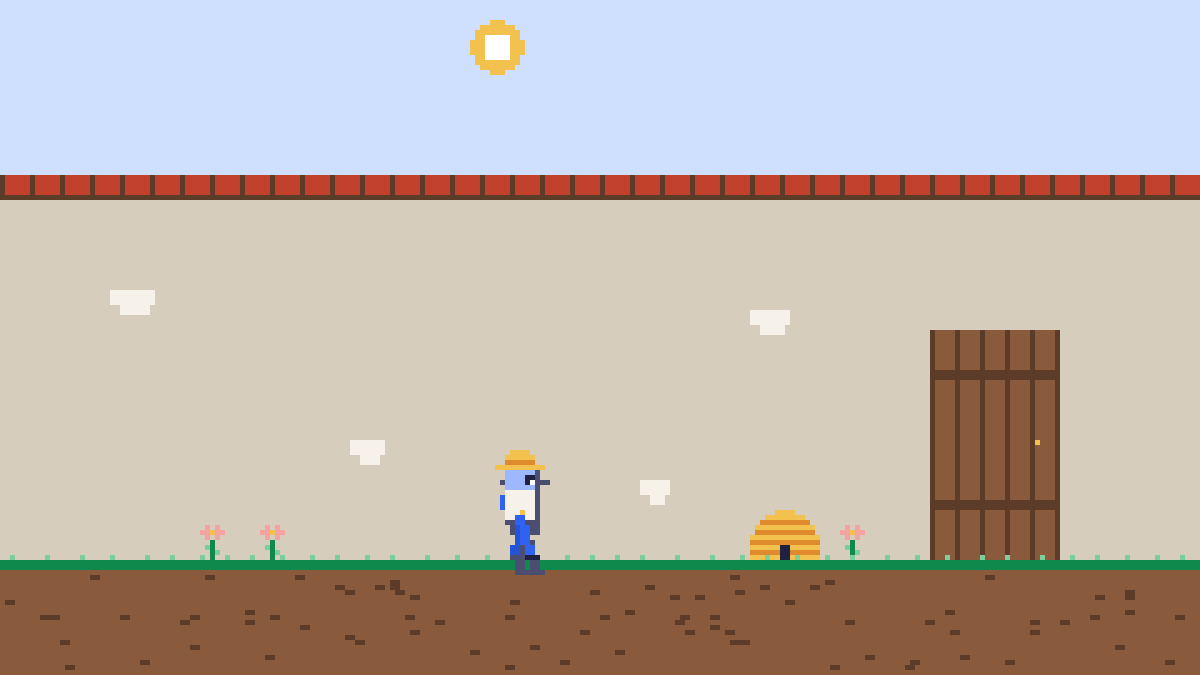
Nur die Imkerin geht an die Regel. Ein leerer Pixel wird dunkel, wo sie ein paar Pixel weiter auf der Seite der Sonne gezeichnet ist; ihre eigenen Pixel bleiben immer vorn.
Auch in dieser Lektion 3 Lesetipps zum Vertiefen 3 Fragen zum Selbsttest
Die Idee
Im Spiel ist der Schlagschatten überall, sobald du darauf achtest: eine Figur vor einer Wand in der Sonne; eine Biene, die über eine Wiese fliegt; die Buchstaben eines Menüs, die über jedem Bild lesbar bleiben sollen. In Pixel Art hat der Schatten harte Kanten und eine Farbe, und er ist um ganze Pixel verschoben. Ein weicher, verwischter Schatten brächte Farben mit, die die Palette nicht hat.
Im Bild oben steht die Imkerin an ihrer Gartenmauer, während die Sonne über den Himmel zieht, und ihr Schatten an der Mauer schwenkt in die andere Richtung: morgens rechts von ihr, mittags unter ihr, abends links.
So funktioniert es
Die Regel wird für jeden Pixel ihres Bildes gefragt und antwortet nur für diesen einen Pixel. Ist sie dort gezeichnet, antwortet die Regel mit ihrer eigenen Farbe, also bleibt sie immer vor ihrem Schatten.
Für einen leeren Pixel stellt sie eine einzige Frage: Ist sie „rechts“ Pixel links von hier und „unten“ Pixel darüber gezeichnet? Dann liegt dieser Pixel in ihrem Schatten und bekommt die Farbe des Schattens; sonst bleibt er leer, und die Mauer scheint durch. Stellt sie diese Frage für jeden leeren Pixel, malt sie ihre ganze Form, nach rechts und unten verschoben. Um den Schatten in eine Richtung zu schieben, schaut die Regel in die andere.
Der Regler „nach rechts“ stellt ein, wie viele Pixel der Schatten rechts von ihr liegt, und unter 0 links. Der Regler „nach unten“ macht dasselbe für unten und oben. Beide beginnen bei 2. Der Regler „Farbe“ wählt die Farbe des Schattens über ihre Nummer in der Palette; die 2, Schiefergrau, ist dunkler als alles hinter ihr. Solange niemand die Regler anfasst, stellt das Bild sie danach ein, wo die Sonne steht: bis zu 3 Pixel zur Seite, solange sie tief steht, und 1 bis 3 Pixel nach unten, mehr, je höher sie steigt.
Eins musst du für dein Spiel wissen: Ein Shader auf einem Sprite malt nur innerhalb des eigenen Bildes des Sprites. Endet das Bild direkt an ihren Stiefeln, wird der Schatten darunter abgeschnitten. Gib dem Bild so viele leere Pixel Platz, wie der Schatten verschoben wird, auf den Seiten, zu denen er fällt.
Was schiefgeht
Bittest du eine KI um einen Schatten, der 2 Pixel nach rechts und 2 nach unten verschoben ist, schreibt sie die Regel oft als „schau 2 Pixel nach rechts und 2 nach unten“. So würde sie ein Sprite zeichnen: an x plus 2. Ein Shader wird aber an der Stelle gefragt, an der der Schatten landen soll, und muss dorthin zurückschauen, woher die Form kommt. Mit dem Pluszeichen findet ein leerer Pixel links von ihr sie zu seiner Rechten und wird dunkel, also fällt der ganze Schatten stattdessen nach links und oben.
Schalte das Bild auf „Mit dem Fehler“. Der Schatten klettert auf der Seite der Sonne die Mauer hinauf, und ein dunkler Rand steht über ihrem Hut, als schiene die Sonne von unten. Jedes Stück der Regel tut noch, was es sagt, darum merkt die KI es nicht; nur die Richtung ist umgedreht.
Zwei Tests fangen das mit einem Bild aus einem einzigen gezeichneten Pixel. Um 2 nach rechts und 1 nach unten verschoben, muss der Schatten an genau einer Stelle liegen; mit dem Fehler landet er 2 links und 1 darüber, in der oberen linken Ecke des Bildes. Mit Einstellungen unter 0 passiert dasselbe andersherum. Ein dritter Test, dass der Schatten ihre Form hat, schlägt auch fehl: Der falsch gesetzte Schatten läuft über den Rand des winzigen Testbildes hinaus und verliert Pixel.
Der Fehler, Zeile für Zeile
- /* Drop shadow, with the mistake: to move the shadow right and down, the rule looks right and down,
-    at x + dx and y + dy. But a rule cannot push a pixel; it asks where its own colour comes from. A
-    place to the left of her finds her to its right and turns dark, so the shadow falls left and up,
-    towards the light instead of away from it.
+ /* Drop shadow: the figure's own shape, moved a few pixels and filled with one dark colour, lies behind
+    her. It lifts a figure off a busy background and tells where the light comes from. The rule cannot
+    push a pixel somewhere else; it can only answer for its own place. So it asks the other way round:
+    is she drawn `dx` pixels to the left and `dy` pixels above me? Then this place is in her shadow.
+    Her own pixels always win, so the shadow stays behind her.

+    The pixel art way: a picture is a grid of whole numbers, 0 where nothing is and 1 to 25 for the
+    palette's colours. The rule is asked for every pixel and answers with a number.
+
     From the course "Shaders for pixel art" on spielerando.com.
     SPDX-License-Identifier: MIT */
…
    const here = at(src, x, y);
    if (here !== 0) return here; // she is in front: her own pixels stay as they are
-   // wrong: it looks where the shadow should go, dx to the right and dy down, not where it comes from
-   return at(src, x + p.dx, y + p.dy) !== 0 ? p.color : 0;
+   // the shadow is her shape moved by dx and dy, so look back to where it comes from: dx to the left, dy up
+   return at(src, x - p.dx, y - p.dy) !== 0 ? p.color : 0;
  }
Was der Test zum Fehler sagt
✔ she stays in front of her own shadow: her pixels keep their colours
✖ the shadow falls to the right and down by the set number of pixels
    got [ '0,0' ], expected [ '4,2' ]
✖ a setting below 0 puts the shadow to the left and up
    got [ '5,4' ], expected [ '1,2' ]
✖ the shadow has her shape: one dark pixel for each of hers it does not hide behind her
    with dx 2 and dy 2
    got 4, expected 9
✔ the shadow is one colour, the chosen one, and nothing else is added
✔ with no offset there is no shadow to see
6 tests: 3 passed, 3 failed
Das sagst du deiner KI
Schreib einen Schlagschatten-Shader für mein Sprite: ihre eigene Form, um ganze Pixel verschoben und mit einer dunklen Farbe gefüllt, hinter ihr.

- Nur ganze Pixel und ganze Zahlen: kein Weichzeichnen, kein Glätten, kein durchscheinender Schatten. Lies die Textur des Sprites ohne Filter (nearest).
- Einstellungen: dx (Pixel nach rechts, unter 0 nach links), dy (Pixel nach unten, unter 0 nach oben) und die Farbe des Schattens [eine Farbe meiner Palette, dunkler als das, worauf der Schatten fällt]. Fang mit dx = [zum Beispiel 2] und dy = [zum Beispiel 2] an.
- Für jeden Pixel: Hat das Sprite dort etwas, zeichne es unverändert, damit sie immer vor ihrem Schatten steht. Sonst schau im Sprite bei x - dx, y - dy nach. Ist dort etwas gezeichnet, zeichne die Farbe des Schattens; sonst zeichne nichts. Achte auf das Vorzeichen: Um den Schatten nach rechts zu schieben, schau nach links.
- Gib dem Bild des Sprites [das größte dx und dy, das ich benutze] leere Pixel Platz auf den Seiten, zu denen der Schatten fällt, sonst wird er an dessen Rand abgeschnitten.

Bevor du den Shader schreibst, schreib dieselbe Regel als kleine, einfache Funktion und teste sie an einem Bild mit einem einzigen gezeichneten Pixel: Mit dx = 2 und dy = 1 liegt der Schatten genau 2 rechts davon und 1 darunter; mit dx = -2 und dy = -1 genau 2 links und 1 darüber; gezeichnete Pixel ändern sich nie; mit dx = 0 und dy = 0 ändert sich gar nichts. Zeig mir die Ausgabe des Tests. Schreib dann den Shader so, dass er genau das tut, was die Funktion tut.
Der Code
Dreimal dieselbe Regel. Die erste ist die, die wir testen; die beiden Shader sind diese Regel in einer Shader-Sprache, und die läuft in deinem Spiel.
Die Regel, getestet: shader.ts
/* Drop shadow: the figure's own shape, moved a few pixels and filled with one dark colour, lies behind
   her. It lifts a figure off a busy background and tells where the light comes from. The rule cannot
   push a pixel somewhere else; it can only answer for its own place. So it asks the other way round:
   is she drawn `dx` pixels to the left and `dy` pixels above me? Then this place is in her shadow.
   Her own pixels always win, so the shadow stays behind her.

   The pixel art way: a picture is a grid of whole numbers, 0 where nothing is and 1 to 25 for the
   palette's colours. The rule is asked for every pixel and answers with a number.

   From the course "Shaders for pixel art" on spielerando.com.
   SPDX-License-Identifier: MIT */

export interface Frame {
  width: number;
  height: number;
  index: Uint8Array;
}

export const DEFAULTS = {
  /** How many pixels the shadow lies to the right of her; below 0 it lies to the left. */
  dx: 2,
  /** How many pixels the shadow lies below her; below 0 it lies above. */
  dy: 2,
  /** The number of the shadow's colour in the palette: 2 is slate. */
  color: 2,
};
export type Params = typeof DEFAULTS;

/** The number at a place of the picture; outside the picture nothing is. */
export function at(src: Frame, x: number, y: number): number {
  if (x < 0 || y < 0 || x >= src.width || y >= src.height) return 0;
  return src.index[y * src.width + x];
}

/** The rule: her own pixels stay; an empty place she would cover if she moved by dx and dy is shadow. */
export function shade(x: number, y: number, _tick: number, src: Frame, p: Params = DEFAULTS): number {
  const here = at(src, x, y);
  if (here !== 0) return here; // she is in front: her own pixels stay as they are
  // the shadow is her shape moved by dx and dy, so look back to where it comes from: dx to the left, dy up
  return at(src, x - p.dx, y - p.dy) !== 0 ? p.color : 0;
}
Dieselbe Regel als Shader: GLSL
#version 300 es
// A shader the pixel art way: a pixel is a whole number, 0 where nothing is, 1 to 25 for the
// palette's colours. The rule is shade(): it is asked for every pixel and answers with a number.
// Everything outside the marked part is the same for every rule. Put your own palette in PALETTE.
precision highp float;
precision highp int;

uniform sampler2D SRC;   // the picture, sampled without smoothing (nearest)
uniform sampler2D OTHER; // a second picture, where the rule uses one
uniform int TICK;        // the time in ticks, 60 a second, counted by the game

const vec3 PALETTE[26] = vec3[26](
  vec3(0.0),
  vec3(31.0, 33.0, 66.0) / 255.0, // 1: k
  vec3(75.0, 78.0, 112.0) / 255.0, // 2: n
  vec3(120.0, 123.0, 152.0) / 255.0, // 3: m
  vec3(198.0, 199.0, 227.0) / 255.0, // 4: e
  vec3(255.0, 255.0, 255.0) / 255.0, // 5: w
  vec3(246.0, 241.0, 233.0) / 255.0, // 6: c
  vec3(214.0, 205.0, 189.0) / 255.0, // 7: d
  vec3(242.0, 193.0, 78.0) / 255.0, // 8: y
  vec3(224.0, 138.0, 46.0) / 255.0, // 9: o
  vec3(194.0, 65.0, 45.0) / 255.0, // 10: r
  vec3(244.0, 163.0, 160.0) / 255.0, // 11: p
  vec3(47.0, 98.0, 240.0) / 255.0, // 12: b
  vec3(35.0, 83.0, 214.0) / 255.0, // 13: u
  vec3(157.0, 184.0, 255.0) / 255.0, // 14: s
  vec3(234.0, 240.0, 255.0) / 255.0, // 15: a
  vec3(207.0, 224.0, 255.0) / 255.0, // 16: i
  vec3(15.0, 138.0, 76.0) / 255.0, // 17: g
  vec3(124.0, 207.0, 154.0) / 255.0, // 18: l
  vec3(226.0, 244.0, 234.0) / 255.0, // 19: f
  vec3(138.0, 90.0, 60.0) / 255.0, // 20: t
  vec3(92.0, 59.0, 40.0) / 255.0, // 21: h
  vec3(109.0, 76.0, 230.0) / 255.0, // 22: v
  vec3(201.0, 187.0, 255.0) / 255.0, // 23: q
  vec3(18.0, 20.0, 43.0) / 255.0, // 24: x
  vec3(39.0, 43.0, 82.0) / 255.0 // 25: z
);

// Which colour of the palette is this? 0 where nothing is drawn.
int number(vec4 c) {
  if (c.a < 0.5) return 0;
  int best = 1;
  float least = 9.0;
  for (int i = 1; i <= 25; i++) {
    vec3 d = c.rgb - PALETTE[i];
    float away = dot(d, d);
    if (away < least) {
      least = away;
      best = i;
    }
  }
  return best;
}

// The number at a place of the picture; outside the picture nothing is.
int at(ivec2 p) {
  ivec2 size = textureSize(SRC, 0);
  if (p.x < 0 || p.y < 0 || p.x >= size.x || p.y >= size.y) return 0;
  return number(texelFetch(SRC, p, 0));
}

// The same for the second picture.
int otherAt(ivec2 p) {
  ivec2 size = textureSize(OTHER, 0);
  if (p.x < 0 || p.y < 0 || p.x >= size.x || p.y >= size.y) return 0;
  return number(texelFetch(OTHER, p, 0));
}

// a wrapped into 0 .. n-1, also for a below zero (the % sign is not safe there)
int wrap(int a, int n) {
  return a - n * int(floor(float(a) / float(n)));
}

// ---- the rule ----
uniform int dx;    // how many pixels the shadow lies to the right of her; below 0 it lies to the left
uniform int dy;    // how many pixels the shadow lies below her; below 0 it lies above
uniform int color; // the number of the shadow's colour in the palette: 2 is slate

// her own pixels stay; an empty place she would cover if she moved by dx and dy is shadow
int shade(ivec2 p) {
  int here = at(p);
  if (here != 0) return here; // she is in front: her own pixels stay as they are
  // the shadow is her shape moved by dx and dy, so look back to where it comes from: dx to the left, dy up
  return at(p - ivec2(dx, dy)) != 0 ? color : 0;
}
// ---- end of the rule ----

out vec4 FRAGMENT;

void main() {
  // the pixel's place, counted from the top left as in the picture
  ivec2 p = ivec2(int(gl_FragCoord.x), textureSize(SRC, 0).y - 1 - int(gl_FragCoord.y));
  int n = shade(p);
  FRAGMENT = n == 0 ? vec4(0.0) : vec4(PALETTE[n], 1.0);
}
Dieselbe Regel für Godot 4
shader_type canvas_item;
// A shader the pixel art way: a pixel is a whole number, 0 where nothing is, 1 to 25 for the
// palette's colours. The rule is shade(): it is asked for every pixel and answers with a number.
// Everything outside the marked part is the same for every rule. Put your own palette in PALETTE.
//
// Put this on the sprite, and give it the sprite's own picture once:
//   material.set_shader_parameter("SRC", texture)
uniform sampler2D SRC : filter_nearest;
uniform sampler2D OTHER : filter_nearest; // a second picture, where the rule uses one
// The time in ticks, 60 a second. The game counts it itself: add 1 in the _physics_process of a
// node that pauses with the game, and set it there, so a paused game pauses its shaders:
//   tick += 1
//   material.set_shader_parameter("TICK", tick)
uniform int TICK;

const vec3 PALETTE[26] = vec3[26](
  vec3(0.0),
  vec3(31.0, 33.0, 66.0) / 255.0, // 1: k
  vec3(75.0, 78.0, 112.0) / 255.0, // 2: n
  vec3(120.0, 123.0, 152.0) / 255.0, // 3: m
  vec3(198.0, 199.0, 227.0) / 255.0, // 4: e
  vec3(255.0, 255.0, 255.0) / 255.0, // 5: w
  vec3(246.0, 241.0, 233.0) / 255.0, // 6: c
  vec3(214.0, 205.0, 189.0) / 255.0, // 7: d
  vec3(242.0, 193.0, 78.0) / 255.0, // 8: y
  vec3(224.0, 138.0, 46.0) / 255.0, // 9: o
  vec3(194.0, 65.0, 45.0) / 255.0, // 10: r
  vec3(244.0, 163.0, 160.0) / 255.0, // 11: p
  vec3(47.0, 98.0, 240.0) / 255.0, // 12: b
  vec3(35.0, 83.0, 214.0) / 255.0, // 13: u
  vec3(157.0, 184.0, 255.0) / 255.0, // 14: s
  vec3(234.0, 240.0, 255.0) / 255.0, // 15: a
  vec3(207.0, 224.0, 255.0) / 255.0, // 16: i
  vec3(15.0, 138.0, 76.0) / 255.0, // 17: g
  vec3(124.0, 207.0, 154.0) / 255.0, // 18: l
  vec3(226.0, 244.0, 234.0) / 255.0, // 19: f
  vec3(138.0, 90.0, 60.0) / 255.0, // 20: t
  vec3(92.0, 59.0, 40.0) / 255.0, // 21: h
  vec3(109.0, 76.0, 230.0) / 255.0, // 22: v
  vec3(201.0, 187.0, 255.0) / 255.0, // 23: q
  vec3(18.0, 20.0, 43.0) / 255.0, // 24: x
  vec3(39.0, 43.0, 82.0) / 255.0 // 25: z
);

// Which colour of the palette is this? 0 where nothing is drawn.
int number(vec4 c) {
  if (c.a < 0.5) return 0;
  int best = 1;
  float least = 9.0;
  for (int i = 1; i <= 25; i++) {
    vec3 d = c.rgb - PALETTE[i];
    float away = dot(d, d);
    if (away < least) {
      least = away;
      best = i;
    }
  }
  return best;
}

// The number at a place of the picture; outside the picture nothing is.
int at(ivec2 p) {
  ivec2 size = textureSize(SRC, 0);
  if (p.x < 0 || p.y < 0 || p.x >= size.x || p.y >= size.y) return 0;
  return number(texelFetch(SRC, p, 0));
}

// The same for the second picture.
int otherAt(ivec2 p) {
  ivec2 size = textureSize(OTHER, 0);
  if (p.x < 0 || p.y < 0 || p.x >= size.x || p.y >= size.y) return 0;
  return number(texelFetch(OTHER, p, 0));
}

// a wrapped into 0 .. n-1, also for a below zero (the % sign is not safe there)
int wrap(int a, int n) {
  return a - n * int(floor(float(a) / float(n)));
}

// ---- the rule ----
uniform int dx;    // how many pixels the shadow lies to the right of her; below 0 it lies to the left
uniform int dy;    // how many pixels the shadow lies below her; below 0 it lies above
uniform int color; // the number of the shadow's colour in the palette: 2 is slate

// her own pixels stay; an empty place she would cover if she moved by dx and dy is shadow
int shade(ivec2 p) {
  int here = at(p);
  if (here != 0) return here; // she is in front: her own pixels stay as they are
  // the shadow is her shape moved by dx and dy, so look back to where it comes from: dx to the left, dy up
  return at(p - ivec2(dx, dy)) != 0 ? color : 0;
}
// ---- end of the rule ----

void fragment() {
  ivec2 p = ivec2(UV * vec2(textureSize(SRC, 0)));
  int n = shade(p);
  COLOR = n == 0 ? vec4(0.0) : vec4(PALETTE[n], 1.0);
}
Der Test: shader.test.ts
import assert from "node:assert/strict";
import { test } from "node:test";
import { DEFAULTS, type Frame, at, shade } from "./shader.ts";

/** A tiny picture from rows of digits: 0 is nothing, 1 to 9 are colours. */
function picture(rows: string[]): Frame {
  return { width: rows[0].length, height: rows.length, index: Uint8Array.from(rows.join(""), Number) };
}

function whole(src: Frame, params = DEFAULTS): number[] {
  const out: number[] = [];
  for (let y = 0; y < src.height; y++) for (let x = 0; x < src.width; x++) out.push(shade(x, y, 0, src, params));
  return out;
}

/** The places, as "x,y", where the rule answered the shadow's colour on an empty pixel. */
function shadowOf(src: Frame, params = DEFAULTS): string[] {
  return whole(src, params).flatMap((n, i) => (src.index[i] === 0 && n !== 0 ? [`${i % src.width},${Math.floor(i / src.width)}`] : []));
}

/** One drawn pixel, at 2, 1, with room around it. */
const SPECK = picture([
  "000000",
  "009000",
  "000000",
  "000000",
  "000000",
]);

/** A small figure: a hat, a face, a body. */
const FIGURE = picture([
  "00000000",
  "08880000",
  "00600000",
  "05550000",
  "05550000",
  "00000000",
  "00000000",
]);

test("she stays in front of her own shadow: her pixels keep their colours", () => {
  for (const [dx, dy] of [[2, 2], [1, 0], [0, 1], [-1, -2], [3, 1]]) {
    const answers = whole(FIGURE, { ...DEFAULTS, dx, dy });
    FIGURE.index.forEach((n, i) => {
      if (n !== 0) assert.equal(answers[i], n, `with dx ${dx} and dy ${dy}`);
    });
  }
});

test("the shadow falls to the right and down by the set number of pixels", () => {
  assert.deepEqual(shadowOf(SPECK, { ...DEFAULTS, dx: 2, dy: 1 }), ["4,2"]);
  assert.deepEqual(shadowOf(SPECK, { ...DEFAULTS, dx: 1, dy: 3 }), ["3,4"]);
});

test("a setting below 0 puts the shadow to the left and up", () => {
  const low = picture([
    "000000",
    "000000",
    "000000",
    "000900",
    "000000",
  ]);
  assert.deepEqual(shadowOf(low, { ...DEFAULTS, dx: -2, dy: -1 }), ["1,2"]);
  assert.deepEqual(shadowOf(low, { ...DEFAULTS, dx: 0, dy: -3 }), ["3,0"]);
});

test("the shadow has her shape: one dark pixel for each of hers it does not hide behind her", () => {
  for (const [dx, dy] of [[2, 2], [1, 0], [0, 1], [-1, 1]]) {
    let expected = 0;
    for (let y = 0; y < FIGURE.height; y++) {
      for (let x = 0; x < FIGURE.width; x++) {
        const moved = { x: x + dx, y: y + dy };
        const inside = moved.x >= 0 && moved.y >= 0 && moved.x < FIGURE.width && moved.y < FIGURE.height;
        if (at(FIGURE, x, y) !== 0 && inside && at(FIGURE, moved.x, moved.y) === 0) expected++;
      }
    }
    assert.equal(shadowOf(FIGURE, { ...DEFAULTS, dx, dy }).length, expected, `with dx ${dx} and dy ${dy}`);
  }
});

test("the shadow is one colour, the chosen one, and nothing else is added", () => {
  const answers = whole(FIGURE, { ...DEFAULTS, color: 7 });
  FIGURE.index.forEach((n, i) => assert.ok(answers[i] === n || (n === 0 && (answers[i] === 7 || answers[i] === 0)), `${answers[i]} at ${i}`));
  assert.ok(answers.includes(7), "no shadow at all");
});

test("with no offset there is no shadow to see", () => {
  assert.deepEqual(whole(FIGURE, { ...DEFAULTS, dx: 0, dy: 0 }), [...FIGURE.index]);
});
- 6 Tests bestehen mit der Regel.
- Mit dem eingebauten Fehler schlagen 3 davon fehl: "the shadow falls to the right and down by the set number of pixels", "a setting below 0 puts the shadow to the left and up", "the shadow has her shape: one dark pixel for each of hers it does not hide behind her".
- Der Fehler ist im Bild oben zu sehen: Schalte auf „Mit dem Fehler“.
- Der Shader lief in einem Browser (Chrome/158.0.8127.37) auf 14 Bildern und ergab in 453.600 von 453.600 Pixeln das Bild der Regel.
Probier es aus
- Schieb „nach rechts“ von -4 bis 4, während „nach unten“ auf 2 bleibt. Der Schatten schwenkt von ihrer linken Seite auf die rechte; bei 0 lugt er nur unter der Krempe ihres Huts, unter ihrer Jacke und um ihre Stiefel hervor.
- Schalte auf „Mit dem Fehler“ und lass die Sonne über den Himmel ziehen. Der Schatten folgt der Sonne, statt vor ihr zu fliehen, und der Rand über ihrem Hut bleibt die ganze Zeit.
- Stell „Farbe“ auf 7, das Sand der Mauer. Der Schatten verschwindet im Putz und zeigt sich nur noch als heller Fleck im Gras zu ihren Füßen: Die Farbe eines Schattens muss dunkler sein als alles, worauf er fällt.
Zum Nachlesen
Wo es tiefer geht: unsere Seiten, auf denen diese Lektion aufbaut, und was andere zu ihrem Punkt geschrieben haben.
Outline-Shader für Pixel Art: ein Pixel rund um das Sprite
Die andere Regel, die auf die leeren Pixel neben ihr malt: Sie fragt ihre vier Nachbarn statt einer Stelle weiter weg und zeigt, wofür ein eng um sie geschnittenes Sprite-Bild keinen Platz hat.
Misst eine Sprite-Datei, bevor sie ins Spiel kommt: wie groß ihr Bild wirklich ist und ob ihr Hintergrund wirklich durchsichtig ist, denn ein Schatten fällt nur auf Pixel, die wirklich leer sind.
Was Godot dem Shader eines Sprites mitgibt: die Größe eines Pixels, mit der das Zurückschauen um ganze Pixel ein Schritt in UV wird, und den Hinweis, dass ein Sprite aus einem Sprite-Sheet das ganze Sheet liest.
Teste dich: drei Fragen
Jede Antwort wird sofort geprüft und erklärt. Die Fragen gehören zum Quiz und zählen für deinen Game Coder IQ wie jede andere.
Du gibst dem Schatten die Sandfarbe der Mauer hinter ihr. Auf der Mauer verschwindet der Schatten, und im Gras zu ihren Füßen erscheint ein heller Fleck. Was sagt dir das?
Nächste Lektion Dunkler und heller in Pixel Art: Farbrampen im Shader
Gib deiner KI die ganze Lektion
Der Knopf kopiert, was du ihr sagst, zusammen mit der getesteten Regel, ihrem Test und beiden Shadern. So hat deine KI alles, um das in dein Spiel zu bauen und dir zu zeigen, dass es funktioniert.
Das ist eine Lektion aus dem Kurs „Shader für Pixel Art“ auf spielerando.com: https://spielerando.com/de/courses/pixel-shaders/drop-shadow

Schreib einen Schlagschatten-Shader für mein Sprite: ihre eigene Form, um ganze Pixel verschoben und mit einer dunklen Farbe gefüllt, hinter ihr.

- Nur ganze Pixel und ganze Zahlen: kein Weichzeichnen, kein Glätten, kein durchscheinender Schatten. Lies die Textur des Sprites ohne Filter (nearest).
- Einstellungen: dx (Pixel nach rechts, unter 0 nach links), dy (Pixel nach unten, unter 0 nach oben) und die Farbe des Schattens [eine Farbe meiner Palette, dunkler als das, worauf der Schatten fällt]. Fang mit dx = [zum Beispiel 2] und dy = [zum Beispiel 2] an.
- Für jeden Pixel: Hat das Sprite dort etwas, zeichne es unverändert, damit sie immer vor ihrem Schatten steht. Sonst schau im Sprite bei x - dx, y - dy nach. Ist dort etwas gezeichnet, zeichne die Farbe des Schattens; sonst zeichne nichts. Achte auf das Vorzeichen: Um den Schatten nach rechts zu schieben, schau nach links.
- Gib dem Bild des Sprites [das größte dx und dy, das ich benutze] leere Pixel Platz auf den Seiten, zu denen der Schatten fällt, sonst wird er an dessen Rand abgeschnitten.

Bevor du den Shader schreibst, schreib dieselbe Regel als kleine, einfache Funktion und teste sie an einem Bild mit einem einzigen gezeichneten Pixel: Mit dx = 2 und dy = 1 liegt der Schatten genau 2 rechts davon und 1 darunter; mit dx = -2 und dy = -1 genau 2 links und 1 darüber; gezeichnete Pixel ändern sich nie; mit dx = 0 und dy = 0 ändert sich gar nichts. Zeig mir die Ausgabe des Tests. Schreib dann den Shader so, dass er genau das tut, was die Funktion tut.

Die Regel, getestet (shader.ts):
```ts
/* Drop shadow: the figure's own shape, moved a few pixels and filled with one dark colour, lies behind
   her. It lifts a figure off a busy background and tells where the light comes from. The rule cannot
   push a pixel somewhere else; it can only answer for its own place. So it asks the other way round:
   is she drawn `dx` pixels to the left and `dy` pixels above me? Then this place is in her shadow.
   Her own pixels always win, so the shadow stays behind her.

   The pixel art way: a picture is a grid of whole numbers, 0 where nothing is and 1 to 25 for the
   palette's colours. The rule is asked for every pixel and answers with a number.

   From the course "Shaders for pixel art" on spielerando.com.
   SPDX-License-Identifier: MIT */

export interface Frame {
  width: number;
  height: number;
  index: Uint8Array;
}

export const DEFAULTS = {
  /** How many pixels the shadow lies to the right of her; below 0 it lies to the left. */
  dx: 2,
  /** How many pixels the shadow lies below her; below 0 it lies above. */
  dy: 2,
  /** The number of the shadow's colour in the palette: 2 is slate. */
  color: 2,
};
export type Params = typeof DEFAULTS;

/** The number at a place of the picture; outside the picture nothing is. */
export function at(src: Frame, x: number, y: number): number {
  if (x < 0 || y < 0 || x >= src.width || y >= src.height) return 0;
  return src.index[y * src.width + x];
}

/** The rule: her own pixels stay; an empty place she would cover if she moved by dx and dy is shadow. */
export function shade(x: number, y: number, _tick: number, src: Frame, p: Params = DEFAULTS): number {
  const here = at(src, x, y);
  if (here !== 0) return here; // she is in front: her own pixels stay as they are
  // the shadow is her shape moved by dx and dy, so look back to where it comes from: dx to the left, dy up
  return at(src, x - p.dx, y - p.dy) !== 0 ? p.color : 0;
}
```

Ihr Test (shader.test.ts):
```ts
import assert from "node:assert/strict";
import { test } from "node:test";
import { DEFAULTS, type Frame, at, shade } from "./shader.ts";

/** A tiny picture from rows of digits: 0 is nothing, 1 to 9 are colours. */
function picture(rows: string[]): Frame {
  return { width: rows[0].length, height: rows.length, index: Uint8Array.from(rows.join(""), Number) };
}

function whole(src: Frame, params = DEFAULTS): number[] {
  const out: number[] = [];
  for (let y = 0; y < src.height; y++) for (let x = 0; x < src.width; x++) out.push(shade(x, y, 0, src, params));
  return out;
}

/** The places, as "x,y", where the rule answered the shadow's colour on an empty pixel. */
function shadowOf(src: Frame, params = DEFAULTS): string[] {
  return whole(src, params).flatMap((n, i) => (src.index[i] === 0 && n !== 0 ? [`${i % src.width},${Math.floor(i / src.width)}`] : []));
}

/** One drawn pixel, at 2, 1, with room around it. */
const SPECK = picture([
  "000000",
  "009000",
  "000000",
  "000000",
  "000000",
]);

/** A small figure: a hat, a face, a body. */
const FIGURE = picture([
  "00000000",
  "08880000",
  "00600000",
  "05550000",
  "05550000",
  "00000000",
  "00000000",
]);

test("she stays in front of her own shadow: her pixels keep their colours", () => {
  for (const [dx, dy] of [[2, 2], [1, 0], [0, 1], [-1, -2], [3, 1]]) {
    const answers = whole(FIGURE, { ...DEFAULTS, dx, dy });
    FIGURE.index.forEach((n, i) => {
      if (n !== 0) assert.equal(answers[i], n, `with dx ${dx} and dy ${dy}`);
    });
  }
});

test("the shadow falls to the right and down by the set number of pixels", () => {
  assert.deepEqual(shadowOf(SPECK, { ...DEFAULTS, dx: 2, dy: 1 }), ["4,2"]);
  assert.deepEqual(shadowOf(SPECK, { ...DEFAULTS, dx: 1, dy: 3 }), ["3,4"]);
});

test("a setting below 0 puts the shadow to the left and up", () => {
  const low = picture([
    "000000",
    "000000",
    "000000",
    "000900",
    "000000",
  ]);
  assert.deepEqual(shadowOf(low, { ...DEFAULTS, dx: -2, dy: -1 }), ["1,2"]);
  assert.deepEqual(shadowOf(low, { ...DEFAULTS, dx: 0, dy: -3 }), ["3,0"]);
});

test("the shadow has her shape: one dark pixel for each of hers it does not hide behind her", () => {
  for (const [dx, dy] of [[2, 2], [1, 0], [0, 1], [-1, 1]]) {
    let expected = 0;
    for (let y = 0; y < FIGURE.height; y++) {
      for (let x = 0; x < FIGURE.width; x++) {
        const moved = { x: x + dx, y: y + dy };
        const inside = moved.x >= 0 && moved.y >= 0 && moved.x < FIGURE.width && moved.y < FIGURE.height;
        if (at(FIGURE, x, y) !== 0 && inside && at(FIGURE, moved.x, moved.y) === 0) expected++;
      }
    }
    assert.equal(shadowOf(FIGURE, { ...DEFAULTS, dx, dy }).length, expected, `with dx ${dx} and dy ${dy}`);
  }
});

test("the shadow is one colour, the chosen one, and nothing else is added", () => {
  const answers = whole(FIGURE, { ...DEFAULTS, color: 7 });
  FIGURE.index.forEach((n, i) => assert.ok(answers[i] === n || (n === 0 && (answers[i] === 7 || answers[i] === 0)), `${answers[i]} at ${i}`));
  assert.ok(answers.includes(7), "no shadow at all");
});

test("with no offset there is no shadow to see", () => {
  assert.deepEqual(whole(FIGURE, { ...DEFAULTS, dx: 0, dy: 0 }), [...FIGURE.index]);
});
```

Dieselbe Regel als GLSL-Shader (WebGL 2, OpenGL ES 3.0), Pixel für Pixel gegen die Regel geprüft:
```glsl
#version 300 es
// A shader the pixel art way: a pixel is a whole number, 0 where nothing is, 1 to 25 for the
// palette's colours. The rule is shade(): it is asked for every pixel and answers with a number.
// Everything outside the marked part is the same for every rule. Put your own palette in PALETTE.
precision highp float;
precision highp int;

uniform sampler2D SRC;   // the picture, sampled without smoothing (nearest)
uniform sampler2D OTHER; // a second picture, where the rule uses one
uniform int TICK;        // the time in ticks, 60 a second, counted by the game

const vec3 PALETTE[26] = vec3[26](
  vec3(0.0),
  vec3(31.0, 33.0, 66.0) / 255.0, // 1: k
  vec3(75.0, 78.0, 112.0) / 255.0, // 2: n
  vec3(120.0, 123.0, 152.0) / 255.0, // 3: m
  vec3(198.0, 199.0, 227.0) / 255.0, // 4: e
  vec3(255.0, 255.0, 255.0) / 255.0, // 5: w
  vec3(246.0, 241.0, 233.0) / 255.0, // 6: c
  vec3(214.0, 205.0, 189.0) / 255.0, // 7: d
  vec3(242.0, 193.0, 78.0) / 255.0, // 8: y
  vec3(224.0, 138.0, 46.0) / 255.0, // 9: o
  vec3(194.0, 65.0, 45.0) / 255.0, // 10: r
  vec3(244.0, 163.0, 160.0) / 255.0, // 11: p
  vec3(47.0, 98.0, 240.0) / 255.0, // 12: b
  vec3(35.0, 83.0, 214.0) / 255.0, // 13: u
  vec3(157.0, 184.0, 255.0) / 255.0, // 14: s
  vec3(234.0, 240.0, 255.0) / 255.0, // 15: a
  vec3(207.0, 224.0, 255.0) / 255.0, // 16: i
  vec3(15.0, 138.0, 76.0) / 255.0, // 17: g
  vec3(124.0, 207.0, 154.0) / 255.0, // 18: l
  vec3(226.0, 244.0, 234.0) / 255.0, // 19: f
  vec3(138.0, 90.0, 60.0) / 255.0, // 20: t
  vec3(92.0, 59.0, 40.0) / 255.0, // 21: h
  vec3(109.0, 76.0, 230.0) / 255.0, // 22: v
  vec3(201.0, 187.0, 255.0) / 255.0, // 23: q
  vec3(18.0, 20.0, 43.0) / 255.0, // 24: x
  vec3(39.0, 43.0, 82.0) / 255.0 // 25: z
);

// Which colour of the palette is this? 0 where nothing is drawn.
int number(vec4 c) {
  if (c.a < 0.5) return 0;
  int best = 1;
  float least = 9.0;
  for (int i = 1; i <= 25; i++) {
    vec3 d = c.rgb - PALETTE[i];
    float away = dot(d, d);
    if (away < least) {
      least = away;
      best = i;
    }
  }
  return best;
}

// The number at a place of the picture; outside the picture nothing is.
int at(ivec2 p) {
  ivec2 size = textureSize(SRC, 0);
  if (p.x < 0 || p.y < 0 || p.x >= size.x || p.y >= size.y) return 0;
  return number(texelFetch(SRC, p, 0));
}

// The same for the second picture.
int otherAt(ivec2 p) {
  ivec2 size = textureSize(OTHER, 0);
  if (p.x < 0 || p.y < 0 || p.x >= size.x || p.y >= size.y) return 0;
  return number(texelFetch(OTHER, p, 0));
}

// a wrapped into 0 .. n-1, also for a below zero (the % sign is not safe there)
int wrap(int a, int n) {
  return a - n * int(floor(float(a) / float(n)));
}

// ---- the rule ----
uniform int dx;    // how many pixels the shadow lies to the right of her; below 0 it lies to the left
uniform int dy;    // how many pixels the shadow lies below her; below 0 it lies above
uniform int color; // the number of the shadow's colour in the palette: 2 is slate

// her own pixels stay; an empty place she would cover if she moved by dx and dy is shadow
int shade(ivec2 p) {
  int here = at(p);
  if (here != 0) return here; // she is in front: her own pixels stay as they are
  // the shadow is her shape moved by dx and dy, so look back to where it comes from: dx to the left, dy up
  return at(p - ivec2(dx, dy)) != 0 ? color : 0;
}
// ---- end of the rule ----

out vec4 FRAGMENT;

void main() {
  // the pixel's place, counted from the top left as in the picture
  ivec2 p = ivec2(int(gl_FragCoord.x), textureSize(SRC, 0).y - 1 - int(gl_FragCoord.y));
  int n = shade(p);
  FRAGMENT = n == 0 ? vec4(0.0) : vec4(PALETTE[n], 1.0);
}
```

Dieselbe Regel für Godot 4 (von den Autoren nicht ausgeführt):
```gdshader
shader_type canvas_item;
// A shader the pixel art way: a pixel is a whole number, 0 where nothing is, 1 to 25 for the
// palette's colours. The rule is shade(): it is asked for every pixel and answers with a number.
// Everything outside the marked part is the same for every rule. Put your own palette in PALETTE.
//
// Put this on the sprite, and give it the sprite's own picture once:
//   material.set_shader_parameter("SRC", texture)
uniform sampler2D SRC : filter_nearest;
uniform sampler2D OTHER : filter_nearest; // a second picture, where the rule uses one
// The time in ticks, 60 a second. The game counts it itself: add 1 in the _physics_process of a
// node that pauses with the game, and set it there, so a paused game pauses its shaders:
//   tick += 1
//   material.set_shader_parameter("TICK", tick)
uniform int TICK;

const vec3 PALETTE[26] = vec3[26](
  vec3(0.0),
  vec3(31.0, 33.0, 66.0) / 255.0, // 1: k
  vec3(75.0, 78.0, 112.0) / 255.0, // 2: n
  vec3(120.0, 123.0, 152.0) / 255.0, // 3: m
  vec3(198.0, 199.0, 227.0) / 255.0, // 4: e
  vec3(255.0, 255.0, 255.0) / 255.0, // 5: w
  vec3(246.0, 241.0, 233.0) / 255.0, // 6: c
  vec3(214.0, 205.0, 189.0) / 255.0, // 7: d
  vec3(242.0, 193.0, 78.0) / 255.0, // 8: y
  vec3(224.0, 138.0, 46.0) / 255.0, // 9: o
  vec3(194.0, 65.0, 45.0) / 255.0, // 10: r
  vec3(244.0, 163.0, 160.0) / 255.0, // 11: p
  vec3(47.0, 98.0, 240.0) / 255.0, // 12: b
  vec3(35.0, 83.0, 214.0) / 255.0, // 13: u
  vec3(157.0, 184.0, 255.0) / 255.0, // 14: s
  vec3(234.0, 240.0, 255.0) / 255.0, // 15: a
  vec3(207.0, 224.0, 255.0) / 255.0, // 16: i
  vec3(15.0, 138.0, 76.0) / 255.0, // 17: g
  vec3(124.0, 207.0, 154.0) / 255.0, // 18: l
  vec3(226.0, 244.0, 234.0) / 255.0, // 19: f
  vec3(138.0, 90.0, 60.0) / 255.0, // 20: t
  vec3(92.0, 59.0, 40.0) / 255.0, // 21: h
  vec3(109.0, 76.0, 230.0) / 255.0, // 22: v
  vec3(201.0, 187.0, 255.0) / 255.0, // 23: q
  vec3(18.0, 20.0, 43.0) / 255.0, // 24: x
  vec3(39.0, 43.0, 82.0) / 255.0 // 25: z
);

// Which colour of the palette is this? 0 where nothing is drawn.
int number(vec4 c) {
  if (c.a < 0.5) return 0;
  int best = 1;
  float least = 9.0;
  for (int i = 1; i <= 25; i++) {
    vec3 d = c.rgb - PALETTE[i];
    float away = dot(d, d);
    if (away < least) {
      least = away;
      best = i;
    }
  }
  return best;
}

// The number at a place of the picture; outside the picture nothing is.
int at(ivec2 p) {
  ivec2 size = textureSize(SRC, 0);
  if (p.x < 0 || p.y < 0 || p.x >= size.x || p.y >= size.y) return 0;
  return number(texelFetch(SRC, p, 0));
}

// The same for the second picture.
int otherAt(ivec2 p) {
  ivec2 size = textureSize(OTHER, 0);
  if (p.x < 0 || p.y < 0 || p.x >= size.x || p.y >= size.y) return 0;
  return number(texelFetch(OTHER, p, 0));
}

// a wrapped into 0 .. n-1, also for a below zero (the % sign is not safe there)
int wrap(int a, int n) {
  return a - n * int(floor(float(a) / float(n)));
}

// ---- the rule ----
uniform int dx;    // how many pixels the shadow lies to the right of her; below 0 it lies to the left
uniform int dy;    // how many pixels the shadow lies below her; below 0 it lies above
uniform int color; // the number of the shadow's colour in the palette: 2 is slate

// her own pixels stay; an empty place she would cover if she moved by dx and dy is shadow
int shade(ivec2 p) {
  int here = at(p);
  if (here != 0) return here; // she is in front: her own pixels stay as they are
  // the shadow is her shape moved by dx and dy, so look back to where it comes from: dx to the left, dy up
  return at(p - ivec2(dx, dy)) != 0 ? color : 0;
}
// ---- end of the rule ----

void fragment() {
  ivec2 p = ivec2(UV * vec2(textureSize(SRC, 0)));
  int n = shade(p);
  COLOR = n == 0 ? vec4(0.0) : vec4(PALETTE[n], 1.0);
}
```
Wie hilfreich war diese Seite?
Diese Seite hat noch niemand bewertet.