Outline-Shader für Pixel Art: ein Pixel rund um das Sprite
Eine Umrandung, auch Outline genannt, ist eine Linie, einen Pixel breit, um eine Figur herum, in einer einzigen Farbe, oft der dunkelsten der Palette. Sie hält die Figur vor einer unruhigen oder dunklen Welt lesbar, und sie zeigt, welche Figur der Spieler gewählt hat oder welches Ding sich aufheben lässt. Die Regel zeichnet sie auf die leeren Pixel direkt neben ihr, also behält die Figur jeden Pixel, mit dem sie gezeichnet wurde. Genau deshalb braucht ihr Bild ringsum einen Pixel leeren Platz.
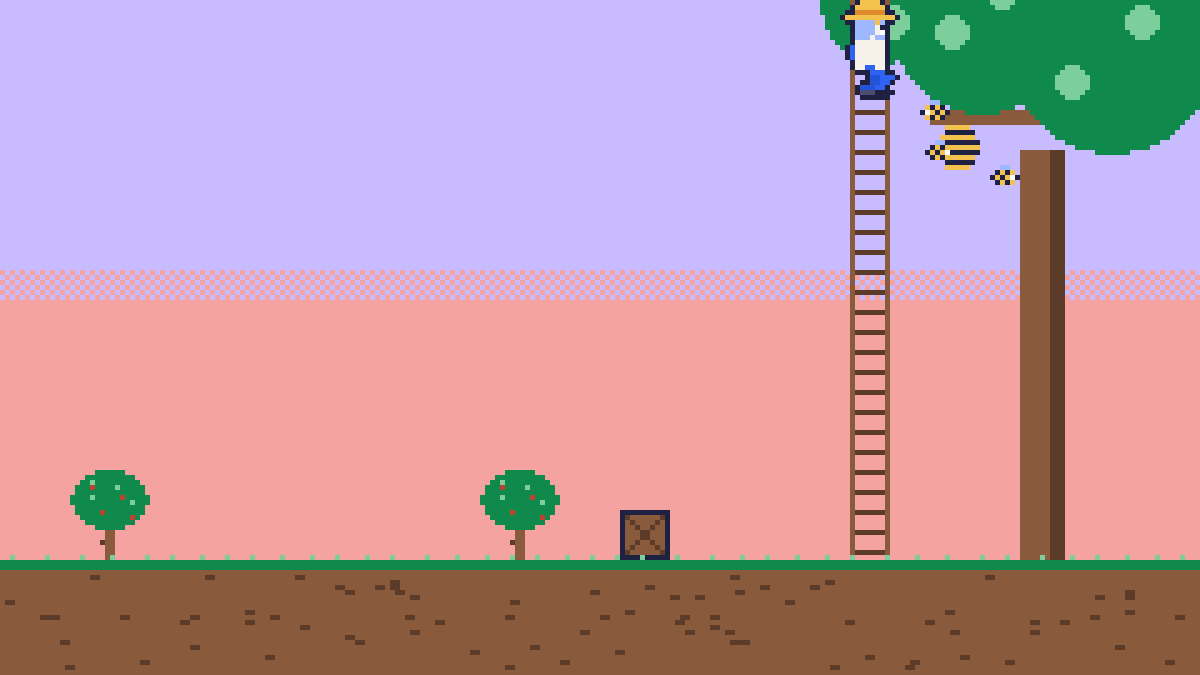
Nur die Imkerin wird der Regel gegeben. Jeder leere Pixel, der eine Seite mit ihr teilt, wird zur Umrandung; sie behält alle ihre eigenen Pixel. Oben auf der Leiter gibt es über ihrem Hut keine Zeile mehr, also hat die Umrandung dort keinen Platz.
Auch in dieser Lektion 3 Lesetipps zum Vertiefen 3 Fragen zum Selbsttest
Die Idee
Sieh dir das Bild an: ein Obstgarten in der Dämmerung, eine Leiter, die grüne Krone eines hohen Baums. Die cremefarbene Jacke und die blaue Hose der Imkerin würden in all dem verschwimmen, und die dunkle Linie um sie herum hält ihre Form klar, wohin sie auch geht. Spiele nehmen dieselbe Linie, um zu zeigen, welche Figur gewählt ist, welche Truhe sich öffnen lässt oder wo eine Figur steht, wenn sie hinter etwas verdeckt ist.
Ein Zeichner kann die Umrandung von Hand in die Figur malen. Dann ist sie Teil jedes Bildes jeder Animation, und eine neue Farbe für sie heißt, jedes Bild zu ändern. Als Regel bleiben die Zeichnungen ohne Umrandung, und die Farbe ist eine Zahl, die das Spiel jederzeit ändern kann: dunkel im Obstgarten, hell in einer Höhle, golden für die gewählte Figur.
So funktioniert es
Die Regel sieht sich die Zahl an ihrem eigenen Platz an. Ist dort etwas gezeichnet, ist die Antwort diese Zahl: Die Umrandung malt nie über sie. Ist der Platz leer, fragt die Regel ihre vier Nachbarn, die eine Seite mit ihm teilen: links, rechts, oben und unten. Ist einer davon gezeichnet, ist die Antwort die Farbe der Umrandung. Sonst bleibt der Platz leer.
Die Ecken werden nicht gefragt. Ein einzelner gezeichneter Punkt bekommt deshalb ein Plus aus vier Pixeln Umrandung, kein Quadrat aus acht. Um sie herum bleibt die Linie einen Pixel breit, folgt ihrer Form und lässt die Ecken von Hut und Stiefeln ein wenig rund.
Der Regler stellt die Farbe der Umrandung über ihre Nummer in der Palette ein; er beginnt bei 1, der dunklen Tinte.
Die Umrandung liegt außerhalb der Figur, auf Pixeln, die leer waren. Ihr Bild braucht also auf jeder Seite mindestens einen leeren Pixel, sonst gibt es keinen Platz, sie zu zeichnen. Im Bild oben bekommt die Regel ein Bild, so groß wie die ganze Bühne, also hat die Imkerin überall Platz, nur nicht oben auf der Leiter: Dort berührt ihr Hut die oberste Zeile, darüber gibt es keine Zeile mehr, und über dem Hut fehlt die Umrandung. In deinem Spiel bekommt die Regel als Bild ihr eigenes Sprite. Sprites werden oft knapp um die Figur zugeschnitten, und dann fehlt die Umrandung überall dort, wo die Figur den Rand des Sprites berührt: unter den Stiefeln, oben auf dem Hut, an der Spitze eines erhobenen Arms.
Was schiefgeht
Umrandungs-Shader, die herumgereicht werden, sehen oft in acht Richtungen, und eine KI, die du um eine Umrandung bittest, schreibt gern einen davon. Mit acht Nachbarn wird auch ein Pixel zur Umrandung, der die Figur nur an einer Ecke berührt. Manche Zeichner wollen eine schwere Umrandung mit eckigen Ecken, und dafür sind acht richtig. Für eine Linie, einen Pixel breit, die ihrer Form folgt, sind sie der Fehler.
Schalte das Bild auf „Mit dem Fehler“ und sieh ihr beim Gehen zu. Die Linie wird schwerer, die Ecken ihrer Hutkrempe werden eckig, ihre schrägen Beine bekommen an jeder Seite eine dicke Treppe, und mitten im Schritt füllt sich die schmale Lücke zwischen ihren Beinen, sodass sie für einen Moment wie ein dunkler Block aussehen.
Zwei Tests fangen das: „a pixel that touches her only at a corner stays empty“ und „a single dot gets an outline of four pixels, a plus around it“. Mit dem Fehler bekommt der Punkt ein Quadrat aus acht.
Der Fehler, Zeile für Zeile
- /* Outline, with the mistake: the rule asks all eight neighbours, the four at the corners too. A pixel
-    that touches the figure only at a corner becomes outline as well. The outline grows heavy, its
-    corners turn square, every slanted edge gets a thick staircase, and small gaps, such as the one
-    between her legs, fill up.
+ /* Outline: an empty pixel right beside the figure becomes the outline's colour, and the figure keeps
+    every pixel she was drawn with. It makes her stand out against a busy or dark world, and it marks
+    the one the player has chosen or can pick up.

+    "Beside" means left, right, above or below: four neighbours. A pixel that touches her only at a
+    corner stays empty, so the outline follows her shape one pixel wide and her corners stay round.
+    Because the outline lies on empty pixels outside her, her picture needs one empty pixel of room on
+    every side: where she touches its edge, there is no pixel left to draw it on.
+
     From the course "Shaders for pixel art" on spielerando.com.
     SPDX-License-Identifier: MIT */
…
  }

- /** The rule, wrong: an empty pixel with her anywhere around it, corners included, becomes the outline. */
+ /** The rule: she stays as drawn; an empty pixel with her to its left, right, top or bottom becomes the outline. */
  export function shade(x: number, y: number, _tick: number, src: Frame, p: Params = DEFAULTS): number {
    const n = at(src, x, y);
    if (n !== 0) return n; // a drawn pixel stays as it was drawn
-   // wrong: all eight neighbours, the four corners too
-   let beside = 0;
-   for (let dy = -1; dy <= 1; dy++) for (let dx = -1; dx <= 1; dx++) beside += at(src, x + dx, y + dy);
+   // the four neighbours that share a side with this pixel; the corners are not asked
+   const beside = at(src, x - 1, y) + at(src, x + 1, y) + at(src, x, y - 1) + at(src, x, y + 1);
    return beside > 0 ? p.color : 0;
  }
Was der Test zum Fehler sagt
✔ every drawn pixel keeps its own colour
✔ an empty pixel beside a drawn one becomes the outline
✖ a pixel that touches her only at a corner stays empty
    the corner at 1, 1
    got 1, expected 0
✖ a single dot gets an outline of four pixels, a plus around it
    got [ '00000', '0###0', '0#3#0', '0###0', '00000' ], expected [ '00000', '00#00', '0#3#0', '00#00', '00000' ]
✔ an empty pixel two steps away stays empty
✖ with one pixel of room on every side, the outline goes all the way round
    got [ '#####', '#386#', '#242#', '#####' ], expected [ '0###0', '#386#', '#242#', '0###0' ]
✔ where she touches the edge of her picture, the outline has no room
✔ the outline is drawn in the chosen colour
8 tests: 5 passed, 3 failed
Das sagst du deiner KI
Schreib einen Outline-Shader für mein Pixel-Art-Sprite: eine Linie, einen Pixel breit, um die Figur herum, in einer Farbe.

- Arbeite mit ganzen Pixeln: kein Glätten und kein Mischen. Lies die Textur des Sprites ohne Filter (nearest).
- Die Umrandung kommt nur auf leere Pixel (Alpha 0). Jeder gezeichnete Pixel behält seine eigene Farbe.
- Ein leerer Pixel wird zur Umrandung, wenn einer der vier Nachbarn, die eine Seite mit ihm teilen (links, rechts, oben, unten), gezeichnet ist. Sieh nicht auf die vier Ecken: Ein einzelner gezeichneter Pixel bekommt ein Plus aus 4 Pixeln Umrandung, kein Quadrat aus 8.
- Die Farbe der Umrandung muss eine Einstellung sein, die ich aus dem Code des Spiels ändern kann: [die Farbe, als Nummer meiner Palette oder als RGB].
- Die Umrandung braucht Platz: Prüf, ob mein Sprite auf jeder Seite mindestens 1 leeren Pixel hat, in jedem Bild. Wenn nicht, sag mir, welche Bilder den Rand berühren, und füg dann den Platz hinzu oder lass die Fläche des Sprites auf jeder Seite um 1 Pixel wachsen.

Bevor du den Shader schreibst, schreib dieselbe Regel als kleine, einfache Funktion. Sie bekommt ein Raster aus ganzen Zahlen (0 = leer, 1 bis N = die Farben meiner Palette) und einen Platz und gibt die Zahl für diesen einen Pixel zurück. Teste sie: Ein gezeichneter Pixel behält seine Farbe, ein Pixel, der die Figur nur an einer Ecke berührt, bleibt leer, und ein einzelner Punkt bekommt eine Umrandung aus genau 4 Pixeln. Zeig mir die Ausgabe des Tests. Schreib dann den Shader so, dass er genau das tut, was die Funktion tut.
Der Code
Dreimal dieselbe Regel. Die erste ist die, die wir testen; die beiden Shader sind diese Regel in einer Shader-Sprache, und die läuft in deinem Spiel.
Die Regel, getestet: shader.ts
/* Outline: an empty pixel right beside the figure becomes the outline's colour, and the figure keeps
   every pixel she was drawn with. It makes her stand out against a busy or dark world, and it marks
   the one the player has chosen or can pick up.

   "Beside" means left, right, above or below: four neighbours. A pixel that touches her only at a
   corner stays empty, so the outline follows her shape one pixel wide and her corners stay round.
   Because the outline lies on empty pixels outside her, her picture needs one empty pixel of room on
   every side: where she touches its edge, there is no pixel left to draw it on.

   From the course "Shaders for pixel art" on spielerando.com.
   SPDX-License-Identifier: MIT */

export interface Frame {
  width: number;
  height: number;
  index: Uint8Array;
}

export const DEFAULTS = {
  /** The number of the outline's colour in the palette: 1 is the dark ink. */
  color: 1,
};
export type Params = typeof DEFAULTS;

/** The number at a place of the picture; outside the picture nothing is. */
export function at(src: Frame, x: number, y: number): number {
  if (x < 0 || y < 0 || x >= src.width || y >= src.height) return 0;
  return src.index[y * src.width + x];
}

/** The rule: she stays as drawn; an empty pixel with her to its left, right, top or bottom becomes the outline. */
export function shade(x: number, y: number, _tick: number, src: Frame, p: Params = DEFAULTS): number {
  const n = at(src, x, y);
  if (n !== 0) return n; // a drawn pixel stays as it was drawn
  // the four neighbours that share a side with this pixel; the corners are not asked
  const beside = at(src, x - 1, y) + at(src, x + 1, y) + at(src, x, y - 1) + at(src, x, y + 1);
  return beside > 0 ? p.color : 0;
}
Dieselbe Regel als Shader: GLSL
#version 300 es
// A shader the pixel art way: a pixel is a whole number, 0 where nothing is, 1 to 25 for the
// palette's colours. The rule is shade(): it is asked for every pixel and answers with a number.
// Everything outside the marked part is the same for every rule. Put your own palette in PALETTE.
precision highp float;
precision highp int;

uniform sampler2D SRC;   // the picture, sampled without smoothing (nearest)
uniform sampler2D OTHER; // a second picture, where the rule uses one
uniform int TICK;        // the time in ticks, 60 a second, counted by the game

const vec3 PALETTE[26] = vec3[26](
  vec3(0.0),
  vec3(31.0, 33.0, 66.0) / 255.0, // 1: k
  vec3(75.0, 78.0, 112.0) / 255.0, // 2: n
  vec3(120.0, 123.0, 152.0) / 255.0, // 3: m
  vec3(198.0, 199.0, 227.0) / 255.0, // 4: e
  vec3(255.0, 255.0, 255.0) / 255.0, // 5: w
  vec3(246.0, 241.0, 233.0) / 255.0, // 6: c
  vec3(214.0, 205.0, 189.0) / 255.0, // 7: d
  vec3(242.0, 193.0, 78.0) / 255.0, // 8: y
  vec3(224.0, 138.0, 46.0) / 255.0, // 9: o
  vec3(194.0, 65.0, 45.0) / 255.0, // 10: r
  vec3(244.0, 163.0, 160.0) / 255.0, // 11: p
  vec3(47.0, 98.0, 240.0) / 255.0, // 12: b
  vec3(35.0, 83.0, 214.0) / 255.0, // 13: u
  vec3(157.0, 184.0, 255.0) / 255.0, // 14: s
  vec3(234.0, 240.0, 255.0) / 255.0, // 15: a
  vec3(207.0, 224.0, 255.0) / 255.0, // 16: i
  vec3(15.0, 138.0, 76.0) / 255.0, // 17: g
  vec3(124.0, 207.0, 154.0) / 255.0, // 18: l
  vec3(226.0, 244.0, 234.0) / 255.0, // 19: f
  vec3(138.0, 90.0, 60.0) / 255.0, // 20: t
  vec3(92.0, 59.0, 40.0) / 255.0, // 21: h
  vec3(109.0, 76.0, 230.0) / 255.0, // 22: v
  vec3(201.0, 187.0, 255.0) / 255.0, // 23: q
  vec3(18.0, 20.0, 43.0) / 255.0, // 24: x
  vec3(39.0, 43.0, 82.0) / 255.0 // 25: z
);

// Which colour of the palette is this? 0 where nothing is drawn.
int number(vec4 c) {
  if (c.a < 0.5) return 0;
  int best = 1;
  float least = 9.0;
  for (int i = 1; i <= 25; i++) {
    vec3 d = c.rgb - PALETTE[i];
    float away = dot(d, d);
    if (away < least) {
      least = away;
      best = i;
    }
  }
  return best;
}

// The number at a place of the picture; outside the picture nothing is.
int at(ivec2 p) {
  ivec2 size = textureSize(SRC, 0);
  if (p.x < 0 || p.y < 0 || p.x >= size.x || p.y >= size.y) return 0;
  return number(texelFetch(SRC, p, 0));
}

// The same for the second picture.
int otherAt(ivec2 p) {
  ivec2 size = textureSize(OTHER, 0);
  if (p.x < 0 || p.y < 0 || p.x >= size.x || p.y >= size.y) return 0;
  return number(texelFetch(OTHER, p, 0));
}

// a wrapped into 0 .. n-1, also for a below zero (the % sign is not safe there)
int wrap(int a, int n) {
  return a - n * int(floor(float(a) / float(n)));
}

// ---- the rule ----
uniform int color; // the number of the outline's colour in the palette: 1 is the dark ink

// she stays as drawn; an empty pixel with her to its left, right, top or bottom becomes the outline
int shade(ivec2 p) {
  int n = at(p);
  if (n != 0) return n; // a drawn pixel stays as it was drawn
  // the four neighbours that share a side with this pixel; the corners are not asked
  int beside = at(p + ivec2(-1, 0)) + at(p + ivec2(1, 0)) + at(p + ivec2(0, -1)) + at(p + ivec2(0, 1));
  return beside > 0 ? color : 0;
}
// ---- end of the rule ----

out vec4 FRAGMENT;

void main() {
  // the pixel's place, counted from the top left as in the picture
  ivec2 p = ivec2(int(gl_FragCoord.x), textureSize(SRC, 0).y - 1 - int(gl_FragCoord.y));
  int n = shade(p);
  FRAGMENT = n == 0 ? vec4(0.0) : vec4(PALETTE[n], 1.0);
}
Dieselbe Regel für Godot 4
shader_type canvas_item;
// A shader the pixel art way: a pixel is a whole number, 0 where nothing is, 1 to 25 for the
// palette's colours. The rule is shade(): it is asked for every pixel and answers with a number.
// Everything outside the marked part is the same for every rule. Put your own palette in PALETTE.
//
// Put this on the sprite, and give it the sprite's own picture once:
//   material.set_shader_parameter("SRC", texture)
uniform sampler2D SRC : filter_nearest;
uniform sampler2D OTHER : filter_nearest; // a second picture, where the rule uses one
// The time in ticks, 60 a second. The game counts it itself: add 1 in the _physics_process of a
// node that pauses with the game, and set it there, so a paused game pauses its shaders:
//   tick += 1
//   material.set_shader_parameter("TICK", tick)
uniform int TICK;

const vec3 PALETTE[26] = vec3[26](
  vec3(0.0),
  vec3(31.0, 33.0, 66.0) / 255.0, // 1: k
  vec3(75.0, 78.0, 112.0) / 255.0, // 2: n
  vec3(120.0, 123.0, 152.0) / 255.0, // 3: m
  vec3(198.0, 199.0, 227.0) / 255.0, // 4: e
  vec3(255.0, 255.0, 255.0) / 255.0, // 5: w
  vec3(246.0, 241.0, 233.0) / 255.0, // 6: c
  vec3(214.0, 205.0, 189.0) / 255.0, // 7: d
  vec3(242.0, 193.0, 78.0) / 255.0, // 8: y
  vec3(224.0, 138.0, 46.0) / 255.0, // 9: o
  vec3(194.0, 65.0, 45.0) / 255.0, // 10: r
  vec3(244.0, 163.0, 160.0) / 255.0, // 11: p
  vec3(47.0, 98.0, 240.0) / 255.0, // 12: b
  vec3(35.0, 83.0, 214.0) / 255.0, // 13: u
  vec3(157.0, 184.0, 255.0) / 255.0, // 14: s
  vec3(234.0, 240.0, 255.0) / 255.0, // 15: a
  vec3(207.0, 224.0, 255.0) / 255.0, // 16: i
  vec3(15.0, 138.0, 76.0) / 255.0, // 17: g
  vec3(124.0, 207.0, 154.0) / 255.0, // 18: l
  vec3(226.0, 244.0, 234.0) / 255.0, // 19: f
  vec3(138.0, 90.0, 60.0) / 255.0, // 20: t
  vec3(92.0, 59.0, 40.0) / 255.0, // 21: h
  vec3(109.0, 76.0, 230.0) / 255.0, // 22: v
  vec3(201.0, 187.0, 255.0) / 255.0, // 23: q
  vec3(18.0, 20.0, 43.0) / 255.0, // 24: x
  vec3(39.0, 43.0, 82.0) / 255.0 // 25: z
);

// Which colour of the palette is this? 0 where nothing is drawn.
int number(vec4 c) {
  if (c.a < 0.5) return 0;
  int best = 1;
  float least = 9.0;
  for (int i = 1; i <= 25; i++) {
    vec3 d = c.rgb - PALETTE[i];
    float away = dot(d, d);
    if (away < least) {
      least = away;
      best = i;
    }
  }
  return best;
}

// The number at a place of the picture; outside the picture nothing is.
int at(ivec2 p) {
  ivec2 size = textureSize(SRC, 0);
  if (p.x < 0 || p.y < 0 || p.x >= size.x || p.y >= size.y) return 0;
  return number(texelFetch(SRC, p, 0));
}

// The same for the second picture.
int otherAt(ivec2 p) {
  ivec2 size = textureSize(OTHER, 0);
  if (p.x < 0 || p.y < 0 || p.x >= size.x || p.y >= size.y) return 0;
  return number(texelFetch(OTHER, p, 0));
}

// a wrapped into 0 .. n-1, also for a below zero (the % sign is not safe there)
int wrap(int a, int n) {
  return a - n * int(floor(float(a) / float(n)));
}

// ---- the rule ----
uniform int color; // the number of the outline's colour in the palette: 1 is the dark ink

// she stays as drawn; an empty pixel with her to its left, right, top or bottom becomes the outline
int shade(ivec2 p) {
  int n = at(p);
  if (n != 0) return n; // a drawn pixel stays as it was drawn
  // the four neighbours that share a side with this pixel; the corners are not asked
  int beside = at(p + ivec2(-1, 0)) + at(p + ivec2(1, 0)) + at(p + ivec2(0, -1)) + at(p + ivec2(0, 1));
  return beside > 0 ? color : 0;
}
// ---- end of the rule ----

void fragment() {
  ivec2 p = ivec2(UV * vec2(textureSize(SRC, 0)));
  int n = shade(p);
  COLOR = n == 0 ? vec4(0.0) : vec4(PALETTE[n], 1.0);
}
Der Test: shader.test.ts
import assert from "node:assert/strict";
import { test } from "node:test";
import { DEFAULTS, type Frame, shade } from "./shader.ts";

/** A tiny picture from rows of digits: 0 is nothing, 1 to 9 are colours. */
function picture(rows: string[]): Frame {
  return { width: rows[0].length, height: rows.length, index: Uint8Array.from(rows.join(""), Number) };
}

/** The whole picture after the rule, as rows of digits, with the outline drawn as "#". */
function after(src: Frame, color = 9): string[] {
  const rows: string[] = [];
  for (let y = 0; y < src.height; y++) {
    let row = "";
    for (let x = 0; x < src.width; x++) {
      const n = shade(x, y, 0, src, { ...DEFAULTS, color });
      row += n === color && src.index[y * src.width + x] === 0 ? "#" : String(n);
    }
    rows.push(row);
  }
  return rows;
}

const DOT = picture([
  "00000",
  "00000",
  "00300",
  "00000",
  "00000",
]);

const BOX = picture([
  "00000",
  "03860",
  "02420",
  "00000",
]);

test("every drawn pixel keeps its own colour", () => {
  assert.deepEqual(after(BOX).map((row) => row.replace(/#/g, "0")), ["00000", "03860", "02420", "00000"]);
});

test("an empty pixel beside a drawn one becomes the outline", () => {
  assert.equal(shade(2, 1, 0, DOT), DEFAULTS.color, "above");
  assert.equal(shade(2, 3, 0, DOT), DEFAULTS.color, "below");
  assert.equal(shade(1, 2, 0, DOT), DEFAULTS.color, "to the left");
  assert.equal(shade(3, 2, 0, DOT), DEFAULTS.color, "to the right");
});

test("a pixel that touches her only at a corner stays empty", () => {
  for (const [x, y] of [[1, 1], [3, 1], [1, 3], [3, 3]]) assert.equal(shade(x, y, 0, DOT), 0, `the corner at ${x}, ${y}`);
  assert.equal(shade(0, 0, 0, BOX), 0, "the corner of the box");
});

test("a single dot gets an outline of four pixels, a plus around it", () => {
  assert.deepEqual(after(DOT), ["00000", "00#00", "0#3#0", "00#00", "00000"]);
});

test("an empty pixel two steps away stays empty", () => {
  assert.equal(shade(2, 0, 0, DOT), 0);
  assert.equal(shade(0, 2, 0, DOT), 0);
  assert.equal(shade(4, 4, 0, DOT), 0);
});

test("with one pixel of room on every side, the outline goes all the way round", () => {
  assert.deepEqual(after(BOX), ["0###0", "#386#", "#242#", "0###0"]);
});

test("where she touches the edge of her picture, the outline has no room", () => {
  // the same box cut tight: no empty pixel is left beside it, so there is no outline at all
  const tight = picture(["386", "242"]);
  assert.deepEqual(after(tight), ["386", "242"]);
});

test("the outline is drawn in the chosen colour", () => {
  assert.equal(shade(2, 1, 0, DOT, { color: 1 }), 1);
  assert.equal(shade(2, 1, 0, DOT, { color: 25 }), 25);
});
- 8 Tests bestehen mit der Regel.
- Mit dem eingebauten Fehler schlagen 3 davon fehl: "a pixel that touches her only at a corner stays empty", "a single dot gets an outline of four pixels, a plus around it", "with one pixel of room on every side, the outline goes all the way round".
- Der Fehler ist im Bild oben zu sehen: Schalte auf „Mit dem Fehler“.
- Der Shader lief in einem Browser (Chrome/158.0.8127.37) auf 10 Bildern und ergab in 324.000 von 324.000 Pixeln das Bild der Regel.
Probier es aus
- Zieh den Farbregler durch die Palette. Die Tinte hebt sich von der Dämmerung ab; manche Farben verschwinden fast vor dem Himmel oder dem Baum. Wähl die Farbe der Umrandung für die Welt, in der deine Figur steht, nicht für die Figur.
- Schalte zwischen „Mit der Regel“ und „Mit dem Fehler“, während sie geht. Achte auf ihre Beine: Mit der Regel ist mitten im Schritt eine Lücke zwischen ihnen, mit dem Fehler ist sie mit Umrandung gefüllt.
- Halt das Bild an, wenn sie oben auf der Leiter ist, und sieh über ihren Hut. Dort ist keine Linie, mit der Regel genauso wie mit dem Fehler: Keine Regel kann auf einen Pixel zeichnen, den ihr Bild nicht hat.
Zum Nachlesen
Wo es tiefer geht: unsere Seiten, auf denen diese Lektion aufbaut, und was andere zu ihrem Punkt geschrieben haben.
Misst ein Blatt mit Einzelbildern, bevor es in dein Spiel kommt, und nennt drei Dinge, die eine Umrandung verderben: einen gemalten statt durchsichtigen Hintergrund, eine Figur über den Schnitt hinweg und weiche Randpixel.
Wie lang der Rand einer Figur ist, gezählt an den vier Seiten jedes Pixels, so wie diese Umrandung ihn sieht, und wie viel rauer drei Arten, ein Sprite zu drehen, diesen Rand machen, damit du nach Zahlen wählst.
Die Reihenfolge der Shader-Effekte in einem Pixel-Art-Spiel
Wo die Umrandung unter den Effekten eines Spiels hingehört: aufs Sprite selbst, mit Blitz und Farbtausch, vor Welt, Licht und Nacht, damit die Nacht ihre Umrandung mit abdunkelt.
Teste dich: drei Fragen
Jede Antwort wird sofort geprüft und erklärt. Die Fragen gehören zum Quiz und zählen für deinen Game Coder IQ wie jede andere.
Eine Regel für die Umrandung wird nach einem Pixel gefragt. Wann antwortet sie mit der Farbe der Umrandung?
Nächste Lektion Rauschen im Shader für Pixel Art: auf jedem Gerät dieselben Sterne
Gib deiner KI die ganze Lektion
Der Knopf kopiert, was du ihr sagst, zusammen mit der getesteten Regel, ihrem Test und beiden Shadern. So hat deine KI alles, um das in dein Spiel zu bauen und dir zu zeigen, dass es funktioniert.
Das ist eine Lektion aus dem Kurs „Shader für Pixel Art“ auf spielerando.com: https://spielerando.com/de/courses/pixel-shaders/outline

Schreib einen Outline-Shader für mein Pixel-Art-Sprite: eine Linie, einen Pixel breit, um die Figur herum, in einer Farbe.

- Arbeite mit ganzen Pixeln: kein Glätten und kein Mischen. Lies die Textur des Sprites ohne Filter (nearest).
- Die Umrandung kommt nur auf leere Pixel (Alpha 0). Jeder gezeichnete Pixel behält seine eigene Farbe.
- Ein leerer Pixel wird zur Umrandung, wenn einer der vier Nachbarn, die eine Seite mit ihm teilen (links, rechts, oben, unten), gezeichnet ist. Sieh nicht auf die vier Ecken: Ein einzelner gezeichneter Pixel bekommt ein Plus aus 4 Pixeln Umrandung, kein Quadrat aus 8.
- Die Farbe der Umrandung muss eine Einstellung sein, die ich aus dem Code des Spiels ändern kann: [die Farbe, als Nummer meiner Palette oder als RGB].
- Die Umrandung braucht Platz: Prüf, ob mein Sprite auf jeder Seite mindestens 1 leeren Pixel hat, in jedem Bild. Wenn nicht, sag mir, welche Bilder den Rand berühren, und füg dann den Platz hinzu oder lass die Fläche des Sprites auf jeder Seite um 1 Pixel wachsen.

Bevor du den Shader schreibst, schreib dieselbe Regel als kleine, einfache Funktion. Sie bekommt ein Raster aus ganzen Zahlen (0 = leer, 1 bis N = die Farben meiner Palette) und einen Platz und gibt die Zahl für diesen einen Pixel zurück. Teste sie: Ein gezeichneter Pixel behält seine Farbe, ein Pixel, der die Figur nur an einer Ecke berührt, bleibt leer, und ein einzelner Punkt bekommt eine Umrandung aus genau 4 Pixeln. Zeig mir die Ausgabe des Tests. Schreib dann den Shader so, dass er genau das tut, was die Funktion tut.

Die Regel, getestet (shader.ts):
```ts
/* Outline: an empty pixel right beside the figure becomes the outline's colour, and the figure keeps
   every pixel she was drawn with. It makes her stand out against a busy or dark world, and it marks
   the one the player has chosen or can pick up.

   "Beside" means left, right, above or below: four neighbours. A pixel that touches her only at a
   corner stays empty, so the outline follows her shape one pixel wide and her corners stay round.
   Because the outline lies on empty pixels outside her, her picture needs one empty pixel of room on
   every side: where she touches its edge, there is no pixel left to draw it on.

   From the course "Shaders for pixel art" on spielerando.com.
   SPDX-License-Identifier: MIT */

export interface Frame {
  width: number;
  height: number;
  index: Uint8Array;
}

export const DEFAULTS = {
  /** The number of the outline's colour in the palette: 1 is the dark ink. */
  color: 1,
};
export type Params = typeof DEFAULTS;

/** The number at a place of the picture; outside the picture nothing is. */
export function at(src: Frame, x: number, y: number): number {
  if (x < 0 || y < 0 || x >= src.width || y >= src.height) return 0;
  return src.index[y * src.width + x];
}

/** The rule: she stays as drawn; an empty pixel with her to its left, right, top or bottom becomes the outline. */
export function shade(x: number, y: number, _tick: number, src: Frame, p: Params = DEFAULTS): number {
  const n = at(src, x, y);
  if (n !== 0) return n; // a drawn pixel stays as it was drawn
  // the four neighbours that share a side with this pixel; the corners are not asked
  const beside = at(src, x - 1, y) + at(src, x + 1, y) + at(src, x, y - 1) + at(src, x, y + 1);
  return beside > 0 ? p.color : 0;
}
```

Ihr Test (shader.test.ts):
```ts
import assert from "node:assert/strict";
import { test } from "node:test";
import { DEFAULTS, type Frame, shade } from "./shader.ts";

/** A tiny picture from rows of digits: 0 is nothing, 1 to 9 are colours. */
function picture(rows: string[]): Frame {
  return { width: rows[0].length, height: rows.length, index: Uint8Array.from(rows.join(""), Number) };
}

/** The whole picture after the rule, as rows of digits, with the outline drawn as "#". */
function after(src: Frame, color = 9): string[] {
  const rows: string[] = [];
  for (let y = 0; y < src.height; y++) {
    let row = "";
    for (let x = 0; x < src.width; x++) {
      const n = shade(x, y, 0, src, { ...DEFAULTS, color });
      row += n === color && src.index[y * src.width + x] === 0 ? "#" : String(n);
    }
    rows.push(row);
  }
  return rows;
}

const DOT = picture([
  "00000",
  "00000",
  "00300",
  "00000",
  "00000",
]);

const BOX = picture([
  "00000",
  "03860",
  "02420",
  "00000",
]);

test("every drawn pixel keeps its own colour", () => {
  assert.deepEqual(after(BOX).map((row) => row.replace(/#/g, "0")), ["00000", "03860", "02420", "00000"]);
});

test("an empty pixel beside a drawn one becomes the outline", () => {
  assert.equal(shade(2, 1, 0, DOT), DEFAULTS.color, "above");
  assert.equal(shade(2, 3, 0, DOT), DEFAULTS.color, "below");
  assert.equal(shade(1, 2, 0, DOT), DEFAULTS.color, "to the left");
  assert.equal(shade(3, 2, 0, DOT), DEFAULTS.color, "to the right");
});

test("a pixel that touches her only at a corner stays empty", () => {
  for (const [x, y] of [[1, 1], [3, 1], [1, 3], [3, 3]]) assert.equal(shade(x, y, 0, DOT), 0, `the corner at ${x}, ${y}`);
  assert.equal(shade(0, 0, 0, BOX), 0, "the corner of the box");
});

test("a single dot gets an outline of four pixels, a plus around it", () => {
  assert.deepEqual(after(DOT), ["00000", "00#00", "0#3#0", "00#00", "00000"]);
});

test("an empty pixel two steps away stays empty", () => {
  assert.equal(shade(2, 0, 0, DOT), 0);
  assert.equal(shade(0, 2, 0, DOT), 0);
  assert.equal(shade(4, 4, 0, DOT), 0);
});

test("with one pixel of room on every side, the outline goes all the way round", () => {
  assert.deepEqual(after(BOX), ["0###0", "#386#", "#242#", "0###0"]);
});

test("where she touches the edge of her picture, the outline has no room", () => {
  // the same box cut tight: no empty pixel is left beside it, so there is no outline at all
  const tight = picture(["386", "242"]);
  assert.deepEqual(after(tight), ["386", "242"]);
});

test("the outline is drawn in the chosen colour", () => {
  assert.equal(shade(2, 1, 0, DOT, { color: 1 }), 1);
  assert.equal(shade(2, 1, 0, DOT, { color: 25 }), 25);
});
```

Dieselbe Regel als GLSL-Shader (WebGL 2, OpenGL ES 3.0), Pixel für Pixel gegen die Regel geprüft:
```glsl
#version 300 es
// A shader the pixel art way: a pixel is a whole number, 0 where nothing is, 1 to 25 for the
// palette's colours. The rule is shade(): it is asked for every pixel and answers with a number.
// Everything outside the marked part is the same for every rule. Put your own palette in PALETTE.
precision highp float;
precision highp int;

uniform sampler2D SRC;   // the picture, sampled without smoothing (nearest)
uniform sampler2D OTHER; // a second picture, where the rule uses one
uniform int TICK;        // the time in ticks, 60 a second, counted by the game

const vec3 PALETTE[26] = vec3[26](
  vec3(0.0),
  vec3(31.0, 33.0, 66.0) / 255.0, // 1: k
  vec3(75.0, 78.0, 112.0) / 255.0, // 2: n
  vec3(120.0, 123.0, 152.0) / 255.0, // 3: m
  vec3(198.0, 199.0, 227.0) / 255.0, // 4: e
  vec3(255.0, 255.0, 255.0) / 255.0, // 5: w
  vec3(246.0, 241.0, 233.0) / 255.0, // 6: c
  vec3(214.0, 205.0, 189.0) / 255.0, // 7: d
  vec3(242.0, 193.0, 78.0) / 255.0, // 8: y
  vec3(224.0, 138.0, 46.0) / 255.0, // 9: o
  vec3(194.0, 65.0, 45.0) / 255.0, // 10: r
  vec3(244.0, 163.0, 160.0) / 255.0, // 11: p
  vec3(47.0, 98.0, 240.0) / 255.0, // 12: b
  vec3(35.0, 83.0, 214.0) / 255.0, // 13: u
  vec3(157.0, 184.0, 255.0) / 255.0, // 14: s
  vec3(234.0, 240.0, 255.0) / 255.0, // 15: a
  vec3(207.0, 224.0, 255.0) / 255.0, // 16: i
  vec3(15.0, 138.0, 76.0) / 255.0, // 17: g
  vec3(124.0, 207.0, 154.0) / 255.0, // 18: l
  vec3(226.0, 244.0, 234.0) / 255.0, // 19: f
  vec3(138.0, 90.0, 60.0) / 255.0, // 20: t
  vec3(92.0, 59.0, 40.0) / 255.0, // 21: h
  vec3(109.0, 76.0, 230.0) / 255.0, // 22: v
  vec3(201.0, 187.0, 255.0) / 255.0, // 23: q
  vec3(18.0, 20.0, 43.0) / 255.0, // 24: x
  vec3(39.0, 43.0, 82.0) / 255.0 // 25: z
);

// Which colour of the palette is this? 0 where nothing is drawn.
int number(vec4 c) {
  if (c.a < 0.5) return 0;
  int best = 1;
  float least = 9.0;
  for (int i = 1; i <= 25; i++) {
    vec3 d = c.rgb - PALETTE[i];
    float away = dot(d, d);
    if (away < least) {
      least = away;
      best = i;
    }
  }
  return best;
}

// The number at a place of the picture; outside the picture nothing is.
int at(ivec2 p) {
  ivec2 size = textureSize(SRC, 0);
  if (p.x < 0 || p.y < 0 || p.x >= size.x || p.y >= size.y) return 0;
  return number(texelFetch(SRC, p, 0));
}

// The same for the second picture.
int otherAt(ivec2 p) {
  ivec2 size = textureSize(OTHER, 0);
  if (p.x < 0 || p.y < 0 || p.x >= size.x || p.y >= size.y) return 0;
  return number(texelFetch(OTHER, p, 0));
}

// a wrapped into 0 .. n-1, also for a below zero (the % sign is not safe there)
int wrap(int a, int n) {
  return a - n * int(floor(float(a) / float(n)));
}

// ---- the rule ----
uniform int color; // the number of the outline's colour in the palette: 1 is the dark ink

// she stays as drawn; an empty pixel with her to its left, right, top or bottom becomes the outline
int shade(ivec2 p) {
  int n = at(p);
  if (n != 0) return n; // a drawn pixel stays as it was drawn
  // the four neighbours that share a side with this pixel; the corners are not asked
  int beside = at(p + ivec2(-1, 0)) + at(p + ivec2(1, 0)) + at(p + ivec2(0, -1)) + at(p + ivec2(0, 1));
  return beside > 0 ? color : 0;
}
// ---- end of the rule ----

out vec4 FRAGMENT;

void main() {
  // the pixel's place, counted from the top left as in the picture
  ivec2 p = ivec2(int(gl_FragCoord.x), textureSize(SRC, 0).y - 1 - int(gl_FragCoord.y));
  int n = shade(p);
  FRAGMENT = n == 0 ? vec4(0.0) : vec4(PALETTE[n], 1.0);
}
```

Dieselbe Regel für Godot 4 (von den Autoren nicht ausgeführt):
```gdshader
shader_type canvas_item;
// A shader the pixel art way: a pixel is a whole number, 0 where nothing is, 1 to 25 for the
// palette's colours. The rule is shade(): it is asked for every pixel and answers with a number.
// Everything outside the marked part is the same for every rule. Put your own palette in PALETTE.
//
// Put this on the sprite, and give it the sprite's own picture once:
//   material.set_shader_parameter("SRC", texture)
uniform sampler2D SRC : filter_nearest;
uniform sampler2D OTHER : filter_nearest; // a second picture, where the rule uses one
// The time in ticks, 60 a second. The game counts it itself: add 1 in the _physics_process of a
// node that pauses with the game, and set it there, so a paused game pauses its shaders:
//   tick += 1
//   material.set_shader_parameter("TICK", tick)
uniform int TICK;

const vec3 PALETTE[26] = vec3[26](
  vec3(0.0),
  vec3(31.0, 33.0, 66.0) / 255.0, // 1: k
  vec3(75.0, 78.0, 112.0) / 255.0, // 2: n
  vec3(120.0, 123.0, 152.0) / 255.0, // 3: m
  vec3(198.0, 199.0, 227.0) / 255.0, // 4: e
  vec3(255.0, 255.0, 255.0) / 255.0, // 5: w
  vec3(246.0, 241.0, 233.0) / 255.0, // 6: c
  vec3(214.0, 205.0, 189.0) / 255.0, // 7: d
  vec3(242.0, 193.0, 78.0) / 255.0, // 8: y
  vec3(224.0, 138.0, 46.0) / 255.0, // 9: o
  vec3(194.0, 65.0, 45.0) / 255.0, // 10: r
  vec3(244.0, 163.0, 160.0) / 255.0, // 11: p
  vec3(47.0, 98.0, 240.0) / 255.0, // 12: b
  vec3(35.0, 83.0, 214.0) / 255.0, // 13: u
  vec3(157.0, 184.0, 255.0) / 255.0, // 14: s
  vec3(234.0, 240.0, 255.0) / 255.0, // 15: a
  vec3(207.0, 224.0, 255.0) / 255.0, // 16: i
  vec3(15.0, 138.0, 76.0) / 255.0, // 17: g
  vec3(124.0, 207.0, 154.0) / 255.0, // 18: l
  vec3(226.0, 244.0, 234.0) / 255.0, // 19: f
  vec3(138.0, 90.0, 60.0) / 255.0, // 20: t
  vec3(92.0, 59.0, 40.0) / 255.0, // 21: h
  vec3(109.0, 76.0, 230.0) / 255.0, // 22: v
  vec3(201.0, 187.0, 255.0) / 255.0, // 23: q
  vec3(18.0, 20.0, 43.0) / 255.0, // 24: x
  vec3(39.0, 43.0, 82.0) / 255.0 // 25: z
);

// Which colour of the palette is this? 0 where nothing is drawn.
int number(vec4 c) {
  if (c.a < 0.5) return 0;
  int best = 1;
  float least = 9.0;
  for (int i = 1; i <= 25; i++) {
    vec3 d = c.rgb - PALETTE[i];
    float away = dot(d, d);
    if (away < least) {
      least = away;
      best = i;
    }
  }
  return best;
}

// The number at a place of the picture; outside the picture nothing is.
int at(ivec2 p) {
  ivec2 size = textureSize(SRC, 0);
  if (p.x < 0 || p.y < 0 || p.x >= size.x || p.y >= size.y) return 0;
  return number(texelFetch(SRC, p, 0));
}

// The same for the second picture.
int otherAt(ivec2 p) {
  ivec2 size = textureSize(OTHER, 0);
  if (p.x < 0 || p.y < 0 || p.x >= size.x || p.y >= size.y) return 0;
  return number(texelFetch(OTHER, p, 0));
}

// a wrapped into 0 .. n-1, also for a below zero (the % sign is not safe there)
int wrap(int a, int n) {
  return a - n * int(floor(float(a) / float(n)));
}

// ---- the rule ----
uniform int color; // the number of the outline's colour in the palette: 1 is the dark ink

// she stays as drawn; an empty pixel with her to its left, right, top or bottom becomes the outline
int shade(ivec2 p) {
  int n = at(p);
  if (n != 0) return n; // a drawn pixel stays as it was drawn
  // the four neighbours that share a side with this pixel; the corners are not asked
  int beside = at(p + ivec2(-1, 0)) + at(p + ivec2(1, 0)) + at(p + ivec2(0, -1)) + at(p + ivec2(0, 1));
  return beside > 0 ? color : 0;
}
// ---- end of the rule ----

void fragment() {
  ivec2 p = ivec2(UV * vec2(textureSize(SRC, 0)));
  int n = shade(p);
  COLOR = n == 0 ? vec4(0.0) : vec4(PALETTE[n], 1.0);
}
```
Wie hilfreich war diese Seite?
Diese Seite hat noch niemand bewertet.