Drop Shadow Shader for Pixel Art: Look Back, Not Forward
A drop shadow is the figure's own shape, moved a few pixels and filled with one dark colour, lying behind her. It lifts a sprite off a busy background and shows where the light comes from. The rule is short, and it holds the turn of thought that every shader which moves something needs: a rule cannot push a pixel anywhere, it can only look.
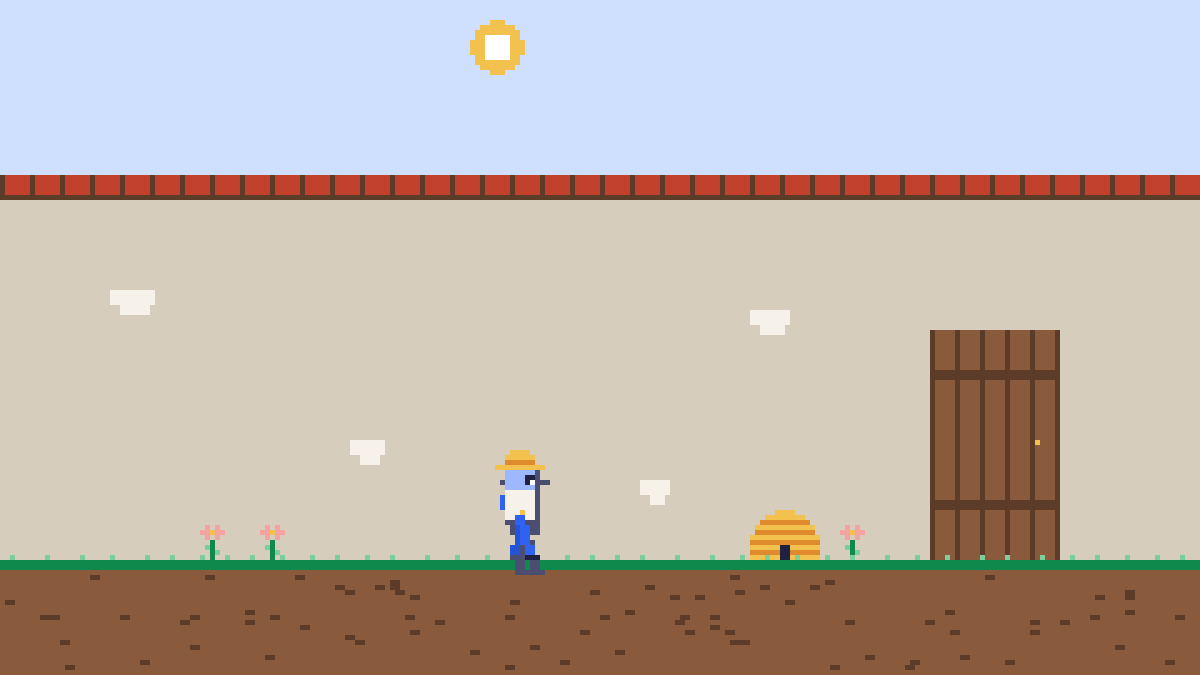
Only the beekeeper is given to the rule. An empty pixel turns dark where she is drawn a few pixels away from it, on the sun's side; her own pixels always stay in front.
Also in this lesson 3 things to read up on 3 questions to check yourself
The idea
In a game the drop shadow is everywhere once you notice it: a figure in front of a sunlit wall, a bee flying above a meadow, the letters of a menu that must stay readable over any picture. In pixel art the shadow is hard-edged and in one colour, moved by whole pixels. A soft, blurred shadow would bring in colours the palette does not have.
In the picture above the beekeeper stands by her garden wall while the sun crosses the sky, and her shadow on the wall swings the other way: to her right in the morning, below her at noon, to her left in the evening.
How it works
The rule is asked for every pixel of her picture and answers for that pixel alone. If she is drawn there, it answers with her own colour, so she always stays in front of her shadow.
For an empty pixel it asks one question: is she drawn "right" pixels to the left of here and "down" pixels above? If so, this pixel lies in her shadow and gets the shadow's colour; if not, it stays empty and the wall shows through. Asking that for every empty pixel paints her whole shape, moved right and down. To move the shadow one way, the rule looks the other way.
The slider "right" sets how many pixels the shadow lies to the right of her, and below 0 to the left. The slider "down" does the same for down and up. Both start at 2. The slider "colour" picks the shadow's colour by its number in the palette; 2, slate, is darker than everything behind her. While nobody touches the sliders, the picture sets them by where the sun stands: up to 3 pixels to the side while it is low, and 1 to 3 pixels down, more the higher it climbs.
One thing to know for your game: a shader on a sprite paints only inside the sprite's own picture. If the picture ends right at her boots, the shadow below them is cut off. Give the picture as many empty pixels of room as the shadow is moved, on the sides it falls to.
What goes wrong
An AI that is asked for a shadow moved 2 pixels right and 2 down often writes the rule as "look 2 pixels right and 2 down". That is how it would draw a sprite: put it at x plus 2. But a shader is asked about the place where the shadow should end up, and it has to look back to where the shape comes from. With the plus sign, an empty pixel to the left of her finds her to its right and turns dark, so the whole shadow falls left and up instead.
Switch the picture to "With the mistake". The shadow climbs the wall on the sun's side of her, and a dark rim stands over her hat, as if the sun shone from below. Every piece of the rule still does what it says, which is why the AI does not notice; only the direction is turned round.
Two tests catch it with a picture of one drawn pixel. Moved 2 right and 1 down, the shadow must be at exactly one place; with the mistake it lands 2 left and 1 up, in the picture's top left corner. With the settings below 0 the same happens the other way. A third test, that the shadow has her shape, fails too: the misplaced shadow runs off the edge of the tiny test picture and loses pixels.
The mistake, line by line
- /* Drop shadow, with the mistake: to move the shadow right and down, the rule looks right and down,
-    at x + dx and y + dy. But a rule cannot push a pixel; it asks where its own colour comes from. A
-    place to the left of her finds her to its right and turns dark, so the shadow falls left and up,
-    towards the light instead of away from it.
+ /* Drop shadow: the figure's own shape, moved a few pixels and filled with one dark colour, lies behind
+    her. It lifts a figure off a busy background and tells where the light comes from. The rule cannot
+    push a pixel somewhere else; it can only answer for its own place. So it asks the other way round:
+    is she drawn `dx` pixels to the left and `dy` pixels above me? Then this place is in her shadow.
+    Her own pixels always win, so the shadow stays behind her.

+    The pixel art way: a picture is a grid of whole numbers, 0 where nothing is and 1 to 25 for the
+    palette's colours. The rule is asked for every pixel and answers with a number.
+
     From the course "Shaders for pixel art" on spielerando.com.
     SPDX-License-Identifier: MIT */
…
    const here = at(src, x, y);
    if (here !== 0) return here; // she is in front: her own pixels stay as they are
-   // wrong: it looks where the shadow should go, dx to the right and dy down, not where it comes from
-   return at(src, x + p.dx, y + p.dy) !== 0 ? p.color : 0;
+   // the shadow is her shape moved by dx and dy, so look back to where it comes from: dx to the left, dy up
+   return at(src, x - p.dx, y - p.dy) !== 0 ? p.color : 0;
  }
What the test says about the mistake
✔ she stays in front of her own shadow: her pixels keep their colours
✖ the shadow falls to the right and down by the set number of pixels
    got [ '0,0' ], expected [ '4,2' ]
✖ a setting below 0 puts the shadow to the left and up
    got [ '5,4' ], expected [ '1,2' ]
✖ the shadow has her shape: one dark pixel for each of hers it does not hide behind her
    with dx 2 and dy 2
    got 4, expected 9
✔ the shadow is one colour, the chosen one, and nothing else is added
✔ with no offset there is no shadow to see
6 tests: 3 passed, 3 failed
Tell your AI
Write a drop-shadow shader for my sprite: her own shape, moved by whole pixels and filled with one dark colour, behind her.

- Whole pixels and whole numbers only: no blur, no smoothing, no see-through shadow. Sample the sprite's texture with nearest filtering.
- Settings: dx (pixels to the right, below 0 to the left), dy (pixels down, below 0 up), and the shadow's colour [a colour of my palette, darker than what the shadow falls on]. Start with dx = [for example 2] and dy = [for example 2].
- For every pixel: if the sprite has something there, draw it unchanged, so she is always in front of her shadow. Otherwise look at the sprite at x - dx, y - dy. If something is drawn there, draw the shadow's colour; if not, draw nothing. Mind the sign: to move the shadow right, look to the left.
- Give the sprite's picture [the largest dx and dy I will use] empty pixels of room on the sides the shadow falls to, or the shadow is cut off at its edge.

Before you write the shader, write the same rule as a small plain function and test it on a picture with one drawn pixel: with dx = 2 and dy = 1 the shadow is exactly 2 to the right of it and 1 below; with dx = -2 and dy = -1 exactly 2 to the left and 1 above; drawn pixels never change; with dx = 0 and dy = 0 nothing changes at all. Show me the test's output. Then write the shader so that it does exactly what the function does.
The code
Three times the same rule. The first is the one we test; the two shaders are that rule in a shader language, which is what your game runs.
The rule, tested: shader.ts
/* Drop shadow: the figure's own shape, moved a few pixels and filled with one dark colour, lies behind
   her. It lifts a figure off a busy background and tells where the light comes from. The rule cannot
   push a pixel somewhere else; it can only answer for its own place. So it asks the other way round:
   is she drawn `dx` pixels to the left and `dy` pixels above me? Then this place is in her shadow.
   Her own pixels always win, so the shadow stays behind her.

   The pixel art way: a picture is a grid of whole numbers, 0 where nothing is and 1 to 25 for the
   palette's colours. The rule is asked for every pixel and answers with a number.

   From the course "Shaders for pixel art" on spielerando.com.
   SPDX-License-Identifier: MIT */

export interface Frame {
  width: number;
  height: number;
  index: Uint8Array;
}

export const DEFAULTS = {
  /** How many pixels the shadow lies to the right of her; below 0 it lies to the left. */
  dx: 2,
  /** How many pixels the shadow lies below her; below 0 it lies above. */
  dy: 2,
  /** The number of the shadow's colour in the palette: 2 is slate. */
  color: 2,
};
export type Params = typeof DEFAULTS;

/** The number at a place of the picture; outside the picture nothing is. */
export function at(src: Frame, x: number, y: number): number {
  if (x < 0 || y < 0 || x >= src.width || y >= src.height) return 0;
  return src.index[y * src.width + x];
}

/** The rule: her own pixels stay; an empty place she would cover if she moved by dx and dy is shadow. */
export function shade(x: number, y: number, _tick: number, src: Frame, p: Params = DEFAULTS): number {
  const here = at(src, x, y);
  if (here !== 0) return here; // she is in front: her own pixels stay as they are
  // the shadow is her shape moved by dx and dy, so look back to where it comes from: dx to the left, dy up
  return at(src, x - p.dx, y - p.dy) !== 0 ? p.color : 0;
}
The same rule as a shader: GLSL
#version 300 es
// A shader the pixel art way: a pixel is a whole number, 0 where nothing is, 1 to 25 for the
// palette's colours. The rule is shade(): it is asked for every pixel and answers with a number.
// Everything outside the marked part is the same for every rule. Put your own palette in PALETTE.
precision highp float;
precision highp int;

uniform sampler2D SRC;   // the picture, sampled without smoothing (nearest)
uniform sampler2D OTHER; // a second picture, where the rule uses one
uniform int TICK;        // the time in ticks, 60 a second, counted by the game

const vec3 PALETTE[26] = vec3[26](
  vec3(0.0),
  vec3(31.0, 33.0, 66.0) / 255.0, // 1: k
  vec3(75.0, 78.0, 112.0) / 255.0, // 2: n
  vec3(120.0, 123.0, 152.0) / 255.0, // 3: m
  vec3(198.0, 199.0, 227.0) / 255.0, // 4: e
  vec3(255.0, 255.0, 255.0) / 255.0, // 5: w
  vec3(246.0, 241.0, 233.0) / 255.0, // 6: c
  vec3(214.0, 205.0, 189.0) / 255.0, // 7: d
  vec3(242.0, 193.0, 78.0) / 255.0, // 8: y
  vec3(224.0, 138.0, 46.0) / 255.0, // 9: o
  vec3(194.0, 65.0, 45.0) / 255.0, // 10: r
  vec3(244.0, 163.0, 160.0) / 255.0, // 11: p
  vec3(47.0, 98.0, 240.0) / 255.0, // 12: b
  vec3(35.0, 83.0, 214.0) / 255.0, // 13: u
  vec3(157.0, 184.0, 255.0) / 255.0, // 14: s
  vec3(234.0, 240.0, 255.0) / 255.0, // 15: a
  vec3(207.0, 224.0, 255.0) / 255.0, // 16: i
  vec3(15.0, 138.0, 76.0) / 255.0, // 17: g
  vec3(124.0, 207.0, 154.0) / 255.0, // 18: l
  vec3(226.0, 244.0, 234.0) / 255.0, // 19: f
  vec3(138.0, 90.0, 60.0) / 255.0, // 20: t
  vec3(92.0, 59.0, 40.0) / 255.0, // 21: h
  vec3(109.0, 76.0, 230.0) / 255.0, // 22: v
  vec3(201.0, 187.0, 255.0) / 255.0, // 23: q
  vec3(18.0, 20.0, 43.0) / 255.0, // 24: x
  vec3(39.0, 43.0, 82.0) / 255.0 // 25: z
);

// Which colour of the palette is this? 0 where nothing is drawn.
int number(vec4 c) {
  if (c.a < 0.5) return 0;
  int best = 1;
  float least = 9.0;
  for (int i = 1; i <= 25; i++) {
    vec3 d = c.rgb - PALETTE[i];
    float away = dot(d, d);
    if (away < least) {
      least = away;
      best = i;
    }
  }
  return best;
}

// The number at a place of the picture; outside the picture nothing is.
int at(ivec2 p) {
  ivec2 size = textureSize(SRC, 0);
  if (p.x < 0 || p.y < 0 || p.x >= size.x || p.y >= size.y) return 0;
  return number(texelFetch(SRC, p, 0));
}

// The same for the second picture.
int otherAt(ivec2 p) {
  ivec2 size = textureSize(OTHER, 0);
  if (p.x < 0 || p.y < 0 || p.x >= size.x || p.y >= size.y) return 0;
  return number(texelFetch(OTHER, p, 0));
}

// a wrapped into 0 .. n-1, also for a below zero (the % sign is not safe there)
int wrap(int a, int n) {
  return a - n * int(floor(float(a) / float(n)));
}

// ---- the rule ----
uniform int dx;    // how many pixels the shadow lies to the right of her; below 0 it lies to the left
uniform int dy;    // how many pixels the shadow lies below her; below 0 it lies above
uniform int color; // the number of the shadow's colour in the palette: 2 is slate

// her own pixels stay; an empty place she would cover if she moved by dx and dy is shadow
int shade(ivec2 p) {
  int here = at(p);
  if (here != 0) return here; // she is in front: her own pixels stay as they are
  // the shadow is her shape moved by dx and dy, so look back to where it comes from: dx to the left, dy up
  return at(p - ivec2(dx, dy)) != 0 ? color : 0;
}
// ---- end of the rule ----

out vec4 FRAGMENT;

void main() {
  // the pixel's place, counted from the top left as in the picture
  ivec2 p = ivec2(int(gl_FragCoord.x), textureSize(SRC, 0).y - 1 - int(gl_FragCoord.y));
  int n = shade(p);
  FRAGMENT = n == 0 ? vec4(0.0) : vec4(PALETTE[n], 1.0);
}
The same rule for Godot 4
shader_type canvas_item;
// A shader the pixel art way: a pixel is a whole number, 0 where nothing is, 1 to 25 for the
// palette's colours. The rule is shade(): it is asked for every pixel and answers with a number.
// Everything outside the marked part is the same for every rule. Put your own palette in PALETTE.
//
// Put this on the sprite, and give it the sprite's own picture once:
//   material.set_shader_parameter("SRC", texture)
uniform sampler2D SRC : filter_nearest;
uniform sampler2D OTHER : filter_nearest; // a second picture, where the rule uses one
// The time in ticks, 60 a second. The game counts it itself: add 1 in the _physics_process of a
// node that pauses with the game, and set it there, so a paused game pauses its shaders:
//   tick += 1
//   material.set_shader_parameter("TICK", tick)
uniform int TICK;

const vec3 PALETTE[26] = vec3[26](
  vec3(0.0),
  vec3(31.0, 33.0, 66.0) / 255.0, // 1: k
  vec3(75.0, 78.0, 112.0) / 255.0, // 2: n
  vec3(120.0, 123.0, 152.0) / 255.0, // 3: m
  vec3(198.0, 199.0, 227.0) / 255.0, // 4: e
  vec3(255.0, 255.0, 255.0) / 255.0, // 5: w
  vec3(246.0, 241.0, 233.0) / 255.0, // 6: c
  vec3(214.0, 205.0, 189.0) / 255.0, // 7: d
  vec3(242.0, 193.0, 78.0) / 255.0, // 8: y
  vec3(224.0, 138.0, 46.0) / 255.0, // 9: o
  vec3(194.0, 65.0, 45.0) / 255.0, // 10: r
  vec3(244.0, 163.0, 160.0) / 255.0, // 11: p
  vec3(47.0, 98.0, 240.0) / 255.0, // 12: b
  vec3(35.0, 83.0, 214.0) / 255.0, // 13: u
  vec3(157.0, 184.0, 255.0) / 255.0, // 14: s
  vec3(234.0, 240.0, 255.0) / 255.0, // 15: a
  vec3(207.0, 224.0, 255.0) / 255.0, // 16: i
  vec3(15.0, 138.0, 76.0) / 255.0, // 17: g
  vec3(124.0, 207.0, 154.0) / 255.0, // 18: l
  vec3(226.0, 244.0, 234.0) / 255.0, // 19: f
  vec3(138.0, 90.0, 60.0) / 255.0, // 20: t
  vec3(92.0, 59.0, 40.0) / 255.0, // 21: h
  vec3(109.0, 76.0, 230.0) / 255.0, // 22: v
  vec3(201.0, 187.0, 255.0) / 255.0, // 23: q
  vec3(18.0, 20.0, 43.0) / 255.0, // 24: x
  vec3(39.0, 43.0, 82.0) / 255.0 // 25: z
);

// Which colour of the palette is this? 0 where nothing is drawn.
int number(vec4 c) {
  if (c.a < 0.5) return 0;
  int best = 1;
  float least = 9.0;
  for (int i = 1; i <= 25; i++) {
    vec3 d = c.rgb - PALETTE[i];
    float away = dot(d, d);
    if (away < least) {
      least = away;
      best = i;
    }
  }
  return best;
}

// The number at a place of the picture; outside the picture nothing is.
int at(ivec2 p) {
  ivec2 size = textureSize(SRC, 0);
  if (p.x < 0 || p.y < 0 || p.x >= size.x || p.y >= size.y) return 0;
  return number(texelFetch(SRC, p, 0));
}

// The same for the second picture.
int otherAt(ivec2 p) {
  ivec2 size = textureSize(OTHER, 0);
  if (p.x < 0 || p.y < 0 || p.x >= size.x || p.y >= size.y) return 0;
  return number(texelFetch(OTHER, p, 0));
}

// a wrapped into 0 .. n-1, also for a below zero (the % sign is not safe there)
int wrap(int a, int n) {
  return a - n * int(floor(float(a) / float(n)));
}

// ---- the rule ----
uniform int dx;    // how many pixels the shadow lies to the right of her; below 0 it lies to the left
uniform int dy;    // how many pixels the shadow lies below her; below 0 it lies above
uniform int color; // the number of the shadow's colour in the palette: 2 is slate

// her own pixels stay; an empty place she would cover if she moved by dx and dy is shadow
int shade(ivec2 p) {
  int here = at(p);
  if (here != 0) return here; // she is in front: her own pixels stay as they are
  // the shadow is her shape moved by dx and dy, so look back to where it comes from: dx to the left, dy up
  return at(p - ivec2(dx, dy)) != 0 ? color : 0;
}
// ---- end of the rule ----

void fragment() {
  ivec2 p = ivec2(UV * vec2(textureSize(SRC, 0)));
  int n = shade(p);
  COLOR = n == 0 ? vec4(0.0) : vec4(PALETTE[n], 1.0);
}
The test: shader.test.ts
import assert from "node:assert/strict";
import { test } from "node:test";
import { DEFAULTS, type Frame, at, shade } from "./shader.ts";

/** A tiny picture from rows of digits: 0 is nothing, 1 to 9 are colours. */
function picture(rows: string[]): Frame {
  return { width: rows[0].length, height: rows.length, index: Uint8Array.from(rows.join(""), Number) };
}

function whole(src: Frame, params = DEFAULTS): number[] {
  const out: number[] = [];
  for (let y = 0; y < src.height; y++) for (let x = 0; x < src.width; x++) out.push(shade(x, y, 0, src, params));
  return out;
}

/** The places, as "x,y", where the rule answered the shadow's colour on an empty pixel. */
function shadowOf(src: Frame, params = DEFAULTS): string[] {
  return whole(src, params).flatMap((n, i) => (src.index[i] === 0 && n !== 0 ? [`${i % src.width},${Math.floor(i / src.width)}`] : []));
}

/** One drawn pixel, at 2, 1, with room around it. */
const SPECK = picture([
  "000000",
  "009000",
  "000000",
  "000000",
  "000000",
]);

/** A small figure: a hat, a face, a body. */
const FIGURE = picture([
  "00000000",
  "08880000",
  "00600000",
  "05550000",
  "05550000",
  "00000000",
  "00000000",
]);

test("she stays in front of her own shadow: her pixels keep their colours", () => {
  for (const [dx, dy] of [[2, 2], [1, 0], [0, 1], [-1, -2], [3, 1]]) {
    const answers = whole(FIGURE, { ...DEFAULTS, dx, dy });
    FIGURE.index.forEach((n, i) => {
      if (n !== 0) assert.equal(answers[i], n, `with dx ${dx} and dy ${dy}`);
    });
  }
});

test("the shadow falls to the right and down by the set number of pixels", () => {
  assert.deepEqual(shadowOf(SPECK, { ...DEFAULTS, dx: 2, dy: 1 }), ["4,2"]);
  assert.deepEqual(shadowOf(SPECK, { ...DEFAULTS, dx: 1, dy: 3 }), ["3,4"]);
});

test("a setting below 0 puts the shadow to the left and up", () => {
  const low = picture([
    "000000",
    "000000",
    "000000",
    "000900",
    "000000",
  ]);
  assert.deepEqual(shadowOf(low, { ...DEFAULTS, dx: -2, dy: -1 }), ["1,2"]);
  assert.deepEqual(shadowOf(low, { ...DEFAULTS, dx: 0, dy: -3 }), ["3,0"]);
});

test("the shadow has her shape: one dark pixel for each of hers it does not hide behind her", () => {
  for (const [dx, dy] of [[2, 2], [1, 0], [0, 1], [-1, 1]]) {
    let expected = 0;
    for (let y = 0; y < FIGURE.height; y++) {
      for (let x = 0; x < FIGURE.width; x++) {
        const moved = { x: x + dx, y: y + dy };
        const inside = moved.x >= 0 && moved.y >= 0 && moved.x < FIGURE.width && moved.y < FIGURE.height;
        if (at(FIGURE, x, y) !== 0 && inside && at(FIGURE, moved.x, moved.y) === 0) expected++;
      }
    }
    assert.equal(shadowOf(FIGURE, { ...DEFAULTS, dx, dy }).length, expected, `with dx ${dx} and dy ${dy}`);
  }
});

test("the shadow is one colour, the chosen one, and nothing else is added", () => {
  const answers = whole(FIGURE, { ...DEFAULTS, color: 7 });
  FIGURE.index.forEach((n, i) => assert.ok(answers[i] === n || (n === 0 && (answers[i] === 7 || answers[i] === 0)), `${answers[i]} at ${i}`));
  assert.ok(answers.includes(7), "no shadow at all");
});

test("with no offset there is no shadow to see", () => {
  assert.deepEqual(whole(FIGURE, { ...DEFAULTS, dx: 0, dy: 0 }), [...FIGURE.index]);
});
- 6 tests pass on the rule.
- With the mistake put in, 3 of them fail: "the shadow falls to the right and down by the set number of pixels", "a setting below 0 puts the shadow to the left and up", "the shadow has her shape: one dark pixel for each of hers it does not hide behind her".
- The mistake shows in the picture above: switch to "With the mistake".
- The shader ran in a browser (Chrome/158.0.8127.37) on 14 pictures and gave the rule's picture in 453,600 of 453,600 pixels.
Try it
- Move "right" from -4 to 4 while "down" stays at 2. The shadow swings from her left side to her right; at 0 it peeks out only under the brim of her hat, below her jacket and around her boots.
- Switch to "With the mistake" and let the sun cross the sky. The shadow follows the sun instead of fleeing it, and the rim over her hat never leaves.
- Set "colour" to 7, the sand of the wall. The shadow vanishes into the plaster and shows only as a light patch on the grass at her feet: a shadow's colour has to be darker than everything it falls on.
Read up
Where to go deeper: the pages of ours this lesson builds on, and what others have written about its point.
Outline Shader for Pixel Art: One Pixel Around the Sprite
The other rule that paints on the empty pixels beside her: it asks her four neighbours instead of one place further off, and shows what a sprite picture cut tight around her has no room for.
Measures a sprite file before it goes in: how big its picture really is and whether its background is truly see-through, because a shadow can only fall on pixels that are really empty.
What Godot hands a sprite's shader: the size of one pixel, which turns this lesson's look back by whole pixels into a step in UV, and the note that a sprite cut from a sheet reads the whole sheet.
Check yourself: three questions
Each answer is checked and explained at once. The questions are part of the quiz, so they count for your Game Coder IQ like any other.
You give the shadow the sand colour of the wall behind her. On the wall the shadow vanishes, and on the grass at her feet a light patch appears. What does that tell you?
Next lesson Darker and Lighter in Pixel Art: Colour Ramps in a Shader
Give the whole lesson to your AI
The button copies what to tell it together with the tested rule, its test and both shaders, so your AI has everything to build this in your game and to show you that it works.
This is a lesson from the course "Shaders for Pixel Art" on spielerando.com: https://spielerando.com/en/courses/pixel-shaders/drop-shadow

Write a drop-shadow shader for my sprite: her own shape, moved by whole pixels and filled with one dark colour, behind her.

- Whole pixels and whole numbers only: no blur, no smoothing, no see-through shadow. Sample the sprite's texture with nearest filtering.
- Settings: dx (pixels to the right, below 0 to the left), dy (pixels down, below 0 up), and the shadow's colour [a colour of my palette, darker than what the shadow falls on]. Start with dx = [for example 2] and dy = [for example 2].
- For every pixel: if the sprite has something there, draw it unchanged, so she is always in front of her shadow. Otherwise look at the sprite at x - dx, y - dy. If something is drawn there, draw the shadow's colour; if not, draw nothing. Mind the sign: to move the shadow right, look to the left.
- Give the sprite's picture [the largest dx and dy I will use] empty pixels of room on the sides the shadow falls to, or the shadow is cut off at its edge.

Before you write the shader, write the same rule as a small plain function and test it on a picture with one drawn pixel: with dx = 2 and dy = 1 the shadow is exactly 2 to the right of it and 1 below; with dx = -2 and dy = -1 exactly 2 to the left and 1 above; drawn pixels never change; with dx = 0 and dy = 0 nothing changes at all. Show me the test's output. Then write the shader so that it does exactly what the function does.

The rule, tested (shader.ts):
```ts
/* Drop shadow: the figure's own shape, moved a few pixels and filled with one dark colour, lies behind
   her. It lifts a figure off a busy background and tells where the light comes from. The rule cannot
   push a pixel somewhere else; it can only answer for its own place. So it asks the other way round:
   is she drawn `dx` pixels to the left and `dy` pixels above me? Then this place is in her shadow.
   Her own pixels always win, so the shadow stays behind her.

   The pixel art way: a picture is a grid of whole numbers, 0 where nothing is and 1 to 25 for the
   palette's colours. The rule is asked for every pixel and answers with a number.

   From the course "Shaders for pixel art" on spielerando.com.
   SPDX-License-Identifier: MIT */

export interface Frame {
  width: number;
  height: number;
  index: Uint8Array;
}

export const DEFAULTS = {
  /** How many pixels the shadow lies to the right of her; below 0 it lies to the left. */
  dx: 2,
  /** How many pixels the shadow lies below her; below 0 it lies above. */
  dy: 2,
  /** The number of the shadow's colour in the palette: 2 is slate. */
  color: 2,
};
export type Params = typeof DEFAULTS;

/** The number at a place of the picture; outside the picture nothing is. */
export function at(src: Frame, x: number, y: number): number {
  if (x < 0 || y < 0 || x >= src.width || y >= src.height) return 0;
  return src.index[y * src.width + x];
}

/** The rule: her own pixels stay; an empty place she would cover if she moved by dx and dy is shadow. */
export function shade(x: number, y: number, _tick: number, src: Frame, p: Params = DEFAULTS): number {
  const here = at(src, x, y);
  if (here !== 0) return here; // she is in front: her own pixels stay as they are
  // the shadow is her shape moved by dx and dy, so look back to where it comes from: dx to the left, dy up
  return at(src, x - p.dx, y - p.dy) !== 0 ? p.color : 0;
}
```

Its test (shader.test.ts):
```ts
import assert from "node:assert/strict";
import { test } from "node:test";
import { DEFAULTS, type Frame, at, shade } from "./shader.ts";

/** A tiny picture from rows of digits: 0 is nothing, 1 to 9 are colours. */
function picture(rows: string[]): Frame {
  return { width: rows[0].length, height: rows.length, index: Uint8Array.from(rows.join(""), Number) };
}

function whole(src: Frame, params = DEFAULTS): number[] {
  const out: number[] = [];
  for (let y = 0; y < src.height; y++) for (let x = 0; x < src.width; x++) out.push(shade(x, y, 0, src, params));
  return out;
}

/** The places, as "x,y", where the rule answered the shadow's colour on an empty pixel. */
function shadowOf(src: Frame, params = DEFAULTS): string[] {
  return whole(src, params).flatMap((n, i) => (src.index[i] === 0 && n !== 0 ? [`${i % src.width},${Math.floor(i / src.width)}`] : []));
}

/** One drawn pixel, at 2, 1, with room around it. */
const SPECK = picture([
  "000000",
  "009000",
  "000000",
  "000000",
  "000000",
]);

/** A small figure: a hat, a face, a body. */
const FIGURE = picture([
  "00000000",
  "08880000",
  "00600000",
  "05550000",
  "05550000",
  "00000000",
  "00000000",
]);

test("she stays in front of her own shadow: her pixels keep their colours", () => {
  for (const [dx, dy] of [[2, 2], [1, 0], [0, 1], [-1, -2], [3, 1]]) {
    const answers = whole(FIGURE, { ...DEFAULTS, dx, dy });
    FIGURE.index.forEach((n, i) => {
      if (n !== 0) assert.equal(answers[i], n, `with dx ${dx} and dy ${dy}`);
    });
  }
});

test("the shadow falls to the right and down by the set number of pixels", () => {
  assert.deepEqual(shadowOf(SPECK, { ...DEFAULTS, dx: 2, dy: 1 }), ["4,2"]);
  assert.deepEqual(shadowOf(SPECK, { ...DEFAULTS, dx: 1, dy: 3 }), ["3,4"]);
});

test("a setting below 0 puts the shadow to the left and up", () => {
  const low = picture([
    "000000",
    "000000",
    "000000",
    "000900",
    "000000",
  ]);
  assert.deepEqual(shadowOf(low, { ...DEFAULTS, dx: -2, dy: -1 }), ["1,2"]);
  assert.deepEqual(shadowOf(low, { ...DEFAULTS, dx: 0, dy: -3 }), ["3,0"]);
});

test("the shadow has her shape: one dark pixel for each of hers it does not hide behind her", () => {
  for (const [dx, dy] of [[2, 2], [1, 0], [0, 1], [-1, 1]]) {
    let expected = 0;
    for (let y = 0; y < FIGURE.height; y++) {
      for (let x = 0; x < FIGURE.width; x++) {
        const moved = { x: x + dx, y: y + dy };
        const inside = moved.x >= 0 && moved.y >= 0 && moved.x < FIGURE.width && moved.y < FIGURE.height;
        if (at(FIGURE, x, y) !== 0 && inside && at(FIGURE, moved.x, moved.y) === 0) expected++;
      }
    }
    assert.equal(shadowOf(FIGURE, { ...DEFAULTS, dx, dy }).length, expected, `with dx ${dx} and dy ${dy}`);
  }
});

test("the shadow is one colour, the chosen one, and nothing else is added", () => {
  const answers = whole(FIGURE, { ...DEFAULTS, color: 7 });
  FIGURE.index.forEach((n, i) => assert.ok(answers[i] === n || (n === 0 && (answers[i] === 7 || answers[i] === 0)), `${answers[i]} at ${i}`));
  assert.ok(answers.includes(7), "no shadow at all");
});

test("with no offset there is no shadow to see", () => {
  assert.deepEqual(whole(FIGURE, { ...DEFAULTS, dx: 0, dy: 0 }), [...FIGURE.index]);
});
```

The same rule as a GLSL shader (WebGL 2, OpenGL ES 3.0), checked against the rule pixel for pixel:
```glsl
#version 300 es
// A shader the pixel art way: a pixel is a whole number, 0 where nothing is, 1 to 25 for the
// palette's colours. The rule is shade(): it is asked for every pixel and answers with a number.
// Everything outside the marked part is the same for every rule. Put your own palette in PALETTE.
precision highp float;
precision highp int;

uniform sampler2D SRC;   // the picture, sampled without smoothing (nearest)
uniform sampler2D OTHER; // a second picture, where the rule uses one
uniform int TICK;        // the time in ticks, 60 a second, counted by the game

const vec3 PALETTE[26] = vec3[26](
  vec3(0.0),
  vec3(31.0, 33.0, 66.0) / 255.0, // 1: k
  vec3(75.0, 78.0, 112.0) / 255.0, // 2: n
  vec3(120.0, 123.0, 152.0) / 255.0, // 3: m
  vec3(198.0, 199.0, 227.0) / 255.0, // 4: e
  vec3(255.0, 255.0, 255.0) / 255.0, // 5: w
  vec3(246.0, 241.0, 233.0) / 255.0, // 6: c
  vec3(214.0, 205.0, 189.0) / 255.0, // 7: d
  vec3(242.0, 193.0, 78.0) / 255.0, // 8: y
  vec3(224.0, 138.0, 46.0) / 255.0, // 9: o
  vec3(194.0, 65.0, 45.0) / 255.0, // 10: r
  vec3(244.0, 163.0, 160.0) / 255.0, // 11: p
  vec3(47.0, 98.0, 240.0) / 255.0, // 12: b
  vec3(35.0, 83.0, 214.0) / 255.0, // 13: u
  vec3(157.0, 184.0, 255.0) / 255.0, // 14: s
  vec3(234.0, 240.0, 255.0) / 255.0, // 15: a
  vec3(207.0, 224.0, 255.0) / 255.0, // 16: i
  vec3(15.0, 138.0, 76.0) / 255.0, // 17: g
  vec3(124.0, 207.0, 154.0) / 255.0, // 18: l
  vec3(226.0, 244.0, 234.0) / 255.0, // 19: f
  vec3(138.0, 90.0, 60.0) / 255.0, // 20: t
  vec3(92.0, 59.0, 40.0) / 255.0, // 21: h
  vec3(109.0, 76.0, 230.0) / 255.0, // 22: v
  vec3(201.0, 187.0, 255.0) / 255.0, // 23: q
  vec3(18.0, 20.0, 43.0) / 255.0, // 24: x
  vec3(39.0, 43.0, 82.0) / 255.0 // 25: z
);

// Which colour of the palette is this? 0 where nothing is drawn.
int number(vec4 c) {
  if (c.a < 0.5) return 0;
  int best = 1;
  float least = 9.0;
  for (int i = 1; i <= 25; i++) {
    vec3 d = c.rgb - PALETTE[i];
    float away = dot(d, d);
    if (away < least) {
      least = away;
      best = i;
    }
  }
  return best;
}

// The number at a place of the picture; outside the picture nothing is.
int at(ivec2 p) {
  ivec2 size = textureSize(SRC, 0);
  if (p.x < 0 || p.y < 0 || p.x >= size.x || p.y >= size.y) return 0;
  return number(texelFetch(SRC, p, 0));
}

// The same for the second picture.
int otherAt(ivec2 p) {
  ivec2 size = textureSize(OTHER, 0);
  if (p.x < 0 || p.y < 0 || p.x >= size.x || p.y >= size.y) return 0;
  return number(texelFetch(OTHER, p, 0));
}

// a wrapped into 0 .. n-1, also for a below zero (the % sign is not safe there)
int wrap(int a, int n) {
  return a - n * int(floor(float(a) / float(n)));
}

// ---- the rule ----
uniform int dx;    // how many pixels the shadow lies to the right of her; below 0 it lies to the left
uniform int dy;    // how many pixels the shadow lies below her; below 0 it lies above
uniform int color; // the number of the shadow's colour in the palette: 2 is slate

// her own pixels stay; an empty place she would cover if she moved by dx and dy is shadow
int shade(ivec2 p) {
  int here = at(p);
  if (here != 0) return here; // she is in front: her own pixels stay as they are
  // the shadow is her shape moved by dx and dy, so look back to where it comes from: dx to the left, dy up
  return at(p - ivec2(dx, dy)) != 0 ? color : 0;
}
// ---- end of the rule ----

out vec4 FRAGMENT;

void main() {
  // the pixel's place, counted from the top left as in the picture
  ivec2 p = ivec2(int(gl_FragCoord.x), textureSize(SRC, 0).y - 1 - int(gl_FragCoord.y));
  int n = shade(p);
  FRAGMENT = n == 0 ? vec4(0.0) : vec4(PALETTE[n], 1.0);
}
```

The same rule for Godot 4 (not run by the authors):
```gdshader
shader_type canvas_item;
// A shader the pixel art way: a pixel is a whole number, 0 where nothing is, 1 to 25 for the
// palette's colours. The rule is shade(): it is asked for every pixel and answers with a number.
// Everything outside the marked part is the same for every rule. Put your own palette in PALETTE.
//
// Put this on the sprite, and give it the sprite's own picture once:
//   material.set_shader_parameter("SRC", texture)
uniform sampler2D SRC : filter_nearest;
uniform sampler2D OTHER : filter_nearest; // a second picture, where the rule uses one
// The time in ticks, 60 a second. The game counts it itself: add 1 in the _physics_process of a
// node that pauses with the game, and set it there, so a paused game pauses its shaders:
//   tick += 1
//   material.set_shader_parameter("TICK", tick)
uniform int TICK;

const vec3 PALETTE[26] = vec3[26](
  vec3(0.0),
  vec3(31.0, 33.0, 66.0) / 255.0, // 1: k
  vec3(75.0, 78.0, 112.0) / 255.0, // 2: n
  vec3(120.0, 123.0, 152.0) / 255.0, // 3: m
  vec3(198.0, 199.0, 227.0) / 255.0, // 4: e
  vec3(255.0, 255.0, 255.0) / 255.0, // 5: w
  vec3(246.0, 241.0, 233.0) / 255.0, // 6: c
  vec3(214.0, 205.0, 189.0) / 255.0, // 7: d
  vec3(242.0, 193.0, 78.0) / 255.0, // 8: y
  vec3(224.0, 138.0, 46.0) / 255.0, // 9: o
  vec3(194.0, 65.0, 45.0) / 255.0, // 10: r
  vec3(244.0, 163.0, 160.0) / 255.0, // 11: p
  vec3(47.0, 98.0, 240.0) / 255.0, // 12: b
  vec3(35.0, 83.0, 214.0) / 255.0, // 13: u
  vec3(157.0, 184.0, 255.0) / 255.0, // 14: s
  vec3(234.0, 240.0, 255.0) / 255.0, // 15: a
  vec3(207.0, 224.0, 255.0) / 255.0, // 16: i
  vec3(15.0, 138.0, 76.0) / 255.0, // 17: g
  vec3(124.0, 207.0, 154.0) / 255.0, // 18: l
  vec3(226.0, 244.0, 234.0) / 255.0, // 19: f
  vec3(138.0, 90.0, 60.0) / 255.0, // 20: t
  vec3(92.0, 59.0, 40.0) / 255.0, // 21: h
  vec3(109.0, 76.0, 230.0) / 255.0, // 22: v
  vec3(201.0, 187.0, 255.0) / 255.0, // 23: q
  vec3(18.0, 20.0, 43.0) / 255.0, // 24: x
  vec3(39.0, 43.0, 82.0) / 255.0 // 25: z
);

// Which colour of the palette is this? 0 where nothing is drawn.
int number(vec4 c) {
  if (c.a < 0.5) return 0;
  int best = 1;
  float least = 9.0;
  for (int i = 1; i <= 25; i++) {
    vec3 d = c.rgb - PALETTE[i];
    float away = dot(d, d);
    if (away < least) {
      least = away;
      best = i;
    }
  }
  return best;
}

// The number at a place of the picture; outside the picture nothing is.
int at(ivec2 p) {
  ivec2 size = textureSize(SRC, 0);
  if (p.x < 0 || p.y < 0 || p.x >= size.x || p.y >= size.y) return 0;
  return number(texelFetch(SRC, p, 0));
}

// The same for the second picture.
int otherAt(ivec2 p) {
  ivec2 size = textureSize(OTHER, 0);
  if (p.x < 0 || p.y < 0 || p.x >= size.x || p.y >= size.y) return 0;
  return number(texelFetch(OTHER, p, 0));
}

// a wrapped into 0 .. n-1, also for a below zero (the % sign is not safe there)
int wrap(int a, int n) {
  return a - n * int(floor(float(a) / float(n)));
}

// ---- the rule ----
uniform int dx;    // how many pixels the shadow lies to the right of her; below 0 it lies to the left
uniform int dy;    // how many pixels the shadow lies below her; below 0 it lies above
uniform int color; // the number of the shadow's colour in the palette: 2 is slate

// her own pixels stay; an empty place she would cover if she moved by dx and dy is shadow
int shade(ivec2 p) {
  int here = at(p);
  if (here != 0) return here; // she is in front: her own pixels stay as they are
  // the shadow is her shape moved by dx and dy, so look back to where it comes from: dx to the left, dy up
  return at(p - ivec2(dx, dy)) != 0 ? color : 0;
}
// ---- end of the rule ----

void fragment() {
  ivec2 p = ivec2(UV * vec2(textureSize(SRC, 0)));
  int n = shade(p);
  COLOR = n == 0 ? vec4(0.0) : vec4(PALETTE[n], 1.0);
}
```
How useful was this page?
Nobody has rated this page yet.