Laternenlicht in Pixel Art: ein Shader mit runden, gerasterten Ringen
Licht von einer Laterne, einer Fackel oder einer leuchtenden Spielfigur an einem dunklen Ort: hell nahe der Flamme, dunkler weiter weg, in Ringen. Die Regel dieser Lektion macht jeden Pixel um eine Stufe der Palette dunkler für jeden Ring, außerhalb dessen er liegt, und sie mischt die beiden Stufen dort, wo ein Ring an den nächsten stößt.
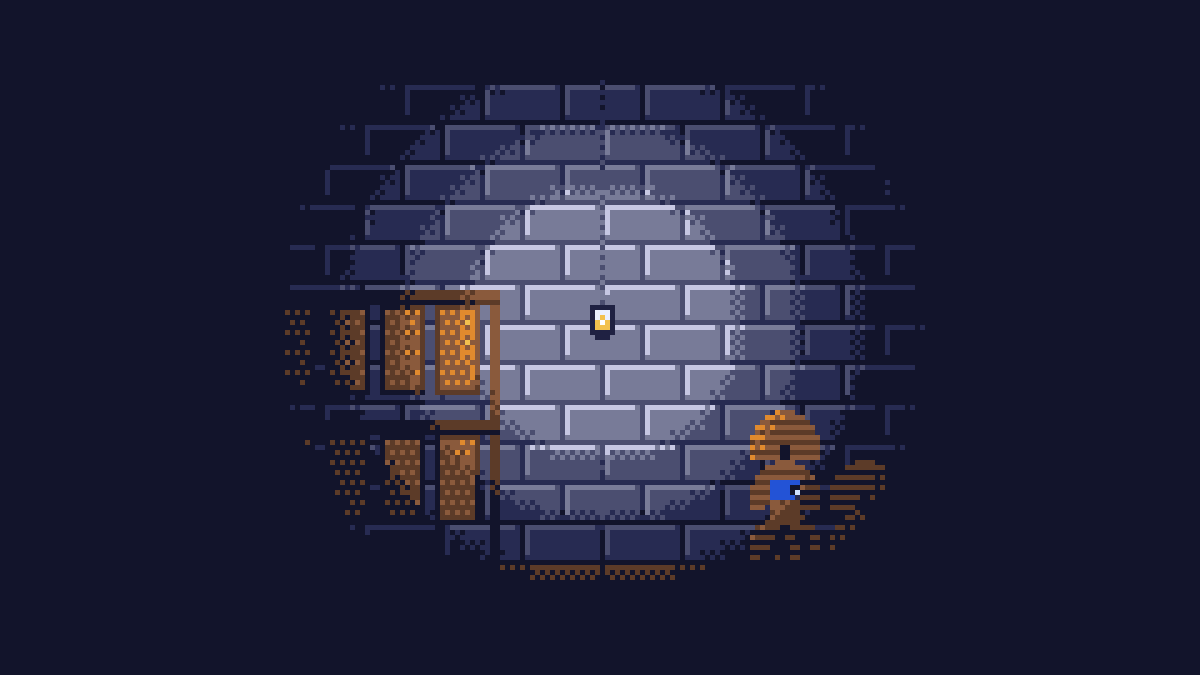
Der Keller ist in seinen eigenen Farben gezeichnet; die Regel macht jeden Pixel um eine Stufe dunkler für jeden Ring, außerhalb dessen er liegt. Die Reichweite der Laterne wächst und schrumpft langsam, und die Imkerin ist nur beleuchtet, solange sie in ihrer Nähe ist.
Auch in dieser Lektion 3 Lesetipps zum Vertiefen 3 Fragen zum Selbsttest
Die Idee
Licht in Pixel Art verläuft selten weich. Eine kleine Palette hat von jeder Farbe nur wenige Schattierungen, also fällt das Licht in Stufen ab: ein Ring, in dem alles seine eigene Farbe hat, ein Ring eine Schattierung dunkler, noch einer dunkler, und dann das Dunkel des Raums. Wo zwei Ringe aneinanderstoßen, mischt ein Punktmuster sie. So wirkt die Stufe weicher, ohne eine Farbe, die die Palette nicht hat.
Im Bild ist der Keller in seinen eigenen Farben gezeichnet, als wäre er überall beleuchtet. Die Regel macht ihn dunkel. Du zeichnest die Welt einmal in vollen Farben, und die Regel entscheidet, wie viel davon das Licht erreicht. Die Imkerin wird von derselben Regel beleuchtet: Unter der Laterne tritt sie aus dem Dunkel, und wenn sie weitergeht, taucht sie wieder hinein. Niemand hat sie im Dunkeln gezeichnet.
So funktioniert es
Für jeden Pixel rechnet die Regel aus, wie weit er von der Laterne entfernt ist, ohne Wurzel. Sie nimmt die Schritte quer mal sich selbst plus die Schritte nach unten mal sich selbst und vergleicht das mit der Reichweite mal sich selbst. Ein Pixel 5 quer und einer 3 quer und 4 nach unten ergeben beide 25: gleich weit weg, wie auf einem Kreis.
Dann zählt sie Ringe. Im vollen Licht („Reichweite des vollen Lichts“, am Anfang 22 Pixel) bleibt jede Farbe, wie sie ist. Jeder Ring von „Breite jedes Rings“ Pixeln weiter draußen (12) bringt eine Stufe dazu, bis zu „Stufen Dunkel“ (4). Eine Stufe ist die nächstdunklere Farbe aus der Tabelle der Palette: Honig wird Bernstein, dann Holz, dann dunkles Holz, dann Nacht. Bis du einen Regler anfasst, wandert die Reichweite von 14 bis 30 Pixel und zurück, wie ein Docht, der hoch- und heruntergedreht wird.
Der gerasterte Rand nutzt das 4×4-Muster aus der Lektion übers Dithering. Die Zahl jedes Pixels im Muster, 0 bis 15, wird bei „gerasterter Rand“ 4 zu 0 bis 3 zusätzlichen Pixeln: So weit hinter dem Ring zählt dieser Pixel noch als drinnen. Im ersten Pixel hinter einem Ring nehmen 4 von je 16 Pixeln die dunklere Stufe, im nächsten 8, dann 12, dann alle. Das Muster hängt am Bildschirm, nicht am Licht. Es bleibt also an seinem Platz, während das Licht wächst und schrumpft.
Auch der Platz der Laterne ist eine Einstellung: Im Spiel setzt du ihn in jedem Bild neu, und die Ringe gehen mit.
Was schiefgeht
Die Regel muss mit ganzen Zahlen auskommen, und der echte Abstand braucht eine Wurzel. Eine KI, die das weiß, greift oft zu dem Abstand, den sie von Rastern und Kacheln kennt: Schritte quer plus Schritte nach unten. Das ist eine ganze Zahl und sieht genau zur Seite richtig aus. Aber es misst, wie weit du auf einem Raster läufst, nicht wie weit Licht reicht. Eine Stelle schräg zur Laterne gilt als weiter weg, als sie ist, und das Licht wird eine Raute.
Schalte das Bild auf „Mit dem Fehler“. Die Ringe an der Wand werden zu Rauten, deren Ecken genau nach oben, nach unten und zu beiden Seiten zeigen, und die Steine schräg zwischen diesen Ecken fallen zu früh ins Dunkel.
Zwei Tests fangen das. Stellen, die 5 Pixel entfernt sind, genau quer, genau nach unten und schräg (3 quer, 4 nach unten), müssen alle dieselbe Stufe bekommen. Und bei einer Reichweite von 4 muss eine Stelle 3 quer und 2 nach unten voll beleuchtet sein. Quer plus unten macht aus diesen Stellen 7 und 5 Pixel Abstand, also scheitern beide Tests.
Der Fehler, Zeile für Zeile
- /* Lantern light, with the mistake: the distance to the lantern is measured as the steps across plus the
-    steps up or down, a whole number without squares. That is how far one walks on a grid, not how far
-    light reaches: a place on the slant counts as further away than it is, and the light comes out as a
-    diamond with corners above, below and to the sides of the lantern.
+ /* Lantern light: the picture is dark everywhere, and around a lantern it is lit in rings. Inside the
+    lantern's reach every colour is its own; each ring further out is one step darker, through the
+    palette's table of darker colours, until the dark of the room. Where one ring meets the next, the
+    4 by 4 pattern mixes the two steps, so the edge is dithered instead of hard. It is the light of a
+    lantern in a cellar, of a torch in a cave, of the glow around the player in a dark level.

+    The pixel art way: a picture is a grid of whole numbers, 0 where nothing is and 1 to 25 for the
+    palette's colours. The distance to the lantern is compared squared, so no square root is needed and
+    the light still comes out round.
+
     From the course "Shaders for pixel art" on spielerando.com.
     SPDX-License-Identifier: MIT */
…
  }

- /** The rule, wrong: the distance is across plus down, so the rings are diamonds. */
+ /** The rule: one step darker for every ring the pixel lies outside of. */
  export function shade(x: number, y: number, _tick: number, src: Frame, p: Params = DEFAULTS): number {
-   // how far from the lantern, wrong: the steps across plus the steps down, without squares
+   // how far from the lantern, squared: no square root is needed, and the light comes out round
    const dx = x - p.lanternX;
    const dy = y - p.lanternY;
-   const far = Math.abs(dx) + Math.abs(dy);
+   const far = dx * dx + dy * dy;
    // the pattern's number for this place, turned into 0 to edge - 1: how far into the edge this pixel stays lit
    const jitter = (BAYER[(y & 3) * 4 + (x & 3)] * p.edge) >> 4;
…
    for (let k = 0; k < p.dark; k++) {
      const reach = p.radius + k * p.ring + jitter;
-     if (far > reach) steps++;
+     if (far > reach * reach) steps++;
    }
    return darker(at(src, x, y), steps);
Was der Test zum Fehler sagt
✔ at the lantern and within its reach every colour is its own
✔ where no light reaches, a colour is as many steps darker as `dark` says, by the table
✖ the light is round: places as far from the lantern straight across and on the slant get the same step
    at 13, 14
    got 20, expected 9
✖ a place on the slant inside the full light is fully lit
    got 9, expected 8
✔ with a hard edge the light steps down exactly where a ring ends
✔ a dithered edge mixes the two steps by the pattern, only in the pixels just outside the ring
✔ the dithered edge stays in its place: a pixel gets the same answer at every tick
7 tests: 5 passed, 2 failed
Das sagst du deiner KI
Schreib einen Shader für mein Pixel-Art-Spiel, der den ganzen Bildschirm dunkel macht und ihn in Ringen um eine Laterne erhellt.

- Arbeite mit ganzen Pixeln und nur mit den Farben meiner Palette: kein Glätten, kein Mischen, keine neuen Farben. Die nächstdunklere Farbe zu jeder Farbe: [eine Tabelle, oder jede Farbreihe meiner Palette von hell nach dunkel].
- Eine Stufe dunkler heißt: die nächstdunklere Farbe aus dieser Tabelle, keine kleinere Farbnummer und keine Farbe mal einem Anteil.
- Innerhalb von [22] Pixeln um die Laterne bleibt jede Farbe, wie sie ist. Jeder Ring von [12] Pixeln weiter draußen ist eine Stufe dunkler, bis zu [4] Stufen. Hinter dem letzten Ring ist alles so viele Stufen dunkler.
- Miss den Abstand als Kreis: Vergleiche quer mal quer plus unten mal unten mit Reichweite mal Reichweite. Nimm nicht quer plus unten: Das beleuchtet eine Raute.
- Rastere die äußeren [4] Pixel jedes Rings mit dem 4×4-Bayer-Muster, fest am Bildschirm, damit zwei Stufen sich mischen, statt in einer harten Linie aneinanderzustoßen.
- All das und der Platz der Laterne sind Einstellungen, die das Spiel in jedem Bild ändern kann.

Bevor du den Shader schreibst, schreib dieselbe Regel als kleine, einfache Funktion. Sie bekommt ein Raster aus ganzen Zahlen (0 = leer, 1 bis N = meine Farben), einen Platz und die Einstellungen und gibt die Zahl für diesen einen Pixel zurück. Teste sie: Der Pixel der Laterne behält seine Farbe; Stellen 5 Pixel entfernt, genau quer, genau nach unten und 3 quer mit 4 nach unten, bekommen alle dieselbe Stufe; bei einer Reichweite von 4 ist eine Stelle 3 quer und 2 nach unten voll beleuchtet; weit weg ist eine Farbe so viele Stufen dunkler wie eingestellt. Zeig mir die Ausgabe des Tests. Schreib dann den Shader so, dass er genau das tut, was die Funktion tut.
Der Code
Dreimal dieselbe Regel. Die erste ist die, die wir testen; die beiden Shader sind diese Regel in einer Shader-Sprache, und die läuft in deinem Spiel.
Die Regel, getestet: shader.ts
/* Lantern light: the picture is dark everywhere, and around a lantern it is lit in rings. Inside the
   lantern's reach every colour is its own; each ring further out is one step darker, through the
   palette's table of darker colours, until the dark of the room. Where one ring meets the next, the
   4 by 4 pattern mixes the two steps, so the edge is dithered instead of hard. It is the light of a
   lantern in a cellar, of a torch in a cave, of the glow around the player in a dark level.

   The pixel art way: a picture is a grid of whole numbers, 0 where nothing is and 1 to 25 for the
   palette's colours. The distance to the lantern is compared squared, so no square root is needed and
   the light still comes out round.

   From the course "Shaders for pixel art" on spielerando.com.
   SPDX-License-Identifier: MIT */

export interface Frame {
  width: number;
  height: number;
  index: Uint8Array;
}

export const DEFAULTS = {
  /** Where the lantern is, in pixels from the left. The game sets it every frame. */
  lanternX: 120,
  /** Where the lantern is, in pixels from the top. */
  lanternY: 64,
  /** How far the full light reaches, in pixels. */
  radius: 22,
  /** How wide each ring of less light is, in pixels. */
  ring: 12,
  /** How many pixels at the outside of each ring are dithered: 0 is a hard edge. */
  edge: 4,
  /** How many steps darker the picture is where no light reaches. */
  dark: 4,
};
export type Params = typeof DEFAULTS;

/** The 4 by 4 pattern for dithering: 0 to 15, each once.  BAYER[(y & 3) * 4 + (x & 3)] */
const BAYER = [0, 8, 2, 10, 12, 4, 14, 6, 3, 11, 1, 9, 15, 7, 13, 5];
/** The next darker colour of the palette for each number. [0] is nothing. */
const DARKER = [0, 24, 25, 2, 3, 15, 7, 20, 9, 20, 21, 10, 13, 25, 12, 16, 14, 25, 17, 18, 21, 24, 25, 22, 24, 24];

/** The number at a place of the picture; outside the picture nothing is. */
export function at(src: Frame, x: number, y: number): number {
  if (x < 0 || y < 0 || x >= src.width || y >= src.height) return 0;
  return src.index[y * src.width + x];
}

/** A colour made darker by the table, `steps` times. */
function darker(n: number, steps: number): number {
  let c = n;
  for (let i = 0; i < steps; i++) c = DARKER[c];
  return c;
}

/** The rule: one step darker for every ring the pixel lies outside of. */
export function shade(x: number, y: number, _tick: number, src: Frame, p: Params = DEFAULTS): number {
  // how far from the lantern, squared: no square root is needed, and the light comes out round
  const dx = x - p.lanternX;
  const dy = y - p.lanternY;
  const far = dx * dx + dy * dy;
  // the pattern's number for this place, turned into 0 to edge - 1: how far into the edge this pixel stays lit
  const jitter = (BAYER[(y & 3) * 4 + (x & 3)] * p.edge) >> 4;
  // one step darker for every ring this pixel lies outside of
  let steps = 0;
  for (let k = 0; k < p.dark; k++) {
    const reach = p.radius + k * p.ring + jitter;
    if (far > reach * reach) steps++;
  }
  return darker(at(src, x, y), steps);
}
Dieselbe Regel als Shader: GLSL
#version 300 es
// A shader the pixel art way: a pixel is a whole number, 0 where nothing is, 1 to 25 for the
// palette's colours. The rule is shade(): it is asked for every pixel and answers with a number.
// Everything outside the marked part is the same for every rule. Put your own palette in PALETTE.
precision highp float;
precision highp int;

uniform sampler2D SRC;   // the picture, sampled without smoothing (nearest)
uniform sampler2D OTHER; // a second picture, where the rule uses one
uniform int TICK;        // the time in ticks, 60 a second, counted by the game

const vec3 PALETTE[26] = vec3[26](
  vec3(0.0),
  vec3(31.0, 33.0, 66.0) / 255.0, // 1: k
  vec3(75.0, 78.0, 112.0) / 255.0, // 2: n
  vec3(120.0, 123.0, 152.0) / 255.0, // 3: m
  vec3(198.0, 199.0, 227.0) / 255.0, // 4: e
  vec3(255.0, 255.0, 255.0) / 255.0, // 5: w
  vec3(246.0, 241.0, 233.0) / 255.0, // 6: c
  vec3(214.0, 205.0, 189.0) / 255.0, // 7: d
  vec3(242.0, 193.0, 78.0) / 255.0, // 8: y
  vec3(224.0, 138.0, 46.0) / 255.0, // 9: o
  vec3(194.0, 65.0, 45.0) / 255.0, // 10: r
  vec3(244.0, 163.0, 160.0) / 255.0, // 11: p
  vec3(47.0, 98.0, 240.0) / 255.0, // 12: b
  vec3(35.0, 83.0, 214.0) / 255.0, // 13: u
  vec3(157.0, 184.0, 255.0) / 255.0, // 14: s
  vec3(234.0, 240.0, 255.0) / 255.0, // 15: a
  vec3(207.0, 224.0, 255.0) / 255.0, // 16: i
  vec3(15.0, 138.0, 76.0) / 255.0, // 17: g
  vec3(124.0, 207.0, 154.0) / 255.0, // 18: l
  vec3(226.0, 244.0, 234.0) / 255.0, // 19: f
  vec3(138.0, 90.0, 60.0) / 255.0, // 20: t
  vec3(92.0, 59.0, 40.0) / 255.0, // 21: h
  vec3(109.0, 76.0, 230.0) / 255.0, // 22: v
  vec3(201.0, 187.0, 255.0) / 255.0, // 23: q
  vec3(18.0, 20.0, 43.0) / 255.0, // 24: x
  vec3(39.0, 43.0, 82.0) / 255.0 // 25: z
);

// Which colour of the palette is this? 0 where nothing is drawn.
int number(vec4 c) {
  if (c.a < 0.5) return 0;
  int best = 1;
  float least = 9.0;
  for (int i = 1; i <= 25; i++) {
    vec3 d = c.rgb - PALETTE[i];
    float away = dot(d, d);
    if (away < least) {
      least = away;
      best = i;
    }
  }
  return best;
}

// The number at a place of the picture; outside the picture nothing is.
int at(ivec2 p) {
  ivec2 size = textureSize(SRC, 0);
  if (p.x < 0 || p.y < 0 || p.x >= size.x || p.y >= size.y) return 0;
  return number(texelFetch(SRC, p, 0));
}

// The same for the second picture.
int otherAt(ivec2 p) {
  ivec2 size = textureSize(OTHER, 0);
  if (p.x < 0 || p.y < 0 || p.x >= size.x || p.y >= size.y) return 0;
  return number(texelFetch(OTHER, p, 0));
}

// a wrapped into 0 .. n-1, also for a below zero (the % sign is not safe there)
int wrap(int a, int n) {
  return a - n * int(floor(float(a) / float(n)));
}

// ---- the rule ----
uniform int lanternX; // where the lantern is, in pixels from the left. The game sets it every frame.
uniform int lanternY; // where the lantern is, in pixels from the top
uniform int radius;   // how far the full light reaches, in pixels
uniform int ring;     // how wide each ring of less light is, in pixels
uniform int edge;     // how many pixels at the outside of each ring are dithered: 0 is a hard edge
uniform int dark;     // how many steps darker the picture is where no light reaches

// the 4 by 4 pattern for dithering: 0 to 15, each once.  BAYER[(y & 3) * 4 + (x & 3)]
const int BAYER[16] = int[16](0, 8, 2, 10, 12, 4, 14, 6, 3, 11, 1, 9, 15, 7, 13, 5);
// the next darker colour of the palette for each number. [0] is nothing.
const int DARKER[26] = int[26](0, 24, 25, 2, 3, 15, 7, 20, 9, 20, 21, 10, 13, 25, 12, 16, 14, 25, 17, 18, 21, 24, 25, 22, 24, 24);

// a colour made darker by the table, steps times
int darker(int n, int steps) {
  int c = n;
  for (int i = 0; i < steps; i++) c = DARKER[c];
  return c;
}

// one step darker for every ring the pixel lies outside of
int shade(ivec2 p) {
  // how far from the lantern, squared: no square root is needed, and the light comes out round
  int dx = p.x - lanternX;
  int dy = p.y - lanternY;
  int far = dx * dx + dy * dy;
  // the pattern's number for this place, turned into 0 to edge - 1: how far into the edge this pixel stays lit
  int jitter = (BAYER[(p.y & 3) * 4 + (p.x & 3)] * edge) >> 4;
  // one step darker for every ring this pixel lies outside of
  int steps = 0;
  for (int k = 0; k < dark; k++) {
    int reach = radius + k * ring + jitter;
    if (far > reach * reach) steps++;
  }
  return darker(at(p), steps);
}
// ---- end of the rule ----

out vec4 FRAGMENT;

void main() {
  // the pixel's place, counted from the top left as in the picture
  ivec2 p = ivec2(int(gl_FragCoord.x), textureSize(SRC, 0).y - 1 - int(gl_FragCoord.y));
  int n = shade(p);
  FRAGMENT = n == 0 ? vec4(0.0) : vec4(PALETTE[n], 1.0);
}
Dieselbe Regel für Godot 4
shader_type canvas_item;
// A shader the pixel art way: a pixel is a whole number, 0 where nothing is, 1 to 25 for the
// palette's colours. The rule is shade(): it is asked for every pixel and answers with a number.
// Everything outside the marked part is the same for every rule. Put your own palette in PALETTE.
//
// Put this on a ColorRect that covers the screen, above everything it should change.
// The rule counts pixels as this shader sees them. Let the game draw at the size of its art and
// enlarge the finished picture (the project's stretch mode "viewport"), or it counts window pixels.
uniform sampler2D SRC : hint_screen_texture, filter_nearest; // what is on the screen behind it
uniform sampler2D OTHER : filter_nearest; // a second picture, where the rule uses one
// The time in ticks, 60 a second. The game counts it itself: add 1 in the _physics_process of a
// node that pauses with the game, and set it there, so a paused game pauses its shaders:
//   tick += 1
//   material.set_shader_parameter("TICK", tick)
uniform int TICK;

const vec3 PALETTE[26] = vec3[26](
  vec3(0.0),
  vec3(31.0, 33.0, 66.0) / 255.0, // 1: k
  vec3(75.0, 78.0, 112.0) / 255.0, // 2: n
  vec3(120.0, 123.0, 152.0) / 255.0, // 3: m
  vec3(198.0, 199.0, 227.0) / 255.0, // 4: e
  vec3(255.0, 255.0, 255.0) / 255.0, // 5: w
  vec3(246.0, 241.0, 233.0) / 255.0, // 6: c
  vec3(214.0, 205.0, 189.0) / 255.0, // 7: d
  vec3(242.0, 193.0, 78.0) / 255.0, // 8: y
  vec3(224.0, 138.0, 46.0) / 255.0, // 9: o
  vec3(194.0, 65.0, 45.0) / 255.0, // 10: r
  vec3(244.0, 163.0, 160.0) / 255.0, // 11: p
  vec3(47.0, 98.0, 240.0) / 255.0, // 12: b
  vec3(35.0, 83.0, 214.0) / 255.0, // 13: u
  vec3(157.0, 184.0, 255.0) / 255.0, // 14: s
  vec3(234.0, 240.0, 255.0) / 255.0, // 15: a
  vec3(207.0, 224.0, 255.0) / 255.0, // 16: i
  vec3(15.0, 138.0, 76.0) / 255.0, // 17: g
  vec3(124.0, 207.0, 154.0) / 255.0, // 18: l
  vec3(226.0, 244.0, 234.0) / 255.0, // 19: f
  vec3(138.0, 90.0, 60.0) / 255.0, // 20: t
  vec3(92.0, 59.0, 40.0) / 255.0, // 21: h
  vec3(109.0, 76.0, 230.0) / 255.0, // 22: v
  vec3(201.0, 187.0, 255.0) / 255.0, // 23: q
  vec3(18.0, 20.0, 43.0) / 255.0, // 24: x
  vec3(39.0, 43.0, 82.0) / 255.0 // 25: z
);

// Which colour of the palette is this? 0 where nothing is drawn.
int number(vec4 c) {
  if (c.a < 0.5) return 0;
  int best = 1;
  float least = 9.0;
  for (int i = 1; i <= 25; i++) {
    vec3 d = c.rgb - PALETTE[i];
    float away = dot(d, d);
    if (away < least) {
      least = away;
      best = i;
    }
  }
  return best;
}

// The number at a place of the picture; outside the picture nothing is.
int at(ivec2 p) {
  ivec2 size = textureSize(SRC, 0);
  if (p.x < 0 || p.y < 0 || p.x >= size.x || p.y >= size.y) return 0;
  return number(texelFetch(SRC, p, 0));
}

// The same for the second picture.
int otherAt(ivec2 p) {
  ivec2 size = textureSize(OTHER, 0);
  if (p.x < 0 || p.y < 0 || p.x >= size.x || p.y >= size.y) return 0;
  return number(texelFetch(OTHER, p, 0));
}

// a wrapped into 0 .. n-1, also for a below zero (the % sign is not safe there)
int wrap(int a, int n) {
  return a - n * int(floor(float(a) / float(n)));
}

// ---- the rule ----
uniform int lanternX; // where the lantern is, in pixels from the left. The game sets it every frame.
uniform int lanternY; // where the lantern is, in pixels from the top
uniform int radius;   // how far the full light reaches, in pixels
uniform int ring;     // how wide each ring of less light is, in pixels
uniform int edge;     // how many pixels at the outside of each ring are dithered: 0 is a hard edge
uniform int dark;     // how many steps darker the picture is where no light reaches

// the 4 by 4 pattern for dithering: 0 to 15, each once.  BAYER[(y & 3) * 4 + (x & 3)]
const int BAYER[16] = int[16](0, 8, 2, 10, 12, 4, 14, 6, 3, 11, 1, 9, 15, 7, 13, 5);
// the next darker colour of the palette for each number. [0] is nothing.
const int DARKER[26] = int[26](0, 24, 25, 2, 3, 15, 7, 20, 9, 20, 21, 10, 13, 25, 12, 16, 14, 25, 17, 18, 21, 24, 25, 22, 24, 24);

// a colour made darker by the table, steps times
int darker(int n, int steps) {
  int c = n;
  for (int i = 0; i < steps; i++) c = DARKER[c];
  return c;
}

// one step darker for every ring the pixel lies outside of
int shade(ivec2 p) {
  // how far from the lantern, squared: no square root is needed, and the light comes out round
  int dx = p.x - lanternX;
  int dy = p.y - lanternY;
  int far = dx * dx + dy * dy;
  // the pattern's number for this place, turned into 0 to edge - 1: how far into the edge this pixel stays lit
  int jitter = (BAYER[(p.y & 3) * 4 + (p.x & 3)] * edge) >> 4;
  // one step darker for every ring this pixel lies outside of
  int steps = 0;
  for (int k = 0; k < dark; k++) {
    int reach = radius + k * ring + jitter;
    if (far > reach * reach) steps++;
  }
  return darker(at(p), steps);
}
// ---- end of the rule ----

void fragment() {
  ivec2 p = ivec2(SCREEN_UV * vec2(textureSize(SRC, 0)));
  int n = shade(p);
  COLOR = n == 0 ? vec4(0.0) : vec4(PALETTE[n], 1.0);
}
Der Test: shader.test.ts
import assert from "node:assert/strict";
import { test } from "node:test";
import { DEFAULTS, type Frame, shade } from "./shader.ts";

/** A tiny picture from rows of digits: 0 is nothing, 1 to 9 are colours. */
function picture(rows: string[]): Frame {
  return { width: rows[0].length, height: rows.length, index: Uint8Array.from(rows.join(""), Number) };
}

// a wall of honey, 21 by 21 pixels; honey (8) goes darker as amber (9), wood (20), dark wood (21)
const WALL = picture(Array.from({ length: 21 }, () => "8".repeat(21)));

// the lantern in the middle of the wall: full light 4 pixels far, rings 2 pixels wide, 3 steps of dark
const LAMP = { ...DEFAULTS, lanternX: 10, lanternY: 10, radius: 4, ring: 2, edge: 0, dark: 3 };

test("at the lantern and within its reach every colour is its own", () => {
  assert.equal(shade(10, 10, 0, WALL, LAMP), 8);
  assert.equal(shade(14, 10, 0, WALL, LAMP), 8);
  assert.equal(shade(10, 6, 0, WALL, LAMP), 8);
});

test("where no light reaches, a colour is as many steps darker as `dark` says, by the table", () => {
  assert.equal(shade(0, 0, 0, WALL, LAMP), 21);
  assert.equal(shade(0, 0, 0, WALL, { ...LAMP, dark: 1 }), 9);
  assert.equal(shade(20, 20, 0, WALL, { ...LAMP, dark: 2 }), 20);
});

test("the light is round: places as far from the lantern straight across and on the slant get the same step", () => {
  // 5 pixels away: straight to the right, straight down, and 3 across with 4 down, 4 across with 3 down
  const places = [[15, 10], [10, 15], [13, 14], [6, 13]];
  for (const [x, y] of places) assert.equal(shade(x, y, 0, WALL, LAMP), 9, `at ${x}, ${y}`);
});

test("a place on the slant inside the full light is fully lit", () => {
  // 3 across and 2 down is less than 4 pixels away
  assert.equal(shade(13, 12, 0, WALL, LAMP), 8);
  assert.equal(shade(7, 8, 0, WALL, LAMP), 8);
});

test("with a hard edge the light steps down exactly where a ring ends", () => {
  const row = [14, 15, 16, 17, 18, 19].map((x) => shade(x, 10, 0, WALL, LAMP));
  assert.deepEqual(row, [8, 9, 9, 20, 20, 21]);
});

test("a dithered edge mixes the two steps by the pattern, only in the pixels just outside the ring", () => {
  const soft = { ...LAMP, radius: 4, ring: 10, edge: 4, dark: 1 };
  const inside = new Set<number>();
  const edge = new Set<number>();
  const outside = new Set<number>();
  for (let y = 0; y < WALL.height; y++) {
    for (let x = 0; x < WALL.width; x++) {
      const far = (x - 10) * (x - 10) + (y - 10) * (y - 10);
      const n = shade(x, y, 0, WALL, soft);
      if (far <= 4 * 4) inside.add(n);
      else if (far > 7 * 7) outside.add(n);
      else edge.add(n);
    }
  }
  assert.deepEqual([...inside], [8]);
  assert.deepEqual([...outside], [9]);
  assert.deepEqual([...edge].sort((a, b) => a - b), [8, 9]);
});

test("the dithered edge stays in its place: a pixel gets the same answer at every tick", () => {
  const soft = { ...LAMP, edge: 4 };
  for (const [x, y] of [[15, 11], [6, 12], [12, 16]]) {
    const first = shade(x, y, 0, WALL, soft);
    for (const tick of [1, 2, 59, 977]) assert.equal(shade(x, y, tick, WALL, soft), first);
  }
});
- 7 Tests bestehen mit der Regel.
- Mit dem eingebauten Fehler schlagen 2 davon fehl: "the light is round: places as far from the lantern straight across and on the slant get the same step", "a place on the slant inside the full light is fully lit".
- Der Fehler ist im Bild oben zu sehen: Schalte auf „Mit dem Fehler“.
- Der Shader lief in einem Browser (Chrome/158.0.8127.37) auf 16 Bildern und ergab in 518.400 von 518.400 Pixeln das Bild der Regel.
Probier es aus
- Stell „gerasterter Rand“ auf 0: Die Ringe stoßen in harten Linien aneinander. Schieb ihn dann bis 8: Die Stufen mischen sich über ein breiteres Band, und die Punkte des Musters werden sichtbar.
- Stell „Stufen Dunkel“ auf 1: Der Keller ist nur eine Stufe dunkler, eher Abenddämmerung als Nacht. Bei 6 ist hinter dem letzten Ring fast alles eine der beiden Nachtfarben der Palette.
- Stell „Breite jedes Rings“ auf 4: viele dünne Ringe, wie das Licht einer Kerze. Schalte den Fehler ein, und jeder dünne Ring wird zu einer eigenen Raute.
Zum Nachlesen
Wo es tiefer geht: unsere Seiten, auf denen diese Lektion aufbaut, und was andere zu ihrem Punkt geschrieben haben.
Einen Kreis auf einem Raster füllen, indem man Abstände im Quadrat vergleicht, wie diese Regel es tut, mit Bildern zum Ziehen, und warum ein Radius aus einer ganzen Zahl und einer Hälfte kleine Kreise runder aussehen lässt.
Diese Laterne scheint durch Wände. Für Licht oder Sicht, die an einer Wand endet, rechnet das Rezept aus, welche Kacheln von einem Platz aus zu sehen sind, in beide Richtungen gleich, und das ganze Sichtfeld darum.
Horrorspiel mit KI erstellen: weniger Monster, mehr Angst
Wenn ein kleines Licht alles ist, was der Spieler hat: Dunkel, das gerade genug sehen lässt, und ein Flackern mit zufälligem Takt, das Z3 darauf prüft, ob es in einer Sekunde zu oft ausgeht.
Teste dich: drei Fragen
Jede Antwort wird sofort geprüft und erklärt. Die Fragen gehören zum Quiz und zählen für deinen Game Coder IQ wie jede andere.
Der Keller ist einmal in vollen Farben gezeichnet, als wäre er überall beleuchtet. Wenn die Imkerin von der Laterne weggeht, wie kommt sie ins Dunkel?
Nächste Lektion Tag-und-Nacht-Shader für Pixel Art: dunkler nach der Uhrzeit
Gib deiner KI die ganze Lektion
Der Knopf kopiert, was du ihr sagst, zusammen mit der getesteten Regel, ihrem Test und beiden Shadern. So hat deine KI alles, um das in dein Spiel zu bauen und dir zu zeigen, dass es funktioniert.
Das ist eine Lektion aus dem Kurs „Shader für Pixel Art“ auf spielerando.com: https://spielerando.com/de/courses/pixel-shaders/lantern-light

Schreib einen Shader für mein Pixel-Art-Spiel, der den ganzen Bildschirm dunkel macht und ihn in Ringen um eine Laterne erhellt.

- Arbeite mit ganzen Pixeln und nur mit den Farben meiner Palette: kein Glätten, kein Mischen, keine neuen Farben. Die nächstdunklere Farbe zu jeder Farbe: [eine Tabelle, oder jede Farbreihe meiner Palette von hell nach dunkel].
- Eine Stufe dunkler heißt: die nächstdunklere Farbe aus dieser Tabelle, keine kleinere Farbnummer und keine Farbe mal einem Anteil.
- Innerhalb von [22] Pixeln um die Laterne bleibt jede Farbe, wie sie ist. Jeder Ring von [12] Pixeln weiter draußen ist eine Stufe dunkler, bis zu [4] Stufen. Hinter dem letzten Ring ist alles so viele Stufen dunkler.
- Miss den Abstand als Kreis: Vergleiche quer mal quer plus unten mal unten mit Reichweite mal Reichweite. Nimm nicht quer plus unten: Das beleuchtet eine Raute.
- Rastere die äußeren [4] Pixel jedes Rings mit dem 4×4-Bayer-Muster, fest am Bildschirm, damit zwei Stufen sich mischen, statt in einer harten Linie aneinanderzustoßen.
- All das und der Platz der Laterne sind Einstellungen, die das Spiel in jedem Bild ändern kann.

Bevor du den Shader schreibst, schreib dieselbe Regel als kleine, einfache Funktion. Sie bekommt ein Raster aus ganzen Zahlen (0 = leer, 1 bis N = meine Farben), einen Platz und die Einstellungen und gibt die Zahl für diesen einen Pixel zurück. Teste sie: Der Pixel der Laterne behält seine Farbe; Stellen 5 Pixel entfernt, genau quer, genau nach unten und 3 quer mit 4 nach unten, bekommen alle dieselbe Stufe; bei einer Reichweite von 4 ist eine Stelle 3 quer und 2 nach unten voll beleuchtet; weit weg ist eine Farbe so viele Stufen dunkler wie eingestellt. Zeig mir die Ausgabe des Tests. Schreib dann den Shader so, dass er genau das tut, was die Funktion tut.

Die Regel, getestet (shader.ts):
```ts
/* Lantern light: the picture is dark everywhere, and around a lantern it is lit in rings. Inside the
   lantern's reach every colour is its own; each ring further out is one step darker, through the
   palette's table of darker colours, until the dark of the room. Where one ring meets the next, the
   4 by 4 pattern mixes the two steps, so the edge is dithered instead of hard. It is the light of a
   lantern in a cellar, of a torch in a cave, of the glow around the player in a dark level.

   The pixel art way: a picture is a grid of whole numbers, 0 where nothing is and 1 to 25 for the
   palette's colours. The distance to the lantern is compared squared, so no square root is needed and
   the light still comes out round.

   From the course "Shaders for pixel art" on spielerando.com.
   SPDX-License-Identifier: MIT */

export interface Frame {
  width: number;
  height: number;
  index: Uint8Array;
}

export const DEFAULTS = {
  /** Where the lantern is, in pixels from the left. The game sets it every frame. */
  lanternX: 120,
  /** Where the lantern is, in pixels from the top. */
  lanternY: 64,
  /** How far the full light reaches, in pixels. */
  radius: 22,
  /** How wide each ring of less light is, in pixels. */
  ring: 12,
  /** How many pixels at the outside of each ring are dithered: 0 is a hard edge. */
  edge: 4,
  /** How many steps darker the picture is where no light reaches. */
  dark: 4,
};
export type Params = typeof DEFAULTS;

/** The 4 by 4 pattern for dithering: 0 to 15, each once.  BAYER[(y & 3) * 4 + (x & 3)] */
const BAYER = [0, 8, 2, 10, 12, 4, 14, 6, 3, 11, 1, 9, 15, 7, 13, 5];
/** The next darker colour of the palette for each number. [0] is nothing. */
const DARKER = [0, 24, 25, 2, 3, 15, 7, 20, 9, 20, 21, 10, 13, 25, 12, 16, 14, 25, 17, 18, 21, 24, 25, 22, 24, 24];

/** The number at a place of the picture; outside the picture nothing is. */
export function at(src: Frame, x: number, y: number): number {
  if (x < 0 || y < 0 || x >= src.width || y >= src.height) return 0;
  return src.index[y * src.width + x];
}

/** A colour made darker by the table, `steps` times. */
function darker(n: number, steps: number): number {
  let c = n;
  for (let i = 0; i < steps; i++) c = DARKER[c];
  return c;
}

/** The rule: one step darker for every ring the pixel lies outside of. */
export function shade(x: number, y: number, _tick: number, src: Frame, p: Params = DEFAULTS): number {
  // how far from the lantern, squared: no square root is needed, and the light comes out round
  const dx = x - p.lanternX;
  const dy = y - p.lanternY;
  const far = dx * dx + dy * dy;
  // the pattern's number for this place, turned into 0 to edge - 1: how far into the edge this pixel stays lit
  const jitter = (BAYER[(y & 3) * 4 + (x & 3)] * p.edge) >> 4;
  // one step darker for every ring this pixel lies outside of
  let steps = 0;
  for (let k = 0; k < p.dark; k++) {
    const reach = p.radius + k * p.ring + jitter;
    if (far > reach * reach) steps++;
  }
  return darker(at(src, x, y), steps);
}
```

Ihr Test (shader.test.ts):
```ts
import assert from "node:assert/strict";
import { test } from "node:test";
import { DEFAULTS, type Frame, shade } from "./shader.ts";

/** A tiny picture from rows of digits: 0 is nothing, 1 to 9 are colours. */
function picture(rows: string[]): Frame {
  return { width: rows[0].length, height: rows.length, index: Uint8Array.from(rows.join(""), Number) };
}

// a wall of honey, 21 by 21 pixels; honey (8) goes darker as amber (9), wood (20), dark wood (21)
const WALL = picture(Array.from({ length: 21 }, () => "8".repeat(21)));

// the lantern in the middle of the wall: full light 4 pixels far, rings 2 pixels wide, 3 steps of dark
const LAMP = { ...DEFAULTS, lanternX: 10, lanternY: 10, radius: 4, ring: 2, edge: 0, dark: 3 };

test("at the lantern and within its reach every colour is its own", () => {
  assert.equal(shade(10, 10, 0, WALL, LAMP), 8);
  assert.equal(shade(14, 10, 0, WALL, LAMP), 8);
  assert.equal(shade(10, 6, 0, WALL, LAMP), 8);
});

test("where no light reaches, a colour is as many steps darker as `dark` says, by the table", () => {
  assert.equal(shade(0, 0, 0, WALL, LAMP), 21);
  assert.equal(shade(0, 0, 0, WALL, { ...LAMP, dark: 1 }), 9);
  assert.equal(shade(20, 20, 0, WALL, { ...LAMP, dark: 2 }), 20);
});

test("the light is round: places as far from the lantern straight across and on the slant get the same step", () => {
  // 5 pixels away: straight to the right, straight down, and 3 across with 4 down, 4 across with 3 down
  const places = [[15, 10], [10, 15], [13, 14], [6, 13]];
  for (const [x, y] of places) assert.equal(shade(x, y, 0, WALL, LAMP), 9, `at ${x}, ${y}`);
});

test("a place on the slant inside the full light is fully lit", () => {
  // 3 across and 2 down is less than 4 pixels away
  assert.equal(shade(13, 12, 0, WALL, LAMP), 8);
  assert.equal(shade(7, 8, 0, WALL, LAMP), 8);
});

test("with a hard edge the light steps down exactly where a ring ends", () => {
  const row = [14, 15, 16, 17, 18, 19].map((x) => shade(x, 10, 0, WALL, LAMP));
  assert.deepEqual(row, [8, 9, 9, 20, 20, 21]);
});

test("a dithered edge mixes the two steps by the pattern, only in the pixels just outside the ring", () => {
  const soft = { ...LAMP, radius: 4, ring: 10, edge: 4, dark: 1 };
  const inside = new Set<number>();
  const edge = new Set<number>();
  const outside = new Set<number>();
  for (let y = 0; y < WALL.height; y++) {
    for (let x = 0; x < WALL.width; x++) {
      const far = (x - 10) * (x - 10) + (y - 10) * (y - 10);
      const n = shade(x, y, 0, WALL, soft);
      if (far <= 4 * 4) inside.add(n);
      else if (far > 7 * 7) outside.add(n);
      else edge.add(n);
    }
  }
  assert.deepEqual([...inside], [8]);
  assert.deepEqual([...outside], [9]);
  assert.deepEqual([...edge].sort((a, b) => a - b), [8, 9]);
});

test("the dithered edge stays in its place: a pixel gets the same answer at every tick", () => {
  const soft = { ...LAMP, edge: 4 };
  for (const [x, y] of [[15, 11], [6, 12], [12, 16]]) {
    const first = shade(x, y, 0, WALL, soft);
    for (const tick of [1, 2, 59, 977]) assert.equal(shade(x, y, tick, WALL, soft), first);
  }
});
```

Dieselbe Regel als GLSL-Shader (WebGL 2, OpenGL ES 3.0), Pixel für Pixel gegen die Regel geprüft:
```glsl
#version 300 es
// A shader the pixel art way: a pixel is a whole number, 0 where nothing is, 1 to 25 for the
// palette's colours. The rule is shade(): it is asked for every pixel and answers with a number.
// Everything outside the marked part is the same for every rule. Put your own palette in PALETTE.
precision highp float;
precision highp int;

uniform sampler2D SRC;   // the picture, sampled without smoothing (nearest)
uniform sampler2D OTHER; // a second picture, where the rule uses one
uniform int TICK;        // the time in ticks, 60 a second, counted by the game

const vec3 PALETTE[26] = vec3[26](
  vec3(0.0),
  vec3(31.0, 33.0, 66.0) / 255.0, // 1: k
  vec3(75.0, 78.0, 112.0) / 255.0, // 2: n
  vec3(120.0, 123.0, 152.0) / 255.0, // 3: m
  vec3(198.0, 199.0, 227.0) / 255.0, // 4: e
  vec3(255.0, 255.0, 255.0) / 255.0, // 5: w
  vec3(246.0, 241.0, 233.0) / 255.0, // 6: c
  vec3(214.0, 205.0, 189.0) / 255.0, // 7: d
  vec3(242.0, 193.0, 78.0) / 255.0, // 8: y
  vec3(224.0, 138.0, 46.0) / 255.0, // 9: o
  vec3(194.0, 65.0, 45.0) / 255.0, // 10: r
  vec3(244.0, 163.0, 160.0) / 255.0, // 11: p
  vec3(47.0, 98.0, 240.0) / 255.0, // 12: b
  vec3(35.0, 83.0, 214.0) / 255.0, // 13: u
  vec3(157.0, 184.0, 255.0) / 255.0, // 14: s
  vec3(234.0, 240.0, 255.0) / 255.0, // 15: a
  vec3(207.0, 224.0, 255.0) / 255.0, // 16: i
  vec3(15.0, 138.0, 76.0) / 255.0, // 17: g
  vec3(124.0, 207.0, 154.0) / 255.0, // 18: l
  vec3(226.0, 244.0, 234.0) / 255.0, // 19: f
  vec3(138.0, 90.0, 60.0) / 255.0, // 20: t
  vec3(92.0, 59.0, 40.0) / 255.0, // 21: h
  vec3(109.0, 76.0, 230.0) / 255.0, // 22: v
  vec3(201.0, 187.0, 255.0) / 255.0, // 23: q
  vec3(18.0, 20.0, 43.0) / 255.0, // 24: x
  vec3(39.0, 43.0, 82.0) / 255.0 // 25: z
);

// Which colour of the palette is this? 0 where nothing is drawn.
int number(vec4 c) {
  if (c.a < 0.5) return 0;
  int best = 1;
  float least = 9.0;
  for (int i = 1; i <= 25; i++) {
    vec3 d = c.rgb - PALETTE[i];
    float away = dot(d, d);
    if (away < least) {
      least = away;
      best = i;
    }
  }
  return best;
}

// The number at a place of the picture; outside the picture nothing is.
int at(ivec2 p) {
  ivec2 size = textureSize(SRC, 0);
  if (p.x < 0 || p.y < 0 || p.x >= size.x || p.y >= size.y) return 0;
  return number(texelFetch(SRC, p, 0));
}

// The same for the second picture.
int otherAt(ivec2 p) {
  ivec2 size = textureSize(OTHER, 0);
  if (p.x < 0 || p.y < 0 || p.x >= size.x || p.y >= size.y) return 0;
  return number(texelFetch(OTHER, p, 0));
}

// a wrapped into 0 .. n-1, also for a below zero (the % sign is not safe there)
int wrap(int a, int n) {
  return a - n * int(floor(float(a) / float(n)));
}

// ---- the rule ----
uniform int lanternX; // where the lantern is, in pixels from the left. The game sets it every frame.
uniform int lanternY; // where the lantern is, in pixels from the top
uniform int radius;   // how far the full light reaches, in pixels
uniform int ring;     // how wide each ring of less light is, in pixels
uniform int edge;     // how many pixels at the outside of each ring are dithered: 0 is a hard edge
uniform int dark;     // how many steps darker the picture is where no light reaches

// the 4 by 4 pattern for dithering: 0 to 15, each once.  BAYER[(y & 3) * 4 + (x & 3)]
const int BAYER[16] = int[16](0, 8, 2, 10, 12, 4, 14, 6, 3, 11, 1, 9, 15, 7, 13, 5);
// the next darker colour of the palette for each number. [0] is nothing.
const int DARKER[26] = int[26](0, 24, 25, 2, 3, 15, 7, 20, 9, 20, 21, 10, 13, 25, 12, 16, 14, 25, 17, 18, 21, 24, 25, 22, 24, 24);

// a colour made darker by the table, steps times
int darker(int n, int steps) {
  int c = n;
  for (int i = 0; i < steps; i++) c = DARKER[c];
  return c;
}

// one step darker for every ring the pixel lies outside of
int shade(ivec2 p) {
  // how far from the lantern, squared: no square root is needed, and the light comes out round
  int dx = p.x - lanternX;
  int dy = p.y - lanternY;
  int far = dx * dx + dy * dy;
  // the pattern's number for this place, turned into 0 to edge - 1: how far into the edge this pixel stays lit
  int jitter = (BAYER[(p.y & 3) * 4 + (p.x & 3)] * edge) >> 4;
  // one step darker for every ring this pixel lies outside of
  int steps = 0;
  for (int k = 0; k < dark; k++) {
    int reach = radius + k * ring + jitter;
    if (far > reach * reach) steps++;
  }
  return darker(at(p), steps);
}
// ---- end of the rule ----

out vec4 FRAGMENT;

void main() {
  // the pixel's place, counted from the top left as in the picture
  ivec2 p = ivec2(int(gl_FragCoord.x), textureSize(SRC, 0).y - 1 - int(gl_FragCoord.y));
  int n = shade(p);
  FRAGMENT = n == 0 ? vec4(0.0) : vec4(PALETTE[n], 1.0);
}
```

Dieselbe Regel für Godot 4 (von den Autoren nicht ausgeführt):
```gdshader
shader_type canvas_item;
// A shader the pixel art way: a pixel is a whole number, 0 where nothing is, 1 to 25 for the
// palette's colours. The rule is shade(): it is asked for every pixel and answers with a number.
// Everything outside the marked part is the same for every rule. Put your own palette in PALETTE.
//
// Put this on a ColorRect that covers the screen, above everything it should change.
// The rule counts pixels as this shader sees them. Let the game draw at the size of its art and
// enlarge the finished picture (the project's stretch mode "viewport"), or it counts window pixels.
uniform sampler2D SRC : hint_screen_texture, filter_nearest; // what is on the screen behind it
uniform sampler2D OTHER : filter_nearest; // a second picture, where the rule uses one
// The time in ticks, 60 a second. The game counts it itself: add 1 in the _physics_process of a
// node that pauses with the game, and set it there, so a paused game pauses its shaders:
//   tick += 1
//   material.set_shader_parameter("TICK", tick)
uniform int TICK;

const vec3 PALETTE[26] = vec3[26](
  vec3(0.0),
  vec3(31.0, 33.0, 66.0) / 255.0, // 1: k
  vec3(75.0, 78.0, 112.0) / 255.0, // 2: n
  vec3(120.0, 123.0, 152.0) / 255.0, // 3: m
  vec3(198.0, 199.0, 227.0) / 255.0, // 4: e
  vec3(255.0, 255.0, 255.0) / 255.0, // 5: w
  vec3(246.0, 241.0, 233.0) / 255.0, // 6: c
  vec3(214.0, 205.0, 189.0) / 255.0, // 7: d
  vec3(242.0, 193.0, 78.0) / 255.0, // 8: y
  vec3(224.0, 138.0, 46.0) / 255.0, // 9: o
  vec3(194.0, 65.0, 45.0) / 255.0, // 10: r
  vec3(244.0, 163.0, 160.0) / 255.0, // 11: p
  vec3(47.0, 98.0, 240.0) / 255.0, // 12: b
  vec3(35.0, 83.0, 214.0) / 255.0, // 13: u
  vec3(157.0, 184.0, 255.0) / 255.0, // 14: s
  vec3(234.0, 240.0, 255.0) / 255.0, // 15: a
  vec3(207.0, 224.0, 255.0) / 255.0, // 16: i
  vec3(15.0, 138.0, 76.0) / 255.0, // 17: g
  vec3(124.0, 207.0, 154.0) / 255.0, // 18: l
  vec3(226.0, 244.0, 234.0) / 255.0, // 19: f
  vec3(138.0, 90.0, 60.0) / 255.0, // 20: t
  vec3(92.0, 59.0, 40.0) / 255.0, // 21: h
  vec3(109.0, 76.0, 230.0) / 255.0, // 22: v
  vec3(201.0, 187.0, 255.0) / 255.0, // 23: q
  vec3(18.0, 20.0, 43.0) / 255.0, // 24: x
  vec3(39.0, 43.0, 82.0) / 255.0 // 25: z
);

// Which colour of the palette is this? 0 where nothing is drawn.
int number(vec4 c) {
  if (c.a < 0.5) return 0;
  int best = 1;
  float least = 9.0;
  for (int i = 1; i <= 25; i++) {
    vec3 d = c.rgb - PALETTE[i];
    float away = dot(d, d);
    if (away < least) {
      least = away;
      best = i;
    }
  }
  return best;
}

// The number at a place of the picture; outside the picture nothing is.
int at(ivec2 p) {
  ivec2 size = textureSize(SRC, 0);
  if (p.x < 0 || p.y < 0 || p.x >= size.x || p.y >= size.y) return 0;
  return number(texelFetch(SRC, p, 0));
}

// The same for the second picture.
int otherAt(ivec2 p) {
  ivec2 size = textureSize(OTHER, 0);
  if (p.x < 0 || p.y < 0 || p.x >= size.x || p.y >= size.y) return 0;
  return number(texelFetch(OTHER, p, 0));
}

// a wrapped into 0 .. n-1, also for a below zero (the % sign is not safe there)
int wrap(int a, int n) {
  return a - n * int(floor(float(a) / float(n)));
}

// ---- the rule ----
uniform int lanternX; // where the lantern is, in pixels from the left. The game sets it every frame.
uniform int lanternY; // where the lantern is, in pixels from the top
uniform int radius;   // how far the full light reaches, in pixels
uniform int ring;     // how wide each ring of less light is, in pixels
uniform int edge;     // how many pixels at the outside of each ring are dithered: 0 is a hard edge
uniform int dark;     // how many steps darker the picture is where no light reaches

// the 4 by 4 pattern for dithering: 0 to 15, each once.  BAYER[(y & 3) * 4 + (x & 3)]
const int BAYER[16] = int[16](0, 8, 2, 10, 12, 4, 14, 6, 3, 11, 1, 9, 15, 7, 13, 5);
// the next darker colour of the palette for each number. [0] is nothing.
const int DARKER[26] = int[26](0, 24, 25, 2, 3, 15, 7, 20, 9, 20, 21, 10, 13, 25, 12, 16, 14, 25, 17, 18, 21, 24, 25, 22, 24, 24);

// a colour made darker by the table, steps times
int darker(int n, int steps) {
  int c = n;
  for (int i = 0; i < steps; i++) c = DARKER[c];
  return c;
}

// one step darker for every ring the pixel lies outside of
int shade(ivec2 p) {
  // how far from the lantern, squared: no square root is needed, and the light comes out round
  int dx = p.x - lanternX;
  int dy = p.y - lanternY;
  int far = dx * dx + dy * dy;
  // the pattern's number for this place, turned into 0 to edge - 1: how far into the edge this pixel stays lit
  int jitter = (BAYER[(p.y & 3) * 4 + (p.x & 3)] * edge) >> 4;
  // one step darker for every ring this pixel lies outside of
  int steps = 0;
  for (int k = 0; k < dark; k++) {
    int reach = radius + k * ring + jitter;
    if (far > reach * reach) steps++;
  }
  return darker(at(p), steps);
}
// ---- end of the rule ----

void fragment() {
  ivec2 p = ivec2(SCREEN_UV * vec2(textureSize(SRC, 0)));
  int n = shade(p);
  COLOR = n == 0 ? vec4(0.0) : vec4(PALETTE[n], 1.0);
}
```
Wie hilfreich war diese Seite?
Diese Seite hat noch niemand bewertet.