Hitzeflimmern als Shader für Pixel Art: ohne zerfranste Ränder
Hitzeflimmern ist das Zittern über einer heißen Straße, einer Wüste oder einem Schmelzofen: Was hinter der heißen Luft liegt, scheint zu wabern. In Pixel Art schiebt der Shader die Zeilen eines Streifens im Bild um ganze Pixel zur Seite, mit einer Welle, die nach oben steigt. Die Regel dieser Lektion achtet außerdem auf den linken und rechten Rand des Bildes, wo eine verschobene Zeile sonst Nichts hereinziehen würde.
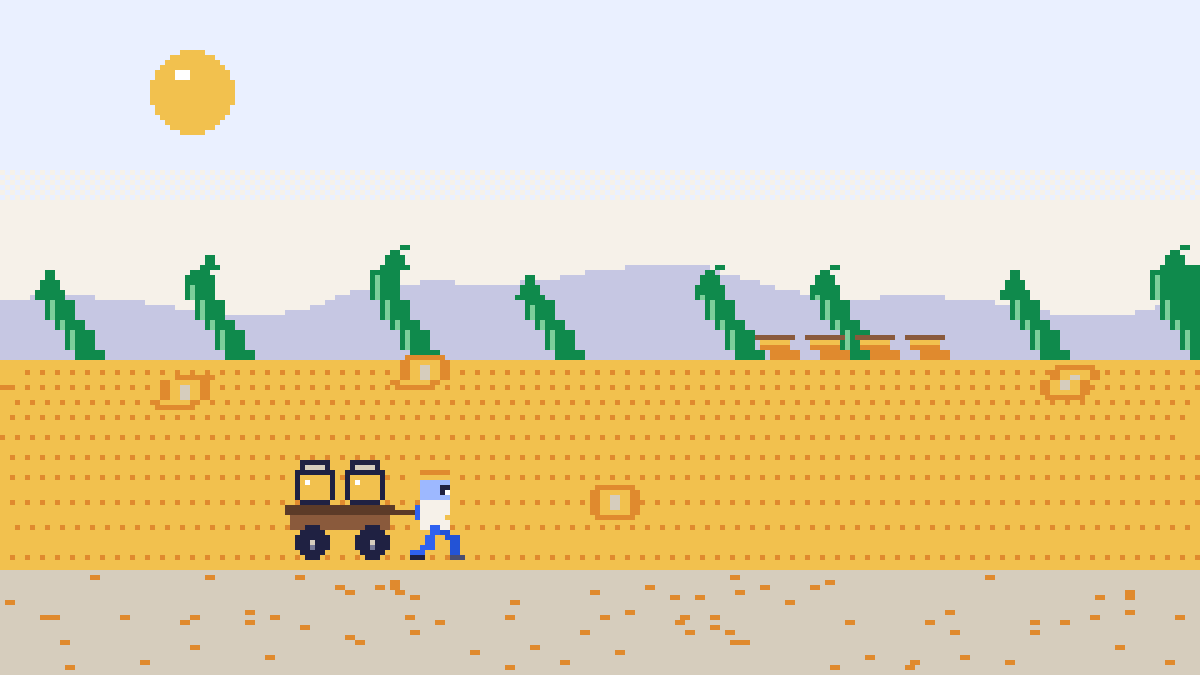
Das ganze Bild bekommt die Regel, und sie verschiebt nur die Zeilen der heißen Luft, um die Welle in ganzen Pixeln. Am linken und rechten Rand des Bildes nimmt sie den Pixel des Randes selbst; die Straße, die Imkerin und ihr Karren unter der heißen Luft bleiben scharf.
Auch in dieser Lektion 3 Lesetipps zum Vertiefen 3 Fragen zum Selbsttest
Die Idee
Heiße Luft am Boden lenkt das Licht ab, das durch sie geht, ungleichmäßig und ständig anders, deshalb scheint ein ferner Baum oder ein Haus zu wabern. Im Spiel sagt das ohne ein Wort „hier ist es heiß“: ein Wüstenlevel, eine Straße im Sommer, die Luft über Lava oder einer Schmiede, eine heiße Zone, von der sich der Spieler fernhalten soll.
Im Bild ist es Mittag im Hochsommer. Die Luft über der staubigen Straße flimmert, und durch sie hindurch wabern das ferne Feld, die Ballen, die kleinen Bienenstöcke und die Pappeln am Horizont. Die Straße selbst, die Imkerin und ihr Karren liegen unter dem Streifen heißer Luft, vor ihm, und bleiben scharf.
Das Flimmern kommt aus der Welle des Kurses, sechzehn ganzen Zahlen: 0, 1, 1, 2, 2, 2, 1, 1, 0, -1, -1, -2, -2, -2, -1, -1. Hitzeflimmern ist in Pixel Art eine Sache von ein oder zwei Pixeln. Eine glatte Kurve würde eine Zeile einer Pappel um einen Teil eines Pixels nach rechts stellen wollen, und ein Bild aus Pixeln kann das nur zeigen, indem es sie verwischt, und dann werden aus den klaren Bäumen am Horizont Schlieren. Mit der Liste steht jede Zeile bei jedem Tick genau auf einem Pixel, und die Pappeln bleiben scharf, während sie sich biegen.
So funktioniert es
Die Regel fragt zuerst, ob ihre Zeile im Streifen heißer Luft liegt: in diesem Bild die Zeilen 46 bis 87. Zeilen darüber und darunter beantwortet sie, wie sie sind.
Im Streifen ist der Schritt der Welle die Zahl der Ticks geteilt durch das Tempo, plus die Nummer der Zeile geteilt durch die Einstellung Zeilen. Eine Gruppe von Zeilen weiter unten ist also einen Schritt weiter in der Welle als die Gruppe darüber, und jeder Schritt steigt alle paar Ticks eine Gruppe höher: Das Flimmern steigt, wie warme Luft es tut. Die Zahl der Welle bei diesem Schritt mal die Stärke ist, wie weit die Zeile rückt, und der Pixel zeigt, was so weit neben ihm liegt.
Dann der Rand. Rückt eine Zeile 2 Pixel nach rechts, müssten ihre zwei linken Pixel zeigen, was links neben dem Bild liegt, und dort ist nichts. Die Regel nimmt stattdessen den Pixel des Randes selbst, deshalb steht der äußerste Pixel dieser Zeile für einen Moment einmal mehr für jeden Pixel, den die Zeile gerückt ist. Im Flimmern fällt das niemandem auf.
Der Regler Stärke geht von 0 bis 2; bei 2 rückt eine Zeile bis zu 4 Pixel. Zeilen geht von 1, einem feinen Flimmern, bei dem jede Zeile einen Schritt von ihrer Nachbarin entfernt ist, bis 4, groben Blöcken. Tempo sagt, wie viele Ticks ein Schritt dauert: Bei 3 braucht die Welle 48 Ticks für eine Runde.
Was schiefgeht
Der Fehler liest den verschobenen Pixel dort, wo die Welle es sagt, auch jenseits des Bildrands. Ein Pixel-Art-Shader liest das Bild Pixel für Pixel an ganzen Plätzen, damit es scharf bleibt, und so ein Lesen hält am Rand nicht von selbst an: Dahinter ist nichts, oder was die Grafikkarte dort eben zurückgibt. Viele Shader, die das Bild weich lesen, bekommen diesen Halt von der Engine geschenkt, und so vergisst man den Rand leicht.
Schalte das Bild auf „Mit dem Fehler“ und schau ganz links und ganz rechts in den Streifen. Ein dunkler, zerfranster Streifen flackert herein und wieder hinaus, bis zu 4 Pixel breit, wenn das Flimmern stark ist. In einem echten Spiel ist dieser Streifen je nach Engine schwarz, in der Hintergrundfarbe, ein Stück von der anderen Seite des Bildschirms oder ein Nachbar aus einem Sprite Sheet.
Zwei Tests fangen das: „at the left and right edge nothing empty comes in“ (am linken und rechten Rand kommt nichts Leeres herein) verschiebt sechzehn Ticks lang ein winziges Feld um bis zu 4 Pixel, und „a row moved off the edge repeats the edge's own pixel“ (eine Zeile, die über den Rand rückt, wiederholt den Pixel des Randes) prüft eine Zeile, die 2 Pixel in jede Richtung rückt.
Der Fehler, Zeile für Zeile
- /* Heat haze, with the mistake: the rule reads the moved pixel wherever the wave says, also past the
-    picture's left and right edge, where there is nothing. At both edges of the hot air a ragged strip
-    of nothing flickers in and out, a few pixels wide.
+ /* Heat haze: the air above something hot shimmers, and what lies behind it wavers. The rule moves
+    each row of a band of the picture sideways by whole pixels, by a wave in ticks. Each band of rows
+    is one step further along the wave than the band above it, so the shimmer climbs like warm air.

+    At the picture's left and right edge a moved row would have to show what lies past the edge, and
+    there is nothing there. The rule takes the edge's own pixel instead.
+
     From the course "Shaders for pixel art" on spielerando.com.
     SPDX-License-Identifier: MIT */
…
  }

- /** The rule, wrong: it reads past the edge of the picture and brings back nothing. */
+ /** The rule: a row of the hot air shows what lies as far beside it as the wave says. */
  export function shade(x: number, y: number, tick: number, src: Frame, p: Params = DEFAULTS): number {
    // above and below the hot air the picture stays as it is
…
    const phase = Math.floor(tick / Math.max(1, p.pace)) + Math.floor(y / Math.max(1, p.rows));
    const shift = WAVE[phase & 15] * p.strength;
-   // wrong: the column is used as it comes, even where it lies past the edge
-   const column = x - shift;
+   // never read past the picture's edge, where nothing is: take the edge's own pixel
+   const column = Math.min(Math.max(x - shift, 0), src.width - 1);
    return at(src, column, y);
  }
Was der Test zum Fehler sagt
✔ rows above and below the hot air stay as they are
✔ a row of the hot air moves by the wave's number times the strength
✔ a band lower down is one step further along the wave, so the shimmer climbs
✖ at the left and right edge nothing empty comes in
    row 1 at tick 0 is 0023456
✖ a row moved off the edge repeats the edge's own pixel
    got '0023456', expected '2223456'
✔ with strength 0 nothing moves
✔ after 16 steps of the wave the air looks the same again
7 tests: 5 passed, 2 failed
Das sagst du deiner KI
Schreib einen Shader für Hitzeflimmern in meinem Pixel-Art-Spiel, über [dem heißen Ding: eine Straße, eine Wüste, Lava], von Bildschirmzeile [oben] bis Zeile [unten].

- Arbeite mit ganzen Pixeln: Jede Zeile in diesem Streifen rückt um eine ganze Zahl von Pixeln zur Seite. Kein Weichzeichnen, kein Mischen. Lies den Bildschirm Pixel für Pixel (nearest).
- Die Welle ist diese Liste aus 16 ganzen Zahlen, kein Sinus: 0, 1, 1, 2, 2, 2, 1, 1, 0, -1, -1, -2, -2, -2, -1, -1. Der Schritt einer Zeile ist die Zahl der Ticks geteilt durch [Tempo, zum Beispiel 3], plus die Nummer der Zeile geteilt durch [Zeilen, zum Beispiel 2], umgebrochen auf 16. Ihre Verschiebung ist die Zahl bei diesem Schritt mal [Stärke, zum Beispiel 1].
- Zeilen über und unter dem Streifen bleiben, wie sie sind.
- Lies am linken und rechten Rand des Bildschirms nie über den Rand hinaus: Nimm stattdessen den Pixel des Randes selbst.

Schreib vor dem Shader dieselbe Regel als kleine, einfache Funktion. Sie bekommt ein Raster aus ganzen Zahlen (0 = leer, 1 bis N = meine Palette), einen Platz und den Tick und gibt die Zahl für diesen einen Pixel zurück. Teste sie: Zeilen außerhalb des Streifens ändern sich nie; eine Zeile im Streifen rückt um die Zahl der Welle mal die Stärke; an beiden Rändern kommt kein leerer Pixel herein, auch nicht bei der größten Verschiebung. Zeig mir die Ausgabe des Tests. Schreib dann den Shader so, dass er genau das tut, was die Funktion tut.
Der Code
Dreimal dieselbe Regel. Die erste ist die, die wir testen; die beiden Shader sind diese Regel in einer Shader-Sprache, und die läuft in deinem Spiel.
Die Regel, getestet: shader.ts
/* Heat haze: the air above something hot shimmers, and what lies behind it wavers. The rule moves
   each row of a band of the picture sideways by whole pixels, by a wave in ticks. Each band of rows
   is one step further along the wave than the band above it, so the shimmer climbs like warm air.

   At the picture's left and right edge a moved row would have to show what lies past the edge, and
   there is nothing there. The rule takes the edge's own pixel instead.

   From the course "Shaders for pixel art" on spielerando.com.
   SPDX-License-Identifier: MIT */

export interface Frame {
  width: number;
  height: number;
  index: Uint8Array;
}

export const DEFAULTS = {
  /** The top row of the hot air, counted from the top of the picture. */
  top: 46,
  /** The first row below the hot air. From here down the picture stays as it is. */
  bottom: 88,
  /** How far a row moves: the wave's number times this, in whole pixels. 0 or more. */
  strength: 1,
  /** How many rows share one step of the wave: 1 is a fine shimmer, more is coarser. */
  rows: 2,
  /** Ticks for one step of the wave. Its 16 steps take 16 times this. */
  pace: 3,
};
export type Params = typeof DEFAULTS;

/** A wave in whole pixels, 16 steps long. */
const WAVE = [0, 1, 1, 2, 2, 2, 1, 1, 0, -1, -1, -2, -2, -2, -1, -1];

/** The number at a place of the picture; outside the picture nothing is. */
export function at(src: Frame, x: number, y: number): number {
  if (x < 0 || y < 0 || x >= src.width || y >= src.height) return 0;
  return src.index[y * src.width + x];
}

/** The rule: a row of the hot air shows what lies as far beside it as the wave says. */
export function shade(x: number, y: number, tick: number, src: Frame, p: Params = DEFAULTS): number {
  // above and below the hot air the picture stays as it is
  if (y < p.top || y >= p.bottom) return at(src, x, y);
  // a band lower down is one step further along the wave, so each step climbs one band at a time
  const phase = Math.floor(tick / Math.max(1, p.pace)) + Math.floor(y / Math.max(1, p.rows));
  const shift = WAVE[phase & 15] * p.strength;
  // never read past the picture's edge, where nothing is: take the edge's own pixel
  const column = Math.min(Math.max(x - shift, 0), src.width - 1);
  return at(src, column, y);
}
Dieselbe Regel als Shader: GLSL
#version 300 es
// A shader the pixel art way: a pixel is a whole number, 0 where nothing is, 1 to 25 for the
// palette's colours. The rule is shade(): it is asked for every pixel and answers with a number.
// Everything outside the marked part is the same for every rule. Put your own palette in PALETTE.
precision highp float;
precision highp int;

uniform sampler2D SRC;   // the picture, sampled without smoothing (nearest)
uniform sampler2D OTHER; // a second picture, where the rule uses one
uniform int TICK;        // the time in ticks, 60 a second, counted by the game

const vec3 PALETTE[26] = vec3[26](
  vec3(0.0),
  vec3(31.0, 33.0, 66.0) / 255.0, // 1: k
  vec3(75.0, 78.0, 112.0) / 255.0, // 2: n
  vec3(120.0, 123.0, 152.0) / 255.0, // 3: m
  vec3(198.0, 199.0, 227.0) / 255.0, // 4: e
  vec3(255.0, 255.0, 255.0) / 255.0, // 5: w
  vec3(246.0, 241.0, 233.0) / 255.0, // 6: c
  vec3(214.0, 205.0, 189.0) / 255.0, // 7: d
  vec3(242.0, 193.0, 78.0) / 255.0, // 8: y
  vec3(224.0, 138.0, 46.0) / 255.0, // 9: o
  vec3(194.0, 65.0, 45.0) / 255.0, // 10: r
  vec3(244.0, 163.0, 160.0) / 255.0, // 11: p
  vec3(47.0, 98.0, 240.0) / 255.0, // 12: b
  vec3(35.0, 83.0, 214.0) / 255.0, // 13: u
  vec3(157.0, 184.0, 255.0) / 255.0, // 14: s
  vec3(234.0, 240.0, 255.0) / 255.0, // 15: a
  vec3(207.0, 224.0, 255.0) / 255.0, // 16: i
  vec3(15.0, 138.0, 76.0) / 255.0, // 17: g
  vec3(124.0, 207.0, 154.0) / 255.0, // 18: l
  vec3(226.0, 244.0, 234.0) / 255.0, // 19: f
  vec3(138.0, 90.0, 60.0) / 255.0, // 20: t
  vec3(92.0, 59.0, 40.0) / 255.0, // 21: h
  vec3(109.0, 76.0, 230.0) / 255.0, // 22: v
  vec3(201.0, 187.0, 255.0) / 255.0, // 23: q
  vec3(18.0, 20.0, 43.0) / 255.0, // 24: x
  vec3(39.0, 43.0, 82.0) / 255.0 // 25: z
);

// Which colour of the palette is this? 0 where nothing is drawn.
int number(vec4 c) {
  if (c.a < 0.5) return 0;
  int best = 1;
  float least = 9.0;
  for (int i = 1; i <= 25; i++) {
    vec3 d = c.rgb - PALETTE[i];
    float away = dot(d, d);
    if (away < least) {
      least = away;
      best = i;
    }
  }
  return best;
}

// The number at a place of the picture; outside the picture nothing is.
int at(ivec2 p) {
  ivec2 size = textureSize(SRC, 0);
  if (p.x < 0 || p.y < 0 || p.x >= size.x || p.y >= size.y) return 0;
  return number(texelFetch(SRC, p, 0));
}

// The same for the second picture.
int otherAt(ivec2 p) {
  ivec2 size = textureSize(OTHER, 0);
  if (p.x < 0 || p.y < 0 || p.x >= size.x || p.y >= size.y) return 0;
  return number(texelFetch(OTHER, p, 0));
}

// a wrapped into 0 .. n-1, also for a below zero (the % sign is not safe there)
int wrap(int a, int n) {
  return a - n * int(floor(float(a) / float(n)));
}

// ---- the rule ----
uniform int top;      // the top row of the hot air, counted from the top of the picture
uniform int bottom;   // the first row below the hot air. From here down the picture stays as it is.
uniform int strength; // how far a row moves: the wave's number times this, in whole pixels. 0 or more.
uniform int rows;     // how many rows share one step of the wave: 1 is a fine shimmer, more is coarser
uniform int pace;     // ticks for one step of the wave. Its 16 steps take 16 times this.

// a wave in whole pixels, 16 steps long
const int WAVE[16] = int[16](0, 1, 1, 2, 2, 2, 1, 1, 0, -1, -1, -2, -2, -2, -1, -1);

// a row of the hot air shows what lies as far beside it as the wave says
int shade(ivec2 p) {
  // above and below the hot air the picture stays as it is
  if (p.y < top || p.y >= bottom) return at(p);
  // a band lower down is one step further along the wave, so each step climbs one band at a time
  int phase = TICK / max(1, pace) + p.y / max(1, rows);
  int shift = WAVE[phase & 15] * strength;
  // never read past the picture's edge, where nothing is: take the edge's own pixel
  int column = min(max(p.x - shift, 0), textureSize(SRC, 0).x - 1);
  return at(ivec2(column, p.y));
}
// ---- end of the rule ----

out vec4 FRAGMENT;

void main() {
  // the pixel's place, counted from the top left as in the picture
  ivec2 p = ivec2(int(gl_FragCoord.x), textureSize(SRC, 0).y - 1 - int(gl_FragCoord.y));
  int n = shade(p);
  FRAGMENT = n == 0 ? vec4(0.0) : vec4(PALETTE[n], 1.0);
}
Dieselbe Regel für Godot 4
shader_type canvas_item;
// A shader the pixel art way: a pixel is a whole number, 0 where nothing is, 1 to 25 for the
// palette's colours. The rule is shade(): it is asked for every pixel and answers with a number.
// Everything outside the marked part is the same for every rule. Put your own palette in PALETTE.
//
// Put this on a ColorRect that covers the screen, above everything it should change.
// The rule counts pixels as this shader sees them. Let the game draw at the size of its art and
// enlarge the finished picture (the project's stretch mode "viewport"), or it counts window pixels.
uniform sampler2D SRC : hint_screen_texture, filter_nearest; // what is on the screen behind it
uniform sampler2D OTHER : filter_nearest; // a second picture, where the rule uses one
// The time in ticks, 60 a second. The game counts it itself: add 1 in the _physics_process of a
// node that pauses with the game, and set it there, so a paused game pauses its shaders:
//   tick += 1
//   material.set_shader_parameter("TICK", tick)
uniform int TICK;

const vec3 PALETTE[26] = vec3[26](
  vec3(0.0),
  vec3(31.0, 33.0, 66.0) / 255.0, // 1: k
  vec3(75.0, 78.0, 112.0) / 255.0, // 2: n
  vec3(120.0, 123.0, 152.0) / 255.0, // 3: m
  vec3(198.0, 199.0, 227.0) / 255.0, // 4: e
  vec3(255.0, 255.0, 255.0) / 255.0, // 5: w
  vec3(246.0, 241.0, 233.0) / 255.0, // 6: c
  vec3(214.0, 205.0, 189.0) / 255.0, // 7: d
  vec3(242.0, 193.0, 78.0) / 255.0, // 8: y
  vec3(224.0, 138.0, 46.0) / 255.0, // 9: o
  vec3(194.0, 65.0, 45.0) / 255.0, // 10: r
  vec3(244.0, 163.0, 160.0) / 255.0, // 11: p
  vec3(47.0, 98.0, 240.0) / 255.0, // 12: b
  vec3(35.0, 83.0, 214.0) / 255.0, // 13: u
  vec3(157.0, 184.0, 255.0) / 255.0, // 14: s
  vec3(234.0, 240.0, 255.0) / 255.0, // 15: a
  vec3(207.0, 224.0, 255.0) / 255.0, // 16: i
  vec3(15.0, 138.0, 76.0) / 255.0, // 17: g
  vec3(124.0, 207.0, 154.0) / 255.0, // 18: l
  vec3(226.0, 244.0, 234.0) / 255.0, // 19: f
  vec3(138.0, 90.0, 60.0) / 255.0, // 20: t
  vec3(92.0, 59.0, 40.0) / 255.0, // 21: h
  vec3(109.0, 76.0, 230.0) / 255.0, // 22: v
  vec3(201.0, 187.0, 255.0) / 255.0, // 23: q
  vec3(18.0, 20.0, 43.0) / 255.0, // 24: x
  vec3(39.0, 43.0, 82.0) / 255.0 // 25: z
);

// Which colour of the palette is this? 0 where nothing is drawn.
int number(vec4 c) {
  if (c.a < 0.5) return 0;
  int best = 1;
  float least = 9.0;
  for (int i = 1; i <= 25; i++) {
    vec3 d = c.rgb - PALETTE[i];
    float away = dot(d, d);
    if (away < least) {
      least = away;
      best = i;
    }
  }
  return best;
}

// The number at a place of the picture; outside the picture nothing is.
int at(ivec2 p) {
  ivec2 size = textureSize(SRC, 0);
  if (p.x < 0 || p.y < 0 || p.x >= size.x || p.y >= size.y) return 0;
  return number(texelFetch(SRC, p, 0));
}

// The same for the second picture.
int otherAt(ivec2 p) {
  ivec2 size = textureSize(OTHER, 0);
  if (p.x < 0 || p.y < 0 || p.x >= size.x || p.y >= size.y) return 0;
  return number(texelFetch(OTHER, p, 0));
}

// a wrapped into 0 .. n-1, also for a below zero (the % sign is not safe there)
int wrap(int a, int n) {
  return a - n * int(floor(float(a) / float(n)));
}

// ---- the rule ----
uniform int top;      // the top row of the hot air, counted from the top of the picture
uniform int bottom;   // the first row below the hot air. From here down the picture stays as it is.
uniform int strength; // how far a row moves: the wave's number times this, in whole pixels. 0 or more.
uniform int rows;     // how many rows share one step of the wave: 1 is a fine shimmer, more is coarser
uniform int pace;     // ticks for one step of the wave. Its 16 steps take 16 times this.

// a wave in whole pixels, 16 steps long
const int WAVE[16] = int[16](0, 1, 1, 2, 2, 2, 1, 1, 0, -1, -1, -2, -2, -2, -1, -1);

// a row of the hot air shows what lies as far beside it as the wave says
int shade(ivec2 p) {
  // above and below the hot air the picture stays as it is
  if (p.y < top || p.y >= bottom) return at(p);
  // a band lower down is one step further along the wave, so each step climbs one band at a time
  int phase = TICK / max(1, pace) + p.y / max(1, rows);
  int shift = WAVE[phase & 15] * strength;
  // never read past the picture's edge, where nothing is: take the edge's own pixel
  int column = min(max(p.x - shift, 0), textureSize(SRC, 0).x - 1);
  return at(ivec2(column, p.y));
}
// ---- end of the rule ----

void fragment() {
  ivec2 p = ivec2(SCREEN_UV * vec2(textureSize(SRC, 0)));
  int n = shade(p);
  COLOR = n == 0 ? vec4(0.0) : vec4(PALETTE[n], 1.0);
}
Der Test: shader.test.ts
import assert from "node:assert/strict";
import { test } from "node:test";
import { DEFAULTS, type Frame, shade } from "./shader.ts";

/** A tiny picture from rows of digits: 0 is nothing, 1 to 9 are colours. */
function picture(rows: string[]): Frame {
  return { width: rows[0].length, height: rows.length, index: Uint8Array.from(rows.join(""), Number) };
}

/** Sky in row 0, a field seen through the hot air in rows 1 to 4, the hot road in row 5. */
const FIELD = picture([
  "1111111",
  "2345678",
  "2345678",
  "2345678",
  "2345678",
  "9999999",
]);

/** A post in the middle column: shows how far each row has moved. */
const POST = picture([
  "11111111111",
  "11111511111",
  "11111511111",
  "11111511111",
  "11111511111",
  "99999999999",
]);

/** The hot air is rows 1 to 4; one row a step, one tick a step. */
const HOT = { ...DEFAULTS, top: 1, bottom: 5, strength: 1, rows: 1, pace: 1 };
const WAVE = [0, 1, 1, 2, 2, 2, 1, 1, 0, -1, -1, -2, -2, -2, -1, -1];

function row(src: Frame, y: number, tick: number, params = HOT): number[] {
  const out: number[] = [];
  for (let x = 0; x < src.width; x++) out.push(shade(x, y, tick, src, params));
  return out;
}

/** How far a row of the post has moved: where the post is now, minus the middle. */
const moved = (y: number, tick: number, params = HOT) => row(POST, y, tick, params).indexOf(5) - 5;

test("rows above and below the hot air stay as they are", () => {
  for (let tick = 0; tick < 16; tick++) {
    assert.deepEqual(row(FIELD, 0, tick, { ...HOT, strength: 2 }), [1, 1, 1, 1, 1, 1, 1]);
    assert.deepEqual(row(FIELD, 5, tick, { ...HOT, strength: 2 }), [9, 9, 9, 9, 9, 9, 9]);
  }
});

test("a row of the hot air moves by the wave's number times the strength", () => {
  for (let tick = 0; tick < 16; tick++) {
    for (let y = 1; y < 5; y++) {
      assert.equal(moved(y, tick), WAVE[(tick + y) & 15], `row ${y} at tick ${tick}`);
      assert.equal(moved(y, tick, { ...HOT, strength: 2 }), WAVE[(tick + y) & 15] * 2, `row ${y} at tick ${tick}`);
    }
  }
});

test("a band lower down is one step further along the wave, so the shimmer climbs", () => {
  for (let tick = 0; tick < 16; tick++) {
    for (let y = 1; y < 4; y++) assert.equal(moved(y + 1, tick), moved(y, tick + 1), `rows ${y} and ${y + 1} at tick ${tick}`);
  }
  // with two rows to a step, rows 2 and 3 are one band and move together
  for (let tick = 0; tick < 16; tick++) assert.equal(moved(2, tick, { ...HOT, rows: 2 }), moved(3, tick, { ...HOT, rows: 2 }));
});

test("at the left and right edge nothing empty comes in", () => {
  for (let tick = 0; tick < 16; tick++) {
    for (let y = 1; y < 5; y++) {
      const pixels = row(FIELD, y, tick, { ...HOT, strength: 2 }).join("");
      assert.ok(!pixels.includes("0"), `row ${y} at tick ${tick} is ${pixels}`);
    }
  }
});

test("a row moved off the edge repeats the edge's own pixel", () => {
  // at tick 2 row 1 is at step 3 of the wave: 2 pixels to the right. At tick 10 it is at step 11: 2 to the left.
  assert.equal(row(FIELD, 1, 2).join(""), "2223456");
  assert.equal(row(FIELD, 1, 10).join(""), "4567888");
});

test("with strength 0 nothing moves", () => {
  for (let tick = 0; tick < 16; tick++) for (let y = 0; y < 6; y++) assert.deepEqual(row(FIELD, y, tick, { ...HOT, strength: 0 }), [...FIELD.index.slice(y * 7, y * 7 + 7)]);
});

test("after 16 steps of the wave the air looks the same again", () => {
  const slow = { ...HOT, strength: 2, pace: 3 };
  for (let tick = 0; tick < 48; tick++) for (let y = 1; y < 5; y++) assert.deepEqual(row(FIELD, y, tick + 48, slow), row(FIELD, y, tick, slow), `row ${y} at tick ${tick}`);
});
- 7 Tests bestehen mit der Regel.
- Mit dem eingebauten Fehler schlagen 2 davon fehl: "at the left and right edge nothing empty comes in", "a row moved off the edge repeats the edge's own pixel".
- Der Fehler ist im Bild oben zu sehen: Schalte auf „Mit dem Fehler“.
- Der Shader lief in einem Browser (Chrome/158.0.8127.37) auf 14 Bildern und ergab in 453.600 von 453.600 Pixeln das Bild der Regel.
Probier es aus
- Zieh die Stärke auf 2 und schau auf die Pappeln am Horizont: Sie biegen sich zu Wellen, und die Linie der Hügel kräuselt sich. Bei 0 ist alles wieder scharf.
- Zieh Zeilen von 1 auf 4. Bei 1 kräuseln sich die Pappeln fein über ihre ganze Höhe; bei 4 zerfallen sie in ein paar Blöcke, die gegeneinander rutschen.
- Schalte auf „Mit dem Fehler“ und schau auf die äußersten Spalten des Bildes im Streifen: Der dunkle Streifen flackert herein. Mit der Regel bleiben die Ränder ganz.
Zum Nachlesen
Wo es tiefer geht: unsere Seiten, auf denen diese Lektion aufbaut, und was andere zu ihrem Punkt geschrieben haben.
Wind-Shader für Pixel Art: Gras und Bäume, die sich biegen
Dieselbe Welle aus sechzehn ganzen Zahlen an Gras und einem Baum, wo eine Zeile umso weiter ausschlägt, je höher sie steht, und die Wurzelzeile sich nie bewegt: Zeilen aus anderem Grund verschoben, mit anderem Fehler.
Die Regel hinter einer heißen Zone, aus der sich der Spieler fernhalten soll: eine Fläche, die vorher warnt und dann alles in ihr in festem Takt wieder trifft. Ein Flimmern ist eine Art, ihre Warnung zu zeichnen.
Was ein Browser liefern muss, wenn ein Shader einen Pixel jenseits des Bildrands liest: Der Teil über Texel-Abrufe sagt null, wo OpenGL ES es offenlässt. Ein Grund, warum der Streifen des Fehlers je nach Engine anders aussieht.
Teste dich: drei Fragen
Jede Antwort wird sofort geprüft und erklärt. Die Fragen gehören zum Quiz und zählen für deinen Game Coder IQ wie jede andere.
Heiß ist die Straße, und doch bleiben im Bild die Straße und der Karren scharf, während die Pappeln am Horizont wabern. Warum ist das richtig?
Nächste Lektion Bildübergang als Shader für Pixel Art: ein geditherter Wischer
Gib deiner KI die ganze Lektion
Der Knopf kopiert, was du ihr sagst, zusammen mit der getesteten Regel, ihrem Test und beiden Shadern. So hat deine KI alles, um das in dein Spiel zu bauen und dir zu zeigen, dass es funktioniert.
Das ist eine Lektion aus dem Kurs „Shader für Pixel Art“ auf spielerando.com: https://spielerando.com/de/courses/pixel-shaders/heat-haze

Schreib einen Shader für Hitzeflimmern in meinem Pixel-Art-Spiel, über [dem heißen Ding: eine Straße, eine Wüste, Lava], von Bildschirmzeile [oben] bis Zeile [unten].

- Arbeite mit ganzen Pixeln: Jede Zeile in diesem Streifen rückt um eine ganze Zahl von Pixeln zur Seite. Kein Weichzeichnen, kein Mischen. Lies den Bildschirm Pixel für Pixel (nearest).
- Die Welle ist diese Liste aus 16 ganzen Zahlen, kein Sinus: 0, 1, 1, 2, 2, 2, 1, 1, 0, -1, -1, -2, -2, -2, -1, -1. Der Schritt einer Zeile ist die Zahl der Ticks geteilt durch [Tempo, zum Beispiel 3], plus die Nummer der Zeile geteilt durch [Zeilen, zum Beispiel 2], umgebrochen auf 16. Ihre Verschiebung ist die Zahl bei diesem Schritt mal [Stärke, zum Beispiel 1].
- Zeilen über und unter dem Streifen bleiben, wie sie sind.
- Lies am linken und rechten Rand des Bildschirms nie über den Rand hinaus: Nimm stattdessen den Pixel des Randes selbst.

Schreib vor dem Shader dieselbe Regel als kleine, einfache Funktion. Sie bekommt ein Raster aus ganzen Zahlen (0 = leer, 1 bis N = meine Palette), einen Platz und den Tick und gibt die Zahl für diesen einen Pixel zurück. Teste sie: Zeilen außerhalb des Streifens ändern sich nie; eine Zeile im Streifen rückt um die Zahl der Welle mal die Stärke; an beiden Rändern kommt kein leerer Pixel herein, auch nicht bei der größten Verschiebung. Zeig mir die Ausgabe des Tests. Schreib dann den Shader so, dass er genau das tut, was die Funktion tut.

Die Regel, getestet (shader.ts):
```ts
/* Heat haze: the air above something hot shimmers, and what lies behind it wavers. The rule moves
   each row of a band of the picture sideways by whole pixels, by a wave in ticks. Each band of rows
   is one step further along the wave than the band above it, so the shimmer climbs like warm air.

   At the picture's left and right edge a moved row would have to show what lies past the edge, and
   there is nothing there. The rule takes the edge's own pixel instead.

   From the course "Shaders for pixel art" on spielerando.com.
   SPDX-License-Identifier: MIT */

export interface Frame {
  width: number;
  height: number;
  index: Uint8Array;
}

export const DEFAULTS = {
  /** The top row of the hot air, counted from the top of the picture. */
  top: 46,
  /** The first row below the hot air. From here down the picture stays as it is. */
  bottom: 88,
  /** How far a row moves: the wave's number times this, in whole pixels. 0 or more. */
  strength: 1,
  /** How many rows share one step of the wave: 1 is a fine shimmer, more is coarser. */
  rows: 2,
  /** Ticks for one step of the wave. Its 16 steps take 16 times this. */
  pace: 3,
};
export type Params = typeof DEFAULTS;

/** A wave in whole pixels, 16 steps long. */
const WAVE = [0, 1, 1, 2, 2, 2, 1, 1, 0, -1, -1, -2, -2, -2, -1, -1];

/** The number at a place of the picture; outside the picture nothing is. */
export function at(src: Frame, x: number, y: number): number {
  if (x < 0 || y < 0 || x >= src.width || y >= src.height) return 0;
  return src.index[y * src.width + x];
}

/** The rule: a row of the hot air shows what lies as far beside it as the wave says. */
export function shade(x: number, y: number, tick: number, src: Frame, p: Params = DEFAULTS): number {
  // above and below the hot air the picture stays as it is
  if (y < p.top || y >= p.bottom) return at(src, x, y);
  // a band lower down is one step further along the wave, so each step climbs one band at a time
  const phase = Math.floor(tick / Math.max(1, p.pace)) + Math.floor(y / Math.max(1, p.rows));
  const shift = WAVE[phase & 15] * p.strength;
  // never read past the picture's edge, where nothing is: take the edge's own pixel
  const column = Math.min(Math.max(x - shift, 0), src.width - 1);
  return at(src, column, y);
}
```

Ihr Test (shader.test.ts):
```ts
import assert from "node:assert/strict";
import { test } from "node:test";
import { DEFAULTS, type Frame, shade } from "./shader.ts";

/** A tiny picture from rows of digits: 0 is nothing, 1 to 9 are colours. */
function picture(rows: string[]): Frame {
  return { width: rows[0].length, height: rows.length, index: Uint8Array.from(rows.join(""), Number) };
}

/** Sky in row 0, a field seen through the hot air in rows 1 to 4, the hot road in row 5. */
const FIELD = picture([
  "1111111",
  "2345678",
  "2345678",
  "2345678",
  "2345678",
  "9999999",
]);

/** A post in the middle column: shows how far each row has moved. */
const POST = picture([
  "11111111111",
  "11111511111",
  "11111511111",
  "11111511111",
  "11111511111",
  "99999999999",
]);

/** The hot air is rows 1 to 4; one row a step, one tick a step. */
const HOT = { ...DEFAULTS, top: 1, bottom: 5, strength: 1, rows: 1, pace: 1 };
const WAVE = [0, 1, 1, 2, 2, 2, 1, 1, 0, -1, -1, -2, -2, -2, -1, -1];

function row(src: Frame, y: number, tick: number, params = HOT): number[] {
  const out: number[] = [];
  for (let x = 0; x < src.width; x++) out.push(shade(x, y, tick, src, params));
  return out;
}

/** How far a row of the post has moved: where the post is now, minus the middle. */
const moved = (y: number, tick: number, params = HOT) => row(POST, y, tick, params).indexOf(5) - 5;

test("rows above and below the hot air stay as they are", () => {
  for (let tick = 0; tick < 16; tick++) {
    assert.deepEqual(row(FIELD, 0, tick, { ...HOT, strength: 2 }), [1, 1, 1, 1, 1, 1, 1]);
    assert.deepEqual(row(FIELD, 5, tick, { ...HOT, strength: 2 }), [9, 9, 9, 9, 9, 9, 9]);
  }
});

test("a row of the hot air moves by the wave's number times the strength", () => {
  for (let tick = 0; tick < 16; tick++) {
    for (let y = 1; y < 5; y++) {
      assert.equal(moved(y, tick), WAVE[(tick + y) & 15], `row ${y} at tick ${tick}`);
      assert.equal(moved(y, tick, { ...HOT, strength: 2 }), WAVE[(tick + y) & 15] * 2, `row ${y} at tick ${tick}`);
    }
  }
});

test("a band lower down is one step further along the wave, so the shimmer climbs", () => {
  for (let tick = 0; tick < 16; tick++) {
    for (let y = 1; y < 4; y++) assert.equal(moved(y + 1, tick), moved(y, tick + 1), `rows ${y} and ${y + 1} at tick ${tick}`);
  }
  // with two rows to a step, rows 2 and 3 are one band and move together
  for (let tick = 0; tick < 16; tick++) assert.equal(moved(2, tick, { ...HOT, rows: 2 }), moved(3, tick, { ...HOT, rows: 2 }));
});

test("at the left and right edge nothing empty comes in", () => {
  for (let tick = 0; tick < 16; tick++) {
    for (let y = 1; y < 5; y++) {
      const pixels = row(FIELD, y, tick, { ...HOT, strength: 2 }).join("");
      assert.ok(!pixels.includes("0"), `row ${y} at tick ${tick} is ${pixels}`);
    }
  }
});

test("a row moved off the edge repeats the edge's own pixel", () => {
  // at tick 2 row 1 is at step 3 of the wave: 2 pixels to the right. At tick 10 it is at step 11: 2 to the left.
  assert.equal(row(FIELD, 1, 2).join(""), "2223456");
  assert.equal(row(FIELD, 1, 10).join(""), "4567888");
});

test("with strength 0 nothing moves", () => {
  for (let tick = 0; tick < 16; tick++) for (let y = 0; y < 6; y++) assert.deepEqual(row(FIELD, y, tick, { ...HOT, strength: 0 }), [...FIELD.index.slice(y * 7, y * 7 + 7)]);
});

test("after 16 steps of the wave the air looks the same again", () => {
  const slow = { ...HOT, strength: 2, pace: 3 };
  for (let tick = 0; tick < 48; tick++) for (let y = 1; y < 5; y++) assert.deepEqual(row(FIELD, y, tick + 48, slow), row(FIELD, y, tick, slow), `row ${y} at tick ${tick}`);
});
```

Dieselbe Regel als GLSL-Shader (WebGL 2, OpenGL ES 3.0), Pixel für Pixel gegen die Regel geprüft:
```glsl
#version 300 es
// A shader the pixel art way: a pixel is a whole number, 0 where nothing is, 1 to 25 for the
// palette's colours. The rule is shade(): it is asked for every pixel and answers with a number.
// Everything outside the marked part is the same for every rule. Put your own palette in PALETTE.
precision highp float;
precision highp int;

uniform sampler2D SRC;   // the picture, sampled without smoothing (nearest)
uniform sampler2D OTHER; // a second picture, where the rule uses one
uniform int TICK;        // the time in ticks, 60 a second, counted by the game

const vec3 PALETTE[26] = vec3[26](
  vec3(0.0),
  vec3(31.0, 33.0, 66.0) / 255.0, // 1: k
  vec3(75.0, 78.0, 112.0) / 255.0, // 2: n
  vec3(120.0, 123.0, 152.0) / 255.0, // 3: m
  vec3(198.0, 199.0, 227.0) / 255.0, // 4: e
  vec3(255.0, 255.0, 255.0) / 255.0, // 5: w
  vec3(246.0, 241.0, 233.0) / 255.0, // 6: c
  vec3(214.0, 205.0, 189.0) / 255.0, // 7: d
  vec3(242.0, 193.0, 78.0) / 255.0, // 8: y
  vec3(224.0, 138.0, 46.0) / 255.0, // 9: o
  vec3(194.0, 65.0, 45.0) / 255.0, // 10: r
  vec3(244.0, 163.0, 160.0) / 255.0, // 11: p
  vec3(47.0, 98.0, 240.0) / 255.0, // 12: b
  vec3(35.0, 83.0, 214.0) / 255.0, // 13: u
  vec3(157.0, 184.0, 255.0) / 255.0, // 14: s
  vec3(234.0, 240.0, 255.0) / 255.0, // 15: a
  vec3(207.0, 224.0, 255.0) / 255.0, // 16: i
  vec3(15.0, 138.0, 76.0) / 255.0, // 17: g
  vec3(124.0, 207.0, 154.0) / 255.0, // 18: l
  vec3(226.0, 244.0, 234.0) / 255.0, // 19: f
  vec3(138.0, 90.0, 60.0) / 255.0, // 20: t
  vec3(92.0, 59.0, 40.0) / 255.0, // 21: h
  vec3(109.0, 76.0, 230.0) / 255.0, // 22: v
  vec3(201.0, 187.0, 255.0) / 255.0, // 23: q
  vec3(18.0, 20.0, 43.0) / 255.0, // 24: x
  vec3(39.0, 43.0, 82.0) / 255.0 // 25: z
);

// Which colour of the palette is this? 0 where nothing is drawn.
int number(vec4 c) {
  if (c.a < 0.5) return 0;
  int best = 1;
  float least = 9.0;
  for (int i = 1; i <= 25; i++) {
    vec3 d = c.rgb - PALETTE[i];
    float away = dot(d, d);
    if (away < least) {
      least = away;
      best = i;
    }
  }
  return best;
}

// The number at a place of the picture; outside the picture nothing is.
int at(ivec2 p) {
  ivec2 size = textureSize(SRC, 0);
  if (p.x < 0 || p.y < 0 || p.x >= size.x || p.y >= size.y) return 0;
  return number(texelFetch(SRC, p, 0));
}

// The same for the second picture.
int otherAt(ivec2 p) {
  ivec2 size = textureSize(OTHER, 0);
  if (p.x < 0 || p.y < 0 || p.x >= size.x || p.y >= size.y) return 0;
  return number(texelFetch(OTHER, p, 0));
}

// a wrapped into 0 .. n-1, also for a below zero (the % sign is not safe there)
int wrap(int a, int n) {
  return a - n * int(floor(float(a) / float(n)));
}

// ---- the rule ----
uniform int top;      // the top row of the hot air, counted from the top of the picture
uniform int bottom;   // the first row below the hot air. From here down the picture stays as it is.
uniform int strength; // how far a row moves: the wave's number times this, in whole pixels. 0 or more.
uniform int rows;     // how many rows share one step of the wave: 1 is a fine shimmer, more is coarser
uniform int pace;     // ticks for one step of the wave. Its 16 steps take 16 times this.

// a wave in whole pixels, 16 steps long
const int WAVE[16] = int[16](0, 1, 1, 2, 2, 2, 1, 1, 0, -1, -1, -2, -2, -2, -1, -1);

// a row of the hot air shows what lies as far beside it as the wave says
int shade(ivec2 p) {
  // above and below the hot air the picture stays as it is
  if (p.y < top || p.y >= bottom) return at(p);
  // a band lower down is one step further along the wave, so each step climbs one band at a time
  int phase = TICK / max(1, pace) + p.y / max(1, rows);
  int shift = WAVE[phase & 15] * strength;
  // never read past the picture's edge, where nothing is: take the edge's own pixel
  int column = min(max(p.x - shift, 0), textureSize(SRC, 0).x - 1);
  return at(ivec2(column, p.y));
}
// ---- end of the rule ----

out vec4 FRAGMENT;

void main() {
  // the pixel's place, counted from the top left as in the picture
  ivec2 p = ivec2(int(gl_FragCoord.x), textureSize(SRC, 0).y - 1 - int(gl_FragCoord.y));
  int n = shade(p);
  FRAGMENT = n == 0 ? vec4(0.0) : vec4(PALETTE[n], 1.0);
}
```

Dieselbe Regel für Godot 4 (von den Autoren nicht ausgeführt):
```gdshader
shader_type canvas_item;
// A shader the pixel art way: a pixel is a whole number, 0 where nothing is, 1 to 25 for the
// palette's colours. The rule is shade(): it is asked for every pixel and answers with a number.
// Everything outside the marked part is the same for every rule. Put your own palette in PALETTE.
//
// Put this on a ColorRect that covers the screen, above everything it should change.
// The rule counts pixels as this shader sees them. Let the game draw at the size of its art and
// enlarge the finished picture (the project's stretch mode "viewport"), or it counts window pixels.
uniform sampler2D SRC : hint_screen_texture, filter_nearest; // what is on the screen behind it
uniform sampler2D OTHER : filter_nearest; // a second picture, where the rule uses one
// The time in ticks, 60 a second. The game counts it itself: add 1 in the _physics_process of a
// node that pauses with the game, and set it there, so a paused game pauses its shaders:
//   tick += 1
//   material.set_shader_parameter("TICK", tick)
uniform int TICK;

const vec3 PALETTE[26] = vec3[26](
  vec3(0.0),
  vec3(31.0, 33.0, 66.0) / 255.0, // 1: k
  vec3(75.0, 78.0, 112.0) / 255.0, // 2: n
  vec3(120.0, 123.0, 152.0) / 255.0, // 3: m
  vec3(198.0, 199.0, 227.0) / 255.0, // 4: e
  vec3(255.0, 255.0, 255.0) / 255.0, // 5: w
  vec3(246.0, 241.0, 233.0) / 255.0, // 6: c
  vec3(214.0, 205.0, 189.0) / 255.0, // 7: d
  vec3(242.0, 193.0, 78.0) / 255.0, // 8: y
  vec3(224.0, 138.0, 46.0) / 255.0, // 9: o
  vec3(194.0, 65.0, 45.0) / 255.0, // 10: r
  vec3(244.0, 163.0, 160.0) / 255.0, // 11: p
  vec3(47.0, 98.0, 240.0) / 255.0, // 12: b
  vec3(35.0, 83.0, 214.0) / 255.0, // 13: u
  vec3(157.0, 184.0, 255.0) / 255.0, // 14: s
  vec3(234.0, 240.0, 255.0) / 255.0, // 15: a
  vec3(207.0, 224.0, 255.0) / 255.0, // 16: i
  vec3(15.0, 138.0, 76.0) / 255.0, // 17: g
  vec3(124.0, 207.0, 154.0) / 255.0, // 18: l
  vec3(226.0, 244.0, 234.0) / 255.0, // 19: f
  vec3(138.0, 90.0, 60.0) / 255.0, // 20: t
  vec3(92.0, 59.0, 40.0) / 255.0, // 21: h
  vec3(109.0, 76.0, 230.0) / 255.0, // 22: v
  vec3(201.0, 187.0, 255.0) / 255.0, // 23: q
  vec3(18.0, 20.0, 43.0) / 255.0, // 24: x
  vec3(39.0, 43.0, 82.0) / 255.0 // 25: z
);

// Which colour of the palette is this? 0 where nothing is drawn.
int number(vec4 c) {
  if (c.a < 0.5) return 0;
  int best = 1;
  float least = 9.0;
  for (int i = 1; i <= 25; i++) {
    vec3 d = c.rgb - PALETTE[i];
    float away = dot(d, d);
    if (away < least) {
      least = away;
      best = i;
    }
  }
  return best;
}

// The number at a place of the picture; outside the picture nothing is.
int at(ivec2 p) {
  ivec2 size = textureSize(SRC, 0);
  if (p.x < 0 || p.y < 0 || p.x >= size.x || p.y >= size.y) return 0;
  return number(texelFetch(SRC, p, 0));
}

// The same for the second picture.
int otherAt(ivec2 p) {
  ivec2 size = textureSize(OTHER, 0);
  if (p.x < 0 || p.y < 0 || p.x >= size.x || p.y >= size.y) return 0;
  return number(texelFetch(OTHER, p, 0));
}

// a wrapped into 0 .. n-1, also for a below zero (the % sign is not safe there)
int wrap(int a, int n) {
  return a - n * int(floor(float(a) / float(n)));
}

// ---- the rule ----
uniform int top;      // the top row of the hot air, counted from the top of the picture
uniform int bottom;   // the first row below the hot air. From here down the picture stays as it is.
uniform int strength; // how far a row moves: the wave's number times this, in whole pixels. 0 or more.
uniform int rows;     // how many rows share one step of the wave: 1 is a fine shimmer, more is coarser
uniform int pace;     // ticks for one step of the wave. Its 16 steps take 16 times this.

// a wave in whole pixels, 16 steps long
const int WAVE[16] = int[16](0, 1, 1, 2, 2, 2, 1, 1, 0, -1, -1, -2, -2, -2, -1, -1);

// a row of the hot air shows what lies as far beside it as the wave says
int shade(ivec2 p) {
  // above and below the hot air the picture stays as it is
  if (p.y < top || p.y >= bottom) return at(p);
  // a band lower down is one step further along the wave, so each step climbs one band at a time
  int phase = TICK / max(1, pace) + p.y / max(1, rows);
  int shift = WAVE[phase & 15] * strength;
  // never read past the picture's edge, where nothing is: take the edge's own pixel
  int column = min(max(p.x - shift, 0), textureSize(SRC, 0).x - 1);
  return at(ivec2(column, p.y));
}
// ---- end of the rule ----

void fragment() {
  ivec2 p = ivec2(SCREEN_UV * vec2(textureSize(SRC, 0)));
  int n = shade(p);
  COLOR = n == 0 ? vec4(0.0) : vec4(PALETTE[n], 1.0);
}
```
Wie hilfreich war diese Seite?
Diese Seite hat noch niemand bewertet.