Regen-Shader für Pixel Art: Streifen, die nie im Gleichschritt fallen
Regen in Pixel Art sind dünne Streifen, die schnell über den Bildschirm nach unten fallen, einen Pixel breit und ein paar lang. Die Regel dieser Lektion zeichnet sie über das ganze Bild, und zwar aus einer einzigen Zahl je Spalte: Verwürfelt sagt diese Zahl, ob es in der Spalte regnet und wie weit ihre Streifen schon gefallen sind. Von einem Bild zum nächsten wird nichts aufbewahrt; jeder Streifen ist dort, wo die eigene Uhr seiner Spalte ihn hinstellt.
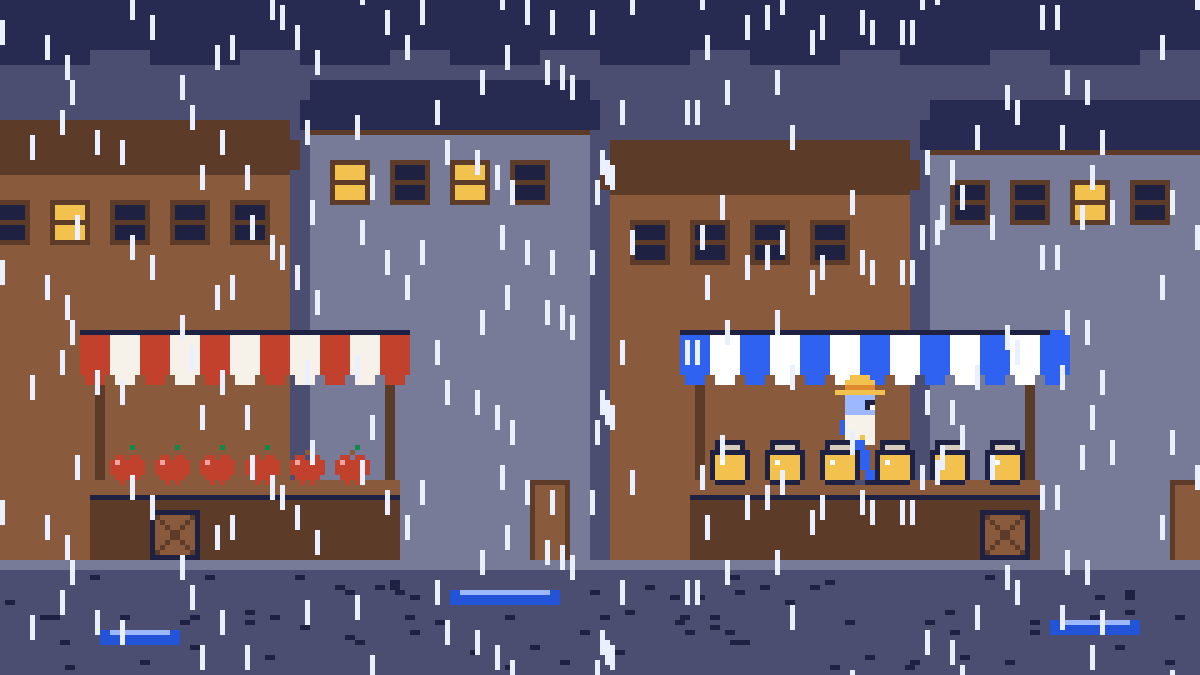
Der ganze Platz geht an die Regel. Jede Pixelspalte hat ihre eigene verwürfelte Zahl: Ein Teil entscheidet, ob es dort regnet, ein anderer, wo im Fallen ihre Streifen sind. So hält kein Streifen Schritt mit dem nächsten, und der Regen ordnet sich nie in Reihen.
Auch in dieser Lektion 3 Lesetipps zum Vertiefen 3 Fragen zum Selbsttest
Die Idee
Ein Schauer über einem Markt, ein Sturm über einem Hafen, Nieselregen nachts auf einem Friedhof: Ein Spieler erkennt Regen an vielen kurzen Streifen, die schnell fallen und nie gemeinsam. Sobald sie sich aufreihen, sieht das Auge ein Muster statt Wetter.
Ein Spiel kann Regen als Hunderte fallender Tropfen zeichnen, jeder ein Ding mit einem Platz, der in jedem Bild weitergeschoben wird. Die Regel hier merkt sich nichts. Für jeden Pixel rechnet sie aus seiner Spalte, seiner Reihe und dem Tick aus, ob gerade ein Streifen durch ihn hindurchläuft. Dieselbe Regel zeichnet Nieselregen und Wolkenbruch; nur eine Zahl ändert sich. Und weil die Streifen dem Tick des Spiels folgen, steht bei einem pausierten Spiel auch der Regen still.
So funktioniert es
Jede Spalte stellt dem Verwürfeln aus der Lektion über Rauschen, dem du trauen kannst, zwei Fragen. Dafür bekommt es die Nummer der Spalte, jedes Mal mit einem anderen Startwert.
Regnet es hier? Die erste Antwort ist eine Zahl von 0 bis 99. Liegt sie unter density, regnet es in der Spalte; sonst kommt jeder Pixel darin zurück, wie er kam. Weil die Antwort zur Spalte gehört, regnet es bei jedem Tick in denselben Spalten.
Wie spät ist diese Spalte dran? Die zweite Antwort, auf 0 bis 47 gekürzt, ist die eigene Verspätung der Spalte. Jede Spalte hat alle 48 Reihen einen Streifen, und die Verspätung sagt, wo diese Streifen liegen.
Dann das Fallen. Die Regel nimmt die Reihe des Pixels, zieht den Tick mal speed ab, zählt die Verspätung der Spalte dazu und bricht das Ergebnis auf 0 bis 47 um. Kommt dabei weniger als streak heraus, ist der Pixel Regen, im blassesten Blau (Nummer 15); überall sonst bleibt das Bild. Weil der Tick abgezogen wird, rückt ein Streifen bei jedem Tick um speed Reihen nach unten, und während er unten hinausläuft, ist der nächste Streifen der Spalte oben schon unterwegs.
Die Regler sind density, in wie vielen Spalten von hundert es regnet (40, solange niemand ihn anfasst; das Bild schwenkt ihn von 6 auf 54 und zurück), speed in Reihen je Tick (3, also 180 Reihen in der Sekunde bei 60 Ticks) und streak, wie viele Pixel lang ein Streifen ist (5).
Was schiefgeht
Alle Spalten fallen im Gleichschritt. Die KI verwürfelt die Spalte, um zu entscheiden, wo es regnet, und das stimmt. Dann lässt sie aber eine einzige Uhr das Fallen aller Spalten antreiben. Jede Spalte für sich ist richtig, und ein Test mit einer Spalte besteht. Doch die Streifen aller Regenspalten stehen jetzt in denselben Reihen, und der Regen kommt in waagerechten Bändern aus Strichen herunter, wie ein Vorhang, der als Ganzes über den Bildschirm rutscht.
Das passiert, weil das Verwürfeln schon da ist, die Bewegung auch, und im Code nichts zu fehlen scheint. Was fehlt, ist die zweite Zahl: die eigene Verspätung der Spalte.
Schalte das Bild auf „Mit dem Fehler“. Die Streifen rasten in flache Reihen ein. Schieb density hoch, und die Reihen füllen sich nur; sie brechen nie auseinander.
Zwei Tests fangen das. „In no row is every raining column wet at once“ schlägt fehl, weil der Vorhang alle Regenspalten in denselben Reihen nass macht. „Most raining columns have a timing of their own“ zählt die Reihen, in denen die Streifen der Spalten beginnen; beim Fehler meldet er, dass die Streifen von 10 Regenspalten in 1 von 48 Reihen beginnen.
Der Fehler, Zeile für Zeile
- /* Rain, with the mistake: the column's scramble decides only whether it rains there, and every column
-    falls on the same clock. The streaks of all raining columns stand in the same rows, so the rain comes
-    down in level bands, like a curtain of dashes, instead of as single drops.
+ /* Rain: thin streaks that fall down the screen, each column in its own time. A scramble of the
+    column's number decides whether it rains there at all, and another one where in the fall its
+    streaks are. Every tick the streaks move down by `speed` rows. Where a streak is, the pixel takes
+    the rain's colour; everywhere else the picture comes back as it came.

+    The pixel art way: a picture is a grid of whole numbers, 0 where nothing is and 1 to 25 for the
+    palette's colours. The rule is asked for every pixel and answers with a number.
+
     From the course "Shaders for pixel art" on spielerando.com.
     SPDX-License-Identifier: MIT */
…
  const wrap = (a: number, n: number) => a - n * Math.floor(a / n);

- /** The rule, wrong: in a column where it rains, a streak wherever the one fall for all columns has reached. */
+ /** The rule: in a column where it rains, a streak wherever the column's own fall has reached. */
  export function shade(x: number, y: number, tick: number, src: Frame, p: Params = DEFAULTS): number {
    const here = at(src, x, y);
    // does it rain in this column? one scramble of the column's number decides, 0 to 99
    if (hash(x + 1 * 65537) % 100 >= p.density) return here;
-   // the mistake: no scramble for when it rains here, so every column is at the same place in its fall
+   // when does it rain here? another scramble of the column's number: where in the fall its streaks are
+   const late = hash(x + 2 * 65537) % GAP;
    // how far the fall has come at this row: it moves down by `speed` rows every tick
-   const fall = wrap(y - tick * p.speed, GAP);
+   const fall = wrap(y - tick * p.speed + late, GAP);
    return fall < p.streak ? p.color : here;
  }
Was der Test zum Fehler sagt
✔ with density 0 nothing changes, and with 100 every column rains
✔ every pixel is either the rain's colour or what was there
✔ a dry column stays dry, and a raining column rains at every tick
✔ a streak falls speed rows every tick
✔ a streak is streak pixels long, and the next one in its column comes 48 rows later
✖ in no row is every raining column wet at once
    at tick 0 all 10 raining columns are wet in row 0
✖ most raining columns have a timing of their own: their streaks start in different rows
    the streaks of 10 raining columns start in 1 of 48 rows
7 tests: 5 passed, 2 failed
Das sagst du deiner KI
Schreib einen Regen-Shader für mein Pixel-Art-Spiel: dünne Streifen, die über den ganzen Bildschirm nach unten fallen, über alles hinweg.

- Nur ganze Pixel: Streifen einen Pixel breit, kein Glätten und kein Mischen. Der Regen hat eine Farbe: [meine Regenfarbe].
- Nimm einen Hash aus ganzen Zahlen, kein sin und keine Zufallsfunktion. Hashe die Nummer der Spalte einmal, um zu entscheiden, ob es in dieser Spalte regnet ([40] Spalten von 100), und noch einmal, mit einem anderen Startwert, für die eigene Verspätung dieser Spalte.
- Die Zeit ist eine ganze Zahl von Ticks, die mein Spiel zählt. Ein Streifen fällt bei jedem Tick [3] Pixel und ist [5] Pixel lang; der nächste in derselben Spalte kommt 48 Pixel hinter ihm.
- Jede Spalte fällt mit ihrer eigenen Verspätung. Keine zwei Spalten dürfen im Gleichschritt laufen, nur weil sie dieselbe Uhr teilen.

Bevor du den Shader schreibst, schreib dieselbe Regel als kleine, einfache Funktion, die einen Platz und einen Tick bekommt und die Nummer der Farbe zurückgibt. Teste sie: Eine trockene Spalte bleibt trocken, ein Streifen rückt bei jedem Tick [3] Reihen nach unten, in keiner Reihe sind alle Regenspalten zugleich nass, und die meisten Regenspalten beginnen ihre Streifen in verschiedenen Reihen. Zeig mir die Ausgabe der Tests. Schreib dann den Shader so, dass er genau das tut, was die Funktion tut.
Der Code
Dreimal dieselbe Regel. Die erste ist die, die wir testen; die beiden Shader sind diese Regel in einer Shader-Sprache, und die läuft in deinem Spiel.
Die Regel, getestet: shader.ts
/* Rain: thin streaks that fall down the screen, each column in its own time. A scramble of the
   column's number decides whether it rains there at all, and another one where in the fall its
   streaks are. Every tick the streaks move down by `speed` rows. Where a streak is, the pixel takes
   the rain's colour; everywhere else the picture comes back as it came.

   The pixel art way: a picture is a grid of whole numbers, 0 where nothing is and 1 to 25 for the
   palette's colours. The rule is asked for every pixel and answers with a number.

   From the course "Shaders for pixel art" on spielerando.com.
   SPDX-License-Identifier: MIT */

export interface Frame {
  width: number;
  height: number;
  index: Uint8Array;
}

export const DEFAULTS = {
  /** How many columns of a hundred it rains in. */
  density: 40,
  /** How many rows a streak falls each tick. */
  speed: 3,
  /** How many pixels long a streak is. */
  streak: 5,
  /** The number of the rain's colour in the palette: 15 is the palest blue. */
  color: 15,
};
export type Params = typeof DEFAULTS;

/** How many rows lie between the tops of two streaks in one column. */
const GAP = 48;

/** The number at a place of the picture; outside the picture nothing is. */
export function at(src: Frame, x: number, y: number): number {
  if (x < 0 || y < 0 || x >= src.width || y >= src.height) return 0;
  return src.index[y * src.width + x];
}

/** A whole number scrambled into another, the same on every machine. */
function hash(n: number): number {
  n = Math.imul(n ^ (n >>> 16), 0x7feb352d);
  n = Math.imul(n ^ (n >>> 15), 0x846ca68b);
  return (n ^ (n >>> 16)) >>> 0;
}

/** a wrapped into 0 .. n-1, also for a below zero */
const wrap = (a: number, n: number) => a - n * Math.floor(a / n);

/** The rule: in a column where it rains, a streak wherever the column's own fall has reached. */
export function shade(x: number, y: number, tick: number, src: Frame, p: Params = DEFAULTS): number {
  const here = at(src, x, y);
  // does it rain in this column? one scramble of the column's number decides, 0 to 99
  if (hash(x + 1 * 65537) % 100 >= p.density) return here;
  // when does it rain here? another scramble of the column's number: where in the fall its streaks are
  const late = hash(x + 2 * 65537) % GAP;
  // how far the fall has come at this row: it moves down by `speed` rows every tick
  const fall = wrap(y - tick * p.speed + late, GAP);
  return fall < p.streak ? p.color : here;
}
Dieselbe Regel als Shader: GLSL
#version 300 es
// A shader the pixel art way: a pixel is a whole number, 0 where nothing is, 1 to 25 for the
// palette's colours. The rule is shade(): it is asked for every pixel and answers with a number.
// Everything outside the marked part is the same for every rule. Put your own palette in PALETTE.
precision highp float;
precision highp int;

uniform sampler2D SRC;   // the picture, sampled without smoothing (nearest)
uniform sampler2D OTHER; // a second picture, where the rule uses one
uniform int TICK;        // the time in ticks, 60 a second, counted by the game

const vec3 PALETTE[26] = vec3[26](
  vec3(0.0),
  vec3(31.0, 33.0, 66.0) / 255.0, // 1: k
  vec3(75.0, 78.0, 112.0) / 255.0, // 2: n
  vec3(120.0, 123.0, 152.0) / 255.0, // 3: m
  vec3(198.0, 199.0, 227.0) / 255.0, // 4: e
  vec3(255.0, 255.0, 255.0) / 255.0, // 5: w
  vec3(246.0, 241.0, 233.0) / 255.0, // 6: c
  vec3(214.0, 205.0, 189.0) / 255.0, // 7: d
  vec3(242.0, 193.0, 78.0) / 255.0, // 8: y
  vec3(224.0, 138.0, 46.0) / 255.0, // 9: o
  vec3(194.0, 65.0, 45.0) / 255.0, // 10: r
  vec3(244.0, 163.0, 160.0) / 255.0, // 11: p
  vec3(47.0, 98.0, 240.0) / 255.0, // 12: b
  vec3(35.0, 83.0, 214.0) / 255.0, // 13: u
  vec3(157.0, 184.0, 255.0) / 255.0, // 14: s
  vec3(234.0, 240.0, 255.0) / 255.0, // 15: a
  vec3(207.0, 224.0, 255.0) / 255.0, // 16: i
  vec3(15.0, 138.0, 76.0) / 255.0, // 17: g
  vec3(124.0, 207.0, 154.0) / 255.0, // 18: l
  vec3(226.0, 244.0, 234.0) / 255.0, // 19: f
  vec3(138.0, 90.0, 60.0) / 255.0, // 20: t
  vec3(92.0, 59.0, 40.0) / 255.0, // 21: h
  vec3(109.0, 76.0, 230.0) / 255.0, // 22: v
  vec3(201.0, 187.0, 255.0) / 255.0, // 23: q
  vec3(18.0, 20.0, 43.0) / 255.0, // 24: x
  vec3(39.0, 43.0, 82.0) / 255.0 // 25: z
);

// Which colour of the palette is this? 0 where nothing is drawn.
int number(vec4 c) {
  if (c.a < 0.5) return 0;
  int best = 1;
  float least = 9.0;
  for (int i = 1; i <= 25; i++) {
    vec3 d = c.rgb - PALETTE[i];
    float away = dot(d, d);
    if (away < least) {
      least = away;
      best = i;
    }
  }
  return best;
}

// The number at a place of the picture; outside the picture nothing is.
int at(ivec2 p) {
  ivec2 size = textureSize(SRC, 0);
  if (p.x < 0 || p.y < 0 || p.x >= size.x || p.y >= size.y) return 0;
  return number(texelFetch(SRC, p, 0));
}

// The same for the second picture.
int otherAt(ivec2 p) {
  ivec2 size = textureSize(OTHER, 0);
  if (p.x < 0 || p.y < 0 || p.x >= size.x || p.y >= size.y) return 0;
  return number(texelFetch(OTHER, p, 0));
}

// a wrapped into 0 .. n-1, also for a below zero (the % sign is not safe there)
int wrap(int a, int n) {
  return a - n * int(floor(float(a) / float(n)));
}

// ---- the rule ----
uniform int density; // how many columns of a hundred it rains in
uniform int speed;   // how many rows a streak falls each tick
uniform int streak;  // how many pixels long a streak is
uniform int color;   // the number of the rain's colour in the palette: 15 is the palest blue

// how many rows lie between the tops of two streaks in one column
const int GAP = 48;

// a whole number scrambled into another, the same on every machine
uint hash(uint n) {
  n ^= n >> 16; n *= 0x7feb352du; n ^= n >> 15; n *= 0x846ca68bu; n ^= n >> 16;
  return n;
}

// in a column where it rains, a streak wherever the column's own fall has reached
int shade(ivec2 p) {
  int here = at(p);
  // does it rain in this column? one scramble of the column's number decides, 0 to 99
  if (int(hash(uint(p.x) + 1u * 65537u) % 100u) >= density) return here;
  // when does it rain here? another scramble of the column's number: where in the fall its streaks are
  int late = int(hash(uint(p.x) + 2u * 65537u) % uint(GAP));
  // how far the fall has come at this row: it moves down by `speed` rows every tick
  int fall = wrap(p.y - TICK * speed + late, GAP);
  return fall < streak ? color : here;
}
// ---- end of the rule ----

out vec4 FRAGMENT;

void main() {
  // the pixel's place, counted from the top left as in the picture
  ivec2 p = ivec2(int(gl_FragCoord.x), textureSize(SRC, 0).y - 1 - int(gl_FragCoord.y));
  int n = shade(p);
  FRAGMENT = n == 0 ? vec4(0.0) : vec4(PALETTE[n], 1.0);
}
Dieselbe Regel für Godot 4
shader_type canvas_item;
// A shader the pixel art way: a pixel is a whole number, 0 where nothing is, 1 to 25 for the
// palette's colours. The rule is shade(): it is asked for every pixel and answers with a number.
// Everything outside the marked part is the same for every rule. Put your own palette in PALETTE.
//
// Put this on a ColorRect that covers the screen, above everything it should change.
// The rule counts pixels as this shader sees them. Let the game draw at the size of its art and
// enlarge the finished picture (the project's stretch mode "viewport"), or it counts window pixels.
uniform sampler2D SRC : hint_screen_texture, filter_nearest; // what is on the screen behind it
uniform sampler2D OTHER : filter_nearest; // a second picture, where the rule uses one
// The time in ticks, 60 a second. The game counts it itself: add 1 in the _physics_process of a
// node that pauses with the game, and set it there, so a paused game pauses its shaders:
//   tick += 1
//   material.set_shader_parameter("TICK", tick)
uniform int TICK;

const vec3 PALETTE[26] = vec3[26](
  vec3(0.0),
  vec3(31.0, 33.0, 66.0) / 255.0, // 1: k
  vec3(75.0, 78.0, 112.0) / 255.0, // 2: n
  vec3(120.0, 123.0, 152.0) / 255.0, // 3: m
  vec3(198.0, 199.0, 227.0) / 255.0, // 4: e
  vec3(255.0, 255.0, 255.0) / 255.0, // 5: w
  vec3(246.0, 241.0, 233.0) / 255.0, // 6: c
  vec3(214.0, 205.0, 189.0) / 255.0, // 7: d
  vec3(242.0, 193.0, 78.0) / 255.0, // 8: y
  vec3(224.0, 138.0, 46.0) / 255.0, // 9: o
  vec3(194.0, 65.0, 45.0) / 255.0, // 10: r
  vec3(244.0, 163.0, 160.0) / 255.0, // 11: p
  vec3(47.0, 98.0, 240.0) / 255.0, // 12: b
  vec3(35.0, 83.0, 214.0) / 255.0, // 13: u
  vec3(157.0, 184.0, 255.0) / 255.0, // 14: s
  vec3(234.0, 240.0, 255.0) / 255.0, // 15: a
  vec3(207.0, 224.0, 255.0) / 255.0, // 16: i
  vec3(15.0, 138.0, 76.0) / 255.0, // 17: g
  vec3(124.0, 207.0, 154.0) / 255.0, // 18: l
  vec3(226.0, 244.0, 234.0) / 255.0, // 19: f
  vec3(138.0, 90.0, 60.0) / 255.0, // 20: t
  vec3(92.0, 59.0, 40.0) / 255.0, // 21: h
  vec3(109.0, 76.0, 230.0) / 255.0, // 22: v
  vec3(201.0, 187.0, 255.0) / 255.0, // 23: q
  vec3(18.0, 20.0, 43.0) / 255.0, // 24: x
  vec3(39.0, 43.0, 82.0) / 255.0 // 25: z
);

// Which colour of the palette is this? 0 where nothing is drawn.
int number(vec4 c) {
  if (c.a < 0.5) return 0;
  int best = 1;
  float least = 9.0;
  for (int i = 1; i <= 25; i++) {
    vec3 d = c.rgb - PALETTE[i];
    float away = dot(d, d);
    if (away < least) {
      least = away;
      best = i;
    }
  }
  return best;
}

// The number at a place of the picture; outside the picture nothing is.
int at(ivec2 p) {
  ivec2 size = textureSize(SRC, 0);
  if (p.x < 0 || p.y < 0 || p.x >= size.x || p.y >= size.y) return 0;
  return number(texelFetch(SRC, p, 0));
}

// The same for the second picture.
int otherAt(ivec2 p) {
  ivec2 size = textureSize(OTHER, 0);
  if (p.x < 0 || p.y < 0 || p.x >= size.x || p.y >= size.y) return 0;
  return number(texelFetch(OTHER, p, 0));
}

// a wrapped into 0 .. n-1, also for a below zero (the % sign is not safe there)
int wrap(int a, int n) {
  return a - n * int(floor(float(a) / float(n)));
}

// ---- the rule ----
uniform int density; // how many columns of a hundred it rains in
uniform int speed;   // how many rows a streak falls each tick
uniform int streak;  // how many pixels long a streak is
uniform int color;   // the number of the rain's colour in the palette: 15 is the palest blue

// how many rows lie between the tops of two streaks in one column
const int GAP = 48;

// a whole number scrambled into another, the same on every machine
uint hash(uint n) {
  n ^= n >> 16; n *= 0x7feb352du; n ^= n >> 15; n *= 0x846ca68bu; n ^= n >> 16;
  return n;
}

// in a column where it rains, a streak wherever the column's own fall has reached
int shade(ivec2 p) {
  int here = at(p);
  // does it rain in this column? one scramble of the column's number decides, 0 to 99
  if (int(hash(uint(p.x) + 1u * 65537u) % 100u) >= density) return here;
  // when does it rain here? another scramble of the column's number: where in the fall its streaks are
  int late = int(hash(uint(p.x) + 2u * 65537u) % uint(GAP));
  // how far the fall has come at this row: it moves down by `speed` rows every tick
  int fall = wrap(p.y - TICK * speed + late, GAP);
  return fall < streak ? color : here;
}
// ---- end of the rule ----

void fragment() {
  ivec2 p = ivec2(SCREEN_UV * vec2(textureSize(SRC, 0)));
  int n = shade(p);
  COLOR = n == 0 ? vec4(0.0) : vec4(PALETTE[n], 1.0);
}
Der Test: shader.test.ts
import assert from "node:assert/strict";
import { test } from "node:test";
import { DEFAULTS, type Frame, shade } from "./shader.ts";

/** A tiny picture from rows of digits: 0 is nothing, 1 to 9 are colours. */
function picture(rows: string[]): Frame {
  return { width: rows[0].length, height: rows.length, index: Uint8Array.from(rows.join(""), Number) };
}

/** A street: 40 rows of sky (2) over 20 rows of road (1), 30 columns wide. */
const STREET = picture([
  ...Array.from({ length: 40 }, () => "222222222222222222222222222222"),
  ...Array.from({ length: 20 }, () => "111111111111111111111111111111"),
]);
/** The rows between the tops of two streaks in one column, as in shader.ts. */
const GAP = 48;

const wet = (x: number, y: number, tick: number, p = DEFAULTS) => shade(x, y, tick, STREET, p) === p.color;
const rainy = (p = DEFAULTS) => Array.from({ length: STREET.width }, (_, x) => x).filter((x) => Array.from({ length: STREET.height }, (_, y) => y).some((y) => wet(x, y, 0, p)));

test("with density 0 nothing changes, and with 100 every column rains", () => {
  for (let tick = 0; tick < 40; tick++) {
    for (let y = 0; y < STREET.height; y++) {
      for (let x = 0; x < STREET.width; x++) assert.equal(shade(x, y, tick, STREET, { ...DEFAULTS, density: 0 }), STREET.index[y * STREET.width + x]);
    }
  }
  assert.equal(rainy({ ...DEFAULTS, density: 100 }).length, STREET.width);
});

test("every pixel is either the rain's colour or what was there", () => {
  for (let tick = 0; tick < 40; tick++) {
    for (let y = 0; y < STREET.height; y++) {
      for (let x = 0; x < STREET.width; x++) {
        const n = shade(x, y, tick, STREET);
        assert.ok(n === DEFAULTS.color || n === STREET.index[y * STREET.width + x], `${n} at ${x}, ${y}`);
      }
    }
  }
});

test("a dry column stays dry, and a raining column rains at every tick", () => {
  const raining = rainy();
  assert.ok(raining.length > 0 && raining.length < STREET.width, `${raining.length} of ${STREET.width} columns rain`);
  for (let tick = 0; tick < 100; tick += 7) {
    for (let x = 0; x < STREET.width; x++) {
      const any = Array.from({ length: STREET.height }, (_, y) => y).some((y) => wet(x, y, tick));
      assert.equal(any, raining.includes(x), `column ${x} at tick ${tick}`);
    }
  }
});

test("a streak falls speed rows every tick", () => {
  for (const speed of [1, 3, 6]) {
    const p = { ...DEFAULTS, speed };
    for (let tick = 0; tick < 30; tick++) {
      for (let y = 0; y + speed < STREET.height; y++) {
        for (let x = 0; x < STREET.width; x++) assert.equal(wet(x, y + speed, tick + 1, p), wet(x, y, tick, p), `at ${x}, ${y}, tick ${tick}`);
      }
    }
  }
});

test("a streak is streak pixels long, and the next one in its column comes 48 rows later", () => {
  for (const streak of [1, 5, 12]) {
    const p = { ...DEFAULTS, streak };
    for (const x of rainy(p)) {
      // where a streak starts: wet here and dry above, both within the picture
      const tops = Array.from({ length: STREET.height - 1 }, (_, i) => i + 1).filter((y) => wet(x, y, 0, p) && !wet(x, y - 1, 0, p));
      for (const top of tops) {
        for (let y = top; y < Math.min(top + streak, STREET.height); y++) assert.ok(wet(x, y, 0, p), `column ${x}: row ${y} should be wet`);
        if (top + streak < STREET.height) assert.ok(!wet(x, top + streak, 0, p), `column ${x}: the streak from row ${top} is longer than ${streak}`);
        if (top + GAP < STREET.height) assert.ok(wet(x, top + GAP, 0, p), `column ${x}: no streak ${GAP} rows below row ${top}`);
      }
    }
  }
});

test("in no row is every raining column wet at once", () => {
  const raining = rainy();
  for (let tick = 0; tick < 48; tick++) {
    for (let y = 0; y < STREET.height; y++) {
      assert.ok(!raining.every((x) => wet(x, y, tick)), `at tick ${tick} all ${raining.length} raining columns are wet in row ${y}`);
    }
  }
});

test("most raining columns have a timing of their own: their streaks start in different rows", () => {
  const raining = rainy();
  const starts = new Set(raining.map((x) => Array.from({ length: GAP }, (_, y) => y).find((y) => wet(x, y, 0) && !wet(x, y - 1, 0))));
  assert.ok(starts.size * 2 > raining.length, `the streaks of ${raining.length} raining columns start in ${starts.size} of ${GAP} rows`);
});
- 7 Tests bestehen mit der Regel.
- Mit dem eingebauten Fehler schlagen 2 davon fehl: "in no row is every raining column wet at once", "most raining columns have a timing of their own: their streaks start in different rows".
- Der Fehler ist im Bild oben zu sehen: Schalte auf „Mit dem Fehler“.
- Der Shader lief in einem Browser (Chrome/158.0.8127.37) auf 14 Bildern und ergab in 453.600 von 453.600 Pixeln das Bild der Regel.
Probier es aus
- Zieh
densityauf 0 und schieb ihn dann langsam hoch. Die Spalten kommen eine nach der anderen dazu, immer dieselben in derselben Reihenfolge, weil die eigene Zahl jeder Spalte entscheidet, wann sie dazukommt. - Stell
speedauf 6 undstreakauf 1. Die Tropfen springen sechs Reihen auf einmal, und das Auge verliert sie. Stellstreakdann auf 6: Ein Streifen, der mindestens so lang ist wie sein Sprung, liest sich wieder als fallende Linie. - Schalte auf „Mit dem Fehler“ und schieb
densityauf 100. Jede Spalte regnet, und der Platz verschwindet hinter festen Balken, die nach unten rutschen. Mit der Regel ist es bei 100 ein Wolkenbruch, aber immer noch aus Tropfen.
Zum Nachlesen
Wo es tiefer geht: unsere Seiten, auf denen diese Lektion aufbaut, und was andere zu ihrem Punkt geschrieben haben.
Was entscheidet, dass es regnet und wie stark: klar, bewölkt, Regen und Sturm, nie von klar direkt zu Sturm, jeder Wechsel eingeblendet. Diese Blende kann die Dichte dieser Regel antreiben statt eines Reglers.
Rauschen im Shader für Pixel Art: auf jedem Gerät dieselben Sterne
Das Verwürfeln, das dieser Regen zweimal fragt, Schritt für Schritt erklärt, und das schnelle mit einer einzigen Multiplikation, das eine KI gern schreibt und dessen Zahlen in gleichen Schritten übers Bild laufen.
Prospecting for Hash Functions
Woher die Form dieses Verwürfelns kommt: schieben und mischen, multiplizieren, zweimal, dann wieder mischen, gefunden von einem Programm, das jeden Hash danach bewertet, wie gleichmäßig ein gekipptes Eingangsbit die Ausgangsbits kippt.
Teste dich: drei Fragen
Jede Antwort wird sofort geprüft und erklärt. Die Fragen gehören zum Quiz und zählen für deinen Game Coder IQ wie jede andere.
Dieser Regen merkt sich nichts von einem Bild zum nächsten. Was passiert mit ihm, wenn der Spieler das Spiel pausiert?
Nächste Lektion Hitzeflimmern als Shader für Pixel Art: ohne zerfranste Ränder
Gib deiner KI die ganze Lektion
Der Knopf kopiert, was du ihr sagst, zusammen mit der getesteten Regel, ihrem Test und beiden Shadern. So hat deine KI alles, um das in dein Spiel zu bauen und dir zu zeigen, dass es funktioniert.
Das ist eine Lektion aus dem Kurs „Shader für Pixel Art“ auf spielerando.com: https://spielerando.com/de/courses/pixel-shaders/rain

Schreib einen Regen-Shader für mein Pixel-Art-Spiel: dünne Streifen, die über den ganzen Bildschirm nach unten fallen, über alles hinweg.

- Nur ganze Pixel: Streifen einen Pixel breit, kein Glätten und kein Mischen. Der Regen hat eine Farbe: [meine Regenfarbe].
- Nimm einen Hash aus ganzen Zahlen, kein sin und keine Zufallsfunktion. Hashe die Nummer der Spalte einmal, um zu entscheiden, ob es in dieser Spalte regnet ([40] Spalten von 100), und noch einmal, mit einem anderen Startwert, für die eigene Verspätung dieser Spalte.
- Die Zeit ist eine ganze Zahl von Ticks, die mein Spiel zählt. Ein Streifen fällt bei jedem Tick [3] Pixel und ist [5] Pixel lang; der nächste in derselben Spalte kommt 48 Pixel hinter ihm.
- Jede Spalte fällt mit ihrer eigenen Verspätung. Keine zwei Spalten dürfen im Gleichschritt laufen, nur weil sie dieselbe Uhr teilen.

Bevor du den Shader schreibst, schreib dieselbe Regel als kleine, einfache Funktion, die einen Platz und einen Tick bekommt und die Nummer der Farbe zurückgibt. Teste sie: Eine trockene Spalte bleibt trocken, ein Streifen rückt bei jedem Tick [3] Reihen nach unten, in keiner Reihe sind alle Regenspalten zugleich nass, und die meisten Regenspalten beginnen ihre Streifen in verschiedenen Reihen. Zeig mir die Ausgabe der Tests. Schreib dann den Shader so, dass er genau das tut, was die Funktion tut.

Die Regel, getestet (shader.ts):
```ts
/* Rain: thin streaks that fall down the screen, each column in its own time. A scramble of the
   column's number decides whether it rains there at all, and another one where in the fall its
   streaks are. Every tick the streaks move down by `speed` rows. Where a streak is, the pixel takes
   the rain's colour; everywhere else the picture comes back as it came.

   The pixel art way: a picture is a grid of whole numbers, 0 where nothing is and 1 to 25 for the
   palette's colours. The rule is asked for every pixel and answers with a number.

   From the course "Shaders for pixel art" on spielerando.com.
   SPDX-License-Identifier: MIT */

export interface Frame {
  width: number;
  height: number;
  index: Uint8Array;
}

export const DEFAULTS = {
  /** How many columns of a hundred it rains in. */
  density: 40,
  /** How many rows a streak falls each tick. */
  speed: 3,
  /** How many pixels long a streak is. */
  streak: 5,
  /** The number of the rain's colour in the palette: 15 is the palest blue. */
  color: 15,
};
export type Params = typeof DEFAULTS;

/** How many rows lie between the tops of two streaks in one column. */
const GAP = 48;

/** The number at a place of the picture; outside the picture nothing is. */
export function at(src: Frame, x: number, y: number): number {
  if (x < 0 || y < 0 || x >= src.width || y >= src.height) return 0;
  return src.index[y * src.width + x];
}

/** A whole number scrambled into another, the same on every machine. */
function hash(n: number): number {
  n = Math.imul(n ^ (n >>> 16), 0x7feb352d);
  n = Math.imul(n ^ (n >>> 15), 0x846ca68b);
  return (n ^ (n >>> 16)) >>> 0;
}

/** a wrapped into 0 .. n-1, also for a below zero */
const wrap = (a: number, n: number) => a - n * Math.floor(a / n);

/** The rule: in a column where it rains, a streak wherever the column's own fall has reached. */
export function shade(x: number, y: number, tick: number, src: Frame, p: Params = DEFAULTS): number {
  const here = at(src, x, y);
  // does it rain in this column? one scramble of the column's number decides, 0 to 99
  if (hash(x + 1 * 65537) % 100 >= p.density) return here;
  // when does it rain here? another scramble of the column's number: where in the fall its streaks are
  const late = hash(x + 2 * 65537) % GAP;
  // how far the fall has come at this row: it moves down by `speed` rows every tick
  const fall = wrap(y - tick * p.speed + late, GAP);
  return fall < p.streak ? p.color : here;
}
```

Ihr Test (shader.test.ts):
```ts
import assert from "node:assert/strict";
import { test } from "node:test";
import { DEFAULTS, type Frame, shade } from "./shader.ts";

/** A tiny picture from rows of digits: 0 is nothing, 1 to 9 are colours. */
function picture(rows: string[]): Frame {
  return { width: rows[0].length, height: rows.length, index: Uint8Array.from(rows.join(""), Number) };
}

/** A street: 40 rows of sky (2) over 20 rows of road (1), 30 columns wide. */
const STREET = picture([
  ...Array.from({ length: 40 }, () => "222222222222222222222222222222"),
  ...Array.from({ length: 20 }, () => "111111111111111111111111111111"),
]);
/** The rows between the tops of two streaks in one column, as in shader.ts. */
const GAP = 48;

const wet = (x: number, y: number, tick: number, p = DEFAULTS) => shade(x, y, tick, STREET, p) === p.color;
const rainy = (p = DEFAULTS) => Array.from({ length: STREET.width }, (_, x) => x).filter((x) => Array.from({ length: STREET.height }, (_, y) => y).some((y) => wet(x, y, 0, p)));

test("with density 0 nothing changes, and with 100 every column rains", () => {
  for (let tick = 0; tick < 40; tick++) {
    for (let y = 0; y < STREET.height; y++) {
      for (let x = 0; x < STREET.width; x++) assert.equal(shade(x, y, tick, STREET, { ...DEFAULTS, density: 0 }), STREET.index[y * STREET.width + x]);
    }
  }
  assert.equal(rainy({ ...DEFAULTS, density: 100 }).length, STREET.width);
});

test("every pixel is either the rain's colour or what was there", () => {
  for (let tick = 0; tick < 40; tick++) {
    for (let y = 0; y < STREET.height; y++) {
      for (let x = 0; x < STREET.width; x++) {
        const n = shade(x, y, tick, STREET);
        assert.ok(n === DEFAULTS.color || n === STREET.index[y * STREET.width + x], `${n} at ${x}, ${y}`);
      }
    }
  }
});

test("a dry column stays dry, and a raining column rains at every tick", () => {
  const raining = rainy();
  assert.ok(raining.length > 0 && raining.length < STREET.width, `${raining.length} of ${STREET.width} columns rain`);
  for (let tick = 0; tick < 100; tick += 7) {
    for (let x = 0; x < STREET.width; x++) {
      const any = Array.from({ length: STREET.height }, (_, y) => y).some((y) => wet(x, y, tick));
      assert.equal(any, raining.includes(x), `column ${x} at tick ${tick}`);
    }
  }
});

test("a streak falls speed rows every tick", () => {
  for (const speed of [1, 3, 6]) {
    const p = { ...DEFAULTS, speed };
    for (let tick = 0; tick < 30; tick++) {
      for (let y = 0; y + speed < STREET.height; y++) {
        for (let x = 0; x < STREET.width; x++) assert.equal(wet(x, y + speed, tick + 1, p), wet(x, y, tick, p), `at ${x}, ${y}, tick ${tick}`);
      }
    }
  }
});

test("a streak is streak pixels long, and the next one in its column comes 48 rows later", () => {
  for (const streak of [1, 5, 12]) {
    const p = { ...DEFAULTS, streak };
    for (const x of rainy(p)) {
      // where a streak starts: wet here and dry above, both within the picture
      const tops = Array.from({ length: STREET.height - 1 }, (_, i) => i + 1).filter((y) => wet(x, y, 0, p) && !wet(x, y - 1, 0, p));
      for (const top of tops) {
        for (let y = top; y < Math.min(top + streak, STREET.height); y++) assert.ok(wet(x, y, 0, p), `column ${x}: row ${y} should be wet`);
        if (top + streak < STREET.height) assert.ok(!wet(x, top + streak, 0, p), `column ${x}: the streak from row ${top} is longer than ${streak}`);
        if (top + GAP < STREET.height) assert.ok(wet(x, top + GAP, 0, p), `column ${x}: no streak ${GAP} rows below row ${top}`);
      }
    }
  }
});

test("in no row is every raining column wet at once", () => {
  const raining = rainy();
  for (let tick = 0; tick < 48; tick++) {
    for (let y = 0; y < STREET.height; y++) {
      assert.ok(!raining.every((x) => wet(x, y, tick)), `at tick ${tick} all ${raining.length} raining columns are wet in row ${y}`);
    }
  }
});

test("most raining columns have a timing of their own: their streaks start in different rows", () => {
  const raining = rainy();
  const starts = new Set(raining.map((x) => Array.from({ length: GAP }, (_, y) => y).find((y) => wet(x, y, 0) && !wet(x, y - 1, 0))));
  assert.ok(starts.size * 2 > raining.length, `the streaks of ${raining.length} raining columns start in ${starts.size} of ${GAP} rows`);
});
```

Dieselbe Regel als GLSL-Shader (WebGL 2, OpenGL ES 3.0), Pixel für Pixel gegen die Regel geprüft:
```glsl
#version 300 es
// A shader the pixel art way: a pixel is a whole number, 0 where nothing is, 1 to 25 for the
// palette's colours. The rule is shade(): it is asked for every pixel and answers with a number.
// Everything outside the marked part is the same for every rule. Put your own palette in PALETTE.
precision highp float;
precision highp int;

uniform sampler2D SRC;   // the picture, sampled without smoothing (nearest)
uniform sampler2D OTHER; // a second picture, where the rule uses one
uniform int TICK;        // the time in ticks, 60 a second, counted by the game

const vec3 PALETTE[26] = vec3[26](
  vec3(0.0),
  vec3(31.0, 33.0, 66.0) / 255.0, // 1: k
  vec3(75.0, 78.0, 112.0) / 255.0, // 2: n
  vec3(120.0, 123.0, 152.0) / 255.0, // 3: m
  vec3(198.0, 199.0, 227.0) / 255.0, // 4: e
  vec3(255.0, 255.0, 255.0) / 255.0, // 5: w
  vec3(246.0, 241.0, 233.0) / 255.0, // 6: c
  vec3(214.0, 205.0, 189.0) / 255.0, // 7: d
  vec3(242.0, 193.0, 78.0) / 255.0, // 8: y
  vec3(224.0, 138.0, 46.0) / 255.0, // 9: o
  vec3(194.0, 65.0, 45.0) / 255.0, // 10: r
  vec3(244.0, 163.0, 160.0) / 255.0, // 11: p
  vec3(47.0, 98.0, 240.0) / 255.0, // 12: b
  vec3(35.0, 83.0, 214.0) / 255.0, // 13: u
  vec3(157.0, 184.0, 255.0) / 255.0, // 14: s
  vec3(234.0, 240.0, 255.0) / 255.0, // 15: a
  vec3(207.0, 224.0, 255.0) / 255.0, // 16: i
  vec3(15.0, 138.0, 76.0) / 255.0, // 17: g
  vec3(124.0, 207.0, 154.0) / 255.0, // 18: l
  vec3(226.0, 244.0, 234.0) / 255.0, // 19: f
  vec3(138.0, 90.0, 60.0) / 255.0, // 20: t
  vec3(92.0, 59.0, 40.0) / 255.0, // 21: h
  vec3(109.0, 76.0, 230.0) / 255.0, // 22: v
  vec3(201.0, 187.0, 255.0) / 255.0, // 23: q
  vec3(18.0, 20.0, 43.0) / 255.0, // 24: x
  vec3(39.0, 43.0, 82.0) / 255.0 // 25: z
);

// Which colour of the palette is this? 0 where nothing is drawn.
int number(vec4 c) {
  if (c.a < 0.5) return 0;
  int best = 1;
  float least = 9.0;
  for (int i = 1; i <= 25; i++) {
    vec3 d = c.rgb - PALETTE[i];
    float away = dot(d, d);
    if (away < least) {
      least = away;
      best = i;
    }
  }
  return best;
}

// The number at a place of the picture; outside the picture nothing is.
int at(ivec2 p) {
  ivec2 size = textureSize(SRC, 0);
  if (p.x < 0 || p.y < 0 || p.x >= size.x || p.y >= size.y) return 0;
  return number(texelFetch(SRC, p, 0));
}

// The same for the second picture.
int otherAt(ivec2 p) {
  ivec2 size = textureSize(OTHER, 0);
  if (p.x < 0 || p.y < 0 || p.x >= size.x || p.y >= size.y) return 0;
  return number(texelFetch(OTHER, p, 0));
}

// a wrapped into 0 .. n-1, also for a below zero (the % sign is not safe there)
int wrap(int a, int n) {
  return a - n * int(floor(float(a) / float(n)));
}

// ---- the rule ----
uniform int density; // how many columns of a hundred it rains in
uniform int speed;   // how many rows a streak falls each tick
uniform int streak;  // how many pixels long a streak is
uniform int color;   // the number of the rain's colour in the palette: 15 is the palest blue

// how many rows lie between the tops of two streaks in one column
const int GAP = 48;

// a whole number scrambled into another, the same on every machine
uint hash(uint n) {
  n ^= n >> 16; n *= 0x7feb352du; n ^= n >> 15; n *= 0x846ca68bu; n ^= n >> 16;
  return n;
}

// in a column where it rains, a streak wherever the column's own fall has reached
int shade(ivec2 p) {
  int here = at(p);
  // does it rain in this column? one scramble of the column's number decides, 0 to 99
  if (int(hash(uint(p.x) + 1u * 65537u) % 100u) >= density) return here;
  // when does it rain here? another scramble of the column's number: where in the fall its streaks are
  int late = int(hash(uint(p.x) + 2u * 65537u) % uint(GAP));
  // how far the fall has come at this row: it moves down by `speed` rows every tick
  int fall = wrap(p.y - TICK * speed + late, GAP);
  return fall < streak ? color : here;
}
// ---- end of the rule ----

out vec4 FRAGMENT;

void main() {
  // the pixel's place, counted from the top left as in the picture
  ivec2 p = ivec2(int(gl_FragCoord.x), textureSize(SRC, 0).y - 1 - int(gl_FragCoord.y));
  int n = shade(p);
  FRAGMENT = n == 0 ? vec4(0.0) : vec4(PALETTE[n], 1.0);
}
```

Dieselbe Regel für Godot 4 (von den Autoren nicht ausgeführt):
```gdshader
shader_type canvas_item;
// A shader the pixel art way: a pixel is a whole number, 0 where nothing is, 1 to 25 for the
// palette's colours. The rule is shade(): it is asked for every pixel and answers with a number.
// Everything outside the marked part is the same for every rule. Put your own palette in PALETTE.
//
// Put this on a ColorRect that covers the screen, above everything it should change.
// The rule counts pixels as this shader sees them. Let the game draw at the size of its art and
// enlarge the finished picture (the project's stretch mode "viewport"), or it counts window pixels.
uniform sampler2D SRC : hint_screen_texture, filter_nearest; // what is on the screen behind it
uniform sampler2D OTHER : filter_nearest; // a second picture, where the rule uses one
// The time in ticks, 60 a second. The game counts it itself: add 1 in the _physics_process of a
// node that pauses with the game, and set it there, so a paused game pauses its shaders:
//   tick += 1
//   material.set_shader_parameter("TICK", tick)
uniform int TICK;

const vec3 PALETTE[26] = vec3[26](
  vec3(0.0),
  vec3(31.0, 33.0, 66.0) / 255.0, // 1: k
  vec3(75.0, 78.0, 112.0) / 255.0, // 2: n
  vec3(120.0, 123.0, 152.0) / 255.0, // 3: m
  vec3(198.0, 199.0, 227.0) / 255.0, // 4: e
  vec3(255.0, 255.0, 255.0) / 255.0, // 5: w
  vec3(246.0, 241.0, 233.0) / 255.0, // 6: c
  vec3(214.0, 205.0, 189.0) / 255.0, // 7: d
  vec3(242.0, 193.0, 78.0) / 255.0, // 8: y
  vec3(224.0, 138.0, 46.0) / 255.0, // 9: o
  vec3(194.0, 65.0, 45.0) / 255.0, // 10: r
  vec3(244.0, 163.0, 160.0) / 255.0, // 11: p
  vec3(47.0, 98.0, 240.0) / 255.0, // 12: b
  vec3(35.0, 83.0, 214.0) / 255.0, // 13: u
  vec3(157.0, 184.0, 255.0) / 255.0, // 14: s
  vec3(234.0, 240.0, 255.0) / 255.0, // 15: a
  vec3(207.0, 224.0, 255.0) / 255.0, // 16: i
  vec3(15.0, 138.0, 76.0) / 255.0, // 17: g
  vec3(124.0, 207.0, 154.0) / 255.0, // 18: l
  vec3(226.0, 244.0, 234.0) / 255.0, // 19: f
  vec3(138.0, 90.0, 60.0) / 255.0, // 20: t
  vec3(92.0, 59.0, 40.0) / 255.0, // 21: h
  vec3(109.0, 76.0, 230.0) / 255.0, // 22: v
  vec3(201.0, 187.0, 255.0) / 255.0, // 23: q
  vec3(18.0, 20.0, 43.0) / 255.0, // 24: x
  vec3(39.0, 43.0, 82.0) / 255.0 // 25: z
);

// Which colour of the palette is this? 0 where nothing is drawn.
int number(vec4 c) {
  if (c.a < 0.5) return 0;
  int best = 1;
  float least = 9.0;
  for (int i = 1; i <= 25; i++) {
    vec3 d = c.rgb - PALETTE[i];
    float away = dot(d, d);
    if (away < least) {
      least = away;
      best = i;
    }
  }
  return best;
}

// The number at a place of the picture; outside the picture nothing is.
int at(ivec2 p) {
  ivec2 size = textureSize(SRC, 0);
  if (p.x < 0 || p.y < 0 || p.x >= size.x || p.y >= size.y) return 0;
  return number(texelFetch(SRC, p, 0));
}

// The same for the second picture.
int otherAt(ivec2 p) {
  ivec2 size = textureSize(OTHER, 0);
  if (p.x < 0 || p.y < 0 || p.x >= size.x || p.y >= size.y) return 0;
  return number(texelFetch(OTHER, p, 0));
}

// a wrapped into 0 .. n-1, also for a below zero (the % sign is not safe there)
int wrap(int a, int n) {
  return a - n * int(floor(float(a) / float(n)));
}

// ---- the rule ----
uniform int density; // how many columns of a hundred it rains in
uniform int speed;   // how many rows a streak falls each tick
uniform int streak;  // how many pixels long a streak is
uniform int color;   // the number of the rain's colour in the palette: 15 is the palest blue

// how many rows lie between the tops of two streaks in one column
const int GAP = 48;

// a whole number scrambled into another, the same on every machine
uint hash(uint n) {
  n ^= n >> 16; n *= 0x7feb352du; n ^= n >> 15; n *= 0x846ca68bu; n ^= n >> 16;
  return n;
}

// in a column where it rains, a streak wherever the column's own fall has reached
int shade(ivec2 p) {
  int here = at(p);
  // does it rain in this column? one scramble of the column's number decides, 0 to 99
  if (int(hash(uint(p.x) + 1u * 65537u) % 100u) >= density) return here;
  // when does it rain here? another scramble of the column's number: where in the fall its streaks are
  int late = int(hash(uint(p.x) + 2u * 65537u) % uint(GAP));
  // how far the fall has come at this row: it moves down by `speed` rows every tick
  int fall = wrap(p.y - TICK * speed + late, GAP);
  return fall < streak ? color : here;
}
// ---- end of the rule ----

void fragment() {
  ivec2 p = ivec2(SCREEN_UV * vec2(textureSize(SRC, 0)));
  int n = shade(p);
  COLOR = n == 0 ? vec4(0.0) : vec4(PALETTE[n], 1.0);
}
```
Wie hilfreich war diese Seite?
Diese Seite hat noch niemand bewertet.