Scanlines-Shader für Pixel Art, und wann du ihn weglässt
Scanlines sind dünne dunkle Linien quer über den Bildschirm: jede zweite Zeile etwas dunkler, der Look eines alten Fernsehers. Die Regel dieser Lektion zeichnet sie über die dunkleren Farben der Palette, hält sie still und verschont, was schon dunkel ist. Sie sagt auch, wann die Linien einem Bild schaden.
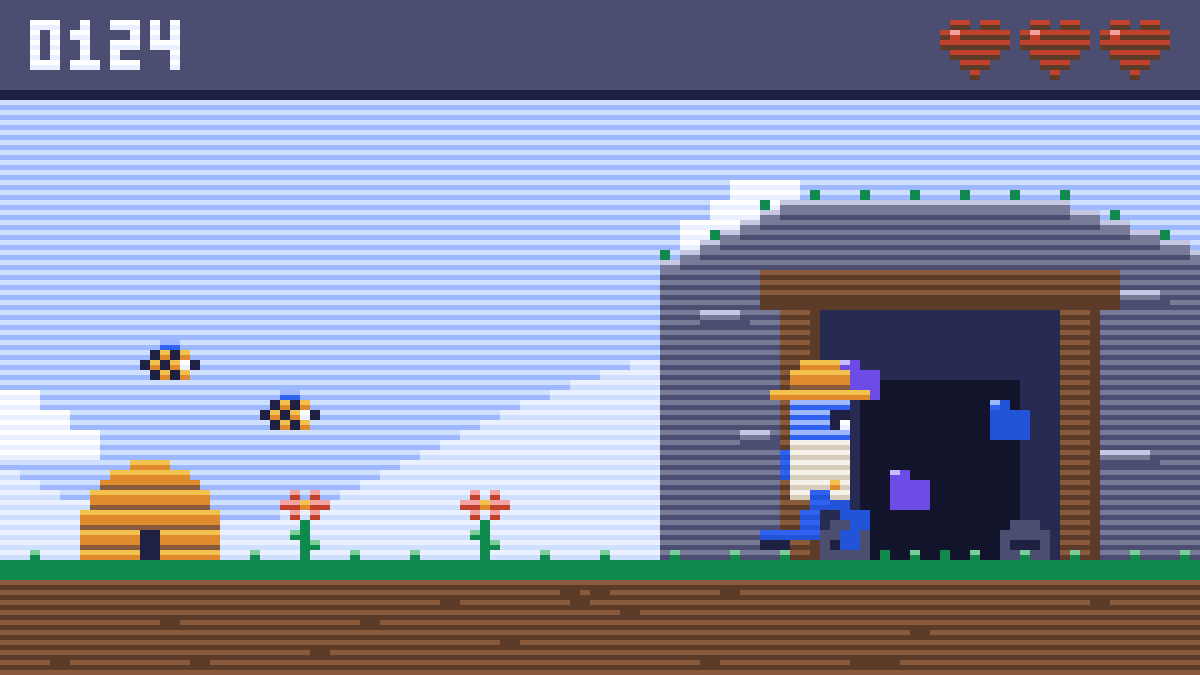
Das Bild des Spiels wird zuerst auf doppelte Größe gebracht; dann wird jede zweite Zeile des Bildschirms eine Stufe dunkler, also ist jeder Pixel der Zeichnung eine helle Zeile über einer dunkleren. In der zweiten Hälfte der Schleife sind die dunklen Zeilen zwei Stufen dunkler. Die dunkelste Farbe jeder Farbreihe behält ihre Farbe: das dunkle Holz, das Moos und die Kristalle an der Höhle und der Schiefer der Leiste.
Auch in dieser Lektion 3 Lesetipps zum Vertiefen 3 Fragen zum Selbsttest
Die Idee
Eine alte Bildröhre hat das Bild Zeile für Zeile gezeichnet, mit einem dünnen dunklen Spalt zwischen den Zeilen. Manche Pixel-Art-Spiele holen sich diesen Look mit Absicht zurück.
Die Linien gehören zum Bildschirm, nicht zur Zeichnung. Ein Pixel-Art-Spiel zeichnet ein kleines Bild und vergrößert es, bevor es es zeigt; hier ist das Bild 120 mal 68 Pixel groß und wird doppelt so groß gezeigt. Die Regel läuft nach dem Vergrößern, also wird jeder Pixel der Zeichnung zu zwei Zeilen des Bildschirms: eine wie gezeichnet, eine dunkler. Lässt du sie stattdessen auf dem kleinen Bild laufen, wird jede zweite Zeile der Zeichnung dunkel, und das sieht aus wie eine Jalousie, nicht wie ein Bildschirm.
Wann du sie weglässt:
- Kleine Schrift. Die Linien schneiden durch jeden Buchstaben. Ein Punktestand aus vier Ziffern bleibt lesbar; Dialoge und Menüs zeichnest du nach den Scanlines, damit sie sauber bleiben.
- Dunkle Bilder. In einem dunklen Level verschont die Regel die dunklen Farben, also fallen die Linien auf die wenigen hellen Dinge, die übrig sind, die Spielfigur, eine Lampe, einen Schlüssel: genau das, was man sehen muss. Dreh sie dort herunter oder aus.
- Ein Bild, das nicht um eine ganze Zahl vergrößert wird. Wenn sich dein Spiel auf jede Fenstergröße streckt, etwa auf das Zweieinhalbfache, können die Linien nicht zu den Zeilen der Zeichnung passen und machen ungleichmäßige Streifen.
So funktioniert es
Die Regel sieht auf die Zeile des Pixels, gezählt vom oberen Rand des Bildschirms. „Bildschirmzeilen pro Linie“ ist 2, also ist jede zweite Zeile die dunkle.
Auf einer dunklen Zeile geht die Farbe „Stufen dunkler“ Stufen in der Tabelle der dunkleren Farben hinab: Weiß wird zum blassesten Blau, Honig zu Bernstein. Aber vor jeder Stufe prüft die Regel, wohin sie führt. Wäre die nächste Farbe eine der beiden Nachtfarben der Palette, bleibt die Farbe, wie sie ist. Das verschont die dunkelste Farbe jeder Farbreihe: Tinte, Schiefer, dunkles Holz, das dunkelste Grün, Blau und Violett. Im Bild sehen die Schattenseite der Balken, die Kristalle, das Moos und der Schiefer der Leiste mit den Linien genauso aus wie ohne.
Die Zeilen bewegen sich nie: Sie werden vom Bildschirm aus gezählt, nie von der Welt oder der Zeit aus. Rechnest du die Zeit dazu, damit sie rollen, oder zählst von der Kamera aus, kriechen oder flimmern sie; der Test „the dark rows stay where they are at every tick“ (die dunklen Zeilen bleiben zu jedem Tick, wo sie sind) hält sie still. Bis du einen Regler anfasst, sind die dunklen Zeilen die halbe Schleife lang eine Stufe dunkler und die andere Hälfte zwei.
Was schiefgeht
„Jede zweite Zeile dunkler“ liest man zuerst so: eine Stufe dunkler für jeden Pixel dieser Zeile. Genau das schreibt eine KI und probiert es an einem hellen Bild aus, wo es richtig aussieht. Aber der dunkelsten Farbe jeder Farbreihe bleibt als nächste Stufe nur die Nacht. Umrisse, Schatten und dunkler Stein werden auf jeder dunklen Zeile zu Nacht, und dunkle Teile des Bildes zerfallen in schwarze Streifen.
Schalte das Bild auf „Mit dem Fehler“. Der Himmel und die hellen Teile sehen aus wie mit der Regel. Aber die dunkelgrüne Kante des Grases, die Schieferleiste oben, das dunkle Holz der Balken an der Höhle und die Kristalle darin füllen sich mit Streifen aus Nacht.
Zwei Tests fangen das: „a colour that is dark already keeps its colour on a dark row“ (eine Farbe, die schon dunkel ist, behält auf einer dunklen Zeile ihre Farbe) und „no dark row ever turns a pixel into night“ (keine dunkle Zeile macht einen Pixel je zu Nacht), der jede Farbe der Palette mit einer, zwei und drei Stufen ausprobiert.
Der Fehler, Zeile für Zeile
- /* Scanlines, with the mistake: the dark row goes down the table of darker colours whatever the colour
-    is, also into night. On a bright picture nothing is wrong. But a colour that is dark already, an
-    outline, a shadow, the inside of a cave, becomes night on every dark row, and dark parts of the
-    picture turn into black stripes in which nothing can be seen.
+ /* Scanlines: every second row of the screen a step darker, the look of an old television, where the
+    picture was drawn in lines with a thin dark gap between them. The rows are counted from the top of
+    the screen, so they never move. A dark row goes one step down the palette's table of darker colours,
+    but never into night: a colour that is dark already keeps its colour, so outlines and shadows do not
+    sink into black.

+    The rule works on the rows of the screen, after the game's picture has been enlarged to it: with a
+    picture shown at twice its size, every pixel of the art is two rows, one as drawn and one darker.
+
+    The pixel art way: a picture is a grid of whole numbers, 0 where nothing is and 1 to 25 for the
+    palette's colours.
+
     From the course "Shaders for pixel art" on spielerando.com.
     SPDX-License-Identifier: MIT */
…
  /** The next darker colour of the palette for each number. [0] is nothing. */
  const DARKER = [0, 24, 25, 2, 3, 15, 7, 20, 9, 20, 21, 10, 13, 25, 12, 16, 14, 25, 17, 18, 21, 24, 25, 22, 24, 24];
+ /** The palette's two night colours: a dark row never turns a pixel into one of them. */
+ const NIGHT = 24;
+ const NIGHT_LIGHTER = 25;

  /** The number at a place of the picture; outside the picture nothing is. */
…
  }

- /** The rule, wrong: the last row of every line a step darker, all the way into night. */
+ /** The rule: the last row of every line a step darker, but never into night. */
  export function shade(x: number, y: number, _tick: number, src: Frame, p: Params = DEFAULTS): number {
    let n = at(src, x, y);
    // the rows are counted from the top of the screen, not from the world and not from the time: they stay put
    if (y % p.rows !== p.rows - 1) return n;
-   // the dark row: one step down the table for each step, wrong: also into night, so dark colours sink into black
-   for (let i = 0; i < p.steps; i++) n = DARKER[n];
+   // the dark row: one step down the table for each step, but never into night, so what is dark already keeps its colour
+   for (let i = 0; i < p.steps; i++) {
+     const d = DARKER[n];
+     if (d === NIGHT || d === NIGHT_LIGHTER) break;
+     n = d;
+   }
    return n;
  }
Was der Test zum Fehler sagt
✔ with lines of 2 rows, the first row keeps its colour and the second is one step darker
✖ a colour that is dark already keeps its colour on a dark row
    got 24, expected 1
✖ no dark row ever turns a pixel into night
    colour 1 became 24 with 1 steps
✔ with lines of 3 rows, two rows keep their colour and the third is darker
✔ the dark rows stay where they are at every tick
✖ more steps go further down the table and still stop before night
    got 24, expected 21
✔ an empty pixel stays empty
7 tests: 4 passed, 3 failed
Das sagst du deiner KI
Füg meinem Pixel-Art-Spiel Scanlines hinzu: jede zweite Zeile des Bildschirms eine Stufe dunkler, wie bei einem alten Fernseher.

- Arbeite mit ganzen Pixeln und nur mit den Farben meiner Palette. Die nächstdunklere Farbe zu jeder Farbe: [eine Tabelle, oder jede Farbreihe meiner Palette von hell nach dunkel].
- Setz es hinter das Vergrößern des Bildes auf den Bildschirm. Mein Spiel wird in [320 mal 180] gezeichnet und [3]-mal so groß gezeigt, also ist eine Linie [3] Zeilen des Bildschirms, und die letzte davon ist die dunkle.
- Zähl die Zeilen vom oberen Rand des Bildschirms. Nicht von der Welt, nicht von der Kamera, nicht von der Zeit: Die Linien bewegen sich nie.
- Die dunkle Zeile ist [1] Stufe dunkler, über die Tabelle, macht aber nie eine Farbe zu [meinen Nachtfarben, oder Schwarz]: Wäre die nächste Stufe Nacht, bleibt die Farbe, wie sie ist.
- Mach es zu einer Einstellung, die man im Spiel ausschalten kann, und zeichne [den Dialogtext, die Menüs] danach, damit sie sauber bleiben.

Bevor du den Shader schreibst, schreib dieselbe Regel als kleine, einfache Funktion. Sie bekommt das vergrößerte Bild als Raster aus ganzen Zahlen (0 = leer, 1 bis N = meine Farben), einen Platz und die Einstellungen und gibt die Zahl für diesen einen Pixel zurück. Teste sie: Bei einer Linie aus [3] Zeilen ist nur die letzte Zeile eine Stufe dunkler, und die anderen behalten ihre Farbe; eine Farbe, deren nächste Stufe Nacht ist, behält ihre Farbe; keine dunkle Zeile macht einen Pixel je zu Nacht; dieselbe Zeile gibt zu jedem Zeitpunkt dieselbe Antwort. Zeig mir die Ausgabe des Tests. Schreib dann den Shader so, dass er genau das tut, was die Funktion tut.
Der Code
Dreimal dieselbe Regel. Die erste ist die, die wir testen; die beiden Shader sind diese Regel in einer Shader-Sprache, und die läuft in deinem Spiel.
Die Regel, getestet: shader.ts
/* Scanlines: every second row of the screen a step darker, the look of an old television, where the
   picture was drawn in lines with a thin dark gap between them. The rows are counted from the top of
   the screen, so they never move. A dark row goes one step down the palette's table of darker colours,
   but never into night: a colour that is dark already keeps its colour, so outlines and shadows do not
   sink into black.

   The rule works on the rows of the screen, after the game's picture has been enlarged to it: with a
   picture shown at twice its size, every pixel of the art is two rows, one as drawn and one darker.

   The pixel art way: a picture is a grid of whole numbers, 0 where nothing is and 1 to 25 for the
   palette's colours.

   From the course "Shaders for pixel art" on spielerando.com.
   SPDX-License-Identifier: MIT */

export interface Frame {
  width: number;
  height: number;
  index: Uint8Array;
}

export const DEFAULTS = {
  /** How many rows of the screen make one line; the last row of each line is the dark one. 2 is every second row. */
  rows: 2,
  /** How many steps darker the dark row is. */
  steps: 1,
};
export type Params = typeof DEFAULTS;

/** The next darker colour of the palette for each number. [0] is nothing. */
const DARKER = [0, 24, 25, 2, 3, 15, 7, 20, 9, 20, 21, 10, 13, 25, 12, 16, 14, 25, 17, 18, 21, 24, 25, 22, 24, 24];
/** The palette's two night colours: a dark row never turns a pixel into one of them. */
const NIGHT = 24;
const NIGHT_LIGHTER = 25;

/** The number at a place of the picture; outside the picture nothing is. */
export function at(src: Frame, x: number, y: number): number {
  if (x < 0 || y < 0 || x >= src.width || y >= src.height) return 0;
  return src.index[y * src.width + x];
}

/** The rule: the last row of every line a step darker, but never into night. */
export function shade(x: number, y: number, _tick: number, src: Frame, p: Params = DEFAULTS): number {
  let n = at(src, x, y);
  // the rows are counted from the top of the screen, not from the world and not from the time: they stay put
  if (y % p.rows !== p.rows - 1) return n;
  // the dark row: one step down the table for each step, but never into night, so what is dark already keeps its colour
  for (let i = 0; i < p.steps; i++) {
    const d = DARKER[n];
    if (d === NIGHT || d === NIGHT_LIGHTER) break;
    n = d;
  }
  return n;
}
Dieselbe Regel als Shader: GLSL
#version 300 es
// A shader the pixel art way: a pixel is a whole number, 0 where nothing is, 1 to 25 for the
// palette's colours. The rule is shade(): it is asked for every pixel and answers with a number.
// Everything outside the marked part is the same for every rule. Put your own palette in PALETTE.
precision highp float;
precision highp int;

uniform sampler2D SRC;   // the picture, sampled without smoothing (nearest)
uniform sampler2D OTHER; // a second picture, where the rule uses one
uniform int TICK;        // the time in ticks, 60 a second, counted by the game

const vec3 PALETTE[26] = vec3[26](
  vec3(0.0),
  vec3(31.0, 33.0, 66.0) / 255.0, // 1: k
  vec3(75.0, 78.0, 112.0) / 255.0, // 2: n
  vec3(120.0, 123.0, 152.0) / 255.0, // 3: m
  vec3(198.0, 199.0, 227.0) / 255.0, // 4: e
  vec3(255.0, 255.0, 255.0) / 255.0, // 5: w
  vec3(246.0, 241.0, 233.0) / 255.0, // 6: c
  vec3(214.0, 205.0, 189.0) / 255.0, // 7: d
  vec3(242.0, 193.0, 78.0) / 255.0, // 8: y
  vec3(224.0, 138.0, 46.0) / 255.0, // 9: o
  vec3(194.0, 65.0, 45.0) / 255.0, // 10: r
  vec3(244.0, 163.0, 160.0) / 255.0, // 11: p
  vec3(47.0, 98.0, 240.0) / 255.0, // 12: b
  vec3(35.0, 83.0, 214.0) / 255.0, // 13: u
  vec3(157.0, 184.0, 255.0) / 255.0, // 14: s
  vec3(234.0, 240.0, 255.0) / 255.0, // 15: a
  vec3(207.0, 224.0, 255.0) / 255.0, // 16: i
  vec3(15.0, 138.0, 76.0) / 255.0, // 17: g
  vec3(124.0, 207.0, 154.0) / 255.0, // 18: l
  vec3(226.0, 244.0, 234.0) / 255.0, // 19: f
  vec3(138.0, 90.0, 60.0) / 255.0, // 20: t
  vec3(92.0, 59.0, 40.0) / 255.0, // 21: h
  vec3(109.0, 76.0, 230.0) / 255.0, // 22: v
  vec3(201.0, 187.0, 255.0) / 255.0, // 23: q
  vec3(18.0, 20.0, 43.0) / 255.0, // 24: x
  vec3(39.0, 43.0, 82.0) / 255.0 // 25: z
);

// Which colour of the palette is this? 0 where nothing is drawn.
int number(vec4 c) {
  if (c.a < 0.5) return 0;
  int best = 1;
  float least = 9.0;
  for (int i = 1; i <= 25; i++) {
    vec3 d = c.rgb - PALETTE[i];
    float away = dot(d, d);
    if (away < least) {
      least = away;
      best = i;
    }
  }
  return best;
}

// The number at a place of the picture; outside the picture nothing is.
int at(ivec2 p) {
  ivec2 size = textureSize(SRC, 0);
  if (p.x < 0 || p.y < 0 || p.x >= size.x || p.y >= size.y) return 0;
  return number(texelFetch(SRC, p, 0));
}

// The same for the second picture.
int otherAt(ivec2 p) {
  ivec2 size = textureSize(OTHER, 0);
  if (p.x < 0 || p.y < 0 || p.x >= size.x || p.y >= size.y) return 0;
  return number(texelFetch(OTHER, p, 0));
}

// a wrapped into 0 .. n-1, also for a below zero (the % sign is not safe there)
int wrap(int a, int n) {
  return a - n * int(floor(float(a) / float(n)));
}

// ---- the rule ----
uniform int rows;  // how many rows of the screen make one line; the last row of each line is the dark one. 2 is every second row.
uniform int steps; // how many steps darker the dark row is

// the next darker colour of the palette for each number. [0] is nothing.
const int DARKER[26] = int[26](0, 24, 25, 2, 3, 15, 7, 20, 9, 20, 21, 10, 13, 25, 12, 16, 14, 25, 17, 18, 21, 24, 25, 22, 24, 24);
// the palette's two night colours: a dark row never turns a pixel into one of them
const int NIGHT = 24;
const int NIGHT_LIGHTER = 25;

// the last row of every line a step darker, but never into night
int shade(ivec2 p) {
  int n = at(p);
  // the rows are counted from the top of the screen, not from the world and not from the time: they stay put
  if (p.y % rows != rows - 1) return n;
  // the dark row: one step down the table for each step, but never into night, so what is dark already keeps its colour
  for (int i = 0; i < steps; i++) {
    int d = DARKER[n];
    if (d == NIGHT || d == NIGHT_LIGHTER) break;
    n = d;
  }
  return n;
}
// ---- end of the rule ----

out vec4 FRAGMENT;

void main() {
  // the pixel's place, counted from the top left as in the picture
  ivec2 p = ivec2(int(gl_FragCoord.x), textureSize(SRC, 0).y - 1 - int(gl_FragCoord.y));
  int n = shade(p);
  FRAGMENT = n == 0 ? vec4(0.0) : vec4(PALETTE[n], 1.0);
}
Dieselbe Regel für Godot 4
shader_type canvas_item;
// A shader the pixel art way: a pixel is a whole number, 0 where nothing is, 1 to 25 for the
// palette's colours. The rule is shade(): it is asked for every pixel and answers with a number.
// Everything outside the marked part is the same for every rule. Put your own palette in PALETTE.
//
// Put this on a ColorRect that covers the screen, above everything it should change.
// The rule counts pixels as this shader sees them. Let the game draw at the size of its art and
// enlarge the finished picture (the project's stretch mode "viewport"), or it counts window pixels.
uniform sampler2D SRC : hint_screen_texture, filter_nearest; // what is on the screen behind it
uniform sampler2D OTHER : filter_nearest; // a second picture, where the rule uses one
// The time in ticks, 60 a second. The game counts it itself: add 1 in the _physics_process of a
// node that pauses with the game, and set it there, so a paused game pauses its shaders:
//   tick += 1
//   material.set_shader_parameter("TICK", tick)
uniform int TICK;

const vec3 PALETTE[26] = vec3[26](
  vec3(0.0),
  vec3(31.0, 33.0, 66.0) / 255.0, // 1: k
  vec3(75.0, 78.0, 112.0) / 255.0, // 2: n
  vec3(120.0, 123.0, 152.0) / 255.0, // 3: m
  vec3(198.0, 199.0, 227.0) / 255.0, // 4: e
  vec3(255.0, 255.0, 255.0) / 255.0, // 5: w
  vec3(246.0, 241.0, 233.0) / 255.0, // 6: c
  vec3(214.0, 205.0, 189.0) / 255.0, // 7: d
  vec3(242.0, 193.0, 78.0) / 255.0, // 8: y
  vec3(224.0, 138.0, 46.0) / 255.0, // 9: o
  vec3(194.0, 65.0, 45.0) / 255.0, // 10: r
  vec3(244.0, 163.0, 160.0) / 255.0, // 11: p
  vec3(47.0, 98.0, 240.0) / 255.0, // 12: b
  vec3(35.0, 83.0, 214.0) / 255.0, // 13: u
  vec3(157.0, 184.0, 255.0) / 255.0, // 14: s
  vec3(234.0, 240.0, 255.0) / 255.0, // 15: a
  vec3(207.0, 224.0, 255.0) / 255.0, // 16: i
  vec3(15.0, 138.0, 76.0) / 255.0, // 17: g
  vec3(124.0, 207.0, 154.0) / 255.0, // 18: l
  vec3(226.0, 244.0, 234.0) / 255.0, // 19: f
  vec3(138.0, 90.0, 60.0) / 255.0, // 20: t
  vec3(92.0, 59.0, 40.0) / 255.0, // 21: h
  vec3(109.0, 76.0, 230.0) / 255.0, // 22: v
  vec3(201.0, 187.0, 255.0) / 255.0, // 23: q
  vec3(18.0, 20.0, 43.0) / 255.0, // 24: x
  vec3(39.0, 43.0, 82.0) / 255.0 // 25: z
);

// Which colour of the palette is this? 0 where nothing is drawn.
int number(vec4 c) {
  if (c.a < 0.5) return 0;
  int best = 1;
  float least = 9.0;
  for (int i = 1; i <= 25; i++) {
    vec3 d = c.rgb - PALETTE[i];
    float away = dot(d, d);
    if (away < least) {
      least = away;
      best = i;
    }
  }
  return best;
}

// The number at a place of the picture; outside the picture nothing is.
int at(ivec2 p) {
  ivec2 size = textureSize(SRC, 0);
  if (p.x < 0 || p.y < 0 || p.x >= size.x || p.y >= size.y) return 0;
  return number(texelFetch(SRC, p, 0));
}

// The same for the second picture.
int otherAt(ivec2 p) {
  ivec2 size = textureSize(OTHER, 0);
  if (p.x < 0 || p.y < 0 || p.x >= size.x || p.y >= size.y) return 0;
  return number(texelFetch(OTHER, p, 0));
}

// a wrapped into 0 .. n-1, also for a below zero (the % sign is not safe there)
int wrap(int a, int n) {
  return a - n * int(floor(float(a) / float(n)));
}

// ---- the rule ----
uniform int rows;  // how many rows of the screen make one line; the last row of each line is the dark one. 2 is every second row.
uniform int steps; // how many steps darker the dark row is

// the next darker colour of the palette for each number. [0] is nothing.
const int DARKER[26] = int[26](0, 24, 25, 2, 3, 15, 7, 20, 9, 20, 21, 10, 13, 25, 12, 16, 14, 25, 17, 18, 21, 24, 25, 22, 24, 24);
// the palette's two night colours: a dark row never turns a pixel into one of them
const int NIGHT = 24;
const int NIGHT_LIGHTER = 25;

// the last row of every line a step darker, but never into night
int shade(ivec2 p) {
  int n = at(p);
  // the rows are counted from the top of the screen, not from the world and not from the time: they stay put
  if (p.y % rows != rows - 1) return n;
  // the dark row: one step down the table for each step, but never into night, so what is dark already keeps its colour
  for (int i = 0; i < steps; i++) {
    int d = DARKER[n];
    if (d == NIGHT || d == NIGHT_LIGHTER) break;
    n = d;
  }
  return n;
}
// ---- end of the rule ----

void fragment() {
  ivec2 p = ivec2(SCREEN_UV * vec2(textureSize(SRC, 0)));
  int n = shade(p);
  COLOR = n == 0 ? vec4(0.0) : vec4(PALETTE[n], 1.0);
}
Der Test: shader.test.ts
import assert from "node:assert/strict";
import { test } from "node:test";
import { DEFAULTS, type Frame, shade } from "./shader.ts";

/** A tiny picture from rows of digits: 0 is nothing, 1 to 9 are colours. */
function picture(rows: string[]): Frame {
  return { width: rows[0].length, height: rows.length, index: Uint8Array.from(rows.join(""), Number) };
}

// two rows of white (5), two of honey (8), two of ink (1) and slate (2), which are dark already
const SCREEN = picture([
  "5555",
  "5555",
  "8888",
  "8888",
  "1212",
  "1212",
]);

// every colour of the palette, 1 to 25, in two rows: the second is a dark row
const ALL: Frame = { width: 25, height: 2, index: Uint8Array.from({ length: 50 }, (_, i) => (i % 25) + 1) };

test("with lines of 2 rows, the first row keeps its colour and the second is one step darker", () => {
  // white goes darker as the palest blue (15), honey as amber (9)
  assert.deepEqual([0, 1, 2, 3].map((y) => shade(1, y, 0, SCREEN)), [5, 15, 8, 9]);
});

test("a colour that is dark already keeps its colour on a dark row", () => {
  assert.equal(shade(0, 5, 0, SCREEN), 1);
  assert.equal(shade(1, 5, 0, SCREEN), 2);
});

test("no dark row ever turns a pixel into night", () => {
  for (const steps of [1, 2, 3]) {
    for (let x = 0; x < 25; x++) {
      const before = ALL.index[25 + x];
      const after = shade(x, 1, 0, ALL, { ...DEFAULTS, steps });
      if (before !== 24 && before !== 25) assert.ok(after !== 24 && after !== 25, `colour ${before} became ${after} with ${steps} steps`);
    }
  }
});

test("with lines of 3 rows, two rows keep their colour and the third is darker", () => {
  const white = picture(["55", "55", "55", "55", "55", "55"]);
  assert.deepEqual([0, 1, 2, 3, 4, 5].map((y) => shade(0, y, 0, white, { ...DEFAULTS, rows: 3 })), [5, 5, 15, 5, 5, 15]);
});

test("the dark rows stay where they are at every tick", () => {
  for (const tick of [1, 2, 3, 60, 1001]) {
    for (let y = 0; y < SCREEN.height; y++) assert.equal(shade(2, y, tick, SCREEN), shade(2, y, 0, SCREEN), `row ${y} at tick ${tick}`);
  }
});

test("more steps go further down the table and still stop before night", () => {
  // white: palest blue, then sky (16); honey: amber, wood (20), dark wood (21), and no further, for dark wood's next step is night
  assert.equal(shade(0, 1, 0, SCREEN, { ...DEFAULTS, steps: 2 }), 16);
  assert.equal(shade(0, 3, 0, SCREEN, { ...DEFAULTS, steps: 2 }), 20);
  assert.equal(shade(0, 3, 0, SCREEN, { ...DEFAULTS, steps: 3 }), 21);
  assert.equal(shade(0, 3, 0, SCREEN, { ...DEFAULTS, steps: 4 }), 21);
});

test("an empty pixel stays empty", () => {
  const holes = picture(["00", "00"]);
  assert.equal(shade(0, 1, 0, holes), 0);
});
- 7 Tests bestehen mit der Regel.
- Mit dem eingebauten Fehler schlagen 3 davon fehl: "a colour that is dark already keeps its colour on a dark row", "no dark row ever turns a pixel into night", "more steps go further down the table and still stop before night".
- Der Fehler ist im Bild oben zu sehen: Schalte auf „Mit dem Fehler“.
- Der Shader lief in einem Browser (Chrome/158.0.8127.37) auf 12 Bildern und ergab in 388.800 von 388.800 Pixeln das Bild der Regel.
Probier es aus
- Stell „Bildschirmzeilen pro Linie“ auf 3. Das Bild ist um 2 vergrößert, also fallen die Linien nicht mehr zwischen die Zeilen der Zeichnung: Manche Pixel bekommen oben eine dunkle Zeile, manche unten, manche keine, und ein ungleichmäßiger Streifen läuft durchs Bild. Bei 2 hat jeder Pixel der Zeichnung wieder seine helle und seine dunkle Zeile.
- Stell „Stufen dunkler“ auf 3. Himmel und Wiese bekommen schwere dunkle Linien, während das dunkle Holz an der Höhle, die Kristalle und der Schiefer der Leiste sich gar nicht ändern: Ihre nächste Stufe wäre Nacht.
- Schalte zwischen „Mit der Regel“ und „Mit dem Fehler“ hin und her und sieh nur auf die dunklen Dinge: die Stiefel der Imkerin, die Schattenseite der Balken, die Leiste. Mit der Regel bleiben sie geschlossen; mit dem Fehler bekommt jedes davon Streifen aus Nacht.
Zum Nachlesen
Wo es tiefer geht: unsere Seiten, auf denen diese Lektion aufbaut, und was andere zu ihrem Punkt geschrieben haben.
Die Reihenfolge der Shader-Effekte in einem Pixel-Art-Spiel
Wo Scanlines unter allen Effekten eines Spiels hingehören: nach der Nacht und dem Licht, zusammen mit dem Vergrößern, weil sie zu den Zeilen des Bildschirms gehören und nicht zur Zeichnung.
Ein Sprite, als Zeilen aus Buchstaben geschrieben und nur um ganze Zahlen vergrößert: Das Rezept verweigert zweieinhalb, wo manche Pixel zwei breit werden und manche drei, die Ungleichheit, die Scanlines aus dem Takt bringt.
Wie Godot 4 ein Pixel-Art-Spiel nur um eine ganze Zahl vergrößert: Der Stretch Scale Mode integer rundet einen Maßstab von 2,5 auf 2 ab und füllt den Rest mit schwarzen Balken, damit die Linien zu den Zeilen der Zeichnung passen.
Teste dich: drei Fragen
Jede Antwort wird sofort geprüft und erklärt. Die Fragen gehören zum Quiz und zählen für deinen Game Coder IQ wie jede andere.
Deine KI hat die Scanline-Regel dieser Lektion auf dem kleinen Bild des Spiels laufen lassen, bevor es auf den Bildschirm vergrößert wurde. Was siehst du?
Nächste Lektion Die Reihenfolge der Shader-Effekte in einem Pixel-Art-Spiel
Gib deiner KI die ganze Lektion
Der Knopf kopiert, was du ihr sagst, zusammen mit der getesteten Regel, ihrem Test und beiden Shadern. So hat deine KI alles, um das in dein Spiel zu bauen und dir zu zeigen, dass es funktioniert.
Das ist eine Lektion aus dem Kurs „Shader für Pixel Art“ auf spielerando.com: https://spielerando.com/de/courses/pixel-shaders/scanlines

Füg meinem Pixel-Art-Spiel Scanlines hinzu: jede zweite Zeile des Bildschirms eine Stufe dunkler, wie bei einem alten Fernseher.

- Arbeite mit ganzen Pixeln und nur mit den Farben meiner Palette. Die nächstdunklere Farbe zu jeder Farbe: [eine Tabelle, oder jede Farbreihe meiner Palette von hell nach dunkel].
- Setz es hinter das Vergrößern des Bildes auf den Bildschirm. Mein Spiel wird in [320 mal 180] gezeichnet und [3]-mal so groß gezeigt, also ist eine Linie [3] Zeilen des Bildschirms, und die letzte davon ist die dunkle.
- Zähl die Zeilen vom oberen Rand des Bildschirms. Nicht von der Welt, nicht von der Kamera, nicht von der Zeit: Die Linien bewegen sich nie.
- Die dunkle Zeile ist [1] Stufe dunkler, über die Tabelle, macht aber nie eine Farbe zu [meinen Nachtfarben, oder Schwarz]: Wäre die nächste Stufe Nacht, bleibt die Farbe, wie sie ist.
- Mach es zu einer Einstellung, die man im Spiel ausschalten kann, und zeichne [den Dialogtext, die Menüs] danach, damit sie sauber bleiben.

Bevor du den Shader schreibst, schreib dieselbe Regel als kleine, einfache Funktion. Sie bekommt das vergrößerte Bild als Raster aus ganzen Zahlen (0 = leer, 1 bis N = meine Farben), einen Platz und die Einstellungen und gibt die Zahl für diesen einen Pixel zurück. Teste sie: Bei einer Linie aus [3] Zeilen ist nur die letzte Zeile eine Stufe dunkler, und die anderen behalten ihre Farbe; eine Farbe, deren nächste Stufe Nacht ist, behält ihre Farbe; keine dunkle Zeile macht einen Pixel je zu Nacht; dieselbe Zeile gibt zu jedem Zeitpunkt dieselbe Antwort. Zeig mir die Ausgabe des Tests. Schreib dann den Shader so, dass er genau das tut, was die Funktion tut.

Die Regel, getestet (shader.ts):
```ts
/* Scanlines: every second row of the screen a step darker, the look of an old television, where the
   picture was drawn in lines with a thin dark gap between them. The rows are counted from the top of
   the screen, so they never move. A dark row goes one step down the palette's table of darker colours,
   but never into night: a colour that is dark already keeps its colour, so outlines and shadows do not
   sink into black.

   The rule works on the rows of the screen, after the game's picture has been enlarged to it: with a
   picture shown at twice its size, every pixel of the art is two rows, one as drawn and one darker.

   The pixel art way: a picture is a grid of whole numbers, 0 where nothing is and 1 to 25 for the
   palette's colours.

   From the course "Shaders for pixel art" on spielerando.com.
   SPDX-License-Identifier: MIT */

export interface Frame {
  width: number;
  height: number;
  index: Uint8Array;
}

export const DEFAULTS = {
  /** How many rows of the screen make one line; the last row of each line is the dark one. 2 is every second row. */
  rows: 2,
  /** How many steps darker the dark row is. */
  steps: 1,
};
export type Params = typeof DEFAULTS;

/** The next darker colour of the palette for each number. [0] is nothing. */
const DARKER = [0, 24, 25, 2, 3, 15, 7, 20, 9, 20, 21, 10, 13, 25, 12, 16, 14, 25, 17, 18, 21, 24, 25, 22, 24, 24];
/** The palette's two night colours: a dark row never turns a pixel into one of them. */
const NIGHT = 24;
const NIGHT_LIGHTER = 25;

/** The number at a place of the picture; outside the picture nothing is. */
export function at(src: Frame, x: number, y: number): number {
  if (x < 0 || y < 0 || x >= src.width || y >= src.height) return 0;
  return src.index[y * src.width + x];
}

/** The rule: the last row of every line a step darker, but never into night. */
export function shade(x: number, y: number, _tick: number, src: Frame, p: Params = DEFAULTS): number {
  let n = at(src, x, y);
  // the rows are counted from the top of the screen, not from the world and not from the time: they stay put
  if (y % p.rows !== p.rows - 1) return n;
  // the dark row: one step down the table for each step, but never into night, so what is dark already keeps its colour
  for (let i = 0; i < p.steps; i++) {
    const d = DARKER[n];
    if (d === NIGHT || d === NIGHT_LIGHTER) break;
    n = d;
  }
  return n;
}
```

Ihr Test (shader.test.ts):
```ts
import assert from "node:assert/strict";
import { test } from "node:test";
import { DEFAULTS, type Frame, shade } from "./shader.ts";

/** A tiny picture from rows of digits: 0 is nothing, 1 to 9 are colours. */
function picture(rows: string[]): Frame {
  return { width: rows[0].length, height: rows.length, index: Uint8Array.from(rows.join(""), Number) };
}

// two rows of white (5), two of honey (8), two of ink (1) and slate (2), which are dark already
const SCREEN = picture([
  "5555",
  "5555",
  "8888",
  "8888",
  "1212",
  "1212",
]);

// every colour of the palette, 1 to 25, in two rows: the second is a dark row
const ALL: Frame = { width: 25, height: 2, index: Uint8Array.from({ length: 50 }, (_, i) => (i % 25) + 1) };

test("with lines of 2 rows, the first row keeps its colour and the second is one step darker", () => {
  // white goes darker as the palest blue (15), honey as amber (9)
  assert.deepEqual([0, 1, 2, 3].map((y) => shade(1, y, 0, SCREEN)), [5, 15, 8, 9]);
});

test("a colour that is dark already keeps its colour on a dark row", () => {
  assert.equal(shade(0, 5, 0, SCREEN), 1);
  assert.equal(shade(1, 5, 0, SCREEN), 2);
});

test("no dark row ever turns a pixel into night", () => {
  for (const steps of [1, 2, 3]) {
    for (let x = 0; x < 25; x++) {
      const before = ALL.index[25 + x];
      const after = shade(x, 1, 0, ALL, { ...DEFAULTS, steps });
      if (before !== 24 && before !== 25) assert.ok(after !== 24 && after !== 25, `colour ${before} became ${after} with ${steps} steps`);
    }
  }
});

test("with lines of 3 rows, two rows keep their colour and the third is darker", () => {
  const white = picture(["55", "55", "55", "55", "55", "55"]);
  assert.deepEqual([0, 1, 2, 3, 4, 5].map((y) => shade(0, y, 0, white, { ...DEFAULTS, rows: 3 })), [5, 5, 15, 5, 5, 15]);
});

test("the dark rows stay where they are at every tick", () => {
  for (const tick of [1, 2, 3, 60, 1001]) {
    for (let y = 0; y < SCREEN.height; y++) assert.equal(shade(2, y, tick, SCREEN), shade(2, y, 0, SCREEN), `row ${y} at tick ${tick}`);
  }
});

test("more steps go further down the table and still stop before night", () => {
  // white: palest blue, then sky (16); honey: amber, wood (20), dark wood (21), and no further, for dark wood's next step is night
  assert.equal(shade(0, 1, 0, SCREEN, { ...DEFAULTS, steps: 2 }), 16);
  assert.equal(shade(0, 3, 0, SCREEN, { ...DEFAULTS, steps: 2 }), 20);
  assert.equal(shade(0, 3, 0, SCREEN, { ...DEFAULTS, steps: 3 }), 21);
  assert.equal(shade(0, 3, 0, SCREEN, { ...DEFAULTS, steps: 4 }), 21);
});

test("an empty pixel stays empty", () => {
  const holes = picture(["00", "00"]);
  assert.equal(shade(0, 1, 0, holes), 0);
});
```

Dieselbe Regel als GLSL-Shader (WebGL 2, OpenGL ES 3.0), Pixel für Pixel gegen die Regel geprüft:
```glsl
#version 300 es
// A shader the pixel art way: a pixel is a whole number, 0 where nothing is, 1 to 25 for the
// palette's colours. The rule is shade(): it is asked for every pixel and answers with a number.
// Everything outside the marked part is the same for every rule. Put your own palette in PALETTE.
precision highp float;
precision highp int;

uniform sampler2D SRC;   // the picture, sampled without smoothing (nearest)
uniform sampler2D OTHER; // a second picture, where the rule uses one
uniform int TICK;        // the time in ticks, 60 a second, counted by the game

const vec3 PALETTE[26] = vec3[26](
  vec3(0.0),
  vec3(31.0, 33.0, 66.0) / 255.0, // 1: k
  vec3(75.0, 78.0, 112.0) / 255.0, // 2: n
  vec3(120.0, 123.0, 152.0) / 255.0, // 3: m
  vec3(198.0, 199.0, 227.0) / 255.0, // 4: e
  vec3(255.0, 255.0, 255.0) / 255.0, // 5: w
  vec3(246.0, 241.0, 233.0) / 255.0, // 6: c
  vec3(214.0, 205.0, 189.0) / 255.0, // 7: d
  vec3(242.0, 193.0, 78.0) / 255.0, // 8: y
  vec3(224.0, 138.0, 46.0) / 255.0, // 9: o
  vec3(194.0, 65.0, 45.0) / 255.0, // 10: r
  vec3(244.0, 163.0, 160.0) / 255.0, // 11: p
  vec3(47.0, 98.0, 240.0) / 255.0, // 12: b
  vec3(35.0, 83.0, 214.0) / 255.0, // 13: u
  vec3(157.0, 184.0, 255.0) / 255.0, // 14: s
  vec3(234.0, 240.0, 255.0) / 255.0, // 15: a
  vec3(207.0, 224.0, 255.0) / 255.0, // 16: i
  vec3(15.0, 138.0, 76.0) / 255.0, // 17: g
  vec3(124.0, 207.0, 154.0) / 255.0, // 18: l
  vec3(226.0, 244.0, 234.0) / 255.0, // 19: f
  vec3(138.0, 90.0, 60.0) / 255.0, // 20: t
  vec3(92.0, 59.0, 40.0) / 255.0, // 21: h
  vec3(109.0, 76.0, 230.0) / 255.0, // 22: v
  vec3(201.0, 187.0, 255.0) / 255.0, // 23: q
  vec3(18.0, 20.0, 43.0) / 255.0, // 24: x
  vec3(39.0, 43.0, 82.0) / 255.0 // 25: z
);

// Which colour of the palette is this? 0 where nothing is drawn.
int number(vec4 c) {
  if (c.a < 0.5) return 0;
  int best = 1;
  float least = 9.0;
  for (int i = 1; i <= 25; i++) {
    vec3 d = c.rgb - PALETTE[i];
    float away = dot(d, d);
    if (away < least) {
      least = away;
      best = i;
    }
  }
  return best;
}

// The number at a place of the picture; outside the picture nothing is.
int at(ivec2 p) {
  ivec2 size = textureSize(SRC, 0);
  if (p.x < 0 || p.y < 0 || p.x >= size.x || p.y >= size.y) return 0;
  return number(texelFetch(SRC, p, 0));
}

// The same for the second picture.
int otherAt(ivec2 p) {
  ivec2 size = textureSize(OTHER, 0);
  if (p.x < 0 || p.y < 0 || p.x >= size.x || p.y >= size.y) return 0;
  return number(texelFetch(OTHER, p, 0));
}

// a wrapped into 0 .. n-1, also for a below zero (the % sign is not safe there)
int wrap(int a, int n) {
  return a - n * int(floor(float(a) / float(n)));
}

// ---- the rule ----
uniform int rows;  // how many rows of the screen make one line; the last row of each line is the dark one. 2 is every second row.
uniform int steps; // how many steps darker the dark row is

// the next darker colour of the palette for each number. [0] is nothing.
const int DARKER[26] = int[26](0, 24, 25, 2, 3, 15, 7, 20, 9, 20, 21, 10, 13, 25, 12, 16, 14, 25, 17, 18, 21, 24, 25, 22, 24, 24);
// the palette's two night colours: a dark row never turns a pixel into one of them
const int NIGHT = 24;
const int NIGHT_LIGHTER = 25;

// the last row of every line a step darker, but never into night
int shade(ivec2 p) {
  int n = at(p);
  // the rows are counted from the top of the screen, not from the world and not from the time: they stay put
  if (p.y % rows != rows - 1) return n;
  // the dark row: one step down the table for each step, but never into night, so what is dark already keeps its colour
  for (int i = 0; i < steps; i++) {
    int d = DARKER[n];
    if (d == NIGHT || d == NIGHT_LIGHTER) break;
    n = d;
  }
  return n;
}
// ---- end of the rule ----

out vec4 FRAGMENT;

void main() {
  // the pixel's place, counted from the top left as in the picture
  ivec2 p = ivec2(int(gl_FragCoord.x), textureSize(SRC, 0).y - 1 - int(gl_FragCoord.y));
  int n = shade(p);
  FRAGMENT = n == 0 ? vec4(0.0) : vec4(PALETTE[n], 1.0);
}
```

Dieselbe Regel für Godot 4 (von den Autoren nicht ausgeführt):
```gdshader
shader_type canvas_item;
// A shader the pixel art way: a pixel is a whole number, 0 where nothing is, 1 to 25 for the
// palette's colours. The rule is shade(): it is asked for every pixel and answers with a number.
// Everything outside the marked part is the same for every rule. Put your own palette in PALETTE.
//
// Put this on a ColorRect that covers the screen, above everything it should change.
// The rule counts pixels as this shader sees them. Let the game draw at the size of its art and
// enlarge the finished picture (the project's stretch mode "viewport"), or it counts window pixels.
uniform sampler2D SRC : hint_screen_texture, filter_nearest; // what is on the screen behind it
uniform sampler2D OTHER : filter_nearest; // a second picture, where the rule uses one
// The time in ticks, 60 a second. The game counts it itself: add 1 in the _physics_process of a
// node that pauses with the game, and set it there, so a paused game pauses its shaders:
//   tick += 1
//   material.set_shader_parameter("TICK", tick)
uniform int TICK;

const vec3 PALETTE[26] = vec3[26](
  vec3(0.0),
  vec3(31.0, 33.0, 66.0) / 255.0, // 1: k
  vec3(75.0, 78.0, 112.0) / 255.0, // 2: n
  vec3(120.0, 123.0, 152.0) / 255.0, // 3: m
  vec3(198.0, 199.0, 227.0) / 255.0, // 4: e
  vec3(255.0, 255.0, 255.0) / 255.0, // 5: w
  vec3(246.0, 241.0, 233.0) / 255.0, // 6: c
  vec3(214.0, 205.0, 189.0) / 255.0, // 7: d
  vec3(242.0, 193.0, 78.0) / 255.0, // 8: y
  vec3(224.0, 138.0, 46.0) / 255.0, // 9: o
  vec3(194.0, 65.0, 45.0) / 255.0, // 10: r
  vec3(244.0, 163.0, 160.0) / 255.0, // 11: p
  vec3(47.0, 98.0, 240.0) / 255.0, // 12: b
  vec3(35.0, 83.0, 214.0) / 255.0, // 13: u
  vec3(157.0, 184.0, 255.0) / 255.0, // 14: s
  vec3(234.0, 240.0, 255.0) / 255.0, // 15: a
  vec3(207.0, 224.0, 255.0) / 255.0, // 16: i
  vec3(15.0, 138.0, 76.0) / 255.0, // 17: g
  vec3(124.0, 207.0, 154.0) / 255.0, // 18: l
  vec3(226.0, 244.0, 234.0) / 255.0, // 19: f
  vec3(138.0, 90.0, 60.0) / 255.0, // 20: t
  vec3(92.0, 59.0, 40.0) / 255.0, // 21: h
  vec3(109.0, 76.0, 230.0) / 255.0, // 22: v
  vec3(201.0, 187.0, 255.0) / 255.0, // 23: q
  vec3(18.0, 20.0, 43.0) / 255.0, // 24: x
  vec3(39.0, 43.0, 82.0) / 255.0 // 25: z
);

// Which colour of the palette is this? 0 where nothing is drawn.
int number(vec4 c) {
  if (c.a < 0.5) return 0;
  int best = 1;
  float least = 9.0;
  for (int i = 1; i <= 25; i++) {
    vec3 d = c.rgb - PALETTE[i];
    float away = dot(d, d);
    if (away < least) {
      least = away;
      best = i;
    }
  }
  return best;
}

// The number at a place of the picture; outside the picture nothing is.
int at(ivec2 p) {
  ivec2 size = textureSize(SRC, 0);
  if (p.x < 0 || p.y < 0 || p.x >= size.x || p.y >= size.y) return 0;
  return number(texelFetch(SRC, p, 0));
}

// The same for the second picture.
int otherAt(ivec2 p) {
  ivec2 size = textureSize(OTHER, 0);
  if (p.x < 0 || p.y < 0 || p.x >= size.x || p.y >= size.y) return 0;
  return number(texelFetch(OTHER, p, 0));
}

// a wrapped into 0 .. n-1, also for a below zero (the % sign is not safe there)
int wrap(int a, int n) {
  return a - n * int(floor(float(a) / float(n)));
}

// ---- the rule ----
uniform int rows;  // how many rows of the screen make one line; the last row of each line is the dark one. 2 is every second row.
uniform int steps; // how many steps darker the dark row is

// the next darker colour of the palette for each number. [0] is nothing.
const int DARKER[26] = int[26](0, 24, 25, 2, 3, 15, 7, 20, 9, 20, 21, 10, 13, 25, 12, 16, 14, 25, 17, 18, 21, 24, 25, 22, 24, 24);
// the palette's two night colours: a dark row never turns a pixel into one of them
const int NIGHT = 24;
const int NIGHT_LIGHTER = 25;

// the last row of every line a step darker, but never into night
int shade(ivec2 p) {
  int n = at(p);
  // the rows are counted from the top of the screen, not from the world and not from the time: they stay put
  if (p.y % rows != rows - 1) return n;
  // the dark row: one step down the table for each step, but never into night, so what is dark already keeps its colour
  for (int i = 0; i < steps; i++) {
    int d = DARKER[n];
    if (d == NIGHT || d == NIGHT_LIGHTER) break;
    n = d;
  }
  return n;
}
// ---- end of the rule ----

void fragment() {
  ivec2 p = ivec2(SCREEN_UV * vec2(textureSize(SRC, 0)));
  int n = shade(p);
  COLOR = n == 0 ? vec4(0.0) : vec4(PALETTE[n], 1.0);
}
```
Wie hilfreich war diese Seite?
Diese Seite hat noch niemand bewertet.