Scanlines Shader for Pixel Art, and When to Leave It Off
Scanlines are thin dark lines across the screen: every second row a little darker, the look of an old television. This lesson's rule draws them through the palette's darker colours, keeps them still, and spares what is dark already. It also says when they hurt a picture.
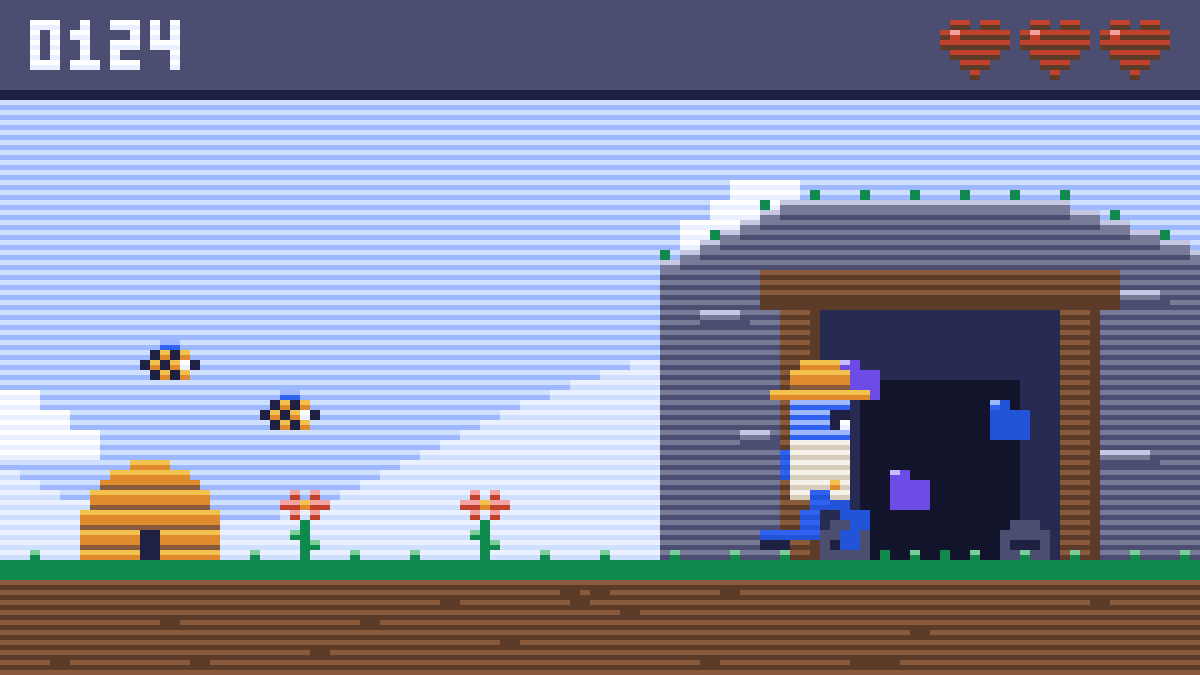
The game's picture is enlarged to twice its size first; then every second row of the screen goes one step darker, so each pixel of the art is a bright row over a darker one. For the second half of the loop the dark rows are two steps darker. The darkest colour of each ramp keeps its colour: the dark wood, moss and crystals at the cave, and the slate of the bar.
Also in this lesson 3 things to read up on 3 questions to check yourself
The idea
An old picture tube drew the picture line by line, with a thin dark gap between the lines. Some pixel art games bring that look back on purpose.
The lines belong to the screen, not to the art. A pixel art game draws a small picture and enlarges it before it shows it; here the picture is 120 by 68 pixels, shown at twice its size. The rule runs after the enlarging, so every pixel of the art becomes two rows of the screen: one as drawn, one darker. Run it on the small picture instead, and every second row of the art turns dark, which looks like blinds, not like a screen.
When to leave them off:
- Small text. The lines cut through every letter. A score of four digits still reads; draw dialogue and menus after the scanlines so they stay clean.
- Dark pictures. In a dark level the rule spares the dark colours, so the lines fall on the few bright things left, the player, a lamp, a key: exactly what the player must see. Turn them down there, or off.
- A picture that is not enlarged by a whole number. If your game stretches to any window size, say two and a half times, the lines cannot fit the art's rows and make uneven stripes of their own.
How it works
The rule looks at the pixel's row, counted from the top of the screen. "Rows of the screen per line" is 2, so every second row is the dark one.
On a dark row the colour goes "steps darker" steps down the palette's table of darker colours: white becomes the palest blue, honey becomes amber. But before each step the rule checks where that step leads. If the next colour would be one of the palette's two night colours, the colour stays. That spares the darkest colour of every ramp: ink, slate, dark wood, the darkest green, blue and violet. In the picture, the beams' shadowed side, the crystals, the moss and the bar's slate look the same with the lines as without.
The rows never move: they are counted from the screen, never from the world or the time. Add the time to make them roll, or count from the camera, and they crawl or flicker; the test "the dark rows stay where they are at every tick" holds them still. Until you touch a slider, the dark rows are one step darker for half the loop and two steps for the other half.
What goes wrong
The obvious reading of "every second row darker" is: one step darker for every pixel on that row. An AI writes exactly that and tries it on a bright picture, where it looks right. But the darkest colour of every ramp has only night left as its next step. Outlines, shadows and dark stone become night on every dark row, and dark parts of the picture turn into black stripes.
Switch the picture to "With the mistake". The sky and the bright parts look the same as with the rule. But the grass's dark green edge, the slate bar at the top, the dark wood of the cave's beams and the crystals inside fill with stripes of night.
Two tests catch it: "a colour that is dark already keeps its colour on a dark row", and "no dark row ever turns a pixel into night", which tries every colour of the palette with one, two and three steps.
The mistake, line by line
- /* Scanlines, with the mistake: the dark row goes down the table of darker colours whatever the colour
-    is, also into night. On a bright picture nothing is wrong. But a colour that is dark already, an
-    outline, a shadow, the inside of a cave, becomes night on every dark row, and dark parts of the
-    picture turn into black stripes in which nothing can be seen.
+ /* Scanlines: every second row of the screen a step darker, the look of an old television, where the
+    picture was drawn in lines with a thin dark gap between them. The rows are counted from the top of
+    the screen, so they never move. A dark row goes one step down the palette's table of darker colours,
+    but never into night: a colour that is dark already keeps its colour, so outlines and shadows do not
+    sink into black.

+    The rule works on the rows of the screen, after the game's picture has been enlarged to it: with a
+    picture shown at twice its size, every pixel of the art is two rows, one as drawn and one darker.
+
+    The pixel art way: a picture is a grid of whole numbers, 0 where nothing is and 1 to 25 for the
+    palette's colours.
+
     From the course "Shaders for pixel art" on spielerando.com.
     SPDX-License-Identifier: MIT */
…
  /** The next darker colour of the palette for each number. [0] is nothing. */
  const DARKER = [0, 24, 25, 2, 3, 15, 7, 20, 9, 20, 21, 10, 13, 25, 12, 16, 14, 25, 17, 18, 21, 24, 25, 22, 24, 24];
+ /** The palette's two night colours: a dark row never turns a pixel into one of them. */
+ const NIGHT = 24;
+ const NIGHT_LIGHTER = 25;

  /** The number at a place of the picture; outside the picture nothing is. */
…
  }

- /** The rule, wrong: the last row of every line a step darker, all the way into night. */
+ /** The rule: the last row of every line a step darker, but never into night. */
  export function shade(x: number, y: number, _tick: number, src: Frame, p: Params = DEFAULTS): number {
    let n = at(src, x, y);
    // the rows are counted from the top of the screen, not from the world and not from the time: they stay put
    if (y % p.rows !== p.rows - 1) return n;
-   // the dark row: one step down the table for each step, wrong: also into night, so dark colours sink into black
-   for (let i = 0; i < p.steps; i++) n = DARKER[n];
+   // the dark row: one step down the table for each step, but never into night, so what is dark already keeps its colour
+   for (let i = 0; i < p.steps; i++) {
+     const d = DARKER[n];
+     if (d === NIGHT || d === NIGHT_LIGHTER) break;
+     n = d;
+   }
    return n;
  }
What the test says about the mistake
✔ with lines of 2 rows, the first row keeps its colour and the second is one step darker
✖ a colour that is dark already keeps its colour on a dark row
    got 24, expected 1
✖ no dark row ever turns a pixel into night
    colour 1 became 24 with 1 steps
✔ with lines of 3 rows, two rows keep their colour and the third is darker
✔ the dark rows stay where they are at every tick
✖ more steps go further down the table and still stop before night
    got 24, expected 21
✔ an empty pixel stays empty
7 tests: 4 passed, 3 failed
Tell your AI
Add scanlines to my pixel art game: every second row of the screen one step darker, like an old television.

- Work on whole pixels and the colours of my palette only. Each colour's next darker colour: [a table, or each ramp of my palette from light to dark].
- Put it after the picture has been enlarged to the screen. My game is drawn at [320 by 180] and shown [3] times as large, so a line is [3] rows of the screen and the last of them is the dark one.
- Count the rows from the top of the screen. Not from the world, not from the camera, not from the time: the lines never move.
- The dark row is [1] step darker through the table, but never turns a colour into [my night colours, or black]: if the next step would be night, the colour stays as it is.
- Make it a setting the player can switch off, and draw [the dialogue text, the menus] after it so they stay clean.

Before the shader, write the same rule as a small plain function. It takes the enlarged picture as a grid of whole numbers (0 = empty, 1 to N = my colours), a place and the settings, and returns the number for that one pixel. Test it: on a line of [3] rows only the last row is one step darker and the others keep their colour; a colour whose next step is night keeps its colour; no dark row ever turns a pixel into night; the same row gives the same answer at every moment. Show me the test's output. Then write the shader so that it does exactly what the function does.
The code
Three times the same rule. The first is the one we test; the two shaders are that rule in a shader language, which is what your game runs.
The rule, tested: shader.ts
/* Scanlines: every second row of the screen a step darker, the look of an old television, where the
   picture was drawn in lines with a thin dark gap between them. The rows are counted from the top of
   the screen, so they never move. A dark row goes one step down the palette's table of darker colours,
   but never into night: a colour that is dark already keeps its colour, so outlines and shadows do not
   sink into black.

   The rule works on the rows of the screen, after the game's picture has been enlarged to it: with a
   picture shown at twice its size, every pixel of the art is two rows, one as drawn and one darker.

   The pixel art way: a picture is a grid of whole numbers, 0 where nothing is and 1 to 25 for the
   palette's colours.

   From the course "Shaders for pixel art" on spielerando.com.
   SPDX-License-Identifier: MIT */

export interface Frame {
  width: number;
  height: number;
  index: Uint8Array;
}

export const DEFAULTS = {
  /** How many rows of the screen make one line; the last row of each line is the dark one. 2 is every second row. */
  rows: 2,
  /** How many steps darker the dark row is. */
  steps: 1,
};
export type Params = typeof DEFAULTS;

/** The next darker colour of the palette for each number. [0] is nothing. */
const DARKER = [0, 24, 25, 2, 3, 15, 7, 20, 9, 20, 21, 10, 13, 25, 12, 16, 14, 25, 17, 18, 21, 24, 25, 22, 24, 24];
/** The palette's two night colours: a dark row never turns a pixel into one of them. */
const NIGHT = 24;
const NIGHT_LIGHTER = 25;

/** The number at a place of the picture; outside the picture nothing is. */
export function at(src: Frame, x: number, y: number): number {
  if (x < 0 || y < 0 || x >= src.width || y >= src.height) return 0;
  return src.index[y * src.width + x];
}

/** The rule: the last row of every line a step darker, but never into night. */
export function shade(x: number, y: number, _tick: number, src: Frame, p: Params = DEFAULTS): number {
  let n = at(src, x, y);
  // the rows are counted from the top of the screen, not from the world and not from the time: they stay put
  if (y % p.rows !== p.rows - 1) return n;
  // the dark row: one step down the table for each step, but never into night, so what is dark already keeps its colour
  for (let i = 0; i < p.steps; i++) {
    const d = DARKER[n];
    if (d === NIGHT || d === NIGHT_LIGHTER) break;
    n = d;
  }
  return n;
}
The same rule as a shader: GLSL
#version 300 es
// A shader the pixel art way: a pixel is a whole number, 0 where nothing is, 1 to 25 for the
// palette's colours. The rule is shade(): it is asked for every pixel and answers with a number.
// Everything outside the marked part is the same for every rule. Put your own palette in PALETTE.
precision highp float;
precision highp int;

uniform sampler2D SRC;   // the picture, sampled without smoothing (nearest)
uniform sampler2D OTHER; // a second picture, where the rule uses one
uniform int TICK;        // the time in ticks, 60 a second, counted by the game

const vec3 PALETTE[26] = vec3[26](
  vec3(0.0),
  vec3(31.0, 33.0, 66.0) / 255.0, // 1: k
  vec3(75.0, 78.0, 112.0) / 255.0, // 2: n
  vec3(120.0, 123.0, 152.0) / 255.0, // 3: m
  vec3(198.0, 199.0, 227.0) / 255.0, // 4: e
  vec3(255.0, 255.0, 255.0) / 255.0, // 5: w
  vec3(246.0, 241.0, 233.0) / 255.0, // 6: c
  vec3(214.0, 205.0, 189.0) / 255.0, // 7: d
  vec3(242.0, 193.0, 78.0) / 255.0, // 8: y
  vec3(224.0, 138.0, 46.0) / 255.0, // 9: o
  vec3(194.0, 65.0, 45.0) / 255.0, // 10: r
  vec3(244.0, 163.0, 160.0) / 255.0, // 11: p
  vec3(47.0, 98.0, 240.0) / 255.0, // 12: b
  vec3(35.0, 83.0, 214.0) / 255.0, // 13: u
  vec3(157.0, 184.0, 255.0) / 255.0, // 14: s
  vec3(234.0, 240.0, 255.0) / 255.0, // 15: a
  vec3(207.0, 224.0, 255.0) / 255.0, // 16: i
  vec3(15.0, 138.0, 76.0) / 255.0, // 17: g
  vec3(124.0, 207.0, 154.0) / 255.0, // 18: l
  vec3(226.0, 244.0, 234.0) / 255.0, // 19: f
  vec3(138.0, 90.0, 60.0) / 255.0, // 20: t
  vec3(92.0, 59.0, 40.0) / 255.0, // 21: h
  vec3(109.0, 76.0, 230.0) / 255.0, // 22: v
  vec3(201.0, 187.0, 255.0) / 255.0, // 23: q
  vec3(18.0, 20.0, 43.0) / 255.0, // 24: x
  vec3(39.0, 43.0, 82.0) / 255.0 // 25: z
);

// Which colour of the palette is this? 0 where nothing is drawn.
int number(vec4 c) {
  if (c.a < 0.5) return 0;
  int best = 1;
  float least = 9.0;
  for (int i = 1; i <= 25; i++) {
    vec3 d = c.rgb - PALETTE[i];
    float away = dot(d, d);
    if (away < least) {
      least = away;
      best = i;
    }
  }
  return best;
}

// The number at a place of the picture; outside the picture nothing is.
int at(ivec2 p) {
  ivec2 size = textureSize(SRC, 0);
  if (p.x < 0 || p.y < 0 || p.x >= size.x || p.y >= size.y) return 0;
  return number(texelFetch(SRC, p, 0));
}

// The same for the second picture.
int otherAt(ivec2 p) {
  ivec2 size = textureSize(OTHER, 0);
  if (p.x < 0 || p.y < 0 || p.x >= size.x || p.y >= size.y) return 0;
  return number(texelFetch(OTHER, p, 0));
}

// a wrapped into 0 .. n-1, also for a below zero (the % sign is not safe there)
int wrap(int a, int n) {
  return a - n * int(floor(float(a) / float(n)));
}

// ---- the rule ----
uniform int rows;  // how many rows of the screen make one line; the last row of each line is the dark one. 2 is every second row.
uniform int steps; // how many steps darker the dark row is

// the next darker colour of the palette for each number. [0] is nothing.
const int DARKER[26] = int[26](0, 24, 25, 2, 3, 15, 7, 20, 9, 20, 21, 10, 13, 25, 12, 16, 14, 25, 17, 18, 21, 24, 25, 22, 24, 24);
// the palette's two night colours: a dark row never turns a pixel into one of them
const int NIGHT = 24;
const int NIGHT_LIGHTER = 25;

// the last row of every line a step darker, but never into night
int shade(ivec2 p) {
  int n = at(p);
  // the rows are counted from the top of the screen, not from the world and not from the time: they stay put
  if (p.y % rows != rows - 1) return n;
  // the dark row: one step down the table for each step, but never into night, so what is dark already keeps its colour
  for (int i = 0; i < steps; i++) {
    int d = DARKER[n];
    if (d == NIGHT || d == NIGHT_LIGHTER) break;
    n = d;
  }
  return n;
}
// ---- end of the rule ----

out vec4 FRAGMENT;

void main() {
  // the pixel's place, counted from the top left as in the picture
  ivec2 p = ivec2(int(gl_FragCoord.x), textureSize(SRC, 0).y - 1 - int(gl_FragCoord.y));
  int n = shade(p);
  FRAGMENT = n == 0 ? vec4(0.0) : vec4(PALETTE[n], 1.0);
}
The same rule for Godot 4
shader_type canvas_item;
// A shader the pixel art way: a pixel is a whole number, 0 where nothing is, 1 to 25 for the
// palette's colours. The rule is shade(): it is asked for every pixel and answers with a number.
// Everything outside the marked part is the same for every rule. Put your own palette in PALETTE.
//
// Put this on a ColorRect that covers the screen, above everything it should change.
// The rule counts pixels as this shader sees them. Let the game draw at the size of its art and
// enlarge the finished picture (the project's stretch mode "viewport"), or it counts window pixels.
uniform sampler2D SRC : hint_screen_texture, filter_nearest; // what is on the screen behind it
uniform sampler2D OTHER : filter_nearest; // a second picture, where the rule uses one
// The time in ticks, 60 a second. The game counts it itself: add 1 in the _physics_process of a
// node that pauses with the game, and set it there, so a paused game pauses its shaders:
//   tick += 1
//   material.set_shader_parameter("TICK", tick)
uniform int TICK;

const vec3 PALETTE[26] = vec3[26](
  vec3(0.0),
  vec3(31.0, 33.0, 66.0) / 255.0, // 1: k
  vec3(75.0, 78.0, 112.0) / 255.0, // 2: n
  vec3(120.0, 123.0, 152.0) / 255.0, // 3: m
  vec3(198.0, 199.0, 227.0) / 255.0, // 4: e
  vec3(255.0, 255.0, 255.0) / 255.0, // 5: w
  vec3(246.0, 241.0, 233.0) / 255.0, // 6: c
  vec3(214.0, 205.0, 189.0) / 255.0, // 7: d
  vec3(242.0, 193.0, 78.0) / 255.0, // 8: y
  vec3(224.0, 138.0, 46.0) / 255.0, // 9: o
  vec3(194.0, 65.0, 45.0) / 255.0, // 10: r
  vec3(244.0, 163.0, 160.0) / 255.0, // 11: p
  vec3(47.0, 98.0, 240.0) / 255.0, // 12: b
  vec3(35.0, 83.0, 214.0) / 255.0, // 13: u
  vec3(157.0, 184.0, 255.0) / 255.0, // 14: s
  vec3(234.0, 240.0, 255.0) / 255.0, // 15: a
  vec3(207.0, 224.0, 255.0) / 255.0, // 16: i
  vec3(15.0, 138.0, 76.0) / 255.0, // 17: g
  vec3(124.0, 207.0, 154.0) / 255.0, // 18: l
  vec3(226.0, 244.0, 234.0) / 255.0, // 19: f
  vec3(138.0, 90.0, 60.0) / 255.0, // 20: t
  vec3(92.0, 59.0, 40.0) / 255.0, // 21: h
  vec3(109.0, 76.0, 230.0) / 255.0, // 22: v
  vec3(201.0, 187.0, 255.0) / 255.0, // 23: q
  vec3(18.0, 20.0, 43.0) / 255.0, // 24: x
  vec3(39.0, 43.0, 82.0) / 255.0 // 25: z
);

// Which colour of the palette is this? 0 where nothing is drawn.
int number(vec4 c) {
  if (c.a < 0.5) return 0;
  int best = 1;
  float least = 9.0;
  for (int i = 1; i <= 25; i++) {
    vec3 d = c.rgb - PALETTE[i];
    float away = dot(d, d);
    if (away < least) {
      least = away;
      best = i;
    }
  }
  return best;
}

// The number at a place of the picture; outside the picture nothing is.
int at(ivec2 p) {
  ivec2 size = textureSize(SRC, 0);
  if (p.x < 0 || p.y < 0 || p.x >= size.x || p.y >= size.y) return 0;
  return number(texelFetch(SRC, p, 0));
}

// The same for the second picture.
int otherAt(ivec2 p) {
  ivec2 size = textureSize(OTHER, 0);
  if (p.x < 0 || p.y < 0 || p.x >= size.x || p.y >= size.y) return 0;
  return number(texelFetch(OTHER, p, 0));
}

// a wrapped into 0 .. n-1, also for a below zero (the % sign is not safe there)
int wrap(int a, int n) {
  return a - n * int(floor(float(a) / float(n)));
}

// ---- the rule ----
uniform int rows;  // how many rows of the screen make one line; the last row of each line is the dark one. 2 is every second row.
uniform int steps; // how many steps darker the dark row is

// the next darker colour of the palette for each number. [0] is nothing.
const int DARKER[26] = int[26](0, 24, 25, 2, 3, 15, 7, 20, 9, 20, 21, 10, 13, 25, 12, 16, 14, 25, 17, 18, 21, 24, 25, 22, 24, 24);
// the palette's two night colours: a dark row never turns a pixel into one of them
const int NIGHT = 24;
const int NIGHT_LIGHTER = 25;

// the last row of every line a step darker, but never into night
int shade(ivec2 p) {
  int n = at(p);
  // the rows are counted from the top of the screen, not from the world and not from the time: they stay put
  if (p.y % rows != rows - 1) return n;
  // the dark row: one step down the table for each step, but never into night, so what is dark already keeps its colour
  for (int i = 0; i < steps; i++) {
    int d = DARKER[n];
    if (d == NIGHT || d == NIGHT_LIGHTER) break;
    n = d;
  }
  return n;
}
// ---- end of the rule ----

void fragment() {
  ivec2 p = ivec2(SCREEN_UV * vec2(textureSize(SRC, 0)));
  int n = shade(p);
  COLOR = n == 0 ? vec4(0.0) : vec4(PALETTE[n], 1.0);
}
The test: shader.test.ts
import assert from "node:assert/strict";
import { test } from "node:test";
import { DEFAULTS, type Frame, shade } from "./shader.ts";

/** A tiny picture from rows of digits: 0 is nothing, 1 to 9 are colours. */
function picture(rows: string[]): Frame {
  return { width: rows[0].length, height: rows.length, index: Uint8Array.from(rows.join(""), Number) };
}

// two rows of white (5), two of honey (8), two of ink (1) and slate (2), which are dark already
const SCREEN = picture([
  "5555",
  "5555",
  "8888",
  "8888",
  "1212",
  "1212",
]);

// every colour of the palette, 1 to 25, in two rows: the second is a dark row
const ALL: Frame = { width: 25, height: 2, index: Uint8Array.from({ length: 50 }, (_, i) => (i % 25) + 1) };

test("with lines of 2 rows, the first row keeps its colour and the second is one step darker", () => {
  // white goes darker as the palest blue (15), honey as amber (9)
  assert.deepEqual([0, 1, 2, 3].map((y) => shade(1, y, 0, SCREEN)), [5, 15, 8, 9]);
});

test("a colour that is dark already keeps its colour on a dark row", () => {
  assert.equal(shade(0, 5, 0, SCREEN), 1);
  assert.equal(shade(1, 5, 0, SCREEN), 2);
});

test("no dark row ever turns a pixel into night", () => {
  for (const steps of [1, 2, 3]) {
    for (let x = 0; x < 25; x++) {
      const before = ALL.index[25 + x];
      const after = shade(x, 1, 0, ALL, { ...DEFAULTS, steps });
      if (before !== 24 && before !== 25) assert.ok(after !== 24 && after !== 25, `colour ${before} became ${after} with ${steps} steps`);
    }
  }
});

test("with lines of 3 rows, two rows keep their colour and the third is darker", () => {
  const white = picture(["55", "55", "55", "55", "55", "55"]);
  assert.deepEqual([0, 1, 2, 3, 4, 5].map((y) => shade(0, y, 0, white, { ...DEFAULTS, rows: 3 })), [5, 5, 15, 5, 5, 15]);
});

test("the dark rows stay where they are at every tick", () => {
  for (const tick of [1, 2, 3, 60, 1001]) {
    for (let y = 0; y < SCREEN.height; y++) assert.equal(shade(2, y, tick, SCREEN), shade(2, y, 0, SCREEN), `row ${y} at tick ${tick}`);
  }
});

test("more steps go further down the table and still stop before night", () => {
  // white: palest blue, then sky (16); honey: amber, wood (20), dark wood (21), and no further, for dark wood's next step is night
  assert.equal(shade(0, 1, 0, SCREEN, { ...DEFAULTS, steps: 2 }), 16);
  assert.equal(shade(0, 3, 0, SCREEN, { ...DEFAULTS, steps: 2 }), 20);
  assert.equal(shade(0, 3, 0, SCREEN, { ...DEFAULTS, steps: 3 }), 21);
  assert.equal(shade(0, 3, 0, SCREEN, { ...DEFAULTS, steps: 4 }), 21);
});

test("an empty pixel stays empty", () => {
  const holes = picture(["00", "00"]);
  assert.equal(shade(0, 1, 0, holes), 0);
});
- 7 tests pass on the rule.
- With the mistake put in, 3 of them fail: "a colour that is dark already keeps its colour on a dark row", "no dark row ever turns a pixel into night", "more steps go further down the table and still stop before night".
- The mistake shows in the picture above: switch to "With the mistake".
- The shader ran in a browser (Chrome/158.0.8127.37) on 12 pictures and gave the rule's picture in 388,800 of 388,800 pixels.
Try it
- Set "rows of the screen per line" to 3. The picture is enlarged by 2, so the lines no longer fall between the art's rows: some pixels get a dark row at the top, some at the bottom, some none, and an uneven stripe runs through the picture. Back at 2, every pixel of the art has its bright row and its dark row.
- Set "steps darker" to 3. The sky and the meadow get heavy dark lines, while the cave's dark wood, the crystals and the bar's slate do not change at all: their next step would be night.
- Switch between "With the rule" and "With the mistake" and look only at the dark things: the beekeeper's boots, the shadowed side of the beams, the bar. With the rule they stay solid; with the mistake each gets stripes of night.
Read up
Where to go deeper: the pages of ours this lesson builds on, and what others have written about its point.
The Order of Shader Effects in a Pixel Art Game
Where scanlines go among all the effects of a game: after the night and the light, together with the enlarging, because they belong to the rows of the screen and not to the art.
A sprite written as rows of letters and enlarged by whole numbers only: the recipe refuses two and a half, where some pixels come out two wide and some three, the unevenness that throws scanlines off.
How Godot 4 keeps a pixel art game enlarged by a whole number: the stretch scale mode integer rounds a scale of 2.5 down to 2 and fills the rest with black bars, so the lines can fit the art's rows.
Check yourself: three questions
Each answer is checked and explained at once. The questions are part of the quiz, so they count for your Game Coder IQ like any other.
Your AI ran this lesson's scanline rule on the game's small picture, before it was enlarged to the screen. What do you see?
Next lesson The Order of Shader Effects in a Pixel Art Game
Give the whole lesson to your AI
The button copies what to tell it together with the tested rule, its test and both shaders, so your AI has everything to build this in your game and to show you that it works.
This is a lesson from the course "Shaders for Pixel Art" on spielerando.com: https://spielerando.com/en/courses/pixel-shaders/scanlines

Add scanlines to my pixel art game: every second row of the screen one step darker, like an old television.

- Work on whole pixels and the colours of my palette only. Each colour's next darker colour: [a table, or each ramp of my palette from light to dark].
- Put it after the picture has been enlarged to the screen. My game is drawn at [320 by 180] and shown [3] times as large, so a line is [3] rows of the screen and the last of them is the dark one.
- Count the rows from the top of the screen. Not from the world, not from the camera, not from the time: the lines never move.
- The dark row is [1] step darker through the table, but never turns a colour into [my night colours, or black]: if the next step would be night, the colour stays as it is.
- Make it a setting the player can switch off, and draw [the dialogue text, the menus] after it so they stay clean.

Before the shader, write the same rule as a small plain function. It takes the enlarged picture as a grid of whole numbers (0 = empty, 1 to N = my colours), a place and the settings, and returns the number for that one pixel. Test it: on a line of [3] rows only the last row is one step darker and the others keep their colour; a colour whose next step is night keeps its colour; no dark row ever turns a pixel into night; the same row gives the same answer at every moment. Show me the test's output. Then write the shader so that it does exactly what the function does.

The rule, tested (shader.ts):
```ts
/* Scanlines: every second row of the screen a step darker, the look of an old television, where the
   picture was drawn in lines with a thin dark gap between them. The rows are counted from the top of
   the screen, so they never move. A dark row goes one step down the palette's table of darker colours,
   but never into night: a colour that is dark already keeps its colour, so outlines and shadows do not
   sink into black.

   The rule works on the rows of the screen, after the game's picture has been enlarged to it: with a
   picture shown at twice its size, every pixel of the art is two rows, one as drawn and one darker.

   The pixel art way: a picture is a grid of whole numbers, 0 where nothing is and 1 to 25 for the
   palette's colours.

   From the course "Shaders for pixel art" on spielerando.com.
   SPDX-License-Identifier: MIT */

export interface Frame {
  width: number;
  height: number;
  index: Uint8Array;
}

export const DEFAULTS = {
  /** How many rows of the screen make one line; the last row of each line is the dark one. 2 is every second row. */
  rows: 2,
  /** How many steps darker the dark row is. */
  steps: 1,
};
export type Params = typeof DEFAULTS;

/** The next darker colour of the palette for each number. [0] is nothing. */
const DARKER = [0, 24, 25, 2, 3, 15, 7, 20, 9, 20, 21, 10, 13, 25, 12, 16, 14, 25, 17, 18, 21, 24, 25, 22, 24, 24];
/** The palette's two night colours: a dark row never turns a pixel into one of them. */
const NIGHT = 24;
const NIGHT_LIGHTER = 25;

/** The number at a place of the picture; outside the picture nothing is. */
export function at(src: Frame, x: number, y: number): number {
  if (x < 0 || y < 0 || x >= src.width || y >= src.height) return 0;
  return src.index[y * src.width + x];
}

/** The rule: the last row of every line a step darker, but never into night. */
export function shade(x: number, y: number, _tick: number, src: Frame, p: Params = DEFAULTS): number {
  let n = at(src, x, y);
  // the rows are counted from the top of the screen, not from the world and not from the time: they stay put
  if (y % p.rows !== p.rows - 1) return n;
  // the dark row: one step down the table for each step, but never into night, so what is dark already keeps its colour
  for (let i = 0; i < p.steps; i++) {
    const d = DARKER[n];
    if (d === NIGHT || d === NIGHT_LIGHTER) break;
    n = d;
  }
  return n;
}
```

Its test (shader.test.ts):
```ts
import assert from "node:assert/strict";
import { test } from "node:test";
import { DEFAULTS, type Frame, shade } from "./shader.ts";

/** A tiny picture from rows of digits: 0 is nothing, 1 to 9 are colours. */
function picture(rows: string[]): Frame {
  return { width: rows[0].length, height: rows.length, index: Uint8Array.from(rows.join(""), Number) };
}

// two rows of white (5), two of honey (8), two of ink (1) and slate (2), which are dark already
const SCREEN = picture([
  "5555",
  "5555",
  "8888",
  "8888",
  "1212",
  "1212",
]);

// every colour of the palette, 1 to 25, in two rows: the second is a dark row
const ALL: Frame = { width: 25, height: 2, index: Uint8Array.from({ length: 50 }, (_, i) => (i % 25) + 1) };

test("with lines of 2 rows, the first row keeps its colour and the second is one step darker", () => {
  // white goes darker as the palest blue (15), honey as amber (9)
  assert.deepEqual([0, 1, 2, 3].map((y) => shade(1, y, 0, SCREEN)), [5, 15, 8, 9]);
});

test("a colour that is dark already keeps its colour on a dark row", () => {
  assert.equal(shade(0, 5, 0, SCREEN), 1);
  assert.equal(shade(1, 5, 0, SCREEN), 2);
});

test("no dark row ever turns a pixel into night", () => {
  for (const steps of [1, 2, 3]) {
    for (let x = 0; x < 25; x++) {
      const before = ALL.index[25 + x];
      const after = shade(x, 1, 0, ALL, { ...DEFAULTS, steps });
      if (before !== 24 && before !== 25) assert.ok(after !== 24 && after !== 25, `colour ${before} became ${after} with ${steps} steps`);
    }
  }
});

test("with lines of 3 rows, two rows keep their colour and the third is darker", () => {
  const white = picture(["55", "55", "55", "55", "55", "55"]);
  assert.deepEqual([0, 1, 2, 3, 4, 5].map((y) => shade(0, y, 0, white, { ...DEFAULTS, rows: 3 })), [5, 5, 15, 5, 5, 15]);
});

test("the dark rows stay where they are at every tick", () => {
  for (const tick of [1, 2, 3, 60, 1001]) {
    for (let y = 0; y < SCREEN.height; y++) assert.equal(shade(2, y, tick, SCREEN), shade(2, y, 0, SCREEN), `row ${y} at tick ${tick}`);
  }
});

test("more steps go further down the table and still stop before night", () => {
  // white: palest blue, then sky (16); honey: amber, wood (20), dark wood (21), and no further, for dark wood's next step is night
  assert.equal(shade(0, 1, 0, SCREEN, { ...DEFAULTS, steps: 2 }), 16);
  assert.equal(shade(0, 3, 0, SCREEN, { ...DEFAULTS, steps: 2 }), 20);
  assert.equal(shade(0, 3, 0, SCREEN, { ...DEFAULTS, steps: 3 }), 21);
  assert.equal(shade(0, 3, 0, SCREEN, { ...DEFAULTS, steps: 4 }), 21);
});

test("an empty pixel stays empty", () => {
  const holes = picture(["00", "00"]);
  assert.equal(shade(0, 1, 0, holes), 0);
});
```

The same rule as a GLSL shader (WebGL 2, OpenGL ES 3.0), checked against the rule pixel for pixel:
```glsl
#version 300 es
// A shader the pixel art way: a pixel is a whole number, 0 where nothing is, 1 to 25 for the
// palette's colours. The rule is shade(): it is asked for every pixel and answers with a number.
// Everything outside the marked part is the same for every rule. Put your own palette in PALETTE.
precision highp float;
precision highp int;

uniform sampler2D SRC;   // the picture, sampled without smoothing (nearest)
uniform sampler2D OTHER; // a second picture, where the rule uses one
uniform int TICK;        // the time in ticks, 60 a second, counted by the game

const vec3 PALETTE[26] = vec3[26](
  vec3(0.0),
  vec3(31.0, 33.0, 66.0) / 255.0, // 1: k
  vec3(75.0, 78.0, 112.0) / 255.0, // 2: n
  vec3(120.0, 123.0, 152.0) / 255.0, // 3: m
  vec3(198.0, 199.0, 227.0) / 255.0, // 4: e
  vec3(255.0, 255.0, 255.0) / 255.0, // 5: w
  vec3(246.0, 241.0, 233.0) / 255.0, // 6: c
  vec3(214.0, 205.0, 189.0) / 255.0, // 7: d
  vec3(242.0, 193.0, 78.0) / 255.0, // 8: y
  vec3(224.0, 138.0, 46.0) / 255.0, // 9: o
  vec3(194.0, 65.0, 45.0) / 255.0, // 10: r
  vec3(244.0, 163.0, 160.0) / 255.0, // 11: p
  vec3(47.0, 98.0, 240.0) / 255.0, // 12: b
  vec3(35.0, 83.0, 214.0) / 255.0, // 13: u
  vec3(157.0, 184.0, 255.0) / 255.0, // 14: s
  vec3(234.0, 240.0, 255.0) / 255.0, // 15: a
  vec3(207.0, 224.0, 255.0) / 255.0, // 16: i
  vec3(15.0, 138.0, 76.0) / 255.0, // 17: g
  vec3(124.0, 207.0, 154.0) / 255.0, // 18: l
  vec3(226.0, 244.0, 234.0) / 255.0, // 19: f
  vec3(138.0, 90.0, 60.0) / 255.0, // 20: t
  vec3(92.0, 59.0, 40.0) / 255.0, // 21: h
  vec3(109.0, 76.0, 230.0) / 255.0, // 22: v
  vec3(201.0, 187.0, 255.0) / 255.0, // 23: q
  vec3(18.0, 20.0, 43.0) / 255.0, // 24: x
  vec3(39.0, 43.0, 82.0) / 255.0 // 25: z
);

// Which colour of the palette is this? 0 where nothing is drawn.
int number(vec4 c) {
  if (c.a < 0.5) return 0;
  int best = 1;
  float least = 9.0;
  for (int i = 1; i <= 25; i++) {
    vec3 d = c.rgb - PALETTE[i];
    float away = dot(d, d);
    if (away < least) {
      least = away;
      best = i;
    }
  }
  return best;
}

// The number at a place of the picture; outside the picture nothing is.
int at(ivec2 p) {
  ivec2 size = textureSize(SRC, 0);
  if (p.x < 0 || p.y < 0 || p.x >= size.x || p.y >= size.y) return 0;
  return number(texelFetch(SRC, p, 0));
}

// The same for the second picture.
int otherAt(ivec2 p) {
  ivec2 size = textureSize(OTHER, 0);
  if (p.x < 0 || p.y < 0 || p.x >= size.x || p.y >= size.y) return 0;
  return number(texelFetch(OTHER, p, 0));
}

// a wrapped into 0 .. n-1, also for a below zero (the % sign is not safe there)
int wrap(int a, int n) {
  return a - n * int(floor(float(a) / float(n)));
}

// ---- the rule ----
uniform int rows;  // how many rows of the screen make one line; the last row of each line is the dark one. 2 is every second row.
uniform int steps; // how many steps darker the dark row is

// the next darker colour of the palette for each number. [0] is nothing.
const int DARKER[26] = int[26](0, 24, 25, 2, 3, 15, 7, 20, 9, 20, 21, 10, 13, 25, 12, 16, 14, 25, 17, 18, 21, 24, 25, 22, 24, 24);
// the palette's two night colours: a dark row never turns a pixel into one of them
const int NIGHT = 24;
const int NIGHT_LIGHTER = 25;

// the last row of every line a step darker, but never into night
int shade(ivec2 p) {
  int n = at(p);
  // the rows are counted from the top of the screen, not from the world and not from the time: they stay put
  if (p.y % rows != rows - 1) return n;
  // the dark row: one step down the table for each step, but never into night, so what is dark already keeps its colour
  for (int i = 0; i < steps; i++) {
    int d = DARKER[n];
    if (d == NIGHT || d == NIGHT_LIGHTER) break;
    n = d;
  }
  return n;
}
// ---- end of the rule ----

out vec4 FRAGMENT;

void main() {
  // the pixel's place, counted from the top left as in the picture
  ivec2 p = ivec2(int(gl_FragCoord.x), textureSize(SRC, 0).y - 1 - int(gl_FragCoord.y));
  int n = shade(p);
  FRAGMENT = n == 0 ? vec4(0.0) : vec4(PALETTE[n], 1.0);
}
```

The same rule for Godot 4 (not run by the authors):
```gdshader
shader_type canvas_item;
// A shader the pixel art way: a pixel is a whole number, 0 where nothing is, 1 to 25 for the
// palette's colours. The rule is shade(): it is asked for every pixel and answers with a number.
// Everything outside the marked part is the same for every rule. Put your own palette in PALETTE.
//
// Put this on a ColorRect that covers the screen, above everything it should change.
// The rule counts pixels as this shader sees them. Let the game draw at the size of its art and
// enlarge the finished picture (the project's stretch mode "viewport"), or it counts window pixels.
uniform sampler2D SRC : hint_screen_texture, filter_nearest; // what is on the screen behind it
uniform sampler2D OTHER : filter_nearest; // a second picture, where the rule uses one
// The time in ticks, 60 a second. The game counts it itself: add 1 in the _physics_process of a
// node that pauses with the game, and set it there, so a paused game pauses its shaders:
//   tick += 1
//   material.set_shader_parameter("TICK", tick)
uniform int TICK;

const vec3 PALETTE[26] = vec3[26](
  vec3(0.0),
  vec3(31.0, 33.0, 66.0) / 255.0, // 1: k
  vec3(75.0, 78.0, 112.0) / 255.0, // 2: n
  vec3(120.0, 123.0, 152.0) / 255.0, // 3: m
  vec3(198.0, 199.0, 227.0) / 255.0, // 4: e
  vec3(255.0, 255.0, 255.0) / 255.0, // 5: w
  vec3(246.0, 241.0, 233.0) / 255.0, // 6: c
  vec3(214.0, 205.0, 189.0) / 255.0, // 7: d
  vec3(242.0, 193.0, 78.0) / 255.0, // 8: y
  vec3(224.0, 138.0, 46.0) / 255.0, // 9: o
  vec3(194.0, 65.0, 45.0) / 255.0, // 10: r
  vec3(244.0, 163.0, 160.0) / 255.0, // 11: p
  vec3(47.0, 98.0, 240.0) / 255.0, // 12: b
  vec3(35.0, 83.0, 214.0) / 255.0, // 13: u
  vec3(157.0, 184.0, 255.0) / 255.0, // 14: s
  vec3(234.0, 240.0, 255.0) / 255.0, // 15: a
  vec3(207.0, 224.0, 255.0) / 255.0, // 16: i
  vec3(15.0, 138.0, 76.0) / 255.0, // 17: g
  vec3(124.0, 207.0, 154.0) / 255.0, // 18: l
  vec3(226.0, 244.0, 234.0) / 255.0, // 19: f
  vec3(138.0, 90.0, 60.0) / 255.0, // 20: t
  vec3(92.0, 59.0, 40.0) / 255.0, // 21: h
  vec3(109.0, 76.0, 230.0) / 255.0, // 22: v
  vec3(201.0, 187.0, 255.0) / 255.0, // 23: q
  vec3(18.0, 20.0, 43.0) / 255.0, // 24: x
  vec3(39.0, 43.0, 82.0) / 255.0 // 25: z
);

// Which colour of the palette is this? 0 where nothing is drawn.
int number(vec4 c) {
  if (c.a < 0.5) return 0;
  int best = 1;
  float least = 9.0;
  for (int i = 1; i <= 25; i++) {
    vec3 d = c.rgb - PALETTE[i];
    float away = dot(d, d);
    if (away < least) {
      least = away;
      best = i;
    }
  }
  return best;
}

// The number at a place of the picture; outside the picture nothing is.
int at(ivec2 p) {
  ivec2 size = textureSize(SRC, 0);
  if (p.x < 0 || p.y < 0 || p.x >= size.x || p.y >= size.y) return 0;
  return number(texelFetch(SRC, p, 0));
}

// The same for the second picture.
int otherAt(ivec2 p) {
  ivec2 size = textureSize(OTHER, 0);
  if (p.x < 0 || p.y < 0 || p.x >= size.x || p.y >= size.y) return 0;
  return number(texelFetch(OTHER, p, 0));
}

// a wrapped into 0 .. n-1, also for a below zero (the % sign is not safe there)
int wrap(int a, int n) {
  return a - n * int(floor(float(a) / float(n)));
}

// ---- the rule ----
uniform int rows;  // how many rows of the screen make one line; the last row of each line is the dark one. 2 is every second row.
uniform int steps; // how many steps darker the dark row is

// the next darker colour of the palette for each number. [0] is nothing.
const int DARKER[26] = int[26](0, 24, 25, 2, 3, 15, 7, 20, 9, 20, 21, 10, 13, 25, 12, 16, 14, 25, 17, 18, 21, 24, 25, 22, 24, 24);
// the palette's two night colours: a dark row never turns a pixel into one of them
const int NIGHT = 24;
const int NIGHT_LIGHTER = 25;

// the last row of every line a step darker, but never into night
int shade(ivec2 p) {
  int n = at(p);
  // the rows are counted from the top of the screen, not from the world and not from the time: they stay put
  if (p.y % rows != rows - 1) return n;
  // the dark row: one step down the table for each step, but never into night, so what is dark already keeps its colour
  for (int i = 0; i < steps; i++) {
    int d = DARKER[n];
    if (d == NIGHT || d == NIGHT_LIGHTER) break;
    n = d;
  }
  return n;
}
// ---- end of the rule ----

void fragment() {
  ivec2 p = ivec2(SCREEN_UV * vec2(textureSize(SRC, 0)));
  int n = shade(p);
  COLOR = n == 0 ? vec4(0.0) : vec4(PALETTE[n], 1.0);
}
```
How useful was this page?
Nobody has rated this page yet.