Wo bin ich? Streifen nach Pixelposition im Pixel-Art-Shader
In der letzten Lektion hat die Regel auf eine Sache geschaut: die Zahl an ihrem eigenen Platz. Jetzt weiß sie auch, wo dieser Platz ist, als Spalte und Zeile, gezählt in ganzen Pixeln von oben links. Mit der Zeile allein legt sie Streifen über ein ganzes Bild, und diese Streifen werden nur gleichmäßig, wenn die Regel Zeilen zählt und nicht Anteile am Bildschirm.
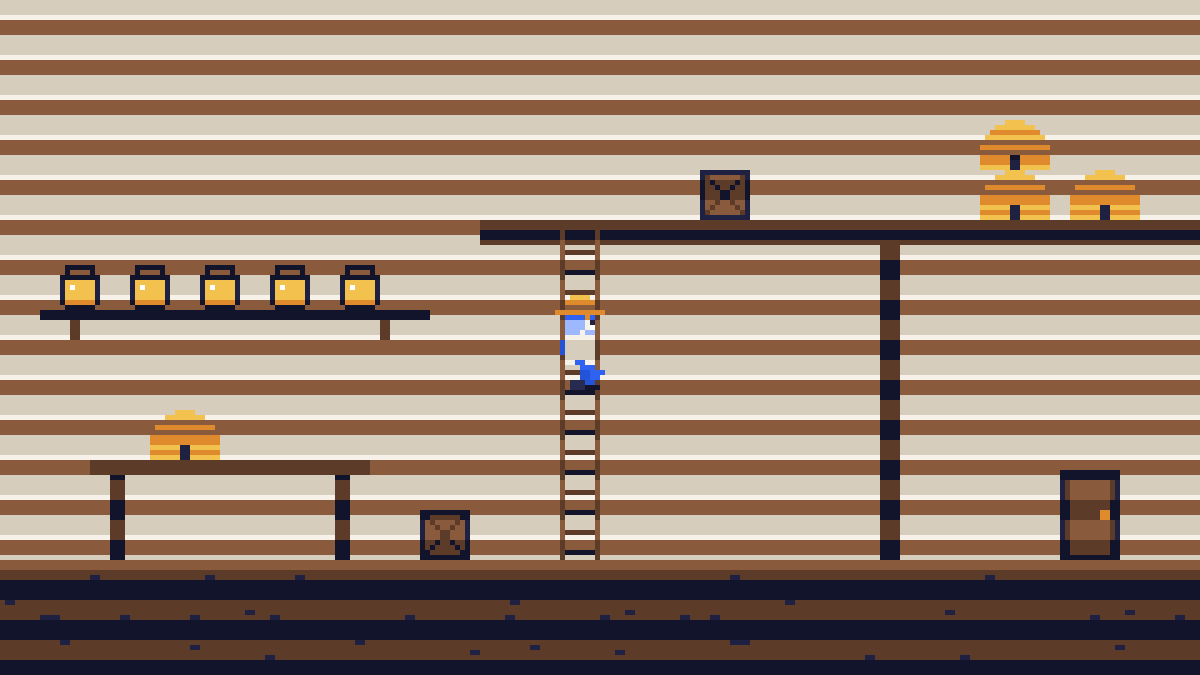
Die Regel kennt nur die Zeile, für die sie gefragt wird. Jeder Streifen hat gleich viele Zeilen, also bleiben die Streifen, wo sie sind, während sie hindurchklettert: Ihr Hut ist in einem Streifen hell und im nächsten dunkler.
Auch in dieser Lektion 3 Lesetipps zum Vertiefen 3 Fragen zum Selbsttest
Die Idee
Der Platz eines Pixels sind zwei ganze Zahlen. Die Spalte, x, beginnt links bei 0. Die Zeile, y, beginnt oben bei 0. Das Bild oben ist 240 Pixel breit und 135 hoch, sein Pixel oben links liegt also bei 0, 0 und der unten rechts bei 239, 134. Die Regel wird für jeden davon gefragt und erfährt, welcher es ist.
Manche Effekte gehören zu einem Ort und nicht zu einem Ding: Schattenstreifen, wo die Sonne durch die Latten eines Fensterladens fällt, ein gestreifter Look über einem ganzen Raum, die Linien einer linierten Seite. Die Regel dieser Lektion legt solche Streifen. Jeder Streifen ist gleich viele Zeilen hoch, und jeder zweite ist eine Stufe dunkler.
Die Streifen gehören zum Ort: Die Imkerin klettert ihre Leiter durch sie hindurch, und sie bleiben, wo sie sind.
So funktioniert es
Die Regel nimmt ihre Zeile und teilt sie durch die Höhe eines Streifens; sie behält nur den ganzen Teil. Bei Streifen von 8 Zeilen sind die Zeilen 0 bis 7 Streifen 0, die Zeilen 8 bis 15 Streifen 1 und so weiter nach unten. Ist die Nummer des Streifens ungerade, wird der Pixel eine Stufe dunkler; ist sie gerade, bleibt er, wie er kam. Die Spalte spielt keine Rolle, eine ganze Zeile liegt also immer in einem Streifen.
„Eine Stufe dunkler“ kommt aus einer Tabelle, die für jede Farbe der Palette die nächstdunklere nennt: Creme wird Sand, Sand wird Holz, Honig wird Bernstein. Die Antwort ist also weiter eine Nummer der Palette, und ein leerer Pixel bleibt leer, weil in der Tabelle für nichts wieder nichts steht.
Der Regler stellt ein, wie viele Zeilen ein Streifen hoch ist, von 2 bis 16. Er beginnt bei 8. Die Wand des Schuppens besteht aus Brettern, die 4 Zeilen hoch sind. Bei 4, 8, 12 oder 16 Zeilen liegt also jedes Brett ganz in einem Streifen. So siehst du leicht, ob die Streifen gleichmäßig sind.
Was schiefgeht
Die meisten Beispiele für Shader geben den Platz eines Pixels nicht in Pixeln an. Sie geben ihn als Anteil am Bild an: 0 ganz oben, 1 ganz unten, 0,5 in der Mitte. Eine KI, die daraus gelernt hat, rechnet den Streifen aus diesem Anteil aus. Sie fragt, wie viele Streifen von 8 Zeilen in die Höhe passen, bekommt 16 und schneidet den Anteil in 16 gleiche Stücke. Aber 135 Zeilen in 16 Stücken sind 8,44 Zeilen pro Stück, und ein Pixel kann nicht 0,44 einer Zeile sein. Also werden manche Streifen 9 Zeilen hoch und andere 8, und je weiter du nach unten schaust, desto weiter rutschen sie von ihrem Platz weg.
Im Computer ist ein Anteil nicht einmal genau. Streifen von 3 Zeilen passen genau in 135 Zeilen, 45 Stück, und trotzdem hat die Fassung mit dem Anteil die Zeilen 39 bis 41 auf zwei verschiedene Streifen verteilt.
Schalte das Bild auf „Mit dem Fehler“ und sieh dir die Wand an. Mit der Regel ist jedes Brett entweder hell oder dunkel. Mit dem Fehler sind Bretter zerschnitten: ein heller Streifen auf einem dunklen Brett, ein dunkler auf einem hellen.
Drei Tests fangen das: Jeder Streifen muss genau so viele Zeilen hoch sein wie verlangt, bis ganz unten; 45 Streifen von 3 Zeilen müssen in 135 Zeilen passen; und die Streifen dürfen nicht davon abhängen, wie hoch das Bild ist. Der letzte zeigt, warum Anteile in einem Spiel schiefgehen: Leg denselben Effekt auf ein kleineres Bild, ein Fenster im Spiel, und mit Anteilen ändern seine Streifen die Größe.
Der Fehler, Zeile für Zeile
- /* Stripes by place, with the mistake: the rule does not count the rows. It takes its place as a share
-    of the picture's height, 0 at the top and nearly 1 at the bottom, the way most shaders are written,
-    and cuts that share into as many stripes as would fit. A share of a height that the stripes do not
-    divide does not come out in whole rows, so some stripes are a row taller than the others, and
-    further down the dark ones lie where light ones should be.
+ /* Stripes by place: the rule is told where its pixel is, as a column and a row in whole pixels counted
+    from the top left, and lays stripes across the whole picture by the row alone. Every stripe is
+    `rows` rows tall, and every second one is one step darker: the shade of the slats of a shutter on a
+    sunny wall, bands across a room, a striped look for a whole screen.

+    The pixel art way: a picture is a grid of whole numbers, 0 where nothing is and 1 to 25 for the
+    palette's colours. The rule is asked for every pixel and answers with a number.
+
     From the course "Shaders for pixel art" on spielerando.com.
     SPDX-License-Identifier: MIT */
…
  }

- /** The rule, wrong: the stripe from a share of the picture's height, cut into as many stripes as fit. */
+ /** The rule: the stripe a pixel lies in comes from its own row, counted from the top in whole rows.
+     Rows 0 to rows - 1 are stripe 0, the next `rows` rows stripe 1, and so on. Every second stripe is
+     one step darker. */
  export function shade(x: number, y: number, _tick: number, src: Frame, p: Params = DEFAULTS): number {
    const n = at(src, x, y);
-   const share = y / src.height;
-   const stripes = Math.floor(src.height / p.rows);
-   const stripe = Math.floor(share * stripes);
+   const stripe = Math.floor(y / p.rows);
    return stripe % 2 === 1 ? DARKER[n] : n;
  }
Was der Test zum Fehler sagt
✔ the top stripe keeps its colours
✔ the next stripe is one step darker: cream turns sand, honey turns amber
✖ every stripe is exactly as many rows tall as asked, all the way down
    stripes 3 rows tall came out as 4, 3, 3, 4, 3, 3
    got 4, expected 3
✖ stripes that fit the picture exactly come out exactly: 45 stripes of 3 rows in 135 rows
    rows 39 to 41 are not one stripe
    got 2, expected 1
✖ the stripes do not depend on how tall the picture is
    row 3
    got 7, expected 6
✔ the column does not matter: a whole row lies in one stripe
✔ nothing stays nothing, in a light stripe and in a dark one
✔ a place outside the picture is nothing
8 tests: 5 passed, 3 failed
Das sagst du deiner KI
Schreib einen Shader für mein Spiel, der waagerechte Streifen über das ganze Bild legt: Jeder Streifen ist genau [8] Pixel hoch, und jeder zweite Streifen ist eine Stufe dunkler.

- Arbeite in den Pixeln des Spiels selbst, gezählt als ganze Zahlen von oben links: Spalte 0 ist links, Zeile 0 oben. Das Bild meines Spiels ist [Breite] mal [Höhe] Pixel groß und wird auf dem Bildschirm [wie viel] mal größer gezeigt. Rechne die Zeile also in Pixeln des Spiels aus, nicht in Pixeln des Bildschirms.
- Arbeite nicht mit einem Anteil an der Höhe des Bildschirms und einer Anzahl von Streifen. Der Streifen ist die Zeile geteilt durch die Höhe eines Streifens, abgerundet.
- „Eine Stufe dunkler“ kommt aus einer Tabelle meiner Palette: für jede Farbe die nächstdunklere. [Die Farben meiner Palette, oder gleich die Tabelle.] Mische nie Farben: Die Antwort ist immer eine Farbe meiner Palette.

Bevor du den Shader schreibst, schreib dieselbe Regel als kleine, einfache Funktion. Sie bekommt ein Raster aus ganzen Zahlen (0 = leer, 1 bis N = die Farben meiner Palette), eine Spalte und eine Zeile und gibt die Zahl für diesen einen Pixel zurück. Teste sie: Jeder Streifen ist bis ganz unten genau [8] Zeilen hoch, auch in einem Bild, dessen Höhe sich nicht glatt durch die Streifen teilen lässt; ein Bild mit anderer Höhe hat dieselben Streifen in denselben Zeilen; leere Pixel bleiben leer. Zeig mir die Ausgabe des Tests. Schreib dann den Shader so, dass er genau das tut, was die Funktion tut.
Der Code
Dreimal dieselbe Regel. Die erste ist die, die wir testen; die beiden Shader sind diese Regel in einer Shader-Sprache, und die läuft in deinem Spiel.
Die Regel, getestet: shader.ts
/* Stripes by place: the rule is told where its pixel is, as a column and a row in whole pixels counted
   from the top left, and lays stripes across the whole picture by the row alone. Every stripe is
   `rows` rows tall, and every second one is one step darker: the shade of the slats of a shutter on a
   sunny wall, bands across a room, a striped look for a whole screen.

   The pixel art way: a picture is a grid of whole numbers, 0 where nothing is and 1 to 25 for the
   palette's colours. The rule is asked for every pixel and answers with a number.

   From the course "Shaders for pixel art" on spielerando.com.
   SPDX-License-Identifier: MIT */

export interface Frame {
  width: number;
  height: number;
  index: Uint8Array;
}

export const DEFAULTS = {
  /** How many rows tall one stripe is. */
  rows: 8,
};
export type Params = typeof DEFAULTS;

/** The next darker colour of the palette for each number. [0] is nothing, and nothing stays nothing. */
const DARKER = [0, 24, 25, 2, 3, 15, 7, 20, 9, 20, 21, 10, 13, 25, 12, 16, 14, 25, 17, 18, 21, 24, 25, 22, 24, 24];

/** The number at a place of the picture; outside the picture nothing is. */
export function at(src: Frame, x: number, y: number): number {
  if (x < 0 || y < 0 || x >= src.width || y >= src.height) return 0;
  return src.index[y * src.width + x];
}

/** The rule: the stripe a pixel lies in comes from its own row, counted from the top in whole rows.
    Rows 0 to rows - 1 are stripe 0, the next `rows` rows stripe 1, and so on. Every second stripe is
    one step darker. */
export function shade(x: number, y: number, _tick: number, src: Frame, p: Params = DEFAULTS): number {
  const n = at(src, x, y);
  const stripe = Math.floor(y / p.rows);
  return stripe % 2 === 1 ? DARKER[n] : n;
}
Dieselbe Regel als Shader: GLSL
#version 300 es
// A shader the pixel art way: a pixel is a whole number, 0 where nothing is, 1 to 25 for the
// palette's colours. The rule is shade(): it is asked for every pixel and answers with a number.
// Everything outside the marked part is the same for every rule. Put your own palette in PALETTE.
precision highp float;
precision highp int;

uniform sampler2D SRC;   // the picture, sampled without smoothing (nearest)
uniform sampler2D OTHER; // a second picture, where the rule uses one
uniform int TICK;        // the time in ticks, 60 a second, counted by the game

const vec3 PALETTE[26] = vec3[26](
  vec3(0.0),
  vec3(31.0, 33.0, 66.0) / 255.0, // 1: k
  vec3(75.0, 78.0, 112.0) / 255.0, // 2: n
  vec3(120.0, 123.0, 152.0) / 255.0, // 3: m
  vec3(198.0, 199.0, 227.0) / 255.0, // 4: e
  vec3(255.0, 255.0, 255.0) / 255.0, // 5: w
  vec3(246.0, 241.0, 233.0) / 255.0, // 6: c
  vec3(214.0, 205.0, 189.0) / 255.0, // 7: d
  vec3(242.0, 193.0, 78.0) / 255.0, // 8: y
  vec3(224.0, 138.0, 46.0) / 255.0, // 9: o
  vec3(194.0, 65.0, 45.0) / 255.0, // 10: r
  vec3(244.0, 163.0, 160.0) / 255.0, // 11: p
  vec3(47.0, 98.0, 240.0) / 255.0, // 12: b
  vec3(35.0, 83.0, 214.0) / 255.0, // 13: u
  vec3(157.0, 184.0, 255.0) / 255.0, // 14: s
  vec3(234.0, 240.0, 255.0) / 255.0, // 15: a
  vec3(207.0, 224.0, 255.0) / 255.0, // 16: i
  vec3(15.0, 138.0, 76.0) / 255.0, // 17: g
  vec3(124.0, 207.0, 154.0) / 255.0, // 18: l
  vec3(226.0, 244.0, 234.0) / 255.0, // 19: f
  vec3(138.0, 90.0, 60.0) / 255.0, // 20: t
  vec3(92.0, 59.0, 40.0) / 255.0, // 21: h
  vec3(109.0, 76.0, 230.0) / 255.0, // 22: v
  vec3(201.0, 187.0, 255.0) / 255.0, // 23: q
  vec3(18.0, 20.0, 43.0) / 255.0, // 24: x
  vec3(39.0, 43.0, 82.0) / 255.0 // 25: z
);

// Which colour of the palette is this? 0 where nothing is drawn.
int number(vec4 c) {
  if (c.a < 0.5) return 0;
  int best = 1;
  float least = 9.0;
  for (int i = 1; i <= 25; i++) {
    vec3 d = c.rgb - PALETTE[i];
    float away = dot(d, d);
    if (away < least) {
      least = away;
      best = i;
    }
  }
  return best;
}

// The number at a place of the picture; outside the picture nothing is.
int at(ivec2 p) {
  ivec2 size = textureSize(SRC, 0);
  if (p.x < 0 || p.y < 0 || p.x >= size.x || p.y >= size.y) return 0;
  return number(texelFetch(SRC, p, 0));
}

// The same for the second picture.
int otherAt(ivec2 p) {
  ivec2 size = textureSize(OTHER, 0);
  if (p.x < 0 || p.y < 0 || p.x >= size.x || p.y >= size.y) return 0;
  return number(texelFetch(OTHER, p, 0));
}

// a wrapped into 0 .. n-1, also for a below zero (the % sign is not safe there)
int wrap(int a, int n) {
  return a - n * int(floor(float(a) / float(n)));
}

// ---- the rule ----
uniform int rows; // how many rows tall one stripe is

// the next darker colour of the palette for each number; [0] is nothing, and nothing stays nothing
const int DARKER[26] = int[26](0, 24, 25, 2, 3, 15, 7, 20, 9, 20, 21, 10, 13, 25, 12, 16, 14, 25, 17, 18, 21, 24, 25, 22, 24, 24);

// the stripe a pixel lies in comes from its own row, counted from the top in whole rows:
// rows 0 to rows - 1 are stripe 0, the next rows rows stripe 1, and so on.
// Every second stripe is one step darker.
int shade(ivec2 p) {
  int n = at(p);
  int stripe = p.y / rows;
  return stripe % 2 == 1 ? DARKER[n] : n;
}
// ---- end of the rule ----

out vec4 FRAGMENT;

void main() {
  // the pixel's place, counted from the top left as in the picture
  ivec2 p = ivec2(int(gl_FragCoord.x), textureSize(SRC, 0).y - 1 - int(gl_FragCoord.y));
  int n = shade(p);
  FRAGMENT = n == 0 ? vec4(0.0) : vec4(PALETTE[n], 1.0);
}
Dieselbe Regel für Godot 4
shader_type canvas_item;
// A shader the pixel art way: a pixel is a whole number, 0 where nothing is, 1 to 25 for the
// palette's colours. The rule is shade(): it is asked for every pixel and answers with a number.
// Everything outside the marked part is the same for every rule. Put your own palette in PALETTE.
//
// Put this on a ColorRect that covers the screen, above everything it should change.
// The rule counts pixels as this shader sees them. Let the game draw at the size of its art and
// enlarge the finished picture (the project's stretch mode "viewport"), or it counts window pixels.
uniform sampler2D SRC : hint_screen_texture, filter_nearest; // what is on the screen behind it
uniform sampler2D OTHER : filter_nearest; // a second picture, where the rule uses one
// The time in ticks, 60 a second. The game counts it itself: add 1 in the _physics_process of a
// node that pauses with the game, and set it there, so a paused game pauses its shaders:
//   tick += 1
//   material.set_shader_parameter("TICK", tick)
uniform int TICK;

const vec3 PALETTE[26] = vec3[26](
  vec3(0.0),
  vec3(31.0, 33.0, 66.0) / 255.0, // 1: k
  vec3(75.0, 78.0, 112.0) / 255.0, // 2: n
  vec3(120.0, 123.0, 152.0) / 255.0, // 3: m
  vec3(198.0, 199.0, 227.0) / 255.0, // 4: e
  vec3(255.0, 255.0, 255.0) / 255.0, // 5: w
  vec3(246.0, 241.0, 233.0) / 255.0, // 6: c
  vec3(214.0, 205.0, 189.0) / 255.0, // 7: d
  vec3(242.0, 193.0, 78.0) / 255.0, // 8: y
  vec3(224.0, 138.0, 46.0) / 255.0, // 9: o
  vec3(194.0, 65.0, 45.0) / 255.0, // 10: r
  vec3(244.0, 163.0, 160.0) / 255.0, // 11: p
  vec3(47.0, 98.0, 240.0) / 255.0, // 12: b
  vec3(35.0, 83.0, 214.0) / 255.0, // 13: u
  vec3(157.0, 184.0, 255.0) / 255.0, // 14: s
  vec3(234.0, 240.0, 255.0) / 255.0, // 15: a
  vec3(207.0, 224.0, 255.0) / 255.0, // 16: i
  vec3(15.0, 138.0, 76.0) / 255.0, // 17: g
  vec3(124.0, 207.0, 154.0) / 255.0, // 18: l
  vec3(226.0, 244.0, 234.0) / 255.0, // 19: f
  vec3(138.0, 90.0, 60.0) / 255.0, // 20: t
  vec3(92.0, 59.0, 40.0) / 255.0, // 21: h
  vec3(109.0, 76.0, 230.0) / 255.0, // 22: v
  vec3(201.0, 187.0, 255.0) / 255.0, // 23: q
  vec3(18.0, 20.0, 43.0) / 255.0, // 24: x
  vec3(39.0, 43.0, 82.0) / 255.0 // 25: z
);

// Which colour of the palette is this? 0 where nothing is drawn.
int number(vec4 c) {
  if (c.a < 0.5) return 0;
  int best = 1;
  float least = 9.0;
  for (int i = 1; i <= 25; i++) {
    vec3 d = c.rgb - PALETTE[i];
    float away = dot(d, d);
    if (away < least) {
      least = away;
      best = i;
    }
  }
  return best;
}

// The number at a place of the picture; outside the picture nothing is.
int at(ivec2 p) {
  ivec2 size = textureSize(SRC, 0);
  if (p.x < 0 || p.y < 0 || p.x >= size.x || p.y >= size.y) return 0;
  return number(texelFetch(SRC, p, 0));
}

// The same for the second picture.
int otherAt(ivec2 p) {
  ivec2 size = textureSize(OTHER, 0);
  if (p.x < 0 || p.y < 0 || p.x >= size.x || p.y >= size.y) return 0;
  return number(texelFetch(OTHER, p, 0));
}

// a wrapped into 0 .. n-1, also for a below zero (the % sign is not safe there)
int wrap(int a, int n) {
  return a - n * int(floor(float(a) / float(n)));
}

// ---- the rule ----
uniform int rows; // how many rows tall one stripe is

// the next darker colour of the palette for each number; [0] is nothing, and nothing stays nothing
const int DARKER[26] = int[26](0, 24, 25, 2, 3, 15, 7, 20, 9, 20, 21, 10, 13, 25, 12, 16, 14, 25, 17, 18, 21, 24, 25, 22, 24, 24);

// the stripe a pixel lies in comes from its own row, counted from the top in whole rows:
// rows 0 to rows - 1 are stripe 0, the next rows rows stripe 1, and so on.
// Every second stripe is one step darker.
int shade(ivec2 p) {
  int n = at(p);
  int stripe = p.y / rows;
  return stripe % 2 == 1 ? DARKER[n] : n;
}
// ---- end of the rule ----

void fragment() {
  ivec2 p = ivec2(SCREEN_UV * vec2(textureSize(SRC, 0)));
  int n = shade(p);
  COLOR = n == 0 ? vec4(0.0) : vec4(PALETTE[n], 1.0);
}
Der Test: shader.test.ts
import assert from "node:assert/strict";
import { test } from "node:test";
import { type Frame, shade } from "./shader.ts";

/** A tiny picture from rows of digits: 0 is nothing, 1 to 9 are colours. */
function picture(rows: string[]): Frame {
  return { width: rows[0].length, height: rows.length, index: Uint8Array.from(rows.join(""), Number) };
}

/** A strip of cream wall (6), one pixel wide and `height` rows tall. */
const strip = (height: number) => picture(Array.from({ length: height }, () => "6"));

/** A shelf on a cream wall: a honey jar (8) with a dark lid (1), and an empty corner (0). */
const SHELF = picture([
  "6116",
  "6886",
  "6886",
  "6660",
]);

/** The rule's answers down one column, from the top. */
const column = (src: Frame, x: number, rows: number) => Array.from({ length: src.height }, (_, y) => shade(x, y, 0, src, { rows }));

test("the top stripe keeps its colours", () => {
  // with stripes 2 rows tall, rows 0 and 1 are the top stripe
  assert.deepEqual([0, 1, 2, 3].map((x) => shade(x, 0, 0, SHELF, { rows: 2 })), [6, 1, 1, 6]);
  assert.deepEqual([0, 1, 2, 3].map((x) => shade(x, 1, 0, SHELF, { rows: 2 })), [6, 8, 8, 6]);
});

test("the next stripe is one step darker: cream turns sand, honey turns amber", () => {
  // rows 2 and 3 are the second stripe: cream (6) becomes sand (7), honey (8) becomes amber (9)
  assert.deepEqual([0, 1, 2, 3].map((x) => shade(x, 2, 0, SHELF, { rows: 2 })), [7, 9, 9, 7]);
  // and with stripes 1 row tall, row 1 is already the second stripe
  assert.deepEqual([0, 1, 2, 3].map((x) => shade(x, 1, 0, SHELF, { rows: 1 })), [7, 9, 9, 7]);
});

test("every stripe is exactly as many rows tall as asked, all the way down", () => {
  for (const rows of [3, 4, 6]) {
    const answers = column(strip(20), 0, rows);
    // cut the column into runs of the same answer: every run but the last one at the bottom is `rows` long
    const runs: number[] = [];
    for (let y = 0; y < answers.length; y++) {
      if (y > 0 && answers[y] === answers[y - 1]) runs[runs.length - 1]++;
      else runs.push(1);
    }
    for (const run of runs.slice(0, -1)) assert.equal(run, rows, `stripes ${rows} rows tall came out as ${runs.join(", ")}`);
    assert.ok(runs[runs.length - 1] <= rows);
  }
});

test("stripes that fit the picture exactly come out exactly: 45 stripes of 3 rows in 135 rows", () => {
  const answers = column(strip(135), 0, 3);
  for (let y = 0; y < 135; y += 3) {
    assert.equal(new Set(answers.slice(y, y + 3)).size, 1, `rows ${y} to ${y + 2} are not one stripe`);
    if (y > 0) assert.notEqual(answers[y], answers[y - 1], `row ${y} does not start a new stripe`);
  }
});

test("the stripes do not depend on how tall the picture is", () => {
  // each of the top 10 rows is in the same stripe in a picture of 10 rows as in one of 17 or of 135
  for (let y = 0; y < 10; y++) {
    const short = shade(0, y, 0, strip(10), { rows: 3 });
    assert.equal(shade(0, y, 0, strip(17), { rows: 3 }), short, `row ${y}`);
    assert.equal(shade(0, y, 0, strip(135), { rows: 3 }), short, `row ${y}`);
  }
});

test("the column does not matter: a whole row lies in one stripe", () => {
  const wall = picture(["666666666"]);
  for (const rows of [1, 2, 5]) {
    const answers = [...Array(9).keys()].map((x) => shade(x, 0, 0, wall, { rows }));
    assert.equal(new Set(answers).size, 1);
  }
});

test("nothing stays nothing, in a light stripe and in a dark one", () => {
  // the empty corner is in the top stripe when stripes are 4 rows tall, and in a dark one when they are 2
  assert.equal(shade(3, 3, 0, SHELF, { rows: 4 }), 0);
  assert.equal(shade(3, 3, 0, SHELF, { rows: 2 }), 0);
});

test("a place outside the picture is nothing", () => {
  assert.equal(shade(0, -1, 0, SHELF, { rows: 2 }), 0);
  assert.equal(shade(4, 2, 0, SHELF, { rows: 2 }), 0);
  assert.equal(shade(0, 4, 0, SHELF, { rows: 2 }), 0);
});
- 8 Tests bestehen mit der Regel.
- Mit dem eingebauten Fehler schlagen 3 davon fehl: "every stripe is exactly as many rows tall as asked, all the way down", "stripes that fit the picture exactly come out exactly: 45 stripes of 3 rows in 135 rows", "the stripes do not depend on how tall the picture is".
- Der Fehler ist im Bild oben zu sehen: Schalte auf „Mit dem Fehler“.
- Der Shader lief in einem Browser (Chrome/158.0.8127.37) auf 10 Bildern und ergab in 324.000 von 324.000 Pixeln das Bild der Regel.
Probier es aus
- Stell den Regler auf 4, 8, 12 und 16. Jedes Mal ist jedes Brett der Wand ganz hell oder ganz dunkel. Probier dann 6 oder 10: Die Streifen sind weiter gleichmäßig, sie passen nur nicht mehr zu den Brettern.
- Sieh ihr bei 8 Zeilen beim Klettern zu. Ihr Hut wird dunkler, sobald er in einen dunklen Streifen kommt, und im nächsten wieder hell. Die Streifen folgen ihr nicht, weil die Regel nur nach der Zeile fragt.
- Schalte bei 8 Zeilen auf „Mit dem Fehler“ und geh die Bretter von oben nach unten durch: Die meisten Streifen beginnen jetzt in einem Brett statt zwischen zweien. Lies dann weiter unten die Ausgabe des Tests, die sagt, wo es schiefging.
Zum Nachlesen
Wo es tiefer geht: unsere Seiten, auf denen diese Lektion aufbaut, und was andere zu ihrem Punkt geschrieben haben.
Scanlines-Shader für Pixel Art, und wann du ihn weglässt
Die andere Wahl der Zeilen: Linien, die zum Bildschirm gehören, gezählt, nachdem das kleine Bild des Spiels vergrößert wurde, und warum ein Bild, das zweieinhalbmal gestreckt wird, eigene ungleiche Streifen macht.
Dithering im Pixel-Art-Shader: zwei Farben in 16 Stufen
Spalte und Zeile zusammen: ein festes Muster aus vier mal vier Plätzen, gelesen am eigenen Platz jedes Pixels, und ob dieser Platz auf dem Bildschirm oder in der Welt gezählt wird, wenn die Kamera scrollt.
In der Shader-Sprache selbst wird der Platz eines Pixels von unten links gezählt und zeigt auf seine Mitte, einen halben Pixel weit drinnen. Deshalb dreht der Shader auf dieser Seite die Zeile um und schneidet die Hälfte ab.
Teste dich: drei Fragen
Jede Antwort wird sofort geprüft und erklärt. Die Fragen gehören zum Quiz und zählen für deinen Game Coder IQ wie jede andere.
Die Streifenregel dieser Lektion erfährt die Spalte und die Zeile ihres Pixels. Welche der beiden entscheidet, ob der Pixel in einem dunklen Streifen liegt?
Nächste Lektion Zeit in Ticks: ein gleichmäßiges Förderband als Pixel-Art-Shader
Gib deiner KI die ganze Lektion
Der Knopf kopiert, was du ihr sagst, zusammen mit der getesteten Regel, ihrem Test und beiden Shadern. So hat deine KI alles, um das in dein Spiel zu bauen und dir zu zeigen, dass es funktioniert.
Das ist eine Lektion aus dem Kurs „Shader für Pixel Art“ auf spielerando.com: https://spielerando.com/de/courses/pixel-shaders/where-am-i

Schreib einen Shader für mein Spiel, der waagerechte Streifen über das ganze Bild legt: Jeder Streifen ist genau [8] Pixel hoch, und jeder zweite Streifen ist eine Stufe dunkler.

- Arbeite in den Pixeln des Spiels selbst, gezählt als ganze Zahlen von oben links: Spalte 0 ist links, Zeile 0 oben. Das Bild meines Spiels ist [Breite] mal [Höhe] Pixel groß und wird auf dem Bildschirm [wie viel] mal größer gezeigt. Rechne die Zeile also in Pixeln des Spiels aus, nicht in Pixeln des Bildschirms.
- Arbeite nicht mit einem Anteil an der Höhe des Bildschirms und einer Anzahl von Streifen. Der Streifen ist die Zeile geteilt durch die Höhe eines Streifens, abgerundet.
- „Eine Stufe dunkler“ kommt aus einer Tabelle meiner Palette: für jede Farbe die nächstdunklere. [Die Farben meiner Palette, oder gleich die Tabelle.] Mische nie Farben: Die Antwort ist immer eine Farbe meiner Palette.

Bevor du den Shader schreibst, schreib dieselbe Regel als kleine, einfache Funktion. Sie bekommt ein Raster aus ganzen Zahlen (0 = leer, 1 bis N = die Farben meiner Palette), eine Spalte und eine Zeile und gibt die Zahl für diesen einen Pixel zurück. Teste sie: Jeder Streifen ist bis ganz unten genau [8] Zeilen hoch, auch in einem Bild, dessen Höhe sich nicht glatt durch die Streifen teilen lässt; ein Bild mit anderer Höhe hat dieselben Streifen in denselben Zeilen; leere Pixel bleiben leer. Zeig mir die Ausgabe des Tests. Schreib dann den Shader so, dass er genau das tut, was die Funktion tut.

Die Regel, getestet (shader.ts):
```ts
/* Stripes by place: the rule is told where its pixel is, as a column and a row in whole pixels counted
   from the top left, and lays stripes across the whole picture by the row alone. Every stripe is
   `rows` rows tall, and every second one is one step darker: the shade of the slats of a shutter on a
   sunny wall, bands across a room, a striped look for a whole screen.

   The pixel art way: a picture is a grid of whole numbers, 0 where nothing is and 1 to 25 for the
   palette's colours. The rule is asked for every pixel and answers with a number.

   From the course "Shaders for pixel art" on spielerando.com.
   SPDX-License-Identifier: MIT */

export interface Frame {
  width: number;
  height: number;
  index: Uint8Array;
}

export const DEFAULTS = {
  /** How many rows tall one stripe is. */
  rows: 8,
};
export type Params = typeof DEFAULTS;

/** The next darker colour of the palette for each number. [0] is nothing, and nothing stays nothing. */
const DARKER = [0, 24, 25, 2, 3, 15, 7, 20, 9, 20, 21, 10, 13, 25, 12, 16, 14, 25, 17, 18, 21, 24, 25, 22, 24, 24];

/** The number at a place of the picture; outside the picture nothing is. */
export function at(src: Frame, x: number, y: number): number {
  if (x < 0 || y < 0 || x >= src.width || y >= src.height) return 0;
  return src.index[y * src.width + x];
}

/** The rule: the stripe a pixel lies in comes from its own row, counted from the top in whole rows.
    Rows 0 to rows - 1 are stripe 0, the next `rows` rows stripe 1, and so on. Every second stripe is
    one step darker. */
export function shade(x: number, y: number, _tick: number, src: Frame, p: Params = DEFAULTS): number {
  const n = at(src, x, y);
  const stripe = Math.floor(y / p.rows);
  return stripe % 2 === 1 ? DARKER[n] : n;
}
```

Ihr Test (shader.test.ts):
```ts
import assert from "node:assert/strict";
import { test } from "node:test";
import { type Frame, shade } from "./shader.ts";

/** A tiny picture from rows of digits: 0 is nothing, 1 to 9 are colours. */
function picture(rows: string[]): Frame {
  return { width: rows[0].length, height: rows.length, index: Uint8Array.from(rows.join(""), Number) };
}

/** A strip of cream wall (6), one pixel wide and `height` rows tall. */
const strip = (height: number) => picture(Array.from({ length: height }, () => "6"));

/** A shelf on a cream wall: a honey jar (8) with a dark lid (1), and an empty corner (0). */
const SHELF = picture([
  "6116",
  "6886",
  "6886",
  "6660",
]);

/** The rule's answers down one column, from the top. */
const column = (src: Frame, x: number, rows: number) => Array.from({ length: src.height }, (_, y) => shade(x, y, 0, src, { rows }));

test("the top stripe keeps its colours", () => {
  // with stripes 2 rows tall, rows 0 and 1 are the top stripe
  assert.deepEqual([0, 1, 2, 3].map((x) => shade(x, 0, 0, SHELF, { rows: 2 })), [6, 1, 1, 6]);
  assert.deepEqual([0, 1, 2, 3].map((x) => shade(x, 1, 0, SHELF, { rows: 2 })), [6, 8, 8, 6]);
});

test("the next stripe is one step darker: cream turns sand, honey turns amber", () => {
  // rows 2 and 3 are the second stripe: cream (6) becomes sand (7), honey (8) becomes amber (9)
  assert.deepEqual([0, 1, 2, 3].map((x) => shade(x, 2, 0, SHELF, { rows: 2 })), [7, 9, 9, 7]);
  // and with stripes 1 row tall, row 1 is already the second stripe
  assert.deepEqual([0, 1, 2, 3].map((x) => shade(x, 1, 0, SHELF, { rows: 1 })), [7, 9, 9, 7]);
});

test("every stripe is exactly as many rows tall as asked, all the way down", () => {
  for (const rows of [3, 4, 6]) {
    const answers = column(strip(20), 0, rows);
    // cut the column into runs of the same answer: every run but the last one at the bottom is `rows` long
    const runs: number[] = [];
    for (let y = 0; y < answers.length; y++) {
      if (y > 0 && answers[y] === answers[y - 1]) runs[runs.length - 1]++;
      else runs.push(1);
    }
    for (const run of runs.slice(0, -1)) assert.equal(run, rows, `stripes ${rows} rows tall came out as ${runs.join(", ")}`);
    assert.ok(runs[runs.length - 1] <= rows);
  }
});

test("stripes that fit the picture exactly come out exactly: 45 stripes of 3 rows in 135 rows", () => {
  const answers = column(strip(135), 0, 3);
  for (let y = 0; y < 135; y += 3) {
    assert.equal(new Set(answers.slice(y, y + 3)).size, 1, `rows ${y} to ${y + 2} are not one stripe`);
    if (y > 0) assert.notEqual(answers[y], answers[y - 1], `row ${y} does not start a new stripe`);
  }
});

test("the stripes do not depend on how tall the picture is", () => {
  // each of the top 10 rows is in the same stripe in a picture of 10 rows as in one of 17 or of 135
  for (let y = 0; y < 10; y++) {
    const short = shade(0, y, 0, strip(10), { rows: 3 });
    assert.equal(shade(0, y, 0, strip(17), { rows: 3 }), short, `row ${y}`);
    assert.equal(shade(0, y, 0, strip(135), { rows: 3 }), short, `row ${y}`);
  }
});

test("the column does not matter: a whole row lies in one stripe", () => {
  const wall = picture(["666666666"]);
  for (const rows of [1, 2, 5]) {
    const answers = [...Array(9).keys()].map((x) => shade(x, 0, 0, wall, { rows }));
    assert.equal(new Set(answers).size, 1);
  }
});

test("nothing stays nothing, in a light stripe and in a dark one", () => {
  // the empty corner is in the top stripe when stripes are 4 rows tall, and in a dark one when they are 2
  assert.equal(shade(3, 3, 0, SHELF, { rows: 4 }), 0);
  assert.equal(shade(3, 3, 0, SHELF, { rows: 2 }), 0);
});

test("a place outside the picture is nothing", () => {
  assert.equal(shade(0, -1, 0, SHELF, { rows: 2 }), 0);
  assert.equal(shade(4, 2, 0, SHELF, { rows: 2 }), 0);
  assert.equal(shade(0, 4, 0, SHELF, { rows: 2 }), 0);
});
```

Dieselbe Regel als GLSL-Shader (WebGL 2, OpenGL ES 3.0), Pixel für Pixel gegen die Regel geprüft:
```glsl
#version 300 es
// A shader the pixel art way: a pixel is a whole number, 0 where nothing is, 1 to 25 for the
// palette's colours. The rule is shade(): it is asked for every pixel and answers with a number.
// Everything outside the marked part is the same for every rule. Put your own palette in PALETTE.
precision highp float;
precision highp int;

uniform sampler2D SRC;   // the picture, sampled without smoothing (nearest)
uniform sampler2D OTHER; // a second picture, where the rule uses one
uniform int TICK;        // the time in ticks, 60 a second, counted by the game

const vec3 PALETTE[26] = vec3[26](
  vec3(0.0),
  vec3(31.0, 33.0, 66.0) / 255.0, // 1: k
  vec3(75.0, 78.0, 112.0) / 255.0, // 2: n
  vec3(120.0, 123.0, 152.0) / 255.0, // 3: m
  vec3(198.0, 199.0, 227.0) / 255.0, // 4: e
  vec3(255.0, 255.0, 255.0) / 255.0, // 5: w
  vec3(246.0, 241.0, 233.0) / 255.0, // 6: c
  vec3(214.0, 205.0, 189.0) / 255.0, // 7: d
  vec3(242.0, 193.0, 78.0) / 255.0, // 8: y
  vec3(224.0, 138.0, 46.0) / 255.0, // 9: o
  vec3(194.0, 65.0, 45.0) / 255.0, // 10: r
  vec3(244.0, 163.0, 160.0) / 255.0, // 11: p
  vec3(47.0, 98.0, 240.0) / 255.0, // 12: b
  vec3(35.0, 83.0, 214.0) / 255.0, // 13: u
  vec3(157.0, 184.0, 255.0) / 255.0, // 14: s
  vec3(234.0, 240.0, 255.0) / 255.0, // 15: a
  vec3(207.0, 224.0, 255.0) / 255.0, // 16: i
  vec3(15.0, 138.0, 76.0) / 255.0, // 17: g
  vec3(124.0, 207.0, 154.0) / 255.0, // 18: l
  vec3(226.0, 244.0, 234.0) / 255.0, // 19: f
  vec3(138.0, 90.0, 60.0) / 255.0, // 20: t
  vec3(92.0, 59.0, 40.0) / 255.0, // 21: h
  vec3(109.0, 76.0, 230.0) / 255.0, // 22: v
  vec3(201.0, 187.0, 255.0) / 255.0, // 23: q
  vec3(18.0, 20.0, 43.0) / 255.0, // 24: x
  vec3(39.0, 43.0, 82.0) / 255.0 // 25: z
);

// Which colour of the palette is this? 0 where nothing is drawn.
int number(vec4 c) {
  if (c.a < 0.5) return 0;
  int best = 1;
  float least = 9.0;
  for (int i = 1; i <= 25; i++) {
    vec3 d = c.rgb - PALETTE[i];
    float away = dot(d, d);
    if (away < least) {
      least = away;
      best = i;
    }
  }
  return best;
}

// The number at a place of the picture; outside the picture nothing is.
int at(ivec2 p) {
  ivec2 size = textureSize(SRC, 0);
  if (p.x < 0 || p.y < 0 || p.x >= size.x || p.y >= size.y) return 0;
  return number(texelFetch(SRC, p, 0));
}

// The same for the second picture.
int otherAt(ivec2 p) {
  ivec2 size = textureSize(OTHER, 0);
  if (p.x < 0 || p.y < 0 || p.x >= size.x || p.y >= size.y) return 0;
  return number(texelFetch(OTHER, p, 0));
}

// a wrapped into 0 .. n-1, also for a below zero (the % sign is not safe there)
int wrap(int a, int n) {
  return a - n * int(floor(float(a) / float(n)));
}

// ---- the rule ----
uniform int rows; // how many rows tall one stripe is

// the next darker colour of the palette for each number; [0] is nothing, and nothing stays nothing
const int DARKER[26] = int[26](0, 24, 25, 2, 3, 15, 7, 20, 9, 20, 21, 10, 13, 25, 12, 16, 14, 25, 17, 18, 21, 24, 25, 22, 24, 24);

// the stripe a pixel lies in comes from its own row, counted from the top in whole rows:
// rows 0 to rows - 1 are stripe 0, the next rows rows stripe 1, and so on.
// Every second stripe is one step darker.
int shade(ivec2 p) {
  int n = at(p);
  int stripe = p.y / rows;
  return stripe % 2 == 1 ? DARKER[n] : n;
}
// ---- end of the rule ----

out vec4 FRAGMENT;

void main() {
  // the pixel's place, counted from the top left as in the picture
  ivec2 p = ivec2(int(gl_FragCoord.x), textureSize(SRC, 0).y - 1 - int(gl_FragCoord.y));
  int n = shade(p);
  FRAGMENT = n == 0 ? vec4(0.0) : vec4(PALETTE[n], 1.0);
}
```

Dieselbe Regel für Godot 4 (von den Autoren nicht ausgeführt):
```gdshader
shader_type canvas_item;
// A shader the pixel art way: a pixel is a whole number, 0 where nothing is, 1 to 25 for the
// palette's colours. The rule is shade(): it is asked for every pixel and answers with a number.
// Everything outside the marked part is the same for every rule. Put your own palette in PALETTE.
//
// Put this on a ColorRect that covers the screen, above everything it should change.
// The rule counts pixels as this shader sees them. Let the game draw at the size of its art and
// enlarge the finished picture (the project's stretch mode "viewport"), or it counts window pixels.
uniform sampler2D SRC : hint_screen_texture, filter_nearest; // what is on the screen behind it
uniform sampler2D OTHER : filter_nearest; // a second picture, where the rule uses one
// The time in ticks, 60 a second. The game counts it itself: add 1 in the _physics_process of a
// node that pauses with the game, and set it there, so a paused game pauses its shaders:
//   tick += 1
//   material.set_shader_parameter("TICK", tick)
uniform int TICK;

const vec3 PALETTE[26] = vec3[26](
  vec3(0.0),
  vec3(31.0, 33.0, 66.0) / 255.0, // 1: k
  vec3(75.0, 78.0, 112.0) / 255.0, // 2: n
  vec3(120.0, 123.0, 152.0) / 255.0, // 3: m
  vec3(198.0, 199.0, 227.0) / 255.0, // 4: e
  vec3(255.0, 255.0, 255.0) / 255.0, // 5: w
  vec3(246.0, 241.0, 233.0) / 255.0, // 6: c
  vec3(214.0, 205.0, 189.0) / 255.0, // 7: d
  vec3(242.0, 193.0, 78.0) / 255.0, // 8: y
  vec3(224.0, 138.0, 46.0) / 255.0, // 9: o
  vec3(194.0, 65.0, 45.0) / 255.0, // 10: r
  vec3(244.0, 163.0, 160.0) / 255.0, // 11: p
  vec3(47.0, 98.0, 240.0) / 255.0, // 12: b
  vec3(35.0, 83.0, 214.0) / 255.0, // 13: u
  vec3(157.0, 184.0, 255.0) / 255.0, // 14: s
  vec3(234.0, 240.0, 255.0) / 255.0, // 15: a
  vec3(207.0, 224.0, 255.0) / 255.0, // 16: i
  vec3(15.0, 138.0, 76.0) / 255.0, // 17: g
  vec3(124.0, 207.0, 154.0) / 255.0, // 18: l
  vec3(226.0, 244.0, 234.0) / 255.0, // 19: f
  vec3(138.0, 90.0, 60.0) / 255.0, // 20: t
  vec3(92.0, 59.0, 40.0) / 255.0, // 21: h
  vec3(109.0, 76.0, 230.0) / 255.0, // 22: v
  vec3(201.0, 187.0, 255.0) / 255.0, // 23: q
  vec3(18.0, 20.0, 43.0) / 255.0, // 24: x
  vec3(39.0, 43.0, 82.0) / 255.0 // 25: z
);

// Which colour of the palette is this? 0 where nothing is drawn.
int number(vec4 c) {
  if (c.a < 0.5) return 0;
  int best = 1;
  float least = 9.0;
  for (int i = 1; i <= 25; i++) {
    vec3 d = c.rgb - PALETTE[i];
    float away = dot(d, d);
    if (away < least) {
      least = away;
      best = i;
    }
  }
  return best;
}

// The number at a place of the picture; outside the picture nothing is.
int at(ivec2 p) {
  ivec2 size = textureSize(SRC, 0);
  if (p.x < 0 || p.y < 0 || p.x >= size.x || p.y >= size.y) return 0;
  return number(texelFetch(SRC, p, 0));
}

// The same for the second picture.
int otherAt(ivec2 p) {
  ivec2 size = textureSize(OTHER, 0);
  if (p.x < 0 || p.y < 0 || p.x >= size.x || p.y >= size.y) return 0;
  return number(texelFetch(OTHER, p, 0));
}

// a wrapped into 0 .. n-1, also for a below zero (the % sign is not safe there)
int wrap(int a, int n) {
  return a - n * int(floor(float(a) / float(n)));
}

// ---- the rule ----
uniform int rows; // how many rows tall one stripe is

// the next darker colour of the palette for each number; [0] is nothing, and nothing stays nothing
const int DARKER[26] = int[26](0, 24, 25, 2, 3, 15, 7, 20, 9, 20, 21, 10, 13, 25, 12, 16, 14, 25, 17, 18, 21, 24, 25, 22, 24, 24);

// the stripe a pixel lies in comes from its own row, counted from the top in whole rows:
// rows 0 to rows - 1 are stripe 0, the next rows rows stripe 1, and so on.
// Every second stripe is one step darker.
int shade(ivec2 p) {
  int n = at(p);
  int stripe = p.y / rows;
  return stripe % 2 == 1 ? DARKER[n] : n;
}
// ---- end of the rule ----

void fragment() {
  ivec2 p = ivec2(SCREEN_UV * vec2(textureSize(SRC, 0)));
  int n = shade(p);
  COLOR = n == 0 ? vec4(0.0) : vec4(PALETTE[n], 1.0);
}
```
Wie hilfreich war diese Seite?
Diese Seite hat noch niemand bewertet.