Zeit in Ticks: ein gleichmäßiges Förderband als Pixel-Art-Shader
Bis jetzt kannte die Regel die Zahl an ihrem Platz und wusste, wo dieser Platz ist. Jetzt kennt sie auch die Zeit, und in diesem Kurs ist die Zeit ein Tick: eine ganze Zahl, die das Spiel sechzigmal in der Sekunde um eins hochzählt. Damit schiebt die Regel ein Förderband alle paar Ticks um einen ganzen Pixel weiter, und jeder Schritt dauert genau so lange wie der davor.
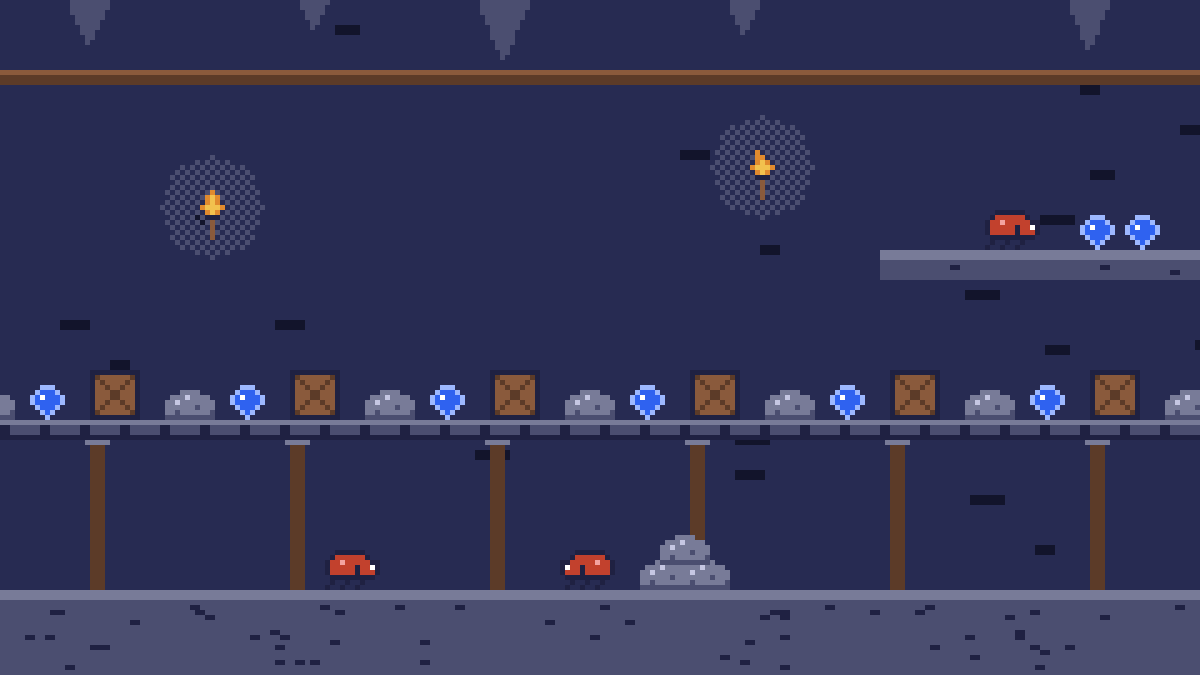
Die Regel kennt die Zeit als Tick, eine ganze Zahl, die in der Sekunde um 60 wächst. Sie schiebt die Zeilen des Bandes alle 6 Ticks um einen Pixel weiter, also dauert jeder Schritt genau so lange wie der davor.
Auch in dieser Lektion 3 Lesetipps zum Vertiefen 3 Fragen zum Selbsttest
Die Idee
Manche Dinge in einem Spiel bewegen sich die ganze Zeit, ohne dass jemand ihre Bilder zeichnet: ein Förderband, ein Laufband, Wasser in einer Rinne, ein Lichtband, das um ein Schild läuft. Eine Regel kann sie bewegen, wenn sie weiß, wie spät es ist.
Diese Zeit zählt das Spiel. Es beginnt bei Tick 0, zählt sechzigmal in der Sekunde eins dazu und gibt die Zahl mit jedem Bild an den Shader. Ein Tick ist ganz, wie ein Pixel. Und weil das Spiel ihn zählt, hält ein pausiertes Spiel auch seine Bänder an.
In Pixel Art bewegt sich ein Ding in ganzen Pixeln, nie in Teilen davon. Für ein Band lautet die Frage also nicht „wie schnell“, sondern „nach wie vielen Ticks ein Pixel weiter“. Diese Zahl ist der Takt.
So funktioniert es
Die Regel teilt den Tick durch den Takt und behält nur den ganzen Teil. So viele Pixel hat sich das Band seit Tick 0 bewegt. Bei einem Takt von 6 ergeben die Ticks 0 bis 5 eine 0, die Ticks 6 bis 11 eine 1, und Tick 60 ergibt 10: zehn Pixel in der Sekunde.
Für einen Pixel in den Zeilen des Bandes antwortet die Regel dann mit der Zahl, die im Bild, wie es kam, so viele Pixel weiter links stand. Alles in diesen Zeilen wandert also nach rechts: die Rippen des Bandes, die Kisten, die Steine und die Edelsteine. Was über den rechten Rand geschoben wird, kommt links wieder herein, wie bei einem Band, das herumläuft.
Zeilen über und unter dem Band antworten mit ihrer eigenen Zahl. Die Beine des Bandes, die Fackeln und die Käfer bleiben also, wo sie sind. Welche Zeilen zum Band gehören, sind zwei Einstellungen der Regel, seine erste und seine letzte Zeile; in diesem Bild sind es 74 und 87.
Der Regler stellt den Takt ein, von 1, das sind sechzig Pixel in der Sekunde, bis 30, das sind zwei. Er beginnt bei 6.
Was schiefgeht
Die meisten Shader zählen die Zeit in Sekunden, und eine KI, die dir einen schreibt, macht es oft genauso. Sie rechnet die Ticks erst in Sekunden um und nimmt sie dann mal eine Geschwindigkeit in Pixeln pro Sekunde. Das klingt nach demselben. Aber in ganzen Zahlen hat eine Sekunde keine Teile: Die Ticks 0 bis 59 sind Sekunde 0, die Ticks 60 bis 119 Sekunde 1. Also steht das Band 59 Ticks lang still und springt dann alle zehn Pixel auf einmal. Behält man die Sekunden als Bruchzahlen, werden die Sprünge kleiner, aber wann immer die Geschwindigkeit nicht glatt in 60 Ticks aufgeht, kommen die Schritte trotzdem in ungleichen Abständen.
Schalte das Bild auf „Mit dem Fehler“. Das Band steht und springt, einmal in der Sekunde. Im Mittel ist es genau so schnell wie mit der Regel. Deshalb besteht der Test, der nur nach einer ganzen Sekunde nachsieht, 60 Ticks und 10 Pixel, bei beiden.
Der Test, der den Fehler fängt, folgt einer Markierung auf dem Band Tick für Tick. Von einem Tick zum nächsten darf sie einen Pixel weiterrücken oder keinen, und in je 6 Ticks muss sie genau einen weiter. Mit dem Fehler scheitert er sofort: Von Tick 59 zu Tick 60 ist die Markierung 10 Pixel gesprungen.
Der Fehler, Zeile für Zeile
- /* A belt that runs by the clock, with the mistake: the rule turns the ticks into seconds first, the
-    way most shaders count time, and multiplies them by a speed in pixels per second. In whole numbers a
-    second has no parts, so the belt stands still for 59 ticks and then jumps all the pixels of a second
-    at once. On average it is as fast as it should be, and still it jerks.
+ /* A belt that runs by the clock: the rows of a conveyor belt, and whatever lies on it, move one pixel
+    to the right every `pace` ticks, and what leaves on the right comes back on the left. The time is the
+    game's tick, a whole number that grows by 60 a second, so the belt moves in even steps of one whole
+    pixel: a conveyor, a moving walkway, a band of light running along a sign.

+    The pixel art way: a picture is a grid of whole numbers, 0 where nothing is and 1 to 25 for the
+    palette's colours. The rule is asked for every pixel and answers with a number.
+
     From the course "Shaders for pixel art" on spielerando.com.
     SPDX-License-Identifier: MIT */
…
  const wrap = (a: number, n: number) => a - n * Math.floor(a / n);

- /** The rule, wrong: the time in whole seconds, times a speed in pixels per second. */
+ /** The rule: what is on the belt moves one pixel to the right every `pace` ticks, and what leaves on
+     the right comes back on the left. Rows above and below the belt stay as they came. */
  export function shade(x: number, y: number, tick: number, src: Frame, p: Params = DEFAULTS): number {
    if (y < p.top || y > p.bottom) return at(src, x, y);
-   const seconds = Math.floor(tick / 60);
-   const moved = seconds * Math.floor(60 / p.pace);
+   // how far the belt has come since tick 0: whole pixels, one every `pace` ticks
+   const moved = Math.floor(tick / p.pace);
+   // what stands here now stood that many pixels further left at tick 0
    return at(src, wrap(x - moved, src.width), y);
  }
Was der Test zum Fehler sagt
✔ at tick 0 the belt is as it was drawn
✖ a tick before pace it has not moved, and at pace ticks it has moved one pixel to the right
    got [ 1, 2, 3, 4, 5, 0 ], expected [ 0, 1, 2, 3, 4, 5 ]
✖ what leaves on the right comes back on the left
    got [ 1, 2, 3, 4, 5, 0 ], expected [ 5, 0, 1, 2, 3, 4 ]
✖ it moves one pixel at a time, once in every pace ticks, never more at once
    at a pace of 6, from tick 59 to 60 it moved 10 pixels
✔ rows above and below the belt stand still
✔ in one second, 60 ticks, it moves 60 / pace pixels: 10 at a pace of 6, 5 at a pace of 12
6 tests: 3 passed, 3 failed
Das sagst du deiner KI
Schreib einen Shader für mein Spiel, der ein Förderband laufen lässt: Die Zeilen [erste Zeile] bis [letzte Zeile] des Bildes rücken alle [6] Ticks um einen ganzen Pixel nach rechts, und was rechts hinausgeht, kommt links wieder herein.

- Die Zeit ist ein Tick: eine ganze Zahl, die mein Spiel 60-mal in der Sekunde um eins hochzählt und dem Shader gibt. Ist das Spiel pausiert, bleibt der Tick stehen. Nimm nicht die Zeit der Engine in Sekunden.
- Wie weit das Band gerückt ist, ist der Tick geteilt durch [6], abgerundet. Rechne die Ticks nicht erst in Sekunden um, um sie dann mit einer Geschwindigkeit malzunehmen.
- Arbeite in ganzen Pixeln des Bildes meines Spiels, nie in Teilen eines Pixels, und mische nie Farben: Jeder Pixel des Bandes zeigt einen Pixel des Bildes, wie es gezeichnet wurde.

Bevor du den Shader schreibst, schreib dieselbe Regel als kleine, einfache Funktion. Sie bekommt ein Raster aus ganzen Zahlen (0 = leer, 1 bis N = die Farben meiner Palette), eine Spalte, eine Zeile und den Tick und gibt die Zahl für diesen einen Pixel zurück. Teste sie: Von einem Tick zum nächsten rückt das Band 0 oder 1 Pixel weiter, nie mehr; in je [6] Ticks hintereinander rückt es genau 1 Pixel; die Zeilen über und unter dem Band bewegen sich nie. Zeig mir die Ausgabe des Tests. Schreib dann den Shader so, dass er genau das tut, was die Funktion tut.
Der Code
Dreimal dieselbe Regel. Die erste ist die, die wir testen; die beiden Shader sind diese Regel in einer Shader-Sprache, und die läuft in deinem Spiel.
Die Regel, getestet: shader.ts
/* A belt that runs by the clock: the rows of a conveyor belt, and whatever lies on it, move one pixel
   to the right every `pace` ticks, and what leaves on the right comes back on the left. The time is the
   game's tick, a whole number that grows by 60 a second, so the belt moves in even steps of one whole
   pixel: a conveyor, a moving walkway, a band of light running along a sign.

   The pixel art way: a picture is a grid of whole numbers, 0 where nothing is and 1 to 25 for the
   palette's colours. The rule is asked for every pixel and answers with a number.

   From the course "Shaders for pixel art" on spielerando.com.
   SPDX-License-Identifier: MIT */

export interface Frame {
  width: number;
  height: number;
  index: Uint8Array;
}

export const DEFAULTS = {
  /** How many ticks the belt waits before it moves on by one pixel. 60 ticks are a second. */
  pace: 6,
  /** The first row the belt and what it carries are in. */
  top: 74,
  /** The last row of the belt. */
  bottom: 87,
};
export type Params = typeof DEFAULTS;

/** The number at a place of the picture; outside the picture nothing is. */
export function at(src: Frame, x: number, y: number): number {
  if (x < 0 || y < 0 || x >= src.width || y >= src.height) return 0;
  return src.index[y * src.width + x];
}

/** a wrapped into 0 .. n-1, also for a below zero (the % sign is not safe there) */
const wrap = (a: number, n: number) => a - n * Math.floor(a / n);

/** The rule: what is on the belt moves one pixel to the right every `pace` ticks, and what leaves on
    the right comes back on the left. Rows above and below the belt stay as they came. */
export function shade(x: number, y: number, tick: number, src: Frame, p: Params = DEFAULTS): number {
  if (y < p.top || y > p.bottom) return at(src, x, y);
  // how far the belt has come since tick 0: whole pixels, one every `pace` ticks
  const moved = Math.floor(tick / p.pace);
  // what stands here now stood that many pixels further left at tick 0
  return at(src, wrap(x - moved, src.width), y);
}
Dieselbe Regel als Shader: GLSL
#version 300 es
// A shader the pixel art way: a pixel is a whole number, 0 where nothing is, 1 to 25 for the
// palette's colours. The rule is shade(): it is asked for every pixel and answers with a number.
// Everything outside the marked part is the same for every rule. Put your own palette in PALETTE.
precision highp float;
precision highp int;

uniform sampler2D SRC;   // the picture, sampled without smoothing (nearest)
uniform sampler2D OTHER; // a second picture, where the rule uses one
uniform int TICK;        // the time in ticks, 60 a second, counted by the game

const vec3 PALETTE[26] = vec3[26](
  vec3(0.0),
  vec3(31.0, 33.0, 66.0) / 255.0, // 1: k
  vec3(75.0, 78.0, 112.0) / 255.0, // 2: n
  vec3(120.0, 123.0, 152.0) / 255.0, // 3: m
  vec3(198.0, 199.0, 227.0) / 255.0, // 4: e
  vec3(255.0, 255.0, 255.0) / 255.0, // 5: w
  vec3(246.0, 241.0, 233.0) / 255.0, // 6: c
  vec3(214.0, 205.0, 189.0) / 255.0, // 7: d
  vec3(242.0, 193.0, 78.0) / 255.0, // 8: y
  vec3(224.0, 138.0, 46.0) / 255.0, // 9: o
  vec3(194.0, 65.0, 45.0) / 255.0, // 10: r
  vec3(244.0, 163.0, 160.0) / 255.0, // 11: p
  vec3(47.0, 98.0, 240.0) / 255.0, // 12: b
  vec3(35.0, 83.0, 214.0) / 255.0, // 13: u
  vec3(157.0, 184.0, 255.0) / 255.0, // 14: s
  vec3(234.0, 240.0, 255.0) / 255.0, // 15: a
  vec3(207.0, 224.0, 255.0) / 255.0, // 16: i
  vec3(15.0, 138.0, 76.0) / 255.0, // 17: g
  vec3(124.0, 207.0, 154.0) / 255.0, // 18: l
  vec3(226.0, 244.0, 234.0) / 255.0, // 19: f
  vec3(138.0, 90.0, 60.0) / 255.0, // 20: t
  vec3(92.0, 59.0, 40.0) / 255.0, // 21: h
  vec3(109.0, 76.0, 230.0) / 255.0, // 22: v
  vec3(201.0, 187.0, 255.0) / 255.0, // 23: q
  vec3(18.0, 20.0, 43.0) / 255.0, // 24: x
  vec3(39.0, 43.0, 82.0) / 255.0 // 25: z
);

// Which colour of the palette is this? 0 where nothing is drawn.
int number(vec4 c) {
  if (c.a < 0.5) return 0;
  int best = 1;
  float least = 9.0;
  for (int i = 1; i <= 25; i++) {
    vec3 d = c.rgb - PALETTE[i];
    float away = dot(d, d);
    if (away < least) {
      least = away;
      best = i;
    }
  }
  return best;
}

// The number at a place of the picture; outside the picture nothing is.
int at(ivec2 p) {
  ivec2 size = textureSize(SRC, 0);
  if (p.x < 0 || p.y < 0 || p.x >= size.x || p.y >= size.y) return 0;
  return number(texelFetch(SRC, p, 0));
}

// The same for the second picture.
int otherAt(ivec2 p) {
  ivec2 size = textureSize(OTHER, 0);
  if (p.x < 0 || p.y < 0 || p.x >= size.x || p.y >= size.y) return 0;
  return number(texelFetch(OTHER, p, 0));
}

// a wrapped into 0 .. n-1, also for a below zero (the % sign is not safe there)
int wrap(int a, int n) {
  return a - n * int(floor(float(a) / float(n)));
}

// ---- the rule ----
uniform int pace;   // how many ticks the belt waits before it moves on by one pixel; 60 ticks are a second
uniform int top;    // the first row the belt and what it carries are in
uniform int bottom; // the last row of the belt

// what is on the belt moves one pixel to the right every pace ticks, and what leaves on the right
// comes back on the left. Rows above and below the belt stay as they came.
int shade(ivec2 p) {
  if (p.y < top || p.y > bottom) return at(p);
  // how far the belt has come since tick 0: whole pixels, one every pace ticks
  int moved = TICK / pace;
  // what stands here now stood that many pixels further left at tick 0
  return at(ivec2(wrap(p.x - moved, textureSize(SRC, 0).x), p.y));
}
// ---- end of the rule ----

out vec4 FRAGMENT;

void main() {
  // the pixel's place, counted from the top left as in the picture
  ivec2 p = ivec2(int(gl_FragCoord.x), textureSize(SRC, 0).y - 1 - int(gl_FragCoord.y));
  int n = shade(p);
  FRAGMENT = n == 0 ? vec4(0.0) : vec4(PALETTE[n], 1.0);
}
Dieselbe Regel für Godot 4
shader_type canvas_item;
// A shader the pixel art way: a pixel is a whole number, 0 where nothing is, 1 to 25 for the
// palette's colours. The rule is shade(): it is asked for every pixel and answers with a number.
// Everything outside the marked part is the same for every rule. Put your own palette in PALETTE.
//
// Put this on a ColorRect that covers the screen, above everything it should change.
// The rule counts pixels as this shader sees them. Let the game draw at the size of its art and
// enlarge the finished picture (the project's stretch mode "viewport"), or it counts window pixels.
uniform sampler2D SRC : hint_screen_texture, filter_nearest; // what is on the screen behind it
uniform sampler2D OTHER : filter_nearest; // a second picture, where the rule uses one
// The time in ticks, 60 a second. The game counts it itself: add 1 in the _physics_process of a
// node that pauses with the game, and set it there, so a paused game pauses its shaders:
//   tick += 1
//   material.set_shader_parameter("TICK", tick)
uniform int TICK;

const vec3 PALETTE[26] = vec3[26](
  vec3(0.0),
  vec3(31.0, 33.0, 66.0) / 255.0, // 1: k
  vec3(75.0, 78.0, 112.0) / 255.0, // 2: n
  vec3(120.0, 123.0, 152.0) / 255.0, // 3: m
  vec3(198.0, 199.0, 227.0) / 255.0, // 4: e
  vec3(255.0, 255.0, 255.0) / 255.0, // 5: w
  vec3(246.0, 241.0, 233.0) / 255.0, // 6: c
  vec3(214.0, 205.0, 189.0) / 255.0, // 7: d
  vec3(242.0, 193.0, 78.0) / 255.0, // 8: y
  vec3(224.0, 138.0, 46.0) / 255.0, // 9: o
  vec3(194.0, 65.0, 45.0) / 255.0, // 10: r
  vec3(244.0, 163.0, 160.0) / 255.0, // 11: p
  vec3(47.0, 98.0, 240.0) / 255.0, // 12: b
  vec3(35.0, 83.0, 214.0) / 255.0, // 13: u
  vec3(157.0, 184.0, 255.0) / 255.0, // 14: s
  vec3(234.0, 240.0, 255.0) / 255.0, // 15: a
  vec3(207.0, 224.0, 255.0) / 255.0, // 16: i
  vec3(15.0, 138.0, 76.0) / 255.0, // 17: g
  vec3(124.0, 207.0, 154.0) / 255.0, // 18: l
  vec3(226.0, 244.0, 234.0) / 255.0, // 19: f
  vec3(138.0, 90.0, 60.0) / 255.0, // 20: t
  vec3(92.0, 59.0, 40.0) / 255.0, // 21: h
  vec3(109.0, 76.0, 230.0) / 255.0, // 22: v
  vec3(201.0, 187.0, 255.0) / 255.0, // 23: q
  vec3(18.0, 20.0, 43.0) / 255.0, // 24: x
  vec3(39.0, 43.0, 82.0) / 255.0 // 25: z
);

// Which colour of the palette is this? 0 where nothing is drawn.
int number(vec4 c) {
  if (c.a < 0.5) return 0;
  int best = 1;
  float least = 9.0;
  for (int i = 1; i <= 25; i++) {
    vec3 d = c.rgb - PALETTE[i];
    float away = dot(d, d);
    if (away < least) {
      least = away;
      best = i;
    }
  }
  return best;
}

// The number at a place of the picture; outside the picture nothing is.
int at(ivec2 p) {
  ivec2 size = textureSize(SRC, 0);
  if (p.x < 0 || p.y < 0 || p.x >= size.x || p.y >= size.y) return 0;
  return number(texelFetch(SRC, p, 0));
}

// The same for the second picture.
int otherAt(ivec2 p) {
  ivec2 size = textureSize(OTHER, 0);
  if (p.x < 0 || p.y < 0 || p.x >= size.x || p.y >= size.y) return 0;
  return number(texelFetch(OTHER, p, 0));
}

// a wrapped into 0 .. n-1, also for a below zero (the % sign is not safe there)
int wrap(int a, int n) {
  return a - n * int(floor(float(a) / float(n)));
}

// ---- the rule ----
uniform int pace;   // how many ticks the belt waits before it moves on by one pixel; 60 ticks are a second
uniform int top;    // the first row the belt and what it carries are in
uniform int bottom; // the last row of the belt

// what is on the belt moves one pixel to the right every pace ticks, and what leaves on the right
// comes back on the left. Rows above and below the belt stay as they came.
int shade(ivec2 p) {
  if (p.y < top || p.y > bottom) return at(p);
  // how far the belt has come since tick 0: whole pixels, one every pace ticks
  int moved = TICK / pace;
  // what stands here now stood that many pixels further left at tick 0
  return at(ivec2(wrap(p.x - moved, textureSize(SRC, 0).x), p.y));
}
// ---- end of the rule ----

void fragment() {
  ivec2 p = ivec2(SCREEN_UV * vec2(textureSize(SRC, 0)));
  int n = shade(p);
  COLOR = n == 0 ? vec4(0.0) : vec4(PALETTE[n], 1.0);
}
Der Test: shader.test.ts
import assert from "node:assert/strict";
import { test } from "node:test";
import { type Frame, shade } from "./shader.ts";

/** A tiny picture from rows of digits: 0 is nothing, 1 to 9 are colours. */
function picture(rows: string[]): Frame {
  return { width: rows[0].length, height: rows.length, index: Uint8Array.from(rows.join(""), Number) };
}

/** A belt 6 pixels long in row 1, carrying things 1 to 5 and a gap (0); a wall above it, the floor below. */
const BELT = picture([
  "777777",
  "123450",
  "666666",
]);
const ON_ROW_1 = { pace: 6, top: 1, bottom: 1 };

/** A longer belt, 40 pixels, with one mark on it, to follow where the mark is. */
const LONG = picture(["1000000000000000000000000000000000000000"]);

/** The rule's answers along one row at a tick. */
const row = (src: Frame, y: number, tick: number, p = ON_ROW_1) => [...Array(src.width).keys()].map((x) => shade(x, y, tick, src, p));

/** The column the mark of LONG is in at a tick. */
const mark = (tick: number, pace: number) => row(LONG, 0, tick, { pace, top: 0, bottom: 0 }).indexOf(1);

/** How many pixels to the right the mark went from one place to another, on a belt that comes round. */
const went = (from: number, to: number) => (to - from + LONG.width) % LONG.width;

test("at tick 0 the belt is as it was drawn", () => {
  assert.deepEqual(row(BELT, 1, 0), [1, 2, 3, 4, 5, 0]);
});

test("a tick before pace it has not moved, and at pace ticks it has moved one pixel to the right", () => {
  assert.deepEqual(row(BELT, 1, 5), [1, 2, 3, 4, 5, 0]);
  assert.deepEqual(row(BELT, 1, 6), [0, 1, 2, 3, 4, 5]);
});

test("what leaves on the right comes back on the left", () => {
  assert.deepEqual(row(BELT, 1, 12), [5, 0, 1, 2, 3, 4]);
  // after 6 pixels, a whole round of this belt, everything is back where it was drawn
  assert.deepEqual(row(BELT, 1, 36), [1, 2, 3, 4, 5, 0]);
});

test("it moves one pixel at a time, once in every pace ticks, never more at once", () => {
  for (const pace of [6, 3, 7]) {
    for (let tick = 0; tick < 240; tick++) {
      const step = went(mark(tick, pace), mark(tick + 1, pace));
      assert.ok(step === 0 || step === 1, `at a pace of ${pace}, from tick ${tick} to ${tick + 1} it moved ${step} pixels`);
    }
    for (let tick = 0; tick < 240; tick++) {
      assert.equal(went(mark(tick, pace), mark(tick + pace, pace)), 1, `at a pace of ${pace}, from tick ${tick} to ${tick + pace}`);
    }
  }
});

test("rows above and below the belt stand still", () => {
  for (const tick of [0, 6, 59, 60, 61, 600]) {
    assert.deepEqual(row(BELT, 0, tick), [7, 7, 7, 7, 7, 7]);
    assert.deepEqual(row(BELT, 2, tick), [6, 6, 6, 6, 6, 6]);
  }
});

test("in one second, 60 ticks, it moves 60 / pace pixels: 10 at a pace of 6, 5 at a pace of 12", () => {
  assert.equal(went(mark(0, 6), mark(60, 6)), 10);
  assert.equal(went(mark(0, 12), mark(60, 12)), 5);
});
- 6 Tests bestehen mit der Regel.
- Mit dem eingebauten Fehler schlagen 3 davon fehl: "a tick before pace it has not moved, and at pace ticks it has moved one pixel to the right", "what leaves on the right comes back on the left", "it moves one pixel at a time, once in every pace ticks, never more at once".
- Der Fehler ist im Bild oben zu sehen: Schalte auf „Mit dem Fehler“.
- Der Shader lief in einem Browser (Chrome/158.0.8127.37) auf 10 Bildern und ergab in 324.000 von 324.000 Pixeln das Bild der Regel.
Probier es aus
- Stell den Regler auf 1 und dann auf 30. Bei 1 rast das Band mit sechzig Pixeln in der Sekunde; bei 30 kriecht es. So oder so ist jeder Schritt ein ganzer Pixel.
- Bewege den Regler, während das Band läuft, und sieh, wie es an eine neue Stelle springt. Die Regel rechnet aus dem Tick allein aus, wo das Band ist, also bedeutet ein neuer Takt eine neue Stelle. Ein Spiel, das die Geschwindigkeit eines Bandes im Lauf ändert, sollte die Strecke selbst zählen und dem Shader statt des Ticks geben.
- Schalte auf „Mit dem Fehler“ und behalte ein paar Sekunden lang einen Edelstein im Auge: Er steht und springt dann. Schalte zurück auf „Mit der Regel“, und derselbe Edelstein wandert.
Zum Nachlesen
Wo es tiefer geht: unsere Seiten, auf denen diese Lektion aufbaut, und was andere zu ihrem Punkt geschrieben haben.
Dieselbe Entscheidung für eine Figur: ein Gang, der von der zurückgelegten Strecke getrieben wird statt von der Uhr, damit ein Fuß am Boden bei jedem Tempo stehen bleibt. Ein Band, das sein Tempo ändert, braucht dasselbe.
Godots eigene Shader-Zeit zählt in Sekunden und läuft weiter, wenn das Spiel pausiert ist; das steht auf dieser Seite. Deshalb bekommt die Godot-Fassung der Regel dieser Lektion stattdessen den Tick des Spiels.
Woher ein Tick fester Länge kommt: ein Spiel, das seine Welt in gleichen Schritten weiterrechnet, egal wie schnell der Bildschirm zeichnet, und die übrige Zeit ins nächste Bild mitnimmt.
Teste dich: drei Fragen
Jede Antwort wird sofort geprüft und erklärt. Die Fragen gehören zum Quiz und zählen für deinen Game Coder IQ wie jede andere.
Die Regel des Bandes bekommt den Tick, eine ganze Zahl, die das Spiel hochzählt. Woher weiß die Regel, wie weit sich das Band bewegt hat?
Nächste Lektion Nur die Palette: ein Farbton-Shader, der Pixel-Art-Farben behält
Gib deiner KI die ganze Lektion
Der Knopf kopiert, was du ihr sagst, zusammen mit der getesteten Regel, ihrem Test und beiden Shadern. So hat deine KI alles, um das in dein Spiel zu bauen und dir zu zeigen, dass es funktioniert.
Das ist eine Lektion aus dem Kurs „Shader für Pixel Art“ auf spielerando.com: https://spielerando.com/de/courses/pixel-shaders/time-in-ticks

Schreib einen Shader für mein Spiel, der ein Förderband laufen lässt: Die Zeilen [erste Zeile] bis [letzte Zeile] des Bildes rücken alle [6] Ticks um einen ganzen Pixel nach rechts, und was rechts hinausgeht, kommt links wieder herein.

- Die Zeit ist ein Tick: eine ganze Zahl, die mein Spiel 60-mal in der Sekunde um eins hochzählt und dem Shader gibt. Ist das Spiel pausiert, bleibt der Tick stehen. Nimm nicht die Zeit der Engine in Sekunden.
- Wie weit das Band gerückt ist, ist der Tick geteilt durch [6], abgerundet. Rechne die Ticks nicht erst in Sekunden um, um sie dann mit einer Geschwindigkeit malzunehmen.
- Arbeite in ganzen Pixeln des Bildes meines Spiels, nie in Teilen eines Pixels, und mische nie Farben: Jeder Pixel des Bandes zeigt einen Pixel des Bildes, wie es gezeichnet wurde.

Bevor du den Shader schreibst, schreib dieselbe Regel als kleine, einfache Funktion. Sie bekommt ein Raster aus ganzen Zahlen (0 = leer, 1 bis N = die Farben meiner Palette), eine Spalte, eine Zeile und den Tick und gibt die Zahl für diesen einen Pixel zurück. Teste sie: Von einem Tick zum nächsten rückt das Band 0 oder 1 Pixel weiter, nie mehr; in je [6] Ticks hintereinander rückt es genau 1 Pixel; die Zeilen über und unter dem Band bewegen sich nie. Zeig mir die Ausgabe des Tests. Schreib dann den Shader so, dass er genau das tut, was die Funktion tut.

Die Regel, getestet (shader.ts):
```ts
/* A belt that runs by the clock: the rows of a conveyor belt, and whatever lies on it, move one pixel
   to the right every `pace` ticks, and what leaves on the right comes back on the left. The time is the
   game's tick, a whole number that grows by 60 a second, so the belt moves in even steps of one whole
   pixel: a conveyor, a moving walkway, a band of light running along a sign.

   The pixel art way: a picture is a grid of whole numbers, 0 where nothing is and 1 to 25 for the
   palette's colours. The rule is asked for every pixel and answers with a number.

   From the course "Shaders for pixel art" on spielerando.com.
   SPDX-License-Identifier: MIT */

export interface Frame {
  width: number;
  height: number;
  index: Uint8Array;
}

export const DEFAULTS = {
  /** How many ticks the belt waits before it moves on by one pixel. 60 ticks are a second. */
  pace: 6,
  /** The first row the belt and what it carries are in. */
  top: 74,
  /** The last row of the belt. */
  bottom: 87,
};
export type Params = typeof DEFAULTS;

/** The number at a place of the picture; outside the picture nothing is. */
export function at(src: Frame, x: number, y: number): number {
  if (x < 0 || y < 0 || x >= src.width || y >= src.height) return 0;
  return src.index[y * src.width + x];
}

/** a wrapped into 0 .. n-1, also for a below zero (the % sign is not safe there) */
const wrap = (a: number, n: number) => a - n * Math.floor(a / n);

/** The rule: what is on the belt moves one pixel to the right every `pace` ticks, and what leaves on
    the right comes back on the left. Rows above and below the belt stay as they came. */
export function shade(x: number, y: number, tick: number, src: Frame, p: Params = DEFAULTS): number {
  if (y < p.top || y > p.bottom) return at(src, x, y);
  // how far the belt has come since tick 0: whole pixels, one every `pace` ticks
  const moved = Math.floor(tick / p.pace);
  // what stands here now stood that many pixels further left at tick 0
  return at(src, wrap(x - moved, src.width), y);
}
```

Ihr Test (shader.test.ts):
```ts
import assert from "node:assert/strict";
import { test } from "node:test";
import { type Frame, shade } from "./shader.ts";

/** A tiny picture from rows of digits: 0 is nothing, 1 to 9 are colours. */
function picture(rows: string[]): Frame {
  return { width: rows[0].length, height: rows.length, index: Uint8Array.from(rows.join(""), Number) };
}

/** A belt 6 pixels long in row 1, carrying things 1 to 5 and a gap (0); a wall above it, the floor below. */
const BELT = picture([
  "777777",
  "123450",
  "666666",
]);
const ON_ROW_1 = { pace: 6, top: 1, bottom: 1 };

/** A longer belt, 40 pixels, with one mark on it, to follow where the mark is. */
const LONG = picture(["1000000000000000000000000000000000000000"]);

/** The rule's answers along one row at a tick. */
const row = (src: Frame, y: number, tick: number, p = ON_ROW_1) => [...Array(src.width).keys()].map((x) => shade(x, y, tick, src, p));

/** The column the mark of LONG is in at a tick. */
const mark = (tick: number, pace: number) => row(LONG, 0, tick, { pace, top: 0, bottom: 0 }).indexOf(1);

/** How many pixels to the right the mark went from one place to another, on a belt that comes round. */
const went = (from: number, to: number) => (to - from + LONG.width) % LONG.width;

test("at tick 0 the belt is as it was drawn", () => {
  assert.deepEqual(row(BELT, 1, 0), [1, 2, 3, 4, 5, 0]);
});

test("a tick before pace it has not moved, and at pace ticks it has moved one pixel to the right", () => {
  assert.deepEqual(row(BELT, 1, 5), [1, 2, 3, 4, 5, 0]);
  assert.deepEqual(row(BELT, 1, 6), [0, 1, 2, 3, 4, 5]);
});

test("what leaves on the right comes back on the left", () => {
  assert.deepEqual(row(BELT, 1, 12), [5, 0, 1, 2, 3, 4]);
  // after 6 pixels, a whole round of this belt, everything is back where it was drawn
  assert.deepEqual(row(BELT, 1, 36), [1, 2, 3, 4, 5, 0]);
});

test("it moves one pixel at a time, once in every pace ticks, never more at once", () => {
  for (const pace of [6, 3, 7]) {
    for (let tick = 0; tick < 240; tick++) {
      const step = went(mark(tick, pace), mark(tick + 1, pace));
      assert.ok(step === 0 || step === 1, `at a pace of ${pace}, from tick ${tick} to ${tick + 1} it moved ${step} pixels`);
    }
    for (let tick = 0; tick < 240; tick++) {
      assert.equal(went(mark(tick, pace), mark(tick + pace, pace)), 1, `at a pace of ${pace}, from tick ${tick} to ${tick + pace}`);
    }
  }
});

test("rows above and below the belt stand still", () => {
  for (const tick of [0, 6, 59, 60, 61, 600]) {
    assert.deepEqual(row(BELT, 0, tick), [7, 7, 7, 7, 7, 7]);
    assert.deepEqual(row(BELT, 2, tick), [6, 6, 6, 6, 6, 6]);
  }
});

test("in one second, 60 ticks, it moves 60 / pace pixels: 10 at a pace of 6, 5 at a pace of 12", () => {
  assert.equal(went(mark(0, 6), mark(60, 6)), 10);
  assert.equal(went(mark(0, 12), mark(60, 12)), 5);
});
```

Dieselbe Regel als GLSL-Shader (WebGL 2, OpenGL ES 3.0), Pixel für Pixel gegen die Regel geprüft:
```glsl
#version 300 es
// A shader the pixel art way: a pixel is a whole number, 0 where nothing is, 1 to 25 for the
// palette's colours. The rule is shade(): it is asked for every pixel and answers with a number.
// Everything outside the marked part is the same for every rule. Put your own palette in PALETTE.
precision highp float;
precision highp int;

uniform sampler2D SRC;   // the picture, sampled without smoothing (nearest)
uniform sampler2D OTHER; // a second picture, where the rule uses one
uniform int TICK;        // the time in ticks, 60 a second, counted by the game

const vec3 PALETTE[26] = vec3[26](
  vec3(0.0),
  vec3(31.0, 33.0, 66.0) / 255.0, // 1: k
  vec3(75.0, 78.0, 112.0) / 255.0, // 2: n
  vec3(120.0, 123.0, 152.0) / 255.0, // 3: m
  vec3(198.0, 199.0, 227.0) / 255.0, // 4: e
  vec3(255.0, 255.0, 255.0) / 255.0, // 5: w
  vec3(246.0, 241.0, 233.0) / 255.0, // 6: c
  vec3(214.0, 205.0, 189.0) / 255.0, // 7: d
  vec3(242.0, 193.0, 78.0) / 255.0, // 8: y
  vec3(224.0, 138.0, 46.0) / 255.0, // 9: o
  vec3(194.0, 65.0, 45.0) / 255.0, // 10: r
  vec3(244.0, 163.0, 160.0) / 255.0, // 11: p
  vec3(47.0, 98.0, 240.0) / 255.0, // 12: b
  vec3(35.0, 83.0, 214.0) / 255.0, // 13: u
  vec3(157.0, 184.0, 255.0) / 255.0, // 14: s
  vec3(234.0, 240.0, 255.0) / 255.0, // 15: a
  vec3(207.0, 224.0, 255.0) / 255.0, // 16: i
  vec3(15.0, 138.0, 76.0) / 255.0, // 17: g
  vec3(124.0, 207.0, 154.0) / 255.0, // 18: l
  vec3(226.0, 244.0, 234.0) / 255.0, // 19: f
  vec3(138.0, 90.0, 60.0) / 255.0, // 20: t
  vec3(92.0, 59.0, 40.0) / 255.0, // 21: h
  vec3(109.0, 76.0, 230.0) / 255.0, // 22: v
  vec3(201.0, 187.0, 255.0) / 255.0, // 23: q
  vec3(18.0, 20.0, 43.0) / 255.0, // 24: x
  vec3(39.0, 43.0, 82.0) / 255.0 // 25: z
);

// Which colour of the palette is this? 0 where nothing is drawn.
int number(vec4 c) {
  if (c.a < 0.5) return 0;
  int best = 1;
  float least = 9.0;
  for (int i = 1; i <= 25; i++) {
    vec3 d = c.rgb - PALETTE[i];
    float away = dot(d, d);
    if (away < least) {
      least = away;
      best = i;
    }
  }
  return best;
}

// The number at a place of the picture; outside the picture nothing is.
int at(ivec2 p) {
  ivec2 size = textureSize(SRC, 0);
  if (p.x < 0 || p.y < 0 || p.x >= size.x || p.y >= size.y) return 0;
  return number(texelFetch(SRC, p, 0));
}

// The same for the second picture.
int otherAt(ivec2 p) {
  ivec2 size = textureSize(OTHER, 0);
  if (p.x < 0 || p.y < 0 || p.x >= size.x || p.y >= size.y) return 0;
  return number(texelFetch(OTHER, p, 0));
}

// a wrapped into 0 .. n-1, also for a below zero (the % sign is not safe there)
int wrap(int a, int n) {
  return a - n * int(floor(float(a) / float(n)));
}

// ---- the rule ----
uniform int pace;   // how many ticks the belt waits before it moves on by one pixel; 60 ticks are a second
uniform int top;    // the first row the belt and what it carries are in
uniform int bottom; // the last row of the belt

// what is on the belt moves one pixel to the right every pace ticks, and what leaves on the right
// comes back on the left. Rows above and below the belt stay as they came.
int shade(ivec2 p) {
  if (p.y < top || p.y > bottom) return at(p);
  // how far the belt has come since tick 0: whole pixels, one every pace ticks
  int moved = TICK / pace;
  // what stands here now stood that many pixels further left at tick 0
  return at(ivec2(wrap(p.x - moved, textureSize(SRC, 0).x), p.y));
}
// ---- end of the rule ----

out vec4 FRAGMENT;

void main() {
  // the pixel's place, counted from the top left as in the picture
  ivec2 p = ivec2(int(gl_FragCoord.x), textureSize(SRC, 0).y - 1 - int(gl_FragCoord.y));
  int n = shade(p);
  FRAGMENT = n == 0 ? vec4(0.0) : vec4(PALETTE[n], 1.0);
}
```

Dieselbe Regel für Godot 4 (von den Autoren nicht ausgeführt):
```gdshader
shader_type canvas_item;
// A shader the pixel art way: a pixel is a whole number, 0 where nothing is, 1 to 25 for the
// palette's colours. The rule is shade(): it is asked for every pixel and answers with a number.
// Everything outside the marked part is the same for every rule. Put your own palette in PALETTE.
//
// Put this on a ColorRect that covers the screen, above everything it should change.
// The rule counts pixels as this shader sees them. Let the game draw at the size of its art and
// enlarge the finished picture (the project's stretch mode "viewport"), or it counts window pixels.
uniform sampler2D SRC : hint_screen_texture, filter_nearest; // what is on the screen behind it
uniform sampler2D OTHER : filter_nearest; // a second picture, where the rule uses one
// The time in ticks, 60 a second. The game counts it itself: add 1 in the _physics_process of a
// node that pauses with the game, and set it there, so a paused game pauses its shaders:
//   tick += 1
//   material.set_shader_parameter("TICK", tick)
uniform int TICK;

const vec3 PALETTE[26] = vec3[26](
  vec3(0.0),
  vec3(31.0, 33.0, 66.0) / 255.0, // 1: k
  vec3(75.0, 78.0, 112.0) / 255.0, // 2: n
  vec3(120.0, 123.0, 152.0) / 255.0, // 3: m
  vec3(198.0, 199.0, 227.0) / 255.0, // 4: e
  vec3(255.0, 255.0, 255.0) / 255.0, // 5: w
  vec3(246.0, 241.0, 233.0) / 255.0, // 6: c
  vec3(214.0, 205.0, 189.0) / 255.0, // 7: d
  vec3(242.0, 193.0, 78.0) / 255.0, // 8: y
  vec3(224.0, 138.0, 46.0) / 255.0, // 9: o
  vec3(194.0, 65.0, 45.0) / 255.0, // 10: r
  vec3(244.0, 163.0, 160.0) / 255.0, // 11: p
  vec3(47.0, 98.0, 240.0) / 255.0, // 12: b
  vec3(35.0, 83.0, 214.0) / 255.0, // 13: u
  vec3(157.0, 184.0, 255.0) / 255.0, // 14: s
  vec3(234.0, 240.0, 255.0) / 255.0, // 15: a
  vec3(207.0, 224.0, 255.0) / 255.0, // 16: i
  vec3(15.0, 138.0, 76.0) / 255.0, // 17: g
  vec3(124.0, 207.0, 154.0) / 255.0, // 18: l
  vec3(226.0, 244.0, 234.0) / 255.0, // 19: f
  vec3(138.0, 90.0, 60.0) / 255.0, // 20: t
  vec3(92.0, 59.0, 40.0) / 255.0, // 21: h
  vec3(109.0, 76.0, 230.0) / 255.0, // 22: v
  vec3(201.0, 187.0, 255.0) / 255.0, // 23: q
  vec3(18.0, 20.0, 43.0) / 255.0, // 24: x
  vec3(39.0, 43.0, 82.0) / 255.0 // 25: z
);

// Which colour of the palette is this? 0 where nothing is drawn.
int number(vec4 c) {
  if (c.a < 0.5) return 0;
  int best = 1;
  float least = 9.0;
  for (int i = 1; i <= 25; i++) {
    vec3 d = c.rgb - PALETTE[i];
    float away = dot(d, d);
    if (away < least) {
      least = away;
      best = i;
    }
  }
  return best;
}

// The number at a place of the picture; outside the picture nothing is.
int at(ivec2 p) {
  ivec2 size = textureSize(SRC, 0);
  if (p.x < 0 || p.y < 0 || p.x >= size.x || p.y >= size.y) return 0;
  return number(texelFetch(SRC, p, 0));
}

// The same for the second picture.
int otherAt(ivec2 p) {
  ivec2 size = textureSize(OTHER, 0);
  if (p.x < 0 || p.y < 0 || p.x >= size.x || p.y >= size.y) return 0;
  return number(texelFetch(OTHER, p, 0));
}

// a wrapped into 0 .. n-1, also for a below zero (the % sign is not safe there)
int wrap(int a, int n) {
  return a - n * int(floor(float(a) / float(n)));
}

// ---- the rule ----
uniform int pace;   // how many ticks the belt waits before it moves on by one pixel; 60 ticks are a second
uniform int top;    // the first row the belt and what it carries are in
uniform int bottom; // the last row of the belt

// what is on the belt moves one pixel to the right every pace ticks, and what leaves on the right
// comes back on the left. Rows above and below the belt stay as they came.
int shade(ivec2 p) {
  if (p.y < top || p.y > bottom) return at(p);
  // how far the belt has come since tick 0: whole pixels, one every pace ticks
  int moved = TICK / pace;
  // what stands here now stood that many pixels further left at tick 0
  return at(ivec2(wrap(p.x - moved, textureSize(SRC, 0).x), p.y));
}
// ---- end of the rule ----

void fragment() {
  ivec2 p = ivec2(SCREEN_UV * vec2(textureSize(SRC, 0)));
  int n = shade(p);
  COLOR = n == 0 ? vec4(0.0) : vec4(PALETTE[n], 1.0);
}
```
Wie hilfreich war diese Seite?
Diese Seite hat noch niemand bewertet.