Time in Ticks: an Even Conveyor Belt Shader for Pixel Art
So far the rule knew the number at its place and where that place is. Now it also knows the time, and in this course the time is a tick: a whole number that the game counts up by one, 60 times a second. With it the rule moves a conveyor belt one whole pixel every few ticks, and every step takes exactly as long as the one before.
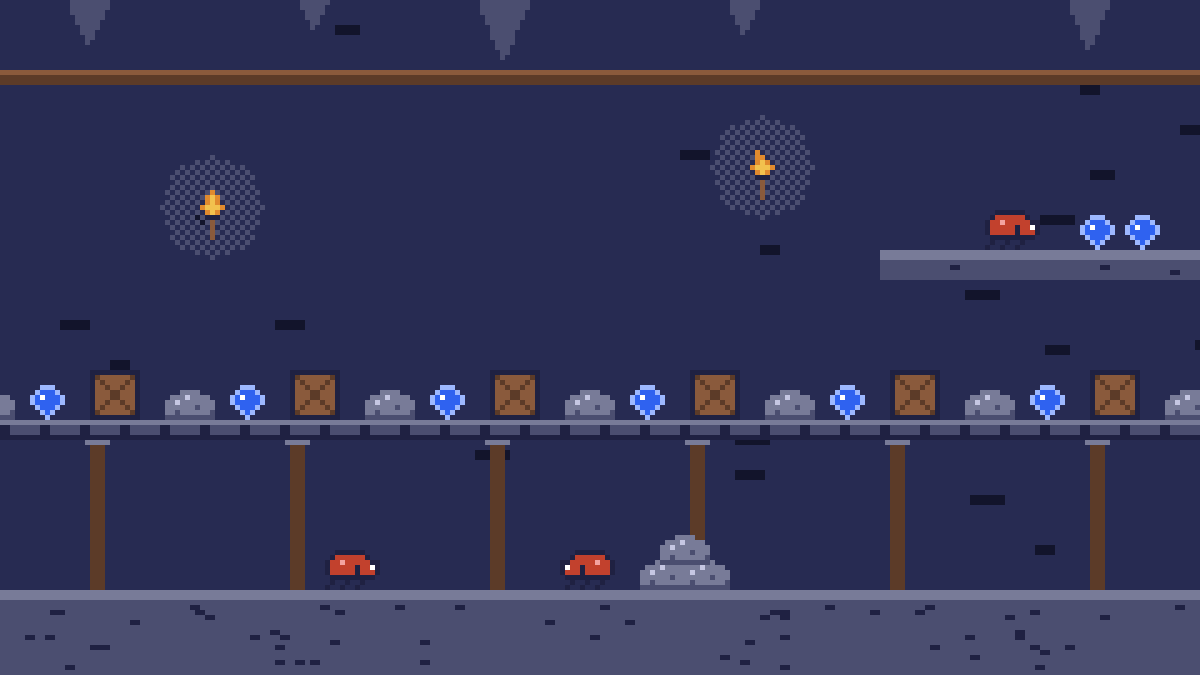
The rule knows the time as a tick, a whole number that grows by 60 a second. It moves the belt's rows one pixel on every 6 ticks, so each step takes exactly as long as the one before.
Also in this lesson 3 things to read up on 3 questions to check yourself
The idea
Some things in a game move all the time without anyone drawing their frames: a conveyor belt, a moving walkway, water running along a channel, a band of light chasing round a sign. A rule can move them, if it knows what time it is.
The game counts that time. It starts at tick 0 and adds one, 60 times a second, and gives the number to the shader with every picture. A tick is whole, like a pixel. And because the game counts it, a paused game stops its belts too.
In pixel art a thing moves in whole pixels, never in parts of one. So the question for a belt is not "how fast", but "after how many ticks one more pixel". That number is the pace.
How it works
The rule divides the tick by the pace and keeps only the whole part. That is how many pixels the belt has moved since tick 0. At a pace of 6, ticks 0 to 5 give 0, ticks 6 to 11 give 1, and tick 60 gives 10: ten pixels a second.
Then, for a pixel in the belt's rows, the rule answers with the number that stood that many pixels further to the left in the picture as it came. So everything in those rows moves to the right: the belt's ribs, the crates, the rocks and the gems. What is pushed past the right edge comes back in on the left, as on a belt that goes round.
Rows above and below the belt answer with their own number, so the belt's legs, the torches and the beetles stay where they are. Which rows belong to the belt are two settings of the rule, its first row and its last; in this picture they are 74 and 87.
The slider sets the pace, from 1, which is sixty pixels a second, to 30, which is two. It starts at 6.
What goes wrong
Most shaders count time in seconds, and an AI writing one for you tends to do the same. It turns the ticks into seconds first and then multiplies them by a speed in pixels per second. That sounds like the same thing. But a second, in whole numbers, has no parts: ticks 0 to 59 are second 0, ticks 60 to 119 are second 1. So the belt stands still for 59 ticks and then jumps all ten pixels at once. Keeping the seconds as fractions makes the jumps smaller, but whenever the speed does not fit into 60 ticks evenly, the steps still come at uneven times.
Switch the picture to "With the mistake". The belt stands, then jumps, once a second. On average it is exactly as fast as with the rule, which is why the test that looks only after a whole second, 60 ticks and 10 pixels, passes on both.
The test that catches it follows a mark on the belt tick by tick. From one tick to the next it may move one pixel or none, and in every 6 ticks it must move exactly one. With the mistake it fails at once: from tick 59 to tick 60 the mark moved 10 pixels.
The mistake, line by line
- /* A belt that runs by the clock, with the mistake: the rule turns the ticks into seconds first, the
-    way most shaders count time, and multiplies them by a speed in pixels per second. In whole numbers a
-    second has no parts, so the belt stands still for 59 ticks and then jumps all the pixels of a second
-    at once. On average it is as fast as it should be, and still it jerks.
+ /* A belt that runs by the clock: the rows of a conveyor belt, and whatever lies on it, move one pixel
+    to the right every `pace` ticks, and what leaves on the right comes back on the left. The time is the
+    game's tick, a whole number that grows by 60 a second, so the belt moves in even steps of one whole
+    pixel: a conveyor, a moving walkway, a band of light running along a sign.

+    The pixel art way: a picture is a grid of whole numbers, 0 where nothing is and 1 to 25 for the
+    palette's colours. The rule is asked for every pixel and answers with a number.
+
     From the course "Shaders for pixel art" on spielerando.com.
     SPDX-License-Identifier: MIT */
…
  const wrap = (a: number, n: number) => a - n * Math.floor(a / n);

- /** The rule, wrong: the time in whole seconds, times a speed in pixels per second. */
+ /** The rule: what is on the belt moves one pixel to the right every `pace` ticks, and what leaves on
+     the right comes back on the left. Rows above and below the belt stay as they came. */
  export function shade(x: number, y: number, tick: number, src: Frame, p: Params = DEFAULTS): number {
    if (y < p.top || y > p.bottom) return at(src, x, y);
-   const seconds = Math.floor(tick / 60);
-   const moved = seconds * Math.floor(60 / p.pace);
+   // how far the belt has come since tick 0: whole pixels, one every `pace` ticks
+   const moved = Math.floor(tick / p.pace);
+   // what stands here now stood that many pixels further left at tick 0
    return at(src, wrap(x - moved, src.width), y);
  }
What the test says about the mistake
✔ at tick 0 the belt is as it was drawn
✖ a tick before pace it has not moved, and at pace ticks it has moved one pixel to the right
    got [ 1, 2, 3, 4, 5, 0 ], expected [ 0, 1, 2, 3, 4, 5 ]
✖ what leaves on the right comes back on the left
    got [ 1, 2, 3, 4, 5, 0 ], expected [ 5, 0, 1, 2, 3, 4 ]
✖ it moves one pixel at a time, once in every pace ticks, never more at once
    at a pace of 6, from tick 59 to 60 it moved 10 pixels
✔ rows above and below the belt stand still
✔ in one second, 60 ticks, it moves 60 / pace pixels: 10 at a pace of 6, 5 at a pace of 12
6 tests: 3 passed, 3 failed
Tell your AI
Write a shader for my game that runs a conveyor belt: the rows [first row] to [last row] of the picture move one whole pixel to the right every [6] ticks, and what leaves on the right comes back in on the left.

- The time is a tick: a whole number my game counts up by one, 60 times a second, and gives to the shader. When the game is paused, the tick stops. Do not use the engine's time in seconds.
- How far the belt has moved is the tick divided by [6], rounded down. Do not turn ticks into seconds first and multiply by a speed.
- Work in whole pixels of my game's picture, never in parts of a pixel, and never blend colours: every pixel of the belt shows a pixel of the picture as it was drawn.

Before you write the shader, write the same rule as a small plain function. It takes a grid of whole numbers (0 = empty, 1 to N = the colours of my palette), a column, a row and the tick, and returns the number for that one pixel. Test it: from one tick to the next the belt moves by 0 or 1 pixel, never more; in every [6] ticks in a row it moves exactly 1 pixel; the rows above and below the belt never move. Show me the test's output. Then write the shader so that it does exactly what the function does.
The code
Three times the same rule. The first is the one we test; the two shaders are that rule in a shader language, which is what your game runs.
The rule, tested: shader.ts
/* A belt that runs by the clock: the rows of a conveyor belt, and whatever lies on it, move one pixel
   to the right every `pace` ticks, and what leaves on the right comes back on the left. The time is the
   game's tick, a whole number that grows by 60 a second, so the belt moves in even steps of one whole
   pixel: a conveyor, a moving walkway, a band of light running along a sign.

   The pixel art way: a picture is a grid of whole numbers, 0 where nothing is and 1 to 25 for the
   palette's colours. The rule is asked for every pixel and answers with a number.

   From the course "Shaders for pixel art" on spielerando.com.
   SPDX-License-Identifier: MIT */

export interface Frame {
  width: number;
  height: number;
  index: Uint8Array;
}

export const DEFAULTS = {
  /** How many ticks the belt waits before it moves on by one pixel. 60 ticks are a second. */
  pace: 6,
  /** The first row the belt and what it carries are in. */
  top: 74,
  /** The last row of the belt. */
  bottom: 87,
};
export type Params = typeof DEFAULTS;

/** The number at a place of the picture; outside the picture nothing is. */
export function at(src: Frame, x: number, y: number): number {
  if (x < 0 || y < 0 || x >= src.width || y >= src.height) return 0;
  return src.index[y * src.width + x];
}

/** a wrapped into 0 .. n-1, also for a below zero (the % sign is not safe there) */
const wrap = (a: number, n: number) => a - n * Math.floor(a / n);

/** The rule: what is on the belt moves one pixel to the right every `pace` ticks, and what leaves on
    the right comes back on the left. Rows above and below the belt stay as they came. */
export function shade(x: number, y: number, tick: number, src: Frame, p: Params = DEFAULTS): number {
  if (y < p.top || y > p.bottom) return at(src, x, y);
  // how far the belt has come since tick 0: whole pixels, one every `pace` ticks
  const moved = Math.floor(tick / p.pace);
  // what stands here now stood that many pixels further left at tick 0
  return at(src, wrap(x - moved, src.width), y);
}
The same rule as a shader: GLSL
#version 300 es
// A shader the pixel art way: a pixel is a whole number, 0 where nothing is, 1 to 25 for the
// palette's colours. The rule is shade(): it is asked for every pixel and answers with a number.
// Everything outside the marked part is the same for every rule. Put your own palette in PALETTE.
precision highp float;
precision highp int;

uniform sampler2D SRC;   // the picture, sampled without smoothing (nearest)
uniform sampler2D OTHER; // a second picture, where the rule uses one
uniform int TICK;        // the time in ticks, 60 a second, counted by the game

const vec3 PALETTE[26] = vec3[26](
  vec3(0.0),
  vec3(31.0, 33.0, 66.0) / 255.0, // 1: k
  vec3(75.0, 78.0, 112.0) / 255.0, // 2: n
  vec3(120.0, 123.0, 152.0) / 255.0, // 3: m
  vec3(198.0, 199.0, 227.0) / 255.0, // 4: e
  vec3(255.0, 255.0, 255.0) / 255.0, // 5: w
  vec3(246.0, 241.0, 233.0) / 255.0, // 6: c
  vec3(214.0, 205.0, 189.0) / 255.0, // 7: d
  vec3(242.0, 193.0, 78.0) / 255.0, // 8: y
  vec3(224.0, 138.0, 46.0) / 255.0, // 9: o
  vec3(194.0, 65.0, 45.0) / 255.0, // 10: r
  vec3(244.0, 163.0, 160.0) / 255.0, // 11: p
  vec3(47.0, 98.0, 240.0) / 255.0, // 12: b
  vec3(35.0, 83.0, 214.0) / 255.0, // 13: u
  vec3(157.0, 184.0, 255.0) / 255.0, // 14: s
  vec3(234.0, 240.0, 255.0) / 255.0, // 15: a
  vec3(207.0, 224.0, 255.0) / 255.0, // 16: i
  vec3(15.0, 138.0, 76.0) / 255.0, // 17: g
  vec3(124.0, 207.0, 154.0) / 255.0, // 18: l
  vec3(226.0, 244.0, 234.0) / 255.0, // 19: f
  vec3(138.0, 90.0, 60.0) / 255.0, // 20: t
  vec3(92.0, 59.0, 40.0) / 255.0, // 21: h
  vec3(109.0, 76.0, 230.0) / 255.0, // 22: v
  vec3(201.0, 187.0, 255.0) / 255.0, // 23: q
  vec3(18.0, 20.0, 43.0) / 255.0, // 24: x
  vec3(39.0, 43.0, 82.0) / 255.0 // 25: z
);

// Which colour of the palette is this? 0 where nothing is drawn.
int number(vec4 c) {
  if (c.a < 0.5) return 0;
  int best = 1;
  float least = 9.0;
  for (int i = 1; i <= 25; i++) {
    vec3 d = c.rgb - PALETTE[i];
    float away = dot(d, d);
    if (away < least) {
      least = away;
      best = i;
    }
  }
  return best;
}

// The number at a place of the picture; outside the picture nothing is.
int at(ivec2 p) {
  ivec2 size = textureSize(SRC, 0);
  if (p.x < 0 || p.y < 0 || p.x >= size.x || p.y >= size.y) return 0;
  return number(texelFetch(SRC, p, 0));
}

// The same for the second picture.
int otherAt(ivec2 p) {
  ivec2 size = textureSize(OTHER, 0);
  if (p.x < 0 || p.y < 0 || p.x >= size.x || p.y >= size.y) return 0;
  return number(texelFetch(OTHER, p, 0));
}

// a wrapped into 0 .. n-1, also for a below zero (the % sign is not safe there)
int wrap(int a, int n) {
  return a - n * int(floor(float(a) / float(n)));
}

// ---- the rule ----
uniform int pace;   // how many ticks the belt waits before it moves on by one pixel; 60 ticks are a second
uniform int top;    // the first row the belt and what it carries are in
uniform int bottom; // the last row of the belt

// what is on the belt moves one pixel to the right every pace ticks, and what leaves on the right
// comes back on the left. Rows above and below the belt stay as they came.
int shade(ivec2 p) {
  if (p.y < top || p.y > bottom) return at(p);
  // how far the belt has come since tick 0: whole pixels, one every pace ticks
  int moved = TICK / pace;
  // what stands here now stood that many pixels further left at tick 0
  return at(ivec2(wrap(p.x - moved, textureSize(SRC, 0).x), p.y));
}
// ---- end of the rule ----

out vec4 FRAGMENT;

void main() {
  // the pixel's place, counted from the top left as in the picture
  ivec2 p = ivec2(int(gl_FragCoord.x), textureSize(SRC, 0).y - 1 - int(gl_FragCoord.y));
  int n = shade(p);
  FRAGMENT = n == 0 ? vec4(0.0) : vec4(PALETTE[n], 1.0);
}
The same rule for Godot 4
shader_type canvas_item;
// A shader the pixel art way: a pixel is a whole number, 0 where nothing is, 1 to 25 for the
// palette's colours. The rule is shade(): it is asked for every pixel and answers with a number.
// Everything outside the marked part is the same for every rule. Put your own palette in PALETTE.
//
// Put this on a ColorRect that covers the screen, above everything it should change.
// The rule counts pixels as this shader sees them. Let the game draw at the size of its art and
// enlarge the finished picture (the project's stretch mode "viewport"), or it counts window pixels.
uniform sampler2D SRC : hint_screen_texture, filter_nearest; // what is on the screen behind it
uniform sampler2D OTHER : filter_nearest; // a second picture, where the rule uses one
// The time in ticks, 60 a second. The game counts it itself: add 1 in the _physics_process of a
// node that pauses with the game, and set it there, so a paused game pauses its shaders:
//   tick += 1
//   material.set_shader_parameter("TICK", tick)
uniform int TICK;

const vec3 PALETTE[26] = vec3[26](
  vec3(0.0),
  vec3(31.0, 33.0, 66.0) / 255.0, // 1: k
  vec3(75.0, 78.0, 112.0) / 255.0, // 2: n
  vec3(120.0, 123.0, 152.0) / 255.0, // 3: m
  vec3(198.0, 199.0, 227.0) / 255.0, // 4: e
  vec3(255.0, 255.0, 255.0) / 255.0, // 5: w
  vec3(246.0, 241.0, 233.0) / 255.0, // 6: c
  vec3(214.0, 205.0, 189.0) / 255.0, // 7: d
  vec3(242.0, 193.0, 78.0) / 255.0, // 8: y
  vec3(224.0, 138.0, 46.0) / 255.0, // 9: o
  vec3(194.0, 65.0, 45.0) / 255.0, // 10: r
  vec3(244.0, 163.0, 160.0) / 255.0, // 11: p
  vec3(47.0, 98.0, 240.0) / 255.0, // 12: b
  vec3(35.0, 83.0, 214.0) / 255.0, // 13: u
  vec3(157.0, 184.0, 255.0) / 255.0, // 14: s
  vec3(234.0, 240.0, 255.0) / 255.0, // 15: a
  vec3(207.0, 224.0, 255.0) / 255.0, // 16: i
  vec3(15.0, 138.0, 76.0) / 255.0, // 17: g
  vec3(124.0, 207.0, 154.0) / 255.0, // 18: l
  vec3(226.0, 244.0, 234.0) / 255.0, // 19: f
  vec3(138.0, 90.0, 60.0) / 255.0, // 20: t
  vec3(92.0, 59.0, 40.0) / 255.0, // 21: h
  vec3(109.0, 76.0, 230.0) / 255.0, // 22: v
  vec3(201.0, 187.0, 255.0) / 255.0, // 23: q
  vec3(18.0, 20.0, 43.0) / 255.0, // 24: x
  vec3(39.0, 43.0, 82.0) / 255.0 // 25: z
);

// Which colour of the palette is this? 0 where nothing is drawn.
int number(vec4 c) {
  if (c.a < 0.5) return 0;
  int best = 1;
  float least = 9.0;
  for (int i = 1; i <= 25; i++) {
    vec3 d = c.rgb - PALETTE[i];
    float away = dot(d, d);
    if (away < least) {
      least = away;
      best = i;
    }
  }
  return best;
}

// The number at a place of the picture; outside the picture nothing is.
int at(ivec2 p) {
  ivec2 size = textureSize(SRC, 0);
  if (p.x < 0 || p.y < 0 || p.x >= size.x || p.y >= size.y) return 0;
  return number(texelFetch(SRC, p, 0));
}

// The same for the second picture.
int otherAt(ivec2 p) {
  ivec2 size = textureSize(OTHER, 0);
  if (p.x < 0 || p.y < 0 || p.x >= size.x || p.y >= size.y) return 0;
  return number(texelFetch(OTHER, p, 0));
}

// a wrapped into 0 .. n-1, also for a below zero (the % sign is not safe there)
int wrap(int a, int n) {
  return a - n * int(floor(float(a) / float(n)));
}

// ---- the rule ----
uniform int pace;   // how many ticks the belt waits before it moves on by one pixel; 60 ticks are a second
uniform int top;    // the first row the belt and what it carries are in
uniform int bottom; // the last row of the belt

// what is on the belt moves one pixel to the right every pace ticks, and what leaves on the right
// comes back on the left. Rows above and below the belt stay as they came.
int shade(ivec2 p) {
  if (p.y < top || p.y > bottom) return at(p);
  // how far the belt has come since tick 0: whole pixels, one every pace ticks
  int moved = TICK / pace;
  // what stands here now stood that many pixels further left at tick 0
  return at(ivec2(wrap(p.x - moved, textureSize(SRC, 0).x), p.y));
}
// ---- end of the rule ----

void fragment() {
  ivec2 p = ivec2(SCREEN_UV * vec2(textureSize(SRC, 0)));
  int n = shade(p);
  COLOR = n == 0 ? vec4(0.0) : vec4(PALETTE[n], 1.0);
}
The test: shader.test.ts
import assert from "node:assert/strict";
import { test } from "node:test";
import { type Frame, shade } from "./shader.ts";

/** A tiny picture from rows of digits: 0 is nothing, 1 to 9 are colours. */
function picture(rows: string[]): Frame {
  return { width: rows[0].length, height: rows.length, index: Uint8Array.from(rows.join(""), Number) };
}

/** A belt 6 pixels long in row 1, carrying things 1 to 5 and a gap (0); a wall above it, the floor below. */
const BELT = picture([
  "777777",
  "123450",
  "666666",
]);
const ON_ROW_1 = { pace: 6, top: 1, bottom: 1 };

/** A longer belt, 40 pixels, with one mark on it, to follow where the mark is. */
const LONG = picture(["1000000000000000000000000000000000000000"]);

/** The rule's answers along one row at a tick. */
const row = (src: Frame, y: number, tick: number, p = ON_ROW_1) => [...Array(src.width).keys()].map((x) => shade(x, y, tick, src, p));

/** The column the mark of LONG is in at a tick. */
const mark = (tick: number, pace: number) => row(LONG, 0, tick, { pace, top: 0, bottom: 0 }).indexOf(1);

/** How many pixels to the right the mark went from one place to another, on a belt that comes round. */
const went = (from: number, to: number) => (to - from + LONG.width) % LONG.width;

test("at tick 0 the belt is as it was drawn", () => {
  assert.deepEqual(row(BELT, 1, 0), [1, 2, 3, 4, 5, 0]);
});

test("a tick before pace it has not moved, and at pace ticks it has moved one pixel to the right", () => {
  assert.deepEqual(row(BELT, 1, 5), [1, 2, 3, 4, 5, 0]);
  assert.deepEqual(row(BELT, 1, 6), [0, 1, 2, 3, 4, 5]);
});

test("what leaves on the right comes back on the left", () => {
  assert.deepEqual(row(BELT, 1, 12), [5, 0, 1, 2, 3, 4]);
  // after 6 pixels, a whole round of this belt, everything is back where it was drawn
  assert.deepEqual(row(BELT, 1, 36), [1, 2, 3, 4, 5, 0]);
});

test("it moves one pixel at a time, once in every pace ticks, never more at once", () => {
  for (const pace of [6, 3, 7]) {
    for (let tick = 0; tick < 240; tick++) {
      const step = went(mark(tick, pace), mark(tick + 1, pace));
      assert.ok(step === 0 || step === 1, `at a pace of ${pace}, from tick ${tick} to ${tick + 1} it moved ${step} pixels`);
    }
    for (let tick = 0; tick < 240; tick++) {
      assert.equal(went(mark(tick, pace), mark(tick + pace, pace)), 1, `at a pace of ${pace}, from tick ${tick} to ${tick + pace}`);
    }
  }
});

test("rows above and below the belt stand still", () => {
  for (const tick of [0, 6, 59, 60, 61, 600]) {
    assert.deepEqual(row(BELT, 0, tick), [7, 7, 7, 7, 7, 7]);
    assert.deepEqual(row(BELT, 2, tick), [6, 6, 6, 6, 6, 6]);
  }
});

test("in one second, 60 ticks, it moves 60 / pace pixels: 10 at a pace of 6, 5 at a pace of 12", () => {
  assert.equal(went(mark(0, 6), mark(60, 6)), 10);
  assert.equal(went(mark(0, 12), mark(60, 12)), 5);
});
- 6 tests pass on the rule.
- With the mistake put in, 3 of them fail: "a tick before pace it has not moved, and at pace ticks it has moved one pixel to the right", "what leaves on the right comes back on the left", "it moves one pixel at a time, once in every pace ticks, never more at once".
- The mistake shows in the picture above: switch to "With the mistake".
- The shader ran in a browser (Chrome/158.0.8127.37) on 10 pictures and gave the rule's picture in 324,000 of 324,000 pixels.
Try it
- Set the slider to 1, then to 30. At 1 the belt races along at sixty pixels a second; at 30 it crawls. Either way every step is one whole pixel.
- Move the slider while the belt runs and watch it jump to a new place. The rule works out where the belt is from the tick alone, so a new pace means a new place. A game that changes a belt's speed while it runs should count the distance itself and give that to the shader instead of the tick.
- Switch to "With the mistake" and keep your eye on one gem for a few seconds: it stands, then leaps. Switch back to "With the rule" and the same gem walks.
Read up
Where to go deeper: the pages of ours this lesson builds on, and what others have written about its point.
The same choice for a figure: a walk driven by the distance she has moved instead of by the clock, so a foot on the ground stays put at every speed. A belt that changes its speed needs the same.
Godot's own shader time is counted in seconds and keeps running while the game is paused; this page says so. It is why the Godot version of this lesson's rule is handed the game's tick instead.
Where a tick of fixed length comes from: a game that steps its world forward in equal steps however fast the screen draws, and carries the time left over on to the next frame.
Check yourself: three questions
Each answer is checked and explained at once. The questions are part of the quiz, so they count for your Game Coder IQ like any other.
The belt's rule is given the tick, a whole number that the game counts up. How does the rule know how far the belt has moved?
Next lesson Only the Palette: a Colour Tint Shader That Keeps Pixel Art Colours
Give the whole lesson to your AI
The button copies what to tell it together with the tested rule, its test and both shaders, so your AI has everything to build this in your game and to show you that it works.
This is a lesson from the course "Shaders for Pixel Art" on spielerando.com: https://spielerando.com/en/courses/pixel-shaders/time-in-ticks

Write a shader for my game that runs a conveyor belt: the rows [first row] to [last row] of the picture move one whole pixel to the right every [6] ticks, and what leaves on the right comes back in on the left.

- The time is a tick: a whole number my game counts up by one, 60 times a second, and gives to the shader. When the game is paused, the tick stops. Do not use the engine's time in seconds.
- How far the belt has moved is the tick divided by [6], rounded down. Do not turn ticks into seconds first and multiply by a speed.
- Work in whole pixels of my game's picture, never in parts of a pixel, and never blend colours: every pixel of the belt shows a pixel of the picture as it was drawn.

Before you write the shader, write the same rule as a small plain function. It takes a grid of whole numbers (0 = empty, 1 to N = the colours of my palette), a column, a row and the tick, and returns the number for that one pixel. Test it: from one tick to the next the belt moves by 0 or 1 pixel, never more; in every [6] ticks in a row it moves exactly 1 pixel; the rows above and below the belt never move. Show me the test's output. Then write the shader so that it does exactly what the function does.

The rule, tested (shader.ts):
```ts
/* A belt that runs by the clock: the rows of a conveyor belt, and whatever lies on it, move one pixel
   to the right every `pace` ticks, and what leaves on the right comes back on the left. The time is the
   game's tick, a whole number that grows by 60 a second, so the belt moves in even steps of one whole
   pixel: a conveyor, a moving walkway, a band of light running along a sign.

   The pixel art way: a picture is a grid of whole numbers, 0 where nothing is and 1 to 25 for the
   palette's colours. The rule is asked for every pixel and answers with a number.

   From the course "Shaders for pixel art" on spielerando.com.
   SPDX-License-Identifier: MIT */

export interface Frame {
  width: number;
  height: number;
  index: Uint8Array;
}

export const DEFAULTS = {
  /** How many ticks the belt waits before it moves on by one pixel. 60 ticks are a second. */
  pace: 6,
  /** The first row the belt and what it carries are in. */
  top: 74,
  /** The last row of the belt. */
  bottom: 87,
};
export type Params = typeof DEFAULTS;

/** The number at a place of the picture; outside the picture nothing is. */
export function at(src: Frame, x: number, y: number): number {
  if (x < 0 || y < 0 || x >= src.width || y >= src.height) return 0;
  return src.index[y * src.width + x];
}

/** a wrapped into 0 .. n-1, also for a below zero (the % sign is not safe there) */
const wrap = (a: number, n: number) => a - n * Math.floor(a / n);

/** The rule: what is on the belt moves one pixel to the right every `pace` ticks, and what leaves on
    the right comes back on the left. Rows above and below the belt stay as they came. */
export function shade(x: number, y: number, tick: number, src: Frame, p: Params = DEFAULTS): number {
  if (y < p.top || y > p.bottom) return at(src, x, y);
  // how far the belt has come since tick 0: whole pixels, one every `pace` ticks
  const moved = Math.floor(tick / p.pace);
  // what stands here now stood that many pixels further left at tick 0
  return at(src, wrap(x - moved, src.width), y);
}
```

Its test (shader.test.ts):
```ts
import assert from "node:assert/strict";
import { test } from "node:test";
import { type Frame, shade } from "./shader.ts";

/** A tiny picture from rows of digits: 0 is nothing, 1 to 9 are colours. */
function picture(rows: string[]): Frame {
  return { width: rows[0].length, height: rows.length, index: Uint8Array.from(rows.join(""), Number) };
}

/** A belt 6 pixels long in row 1, carrying things 1 to 5 and a gap (0); a wall above it, the floor below. */
const BELT = picture([
  "777777",
  "123450",
  "666666",
]);
const ON_ROW_1 = { pace: 6, top: 1, bottom: 1 };

/** A longer belt, 40 pixels, with one mark on it, to follow where the mark is. */
const LONG = picture(["1000000000000000000000000000000000000000"]);

/** The rule's answers along one row at a tick. */
const row = (src: Frame, y: number, tick: number, p = ON_ROW_1) => [...Array(src.width).keys()].map((x) => shade(x, y, tick, src, p));

/** The column the mark of LONG is in at a tick. */
const mark = (tick: number, pace: number) => row(LONG, 0, tick, { pace, top: 0, bottom: 0 }).indexOf(1);

/** How many pixels to the right the mark went from one place to another, on a belt that comes round. */
const went = (from: number, to: number) => (to - from + LONG.width) % LONG.width;

test("at tick 0 the belt is as it was drawn", () => {
  assert.deepEqual(row(BELT, 1, 0), [1, 2, 3, 4, 5, 0]);
});

test("a tick before pace it has not moved, and at pace ticks it has moved one pixel to the right", () => {
  assert.deepEqual(row(BELT, 1, 5), [1, 2, 3, 4, 5, 0]);
  assert.deepEqual(row(BELT, 1, 6), [0, 1, 2, 3, 4, 5]);
});

test("what leaves on the right comes back on the left", () => {
  assert.deepEqual(row(BELT, 1, 12), [5, 0, 1, 2, 3, 4]);
  // after 6 pixels, a whole round of this belt, everything is back where it was drawn
  assert.deepEqual(row(BELT, 1, 36), [1, 2, 3, 4, 5, 0]);
});

test("it moves one pixel at a time, once in every pace ticks, never more at once", () => {
  for (const pace of [6, 3, 7]) {
    for (let tick = 0; tick < 240; tick++) {
      const step = went(mark(tick, pace), mark(tick + 1, pace));
      assert.ok(step === 0 || step === 1, `at a pace of ${pace}, from tick ${tick} to ${tick + 1} it moved ${step} pixels`);
    }
    for (let tick = 0; tick < 240; tick++) {
      assert.equal(went(mark(tick, pace), mark(tick + pace, pace)), 1, `at a pace of ${pace}, from tick ${tick} to ${tick + pace}`);
    }
  }
});

test("rows above and below the belt stand still", () => {
  for (const tick of [0, 6, 59, 60, 61, 600]) {
    assert.deepEqual(row(BELT, 0, tick), [7, 7, 7, 7, 7, 7]);
    assert.deepEqual(row(BELT, 2, tick), [6, 6, 6, 6, 6, 6]);
  }
});

test("in one second, 60 ticks, it moves 60 / pace pixels: 10 at a pace of 6, 5 at a pace of 12", () => {
  assert.equal(went(mark(0, 6), mark(60, 6)), 10);
  assert.equal(went(mark(0, 12), mark(60, 12)), 5);
});
```

The same rule as a GLSL shader (WebGL 2, OpenGL ES 3.0), checked against the rule pixel for pixel:
```glsl
#version 300 es
// A shader the pixel art way: a pixel is a whole number, 0 where nothing is, 1 to 25 for the
// palette's colours. The rule is shade(): it is asked for every pixel and answers with a number.
// Everything outside the marked part is the same for every rule. Put your own palette in PALETTE.
precision highp float;
precision highp int;

uniform sampler2D SRC;   // the picture, sampled without smoothing (nearest)
uniform sampler2D OTHER; // a second picture, where the rule uses one
uniform int TICK;        // the time in ticks, 60 a second, counted by the game

const vec3 PALETTE[26] = vec3[26](
  vec3(0.0),
  vec3(31.0, 33.0, 66.0) / 255.0, // 1: k
  vec3(75.0, 78.0, 112.0) / 255.0, // 2: n
  vec3(120.0, 123.0, 152.0) / 255.0, // 3: m
  vec3(198.0, 199.0, 227.0) / 255.0, // 4: e
  vec3(255.0, 255.0, 255.0) / 255.0, // 5: w
  vec3(246.0, 241.0, 233.0) / 255.0, // 6: c
  vec3(214.0, 205.0, 189.0) / 255.0, // 7: d
  vec3(242.0, 193.0, 78.0) / 255.0, // 8: y
  vec3(224.0, 138.0, 46.0) / 255.0, // 9: o
  vec3(194.0, 65.0, 45.0) / 255.0, // 10: r
  vec3(244.0, 163.0, 160.0) / 255.0, // 11: p
  vec3(47.0, 98.0, 240.0) / 255.0, // 12: b
  vec3(35.0, 83.0, 214.0) / 255.0, // 13: u
  vec3(157.0, 184.0, 255.0) / 255.0, // 14: s
  vec3(234.0, 240.0, 255.0) / 255.0, // 15: a
  vec3(207.0, 224.0, 255.0) / 255.0, // 16: i
  vec3(15.0, 138.0, 76.0) / 255.0, // 17: g
  vec3(124.0, 207.0, 154.0) / 255.0, // 18: l
  vec3(226.0, 244.0, 234.0) / 255.0, // 19: f
  vec3(138.0, 90.0, 60.0) / 255.0, // 20: t
  vec3(92.0, 59.0, 40.0) / 255.0, // 21: h
  vec3(109.0, 76.0, 230.0) / 255.0, // 22: v
  vec3(201.0, 187.0, 255.0) / 255.0, // 23: q
  vec3(18.0, 20.0, 43.0) / 255.0, // 24: x
  vec3(39.0, 43.0, 82.0) / 255.0 // 25: z
);

// Which colour of the palette is this? 0 where nothing is drawn.
int number(vec4 c) {
  if (c.a < 0.5) return 0;
  int best = 1;
  float least = 9.0;
  for (int i = 1; i <= 25; i++) {
    vec3 d = c.rgb - PALETTE[i];
    float away = dot(d, d);
    if (away < least) {
      least = away;
      best = i;
    }
  }
  return best;
}

// The number at a place of the picture; outside the picture nothing is.
int at(ivec2 p) {
  ivec2 size = textureSize(SRC, 0);
  if (p.x < 0 || p.y < 0 || p.x >= size.x || p.y >= size.y) return 0;
  return number(texelFetch(SRC, p, 0));
}

// The same for the second picture.
int otherAt(ivec2 p) {
  ivec2 size = textureSize(OTHER, 0);
  if (p.x < 0 || p.y < 0 || p.x >= size.x || p.y >= size.y) return 0;
  return number(texelFetch(OTHER, p, 0));
}

// a wrapped into 0 .. n-1, also for a below zero (the % sign is not safe there)
int wrap(int a, int n) {
  return a - n * int(floor(float(a) / float(n)));
}

// ---- the rule ----
uniform int pace;   // how many ticks the belt waits before it moves on by one pixel; 60 ticks are a second
uniform int top;    // the first row the belt and what it carries are in
uniform int bottom; // the last row of the belt

// what is on the belt moves one pixel to the right every pace ticks, and what leaves on the right
// comes back on the left. Rows above and below the belt stay as they came.
int shade(ivec2 p) {
  if (p.y < top || p.y > bottom) return at(p);
  // how far the belt has come since tick 0: whole pixels, one every pace ticks
  int moved = TICK / pace;
  // what stands here now stood that many pixels further left at tick 0
  return at(ivec2(wrap(p.x - moved, textureSize(SRC, 0).x), p.y));
}
// ---- end of the rule ----

out vec4 FRAGMENT;

void main() {
  // the pixel's place, counted from the top left as in the picture
  ivec2 p = ivec2(int(gl_FragCoord.x), textureSize(SRC, 0).y - 1 - int(gl_FragCoord.y));
  int n = shade(p);
  FRAGMENT = n == 0 ? vec4(0.0) : vec4(PALETTE[n], 1.0);
}
```

The same rule for Godot 4 (not run by the authors):
```gdshader
shader_type canvas_item;
// A shader the pixel art way: a pixel is a whole number, 0 where nothing is, 1 to 25 for the
// palette's colours. The rule is shade(): it is asked for every pixel and answers with a number.
// Everything outside the marked part is the same for every rule. Put your own palette in PALETTE.
//
// Put this on a ColorRect that covers the screen, above everything it should change.
// The rule counts pixels as this shader sees them. Let the game draw at the size of its art and
// enlarge the finished picture (the project's stretch mode "viewport"), or it counts window pixels.
uniform sampler2D SRC : hint_screen_texture, filter_nearest; // what is on the screen behind it
uniform sampler2D OTHER : filter_nearest; // a second picture, where the rule uses one
// The time in ticks, 60 a second. The game counts it itself: add 1 in the _physics_process of a
// node that pauses with the game, and set it there, so a paused game pauses its shaders:
//   tick += 1
//   material.set_shader_parameter("TICK", tick)
uniform int TICK;

const vec3 PALETTE[26] = vec3[26](
  vec3(0.0),
  vec3(31.0, 33.0, 66.0) / 255.0, // 1: k
  vec3(75.0, 78.0, 112.0) / 255.0, // 2: n
  vec3(120.0, 123.0, 152.0) / 255.0, // 3: m
  vec3(198.0, 199.0, 227.0) / 255.0, // 4: e
  vec3(255.0, 255.0, 255.0) / 255.0, // 5: w
  vec3(246.0, 241.0, 233.0) / 255.0, // 6: c
  vec3(214.0, 205.0, 189.0) / 255.0, // 7: d
  vec3(242.0, 193.0, 78.0) / 255.0, // 8: y
  vec3(224.0, 138.0, 46.0) / 255.0, // 9: o
  vec3(194.0, 65.0, 45.0) / 255.0, // 10: r
  vec3(244.0, 163.0, 160.0) / 255.0, // 11: p
  vec3(47.0, 98.0, 240.0) / 255.0, // 12: b
  vec3(35.0, 83.0, 214.0) / 255.0, // 13: u
  vec3(157.0, 184.0, 255.0) / 255.0, // 14: s
  vec3(234.0, 240.0, 255.0) / 255.0, // 15: a
  vec3(207.0, 224.0, 255.0) / 255.0, // 16: i
  vec3(15.0, 138.0, 76.0) / 255.0, // 17: g
  vec3(124.0, 207.0, 154.0) / 255.0, // 18: l
  vec3(226.0, 244.0, 234.0) / 255.0, // 19: f
  vec3(138.0, 90.0, 60.0) / 255.0, // 20: t
  vec3(92.0, 59.0, 40.0) / 255.0, // 21: h
  vec3(109.0, 76.0, 230.0) / 255.0, // 22: v
  vec3(201.0, 187.0, 255.0) / 255.0, // 23: q
  vec3(18.0, 20.0, 43.0) / 255.0, // 24: x
  vec3(39.0, 43.0, 82.0) / 255.0 // 25: z
);

// Which colour of the palette is this? 0 where nothing is drawn.
int number(vec4 c) {
  if (c.a < 0.5) return 0;
  int best = 1;
  float least = 9.0;
  for (int i = 1; i <= 25; i++) {
    vec3 d = c.rgb - PALETTE[i];
    float away = dot(d, d);
    if (away < least) {
      least = away;
      best = i;
    }
  }
  return best;
}

// The number at a place of the picture; outside the picture nothing is.
int at(ivec2 p) {
  ivec2 size = textureSize(SRC, 0);
  if (p.x < 0 || p.y < 0 || p.x >= size.x || p.y >= size.y) return 0;
  return number(texelFetch(SRC, p, 0));
}

// The same for the second picture.
int otherAt(ivec2 p) {
  ivec2 size = textureSize(OTHER, 0);
  if (p.x < 0 || p.y < 0 || p.x >= size.x || p.y >= size.y) return 0;
  return number(texelFetch(OTHER, p, 0));
}

// a wrapped into 0 .. n-1, also for a below zero (the % sign is not safe there)
int wrap(int a, int n) {
  return a - n * int(floor(float(a) / float(n)));
}

// ---- the rule ----
uniform int pace;   // how many ticks the belt waits before it moves on by one pixel; 60 ticks are a second
uniform int top;    // the first row the belt and what it carries are in
uniform int bottom; // the last row of the belt

// what is on the belt moves one pixel to the right every pace ticks, and what leaves on the right
// comes back on the left. Rows above and below the belt stay as they came.
int shade(ivec2 p) {
  if (p.y < top || p.y > bottom) return at(p);
  // how far the belt has come since tick 0: whole pixels, one every pace ticks
  int moved = TICK / pace;
  // what stands here now stood that many pixels further left at tick 0
  return at(ivec2(wrap(p.x - moved, textureSize(SRC, 0).x), p.y));
}
// ---- end of the rule ----

void fragment() {
  ivec2 p = ivec2(SCREEN_UV * vec2(textureSize(SRC, 0)));
  int n = shade(p);
  COLOR = n == 0 ? vec4(0.0) : vec4(PALETTE[n], 1.0);
}
```
How useful was this page?
Nobody has rated this page yet.