Game Feel and Juice: Feedback First, Decoration Last
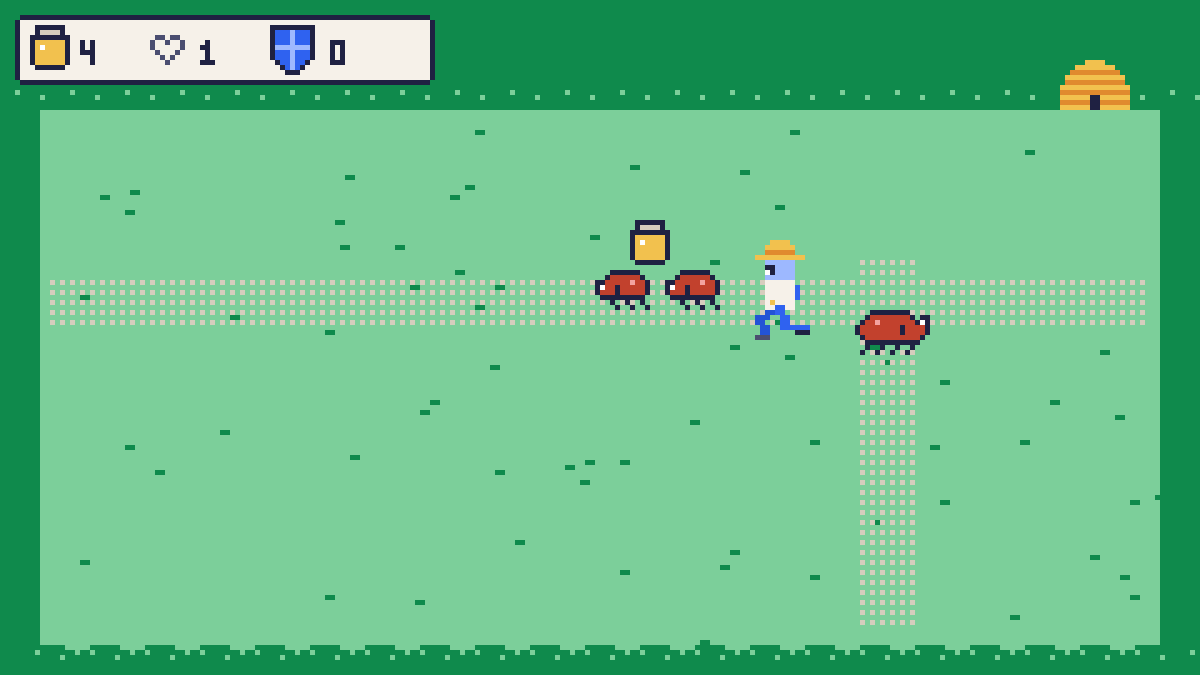
The demo is playing itself. Press a key or a button to take over.
A hit sets her speed to 9 away from the beetle, never adds to it. For 0.25 seconds she cannot steer while the push fades to nothing, and for 0.5 seconds after that she blinks and no hit counts. The big beetle hits with twice the power, 18.
Try it: Step into the path of the pair of beetles: the first throws you back, the second runs into you while you blink and the shield shows it did nothing. Hold the arrows against the push: you slide the same. Let the big beetle hit you: you fly twice as fast and twice as far.
←→↑↓ walk
Shake, sparks and flashes are what people mean when they say a game has juice. Each of them either answers the player, telling her what just happened or what she may do now, or it decorates. This lesson takes the answers in the knockback game above apart, shows why they come after the rule and before anything else, and why decoration on a wrong rule hides the bug instead of fixing it.
Also in this lesson 4 things to read up on 3 questions to check yourself
The idea
A hit is over in a moment. In that moment the player has questions: did it land, which way am I flying, why can I not steer, can I be hit again? An effect that answers one of them is feedback. An effect that answers none is decoration. Decoration is allowed. It just comes last.
The order: rule first, answer second, decoration last. The rule decides what happens. The answer shows the player what the rule decided. Decoration adds weight to an answer that is already right and already readable.
This matters more when an AI builds your game, because it cannot see or feel what it made. Asked to make hits feel better, it adds effects, and effects make any rule look exciting, a wrong one too. So you need to know which effect answers which question, and you need to check the rule before any of them goes in.
In the game above, the beekeeper gathers honey jars, and beetles knock her back when they run into her. Walk into a few before you read on.
How it works
Go through the game three times, in this order.
First, the rule, with your eyes on her alone. Ignore every mark around her. Out in the open, away from the hedge, walk into a beetle, then stand still and let one walk into you. She flies the same short way both times, because a hit sets her speed and never adds to it. Now hold the arrows against the push. She slides just the same, because for 0.25 seconds after a hit she cannot steer. If anything here plays differently from what you just read, the rule is wrong, and no effect may go in yet.
Second, the answers, one question each. Now look at the marks and name the question each one answers.
- The white streak and the puff of dust behind her: which way did the push go, and where did it come from?
- The bar over her hat, red at first: why do the arrows do nothing? While it is red, she cannot steer.
- The blinking, while the bar is blue: may I be hit now? For 0.5 seconds after she can steer again, no hit counts.
- The small shield next to her: a beetle touched me and nothing happened, was that a bug? No. It was a hit that came while she was protected.
- The three numbers in the corner: jars gathered, hits that threw her, and hits that changed nothing.
Every one of them reads the rule's own state. The bar is drawn from the very timer the rule counts down, so it cannot run out before the protection does, or after it.
Third, decoration, last and only on top. Among the marks around her, none is there for show. There is no shake and no burst of sparks. If you added some now, they would sit on top of answers that are already right, and they would have to leave those answers readable. A shake that makes the blinking hard to see has taken an answer away.
What goes wrong
The usual message is something like: make the hits feel more impactful. The AI adds screen shake, sparks, a flash and a sound to every hit, each with a strength and a length it picks itself. The game looks lively at once, and that is the trouble.
When every hit shakes the screen the same way, the big beetle's hit, which throws her twice as fast, gets the same shake as all the others. The one hit that should stand out has nothing left to stand out with.
The effects also get timers of their own. A blink with its own timer ends a little after the protection does, and in that moment she still blinks while a hit can land: the answer lies. The lesson on the hit flash in our course on shaders shows the same mistake in a single effect, a blink counted from the game's clock instead of from the hit.
The worst case is decoration on a wrong rule. The knockback blueprint warns about a push that adds to her speed instead of setting it. Then her own walking counts: walking into the beetle eats part of the push, walking away from it adds to it, and hits feel random. Under heavy shake, sparks and a flash, every hit is a big event, and nobody looks at how far she flew. You try it, it feels strong, and the bug stays in the game.
You notice it by taking the decoration away. Ask your AI to put every effect that answers nothing behind one switch, turn it off, and go through the first two passes again. If the game still tells you everything, the switch held decoration. If something is now missing, that effect was an answer, and it has to read the rule's own state, not keep a timer of its own.
Tell your AI
I want the hits in my game to read better. The mechanic: [what happens when the player is hit].

Do this in order, and show me each step before the next:
1. Write the rule down: what a hit changes, for how long, and what happens to a hit that comes while the last one is still running. Write one test for every case, run the tests and show me their output. Add no effect before they pass.
2. List the questions the player has in that moment, for example: did it land, which way am I going, why can I not steer, can I be hit again. For each question, name the effect that answers it and the value of the rule it reads. No effect may keep a timer of its own.
3. List every other effect that goes with a hit: shake, sparks, flashes, sounds. For each one, write the question it answers, or "none".
4. Put every effect marked "none" behind one switch, off for now, and tell me how to turn it on.

Do not tell me the game feels better. You cannot feel it. Tell me what to press to check each answer myself.
Try it
- In the game above, stand in the path of the pair of beetles and let them come. The first one throws you back, the second runs into you while you blink, and the shield shows it did nothing. Picture that touch without the shield: it would look like a bug.
- Away from the hedge, walk into a beetle once, and once let one walk into you. Watch only how far she flies: the same both times. That is the rule, checked before any effect.
- In your own game, take one hit and write down every effect it sets off, each with the question it answers. Every "none" on that list is decoration: it goes in last, and only where it covers no answer.
Read up
Where to go deeper: the pages of ours this lesson builds on, and what others have written about its point.
Hit Flash Shader for Pixel Art: White Blinks After a Hit
One answer to a hit built as a shader: a white blink counted from the hit, not from the game's clock, with that mistake planted and caught by a named test.
Make Your Game Feel Good: One Action at a Time
Effects added to one action in an order, the cheapest first, with starting values to tune by hand and the ways too many effects make a game worse.
The rule under this lesson's game: why a push sets the speed, the protection that keeps one enemy from trapping her, its proofs, and the tested code to build from.
Game Feel: The Secret Ingredient
Splits how a game feels into layers, from how it answers a press to the effects laid on top, and advises making only the effects that are crucial, since they eat time.
Check yourself: three questions
Each answer is checked and explained at once. The questions are part of the quiz, so they count for your Game Coder IQ like any other.
Your AI offers to put screen shake, sparks and a flash on every hit in your game. In which order should the work on hits go?
Next lesson Where Players Stop in Your Game: Count It, Don't Guess
How useful was this page?
Nobody has rated this page yet.