Treffer-Blitz als Shader für Pixel Art: weiß blinken nach dem Treffer
Ein Treffer-Blitz macht eine Figur für einen Moment weiß, nachdem sie getroffen wurde, oft in zwei oder drei kurzen Blinkern, und gibt ihr dann ihre Farben zurück. Er sagt dem Spieler, dass ein Treffer saß und wen er traf, schneller als eine Zahl über ihrem Kopf oder ein Balken, der kürzer wird. Die Regel ist kurz, und das eine, was sie richtig machen muss, ist der Moment, in dem der Blitz beginnt.
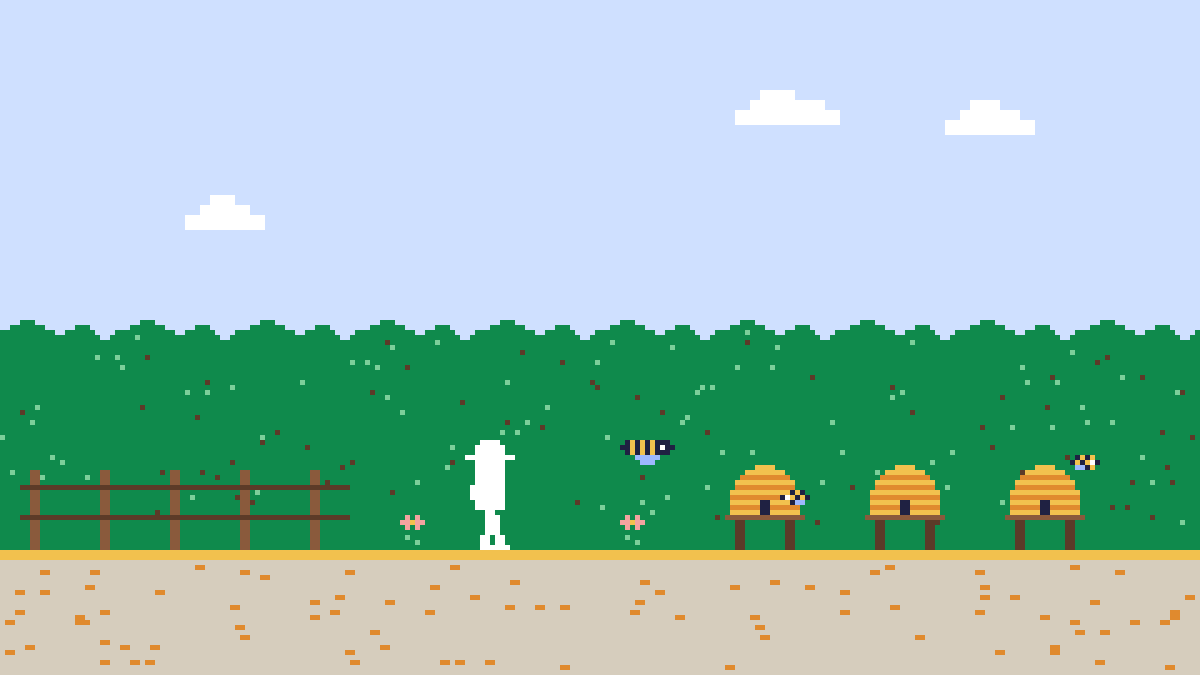
Nur die Imkerin wird der Regel gegeben. Das Spiel zählt die Ticks seit dem Stich und gibt sie weiter; allein aus dieser Zahl macht die Regel sie weiß, dann wieder farbig, dann wieder weiß, und hört nach 30 Ticks auf.
Auch in dieser Lektion 2 Lesetipps zum Vertiefen 3 Fragen zum Selbsttest
Die Idee
In einem Spiel passiert vieles in derselben Sekunde: Eine Wespe schießt heran, ein Schwarm summt um einen Stock, die Imkerin macht einen Schritt. Ein Treffer ist in einem einzigen Tick vorbei, und ohne ein Zeichen sieht der Spieler ihn vielleicht gar nicht. Der Blitz ist dieses Zeichen. Eine halbe Sekunde lang blinkt sie als weiße Gestalt, und eine Figur, die ganz weiß ist, sieht aus wie nichts anderes in der Szene. Das Auge findet sie sofort.
Es ist ein Effekt für ein Sprite: Nur die Figur, die getroffen wurde, blitzt, die Welt um sie herum behält ihre Farben. Das Spiel zeichnet keine weiße Kopie von ihr. Es gibt ihr Bild der Regel und sagt ihr eine Zahl mehr: wie viele Ticks der Treffer her ist.
So funktioniert es
Die Regel sieht sich die Zahl an ihrem eigenen Platz an. Ist sie 0, war dort nichts gezeichnet, und die Antwort ist 0: Der Blitz füllt nicht den leeren Raum um sie herum.
Dann sieht sie auf die Ticks seit dem Treffer. Vor jedem Treffer, und ab 30 Ticks danach, hat sie ihre eigenen Farben. Dazwischen teilt die Regel die Ticks seit dem Treffer in Blinker von je 6 Ticks: In den Blinkern 0, 2 und 4 wird jeder gezeichnete Pixel weiß, in den Blinkern 1 und 3 hat sie ihre eigenen Farben. Das sind drei weiße Blinker mit zwei Pausen, eine halbe Sekunde insgesamt. Die Antwort ist immer Weiß, ihre eigene Farbe an dieser Stelle oder nichts, also kann die Regel keine Farbe erfinden.
Auf die Uhr des Spiels sieht die Regel nie. Egal was die Uhr sagt: Ein Treffer ist in seinem eigenen Tick weiß und blinkt genauso wie jeder andere Treffer.
Im Bild oben zählt das Spiel die Ticks seit jedem Stich für dich, und der Regler dafür folgt. Sobald du einen Regler anfasst, hört das Bild auf zu zählen und hält die Zahlen, die du einstellst:
- Ticks seit dem Treffer: 0 ist der Tick des Treffers.
- Dauer des Blitzens: wie viele Ticks nach dem Treffer sie weiß sein kann.
- Dauer eines Blinkens: wie viele Ticks ein weißer Blinker dauert, und die Pause danach.
Was schiefgeht
Bittest du eine KI um einen blinkenden Blitz, schreibt sie das Blinken oft nach der Zeit des Spiels: „Solange der Blitz an ist, sei weiß, wenn die Zeit in einem geraden Blinker steht.“ Ein Shader hat eine Uhr eingebaut, und nach der Uhr zu blinken ist der Weg aus dem Lehrbuch, also nimmt die KI ihn. Bei einem schnellen Test sieht es richtig aus: Sie blinkt.
Aber jetzt folgen die Blinker der Uhr, nicht dem Treffer. Ein Treffer, der in eine Pause der Uhr fällt, zeigt im Moment des Aufpralls ihre eigenen Farben, und das Weiß kommt erst, wenn die Uhr es sagt. Schalte das Bild auf „Mit dem Fehler“ und sieh dir beide Stiche an. Beim ersten behält sie 3 Ticks lang nach dem Stich ihre eigenen Farben, während die Wespe schon davonfliegt, und der letzte weiße Blinker ist auf 3 Ticks gekürzt. Beim zweiten ist sie nur 2 Ticks lang weiß, dann kommt eine Pause, und die nächsten weißen Blinker kommen 4 Ticks vor denen der Regel. In einem Spiel würde jeder Treffer ein wenig anders blinken, und manche schienen zu spät zu kommen.
Zwei Tests fangen das: „on the tick of the hit she is white, whatever the game's clock says“ verlangt Weiß an 50 verschiedenen Ticks, und „two hits at different times of the game blink alike“ vergleicht zwei Treffer Tick für Tick.
Der Fehler, Zeile für Zeile
- /* Hit flash, with the mistake: the blinks are counted from the game's clock instead of from the hit.
-    While the flash lasts she is white whenever the clock is in a white blink, so the flash starts at a
-    moment that has nothing to do with the hit. Hit on the wrong tick, she shows her own colours at the
-    moment of impact and turns white only later, and no two hits blink alike.
+ /* Hit flash: for a few ticks after a hit, every drawn pixel of the sprite turns white, in blinks, and
+    then she has her own colours again. The player sees at once that the hit landed and on whom, even
+    in a crowd, even when the hit is small.

+    The flash is counted from the hit. The game says how many ticks ago she was hit, and the rule
+    answers from that number alone: on the tick of the hit she is white, whatever the game's clock
+    shows, and every hit blinks the same way.
+
     From the course "Shaders for pixel art" on spielerando.com.
     SPDX-License-Identifier: MIT */
…
  }

- /** The rule, wrong: white in blinks for `flash` ticks after the hit, but the blinks follow the clock. */
- export function shade(x: number, y: number, tick: number, src: Frame, p: Params = DEFAULTS): number {
+ /** The rule: white in blinks for `flash` ticks after the hit, counted from the hit; her own colours before and after. */
+ export function shade(x: number, y: number, _tick: number, src: Frame, p: Params = DEFAULTS): number {
    const n = at(src, x, y);
    if (n === 0) return 0; // nothing stays nothing, also in the flash
    if (p.since < 0 || p.since >= p.flash) return n; // not hit yet, or the flash is over
    const each = Math.max(1, p.blink);
-   // wrong: the blink is worked out from the game's clock, not from the hit
-   return Math.floor(tick / each) % 2 === 0 ? WHITE : n;
+   // counted from the hit: blink 0 is white, blink 1 her own colours, blink 2 white again, and so on
+   return Math.floor(p.since / each) % 2 === 0 ? WHITE : n;
  }
Was der Test zum Fehler sagt
✔ before the hit and after the flash she has her own colours
✔ an empty pixel stays empty, also while she is white
✖ on the tick of the hit she is white, whatever the game's clock says
    hit on tick 6
    got [
  0, 1, 1, 1, 0, 1,
  3, 8, 3, 1, 0, 2,
  9, 2, 0
], expected [
  0, 5, 5, 5, 0, 5,
  5, 5, 5, 5, 0, 5,
  5, 5, 0
]
✖ the flash blinks: white for as long as a blink lasts, then her own colours for as long
    got 'WW------WWWWWW------WWWWWW----', expected 'WWWWWW------WWWWWW------WWWWWW'
✖ two hits at different times of the game blink alike
    tick 1 after each hit
    got [
  0, 5, 5, 5, 0, 5,
  5, 5, 5, 5, 0, 5,
  5, 5, 0
], expected [
  0, 1, 1, 1, 0, 1,
  3, 8, 3, 1, 0, 2,
  9, 2, 0
]
✖ a shorter flash and a faster blink are set by their numbers
    got '---WWW---WWW----', expected 'WWW---WWW-------'
✔ every answer is white, her own colour there, or nothing
7 tests: 3 passed, 4 failed
Das sagst du deiner KI
Schreib einen Treffer-Blitz als Shader für mein Pixel-Art-Sprite: Nach einem Treffer blinkt das Sprite kurz weiß und zeigt danach wieder seine eigenen Farben.

- Arbeite mit ganzen Pixeln und ganzen Ticks (60 in der Sekunde). Kein Glätten, kein Mischen, kein Überblenden: Jeder Pixel ist entweder reines Weiß oder seine eigene Farbe.
- Leere Pixel (Alpha 0) bleiben leer, auch während des Blitzes.
- Das Spiel zählt die Ticks seit dem letzten Treffer und gibt diese Zahl dem Shader als Einstellung. Zähl die Blinker ab dieser Zahl, nie nach der Uhr oder der Zeit des Spiels: Im Tick des Treffers ist das Sprite weiß.
- Der Blitz dauert [30] Ticks. Ein weißer Blinker dauert [6] Ticks, dann [6] Ticks die eigenen Farben, dann wieder Weiß.
- Wird das Sprite während eines Blitzes wieder getroffen, beginnt die Zählung wieder bei 0.

Bevor du den Shader schreibst, schreib dieselbe Regel als kleine, einfache Funktion. Sie bekommt ein Raster aus ganzen Zahlen (0 = leer, 1 bis N = die Farben meiner Palette), einen Platz, den Tick des Spiels und die Ticks seit dem Treffer und gibt die Zahl für diesen einen Pixel zurück. Teste sie: Im Tick des Treffers ist das Sprite weiß, egal welcher Tick des Spiels gerade ist, zwei Treffer zu verschiedenen Ticks blinken gleich, und nach dem Blitz hat jeder Pixel wieder seine eigene Farbe. Zeig mir die Ausgabe des Tests. Schreib dann den Shader so, dass er genau das tut, was die Funktion tut.
Der Code
Dreimal dieselbe Regel. Die erste ist die, die wir testen; die beiden Shader sind diese Regel in einer Shader-Sprache, und die läuft in deinem Spiel.
Die Regel, getestet: shader.ts
/* Hit flash: for a few ticks after a hit, every drawn pixel of the sprite turns white, in blinks, and
   then she has her own colours again. The player sees at once that the hit landed and on whom, even
   in a crowd, even when the hit is small.

   The flash is counted from the hit. The game says how many ticks ago she was hit, and the rule
   answers from that number alone: on the tick of the hit she is white, whatever the game's clock
   shows, and every hit blinks the same way.

   From the course "Shaders for pixel art" on spielerando.com.
   SPDX-License-Identifier: MIT */

export interface Frame {
  width: number;
  height: number;
  index: Uint8Array;
}

export const DEFAULTS = {
  /** Ticks since the hit, counted by the game: 0 on the tick she is hit. */
  since: 60,
  /** How long the whole flash lasts, in ticks (60 are a second). */
  flash: 30,
  /** How long one white blink lasts, and the pause after it, in ticks. */
  blink: 6,
};
export type Params = typeof DEFAULTS;

/** The number of white in the palette. */
const WHITE = 5;

/** The number at a place of the picture; outside the picture nothing is. */
export function at(src: Frame, x: number, y: number): number {
  if (x < 0 || y < 0 || x >= src.width || y >= src.height) return 0;
  return src.index[y * src.width + x];
}

/** The rule: white in blinks for `flash` ticks after the hit, counted from the hit; her own colours before and after. */
export function shade(x: number, y: number, _tick: number, src: Frame, p: Params = DEFAULTS): number {
  const n = at(src, x, y);
  if (n === 0) return 0; // nothing stays nothing, also in the flash
  if (p.since < 0 || p.since >= p.flash) return n; // not hit yet, or the flash is over
  const each = Math.max(1, p.blink);
  // counted from the hit: blink 0 is white, blink 1 her own colours, blink 2 white again, and so on
  return Math.floor(p.since / each) % 2 === 0 ? WHITE : n;
}
Dieselbe Regel als Shader: GLSL
#version 300 es
// A shader the pixel art way: a pixel is a whole number, 0 where nothing is, 1 to 25 for the
// palette's colours. The rule is shade(): it is asked for every pixel and answers with a number.
// Everything outside the marked part is the same for every rule. Put your own palette in PALETTE.
precision highp float;
precision highp int;

uniform sampler2D SRC;   // the picture, sampled without smoothing (nearest)
uniform sampler2D OTHER; // a second picture, where the rule uses one
uniform int TICK;        // the time in ticks, 60 a second, counted by the game

const vec3 PALETTE[26] = vec3[26](
  vec3(0.0),
  vec3(31.0, 33.0, 66.0) / 255.0, // 1: k
  vec3(75.0, 78.0, 112.0) / 255.0, // 2: n
  vec3(120.0, 123.0, 152.0) / 255.0, // 3: m
  vec3(198.0, 199.0, 227.0) / 255.0, // 4: e
  vec3(255.0, 255.0, 255.0) / 255.0, // 5: w
  vec3(246.0, 241.0, 233.0) / 255.0, // 6: c
  vec3(214.0, 205.0, 189.0) / 255.0, // 7: d
  vec3(242.0, 193.0, 78.0) / 255.0, // 8: y
  vec3(224.0, 138.0, 46.0) / 255.0, // 9: o
  vec3(194.0, 65.0, 45.0) / 255.0, // 10: r
  vec3(244.0, 163.0, 160.0) / 255.0, // 11: p
  vec3(47.0, 98.0, 240.0) / 255.0, // 12: b
  vec3(35.0, 83.0, 214.0) / 255.0, // 13: u
  vec3(157.0, 184.0, 255.0) / 255.0, // 14: s
  vec3(234.0, 240.0, 255.0) / 255.0, // 15: a
  vec3(207.0, 224.0, 255.0) / 255.0, // 16: i
  vec3(15.0, 138.0, 76.0) / 255.0, // 17: g
  vec3(124.0, 207.0, 154.0) / 255.0, // 18: l
  vec3(226.0, 244.0, 234.0) / 255.0, // 19: f
  vec3(138.0, 90.0, 60.0) / 255.0, // 20: t
  vec3(92.0, 59.0, 40.0) / 255.0, // 21: h
  vec3(109.0, 76.0, 230.0) / 255.0, // 22: v
  vec3(201.0, 187.0, 255.0) / 255.0, // 23: q
  vec3(18.0, 20.0, 43.0) / 255.0, // 24: x
  vec3(39.0, 43.0, 82.0) / 255.0 // 25: z
);

// Which colour of the palette is this? 0 where nothing is drawn.
int number(vec4 c) {
  if (c.a < 0.5) return 0;
  int best = 1;
  float least = 9.0;
  for (int i = 1; i <= 25; i++) {
    vec3 d = c.rgb - PALETTE[i];
    float away = dot(d, d);
    if (away < least) {
      least = away;
      best = i;
    }
  }
  return best;
}

// The number at a place of the picture; outside the picture nothing is.
int at(ivec2 p) {
  ivec2 size = textureSize(SRC, 0);
  if (p.x < 0 || p.y < 0 || p.x >= size.x || p.y >= size.y) return 0;
  return number(texelFetch(SRC, p, 0));
}

// The same for the second picture.
int otherAt(ivec2 p) {
  ivec2 size = textureSize(OTHER, 0);
  if (p.x < 0 || p.y < 0 || p.x >= size.x || p.y >= size.y) return 0;
  return number(texelFetch(OTHER, p, 0));
}

// a wrapped into 0 .. n-1, also for a below zero (the % sign is not safe there)
int wrap(int a, int n) {
  return a - n * int(floor(float(a) / float(n)));
}

// ---- the rule ----
uniform int since; // ticks since the hit, counted by the game: 0 on the tick she is hit
uniform int flash; // how long the whole flash lasts, in ticks (60 are a second)
uniform int blink; // how long one white blink lasts, and the pause after it, in ticks

// the number of white in the palette
const int WHITE = 5;

// white in blinks for `flash` ticks after the hit, counted from the hit; her own colours before and after
int shade(ivec2 p) {
  int n = at(p);
  if (n == 0) return 0; // nothing stays nothing, also in the flash
  if (since < 0 || since >= flash) return n; // not hit yet, or the flash is over
  int each = max(1, blink);
  // counted from the hit: blink 0 is white, blink 1 her own colours, blink 2 white again, and so on
  return (since / each) % 2 == 0 ? WHITE : n;
}
// ---- end of the rule ----

out vec4 FRAGMENT;

void main() {
  // the pixel's place, counted from the top left as in the picture
  ivec2 p = ivec2(int(gl_FragCoord.x), textureSize(SRC, 0).y - 1 - int(gl_FragCoord.y));
  int n = shade(p);
  FRAGMENT = n == 0 ? vec4(0.0) : vec4(PALETTE[n], 1.0);
}
Dieselbe Regel für Godot 4
shader_type canvas_item;
// A shader the pixel art way: a pixel is a whole number, 0 where nothing is, 1 to 25 for the
// palette's colours. The rule is shade(): it is asked for every pixel and answers with a number.
// Everything outside the marked part is the same for every rule. Put your own palette in PALETTE.
//
// Put this on the sprite, and give it the sprite's own picture once:
//   material.set_shader_parameter("SRC", texture)
uniform sampler2D SRC : filter_nearest;
uniform sampler2D OTHER : filter_nearest; // a second picture, where the rule uses one
// The time in ticks, 60 a second. The game counts it itself: add 1 in the _physics_process of a
// node that pauses with the game, and set it there, so a paused game pauses its shaders:
//   tick += 1
//   material.set_shader_parameter("TICK", tick)
uniform int TICK;

const vec3 PALETTE[26] = vec3[26](
  vec3(0.0),
  vec3(31.0, 33.0, 66.0) / 255.0, // 1: k
  vec3(75.0, 78.0, 112.0) / 255.0, // 2: n
  vec3(120.0, 123.0, 152.0) / 255.0, // 3: m
  vec3(198.0, 199.0, 227.0) / 255.0, // 4: e
  vec3(255.0, 255.0, 255.0) / 255.0, // 5: w
  vec3(246.0, 241.0, 233.0) / 255.0, // 6: c
  vec3(214.0, 205.0, 189.0) / 255.0, // 7: d
  vec3(242.0, 193.0, 78.0) / 255.0, // 8: y
  vec3(224.0, 138.0, 46.0) / 255.0, // 9: o
  vec3(194.0, 65.0, 45.0) / 255.0, // 10: r
  vec3(244.0, 163.0, 160.0) / 255.0, // 11: p
  vec3(47.0, 98.0, 240.0) / 255.0, // 12: b
  vec3(35.0, 83.0, 214.0) / 255.0, // 13: u
  vec3(157.0, 184.0, 255.0) / 255.0, // 14: s
  vec3(234.0, 240.0, 255.0) / 255.0, // 15: a
  vec3(207.0, 224.0, 255.0) / 255.0, // 16: i
  vec3(15.0, 138.0, 76.0) / 255.0, // 17: g
  vec3(124.0, 207.0, 154.0) / 255.0, // 18: l
  vec3(226.0, 244.0, 234.0) / 255.0, // 19: f
  vec3(138.0, 90.0, 60.0) / 255.0, // 20: t
  vec3(92.0, 59.0, 40.0) / 255.0, // 21: h
  vec3(109.0, 76.0, 230.0) / 255.0, // 22: v
  vec3(201.0, 187.0, 255.0) / 255.0, // 23: q
  vec3(18.0, 20.0, 43.0) / 255.0, // 24: x
  vec3(39.0, 43.0, 82.0) / 255.0 // 25: z
);

// Which colour of the palette is this? 0 where nothing is drawn.
int number(vec4 c) {
  if (c.a < 0.5) return 0;
  int best = 1;
  float least = 9.0;
  for (int i = 1; i <= 25; i++) {
    vec3 d = c.rgb - PALETTE[i];
    float away = dot(d, d);
    if (away < least) {
      least = away;
      best = i;
    }
  }
  return best;
}

// The number at a place of the picture; outside the picture nothing is.
int at(ivec2 p) {
  ivec2 size = textureSize(SRC, 0);
  if (p.x < 0 || p.y < 0 || p.x >= size.x || p.y >= size.y) return 0;
  return number(texelFetch(SRC, p, 0));
}

// The same for the second picture.
int otherAt(ivec2 p) {
  ivec2 size = textureSize(OTHER, 0);
  if (p.x < 0 || p.y < 0 || p.x >= size.x || p.y >= size.y) return 0;
  return number(texelFetch(OTHER, p, 0));
}

// a wrapped into 0 .. n-1, also for a below zero (the % sign is not safe there)
int wrap(int a, int n) {
  return a - n * int(floor(float(a) / float(n)));
}

// ---- the rule ----
uniform int since; // ticks since the hit, counted by the game: 0 on the tick she is hit
uniform int flash; // how long the whole flash lasts, in ticks (60 are a second)
uniform int blink; // how long one white blink lasts, and the pause after it, in ticks

// the number of white in the palette
const int WHITE = 5;

// white in blinks for `flash` ticks after the hit, counted from the hit; her own colours before and after
int shade(ivec2 p) {
  int n = at(p);
  if (n == 0) return 0; // nothing stays nothing, also in the flash
  if (since < 0 || since >= flash) return n; // not hit yet, or the flash is over
  int each = max(1, blink);
  // counted from the hit: blink 0 is white, blink 1 her own colours, blink 2 white again, and so on
  return (since / each) % 2 == 0 ? WHITE : n;
}
// ---- end of the rule ----

void fragment() {
  ivec2 p = ivec2(UV * vec2(textureSize(SRC, 0)));
  int n = shade(p);
  COLOR = n == 0 ? vec4(0.0) : vec4(PALETTE[n], 1.0);
}
Der Test: shader.test.ts
import assert from "node:assert/strict";
import { test } from "node:test";
import { DEFAULTS, type Frame, shade } from "./shader.ts";

/** A tiny picture from rows of digits: 0 is nothing, 1 to 9 are colours. 5 is white, so it is left out. */
function picture(rows: string[]): Frame {
  return { width: rows[0].length, height: rows.length, index: Uint8Array.from(rows.join(""), Number) };
}

const WHITE = 5;

const BEETLE = picture([
  "01110",
  "13831",
  "02920",
]);

/** The beetle's whole picture at a moment: `since` ticks after the hit, on the game's tick `tick`. */
function whole(since: number, tick: number, params = DEFAULTS): number[] {
  const out: number[] = [];
  for (let y = 0; y < BEETLE.height; y++) for (let x = 0; x < BEETLE.width; x++) out.push(shade(x, y, tick, BEETLE, { ...params, since }));
  return out;
}

const own = [...BEETLE.index];
const white = own.map((n) => (n === 0 ? 0 : WHITE));

test("before the hit and after the flash she has her own colours", () => {
  assert.deepEqual(whole(-1, 7), own, "not hit yet");
  assert.deepEqual(whole(DEFAULTS.flash, 7), own, "the tick the flash ends");
  assert.deepEqual(whole(DEFAULTS.flash + 100, 7), own, "long after");
});

test("an empty pixel stays empty, also while she is white", () => {
  for (let since = 0; since < DEFAULTS.flash; since++) {
    assert.equal(shade(0, 0, since, BEETLE, { ...DEFAULTS, since }), 0, `tick ${since} after the hit`);
  }
});

test("on the tick of the hit she is white, whatever the game's clock says", () => {
  for (let tick = 0; tick < 50; tick++) assert.deepEqual(whole(0, tick), white, `hit on tick ${tick}`);
});

test("the flash blinks: white for as long as a blink lasts, then her own colours for as long", () => {
  const seen = [];
  for (let since = 0; since < DEFAULTS.flash; since++) seen.push(whole(since, 1000 + since)[2] === WHITE ? "W" : "-");
  // blink 6, flash 30: three white blinks with two pauses between
  assert.equal(seen.join(""), "WWWWWW------WWWWWW------WWWWWW");
});

test("two hits at different times of the game blink alike", () => {
  for (let since = 0; since < 40; since++) {
    assert.deepEqual(whole(since, 100 + since), whole(since, 257 + since), `tick ${since} after each hit`);
  }
});

test("a shorter flash and a faster blink are set by their numbers", () => {
  const seen = [];
  for (let since = 0; since < 16; since++) seen.push(whole(since, 3 + since, { ...DEFAULTS, flash: 12, blink: 3 })[7] === WHITE ? "W" : "-");
  assert.equal(seen.join(""), "WWW---WWW-------");
});

test("every answer is white, her own colour there, or nothing", () => {
  for (let since = -2; since < 40; since++) {
    whole(since, 11 * since + 5).forEach((n, i) => assert.ok(n === own[i] || (n === WHITE && own[i] !== 0), `pixel ${i}, tick ${since} after the hit: ${n}`));
  }
});
- 7 Tests bestehen mit der Regel.
- Mit dem eingebauten Fehler schlagen 4 davon fehl: "on the tick of the hit she is white, whatever the game's clock says", "the flash blinks: white for as long as a blink lasts, then her own colours for as long", "two hits at different times of the game blink alike", "a shorter flash and a faster blink are set by their numbers".
- Der Fehler ist im Bild oben zu sehen: Schalte auf „Mit dem Fehler“.
- Der Shader lief in einem Browser (Chrome/158.0.8127.37) auf 14 Bildern und ergab in 453.600 von 453.600 Pixeln das Bild der Regel.
Probier es aus
- Zieh „Ticks seit dem Treffer“ langsam von 0 bis 60. Von 0 bis 5 ist sie weiß, von 6 bis 11 farbig, ab 12 wieder weiß, und ab 30 behält sie ihre Farben, egal wie weit du ziehst.
- Stell „Ticks seit dem Treffer“ auf 0 und schalte auf „Mit dem Fehler“. Mit der Regel bleibt sie weiß, weil sich die Zahl nicht ändert. Mit dem Fehler blinkt sie von selbst, weil die Uhr weiterläuft.
- Stell die Dauer des Blitzens auf 6, genauso viel wie ein Blinker, und zieh „Ticks seit dem Treffer“ noch einmal. Jetzt gibt es keine Pausen mehr: ein weißer Blitz von 6 Ticks, eine Zehntelsekunde, dann ihre Farben. Ob dein Blitz blinken soll oder nicht, entscheidest du; die Regel kann beides.
Zum Nachlesen
Wo es tiefer geht: unsere Seiten, auf denen diese Lektion aufbaut, und was andere zu ihrem Punkt geschrieben haben.
Die Regel, die oft mit dem Blitz kommt: eine kurze Zeit nach einem Treffer, in der weitere Treffer nichts ändern, warum ein übergangener Treffer sie nicht neu starten darf und warum nie das Blinken entscheidet, ob einer sitzt.
Die andere Hälfte eines Treffers, der sitzt: Die Uhr des Spiels hält für einen Sekundenbruchteil an, während Eingabe und Ton weiterlaufen, und ein zweiter Treffer in der Pause nimmt die längere Zeit, statt zu addieren.
Teste dich: drei Fragen
Jede Antwort wird sofort geprüft und erklärt. Die Fragen gehören zum Quiz und zählen für deinen Game Coder IQ wie jede andere.
Für jeden gezeichneten Pixel entscheidet die Regel des Treffer-Blitzes, ob sie gerade weiß ist. Ab welcher Zahl zählt sie ihre Blinker?
Nächste Lektion Palette Swap als Shader für Pixel Art: neue Kleider, gleiches Sprite
Gib deiner KI die ganze Lektion
Der Knopf kopiert, was du ihr sagst, zusammen mit der getesteten Regel, ihrem Test und beiden Shadern. So hat deine KI alles, um das in dein Spiel zu bauen und dir zu zeigen, dass es funktioniert.
Das ist eine Lektion aus dem Kurs „Shader für Pixel Art“ auf spielerando.com: https://spielerando.com/de/courses/pixel-shaders/hit-flash

Schreib einen Treffer-Blitz als Shader für mein Pixel-Art-Sprite: Nach einem Treffer blinkt das Sprite kurz weiß und zeigt danach wieder seine eigenen Farben.

- Arbeite mit ganzen Pixeln und ganzen Ticks (60 in der Sekunde). Kein Glätten, kein Mischen, kein Überblenden: Jeder Pixel ist entweder reines Weiß oder seine eigene Farbe.
- Leere Pixel (Alpha 0) bleiben leer, auch während des Blitzes.
- Das Spiel zählt die Ticks seit dem letzten Treffer und gibt diese Zahl dem Shader als Einstellung. Zähl die Blinker ab dieser Zahl, nie nach der Uhr oder der Zeit des Spiels: Im Tick des Treffers ist das Sprite weiß.
- Der Blitz dauert [30] Ticks. Ein weißer Blinker dauert [6] Ticks, dann [6] Ticks die eigenen Farben, dann wieder Weiß.
- Wird das Sprite während eines Blitzes wieder getroffen, beginnt die Zählung wieder bei 0.

Bevor du den Shader schreibst, schreib dieselbe Regel als kleine, einfache Funktion. Sie bekommt ein Raster aus ganzen Zahlen (0 = leer, 1 bis N = die Farben meiner Palette), einen Platz, den Tick des Spiels und die Ticks seit dem Treffer und gibt die Zahl für diesen einen Pixel zurück. Teste sie: Im Tick des Treffers ist das Sprite weiß, egal welcher Tick des Spiels gerade ist, zwei Treffer zu verschiedenen Ticks blinken gleich, und nach dem Blitz hat jeder Pixel wieder seine eigene Farbe. Zeig mir die Ausgabe des Tests. Schreib dann den Shader so, dass er genau das tut, was die Funktion tut.

Die Regel, getestet (shader.ts):
```ts
/* Hit flash: for a few ticks after a hit, every drawn pixel of the sprite turns white, in blinks, and
   then she has her own colours again. The player sees at once that the hit landed and on whom, even
   in a crowd, even when the hit is small.

   The flash is counted from the hit. The game says how many ticks ago she was hit, and the rule
   answers from that number alone: on the tick of the hit she is white, whatever the game's clock
   shows, and every hit blinks the same way.

   From the course "Shaders for pixel art" on spielerando.com.
   SPDX-License-Identifier: MIT */

export interface Frame {
  width: number;
  height: number;
  index: Uint8Array;
}

export const DEFAULTS = {
  /** Ticks since the hit, counted by the game: 0 on the tick she is hit. */
  since: 60,
  /** How long the whole flash lasts, in ticks (60 are a second). */
  flash: 30,
  /** How long one white blink lasts, and the pause after it, in ticks. */
  blink: 6,
};
export type Params = typeof DEFAULTS;

/** The number of white in the palette. */
const WHITE = 5;

/** The number at a place of the picture; outside the picture nothing is. */
export function at(src: Frame, x: number, y: number): number {
  if (x < 0 || y < 0 || x >= src.width || y >= src.height) return 0;
  return src.index[y * src.width + x];
}

/** The rule: white in blinks for `flash` ticks after the hit, counted from the hit; her own colours before and after. */
export function shade(x: number, y: number, _tick: number, src: Frame, p: Params = DEFAULTS): number {
  const n = at(src, x, y);
  if (n === 0) return 0; // nothing stays nothing, also in the flash
  if (p.since < 0 || p.since >= p.flash) return n; // not hit yet, or the flash is over
  const each = Math.max(1, p.blink);
  // counted from the hit: blink 0 is white, blink 1 her own colours, blink 2 white again, and so on
  return Math.floor(p.since / each) % 2 === 0 ? WHITE : n;
}
```

Ihr Test (shader.test.ts):
```ts
import assert from "node:assert/strict";
import { test } from "node:test";
import { DEFAULTS, type Frame, shade } from "./shader.ts";

/** A tiny picture from rows of digits: 0 is nothing, 1 to 9 are colours. 5 is white, so it is left out. */
function picture(rows: string[]): Frame {
  return { width: rows[0].length, height: rows.length, index: Uint8Array.from(rows.join(""), Number) };
}

const WHITE = 5;

const BEETLE = picture([
  "01110",
  "13831",
  "02920",
]);

/** The beetle's whole picture at a moment: `since` ticks after the hit, on the game's tick `tick`. */
function whole(since: number, tick: number, params = DEFAULTS): number[] {
  const out: number[] = [];
  for (let y = 0; y < BEETLE.height; y++) for (let x = 0; x < BEETLE.width; x++) out.push(shade(x, y, tick, BEETLE, { ...params, since }));
  return out;
}

const own = [...BEETLE.index];
const white = own.map((n) => (n === 0 ? 0 : WHITE));

test("before the hit and after the flash she has her own colours", () => {
  assert.deepEqual(whole(-1, 7), own, "not hit yet");
  assert.deepEqual(whole(DEFAULTS.flash, 7), own, "the tick the flash ends");
  assert.deepEqual(whole(DEFAULTS.flash + 100, 7), own, "long after");
});

test("an empty pixel stays empty, also while she is white", () => {
  for (let since = 0; since < DEFAULTS.flash; since++) {
    assert.equal(shade(0, 0, since, BEETLE, { ...DEFAULTS, since }), 0, `tick ${since} after the hit`);
  }
});

test("on the tick of the hit she is white, whatever the game's clock says", () => {
  for (let tick = 0; tick < 50; tick++) assert.deepEqual(whole(0, tick), white, `hit on tick ${tick}`);
});

test("the flash blinks: white for as long as a blink lasts, then her own colours for as long", () => {
  const seen = [];
  for (let since = 0; since < DEFAULTS.flash; since++) seen.push(whole(since, 1000 + since)[2] === WHITE ? "W" : "-");
  // blink 6, flash 30: three white blinks with two pauses between
  assert.equal(seen.join(""), "WWWWWW------WWWWWW------WWWWWW");
});

test("two hits at different times of the game blink alike", () => {
  for (let since = 0; since < 40; since++) {
    assert.deepEqual(whole(since, 100 + since), whole(since, 257 + since), `tick ${since} after each hit`);
  }
});

test("a shorter flash and a faster blink are set by their numbers", () => {
  const seen = [];
  for (let since = 0; since < 16; since++) seen.push(whole(since, 3 + since, { ...DEFAULTS, flash: 12, blink: 3 })[7] === WHITE ? "W" : "-");
  assert.equal(seen.join(""), "WWW---WWW-------");
});

test("every answer is white, her own colour there, or nothing", () => {
  for (let since = -2; since < 40; since++) {
    whole(since, 11 * since + 5).forEach((n, i) => assert.ok(n === own[i] || (n === WHITE && own[i] !== 0), `pixel ${i}, tick ${since} after the hit: ${n}`));
  }
});
```

Dieselbe Regel als GLSL-Shader (WebGL 2, OpenGL ES 3.0), Pixel für Pixel gegen die Regel geprüft:
```glsl
#version 300 es
// A shader the pixel art way: a pixel is a whole number, 0 where nothing is, 1 to 25 for the
// palette's colours. The rule is shade(): it is asked for every pixel and answers with a number.
// Everything outside the marked part is the same for every rule. Put your own palette in PALETTE.
precision highp float;
precision highp int;

uniform sampler2D SRC;   // the picture, sampled without smoothing (nearest)
uniform sampler2D OTHER; // a second picture, where the rule uses one
uniform int TICK;        // the time in ticks, 60 a second, counted by the game

const vec3 PALETTE[26] = vec3[26](
  vec3(0.0),
  vec3(31.0, 33.0, 66.0) / 255.0, // 1: k
  vec3(75.0, 78.0, 112.0) / 255.0, // 2: n
  vec3(120.0, 123.0, 152.0) / 255.0, // 3: m
  vec3(198.0, 199.0, 227.0) / 255.0, // 4: e
  vec3(255.0, 255.0, 255.0) / 255.0, // 5: w
  vec3(246.0, 241.0, 233.0) / 255.0, // 6: c
  vec3(214.0, 205.0, 189.0) / 255.0, // 7: d
  vec3(242.0, 193.0, 78.0) / 255.0, // 8: y
  vec3(224.0, 138.0, 46.0) / 255.0, // 9: o
  vec3(194.0, 65.0, 45.0) / 255.0, // 10: r
  vec3(244.0, 163.0, 160.0) / 255.0, // 11: p
  vec3(47.0, 98.0, 240.0) / 255.0, // 12: b
  vec3(35.0, 83.0, 214.0) / 255.0, // 13: u
  vec3(157.0, 184.0, 255.0) / 255.0, // 14: s
  vec3(234.0, 240.0, 255.0) / 255.0, // 15: a
  vec3(207.0, 224.0, 255.0) / 255.0, // 16: i
  vec3(15.0, 138.0, 76.0) / 255.0, // 17: g
  vec3(124.0, 207.0, 154.0) / 255.0, // 18: l
  vec3(226.0, 244.0, 234.0) / 255.0, // 19: f
  vec3(138.0, 90.0, 60.0) / 255.0, // 20: t
  vec3(92.0, 59.0, 40.0) / 255.0, // 21: h
  vec3(109.0, 76.0, 230.0) / 255.0, // 22: v
  vec3(201.0, 187.0, 255.0) / 255.0, // 23: q
  vec3(18.0, 20.0, 43.0) / 255.0, // 24: x
  vec3(39.0, 43.0, 82.0) / 255.0 // 25: z
);

// Which colour of the palette is this? 0 where nothing is drawn.
int number(vec4 c) {
  if (c.a < 0.5) return 0;
  int best = 1;
  float least = 9.0;
  for (int i = 1; i <= 25; i++) {
    vec3 d = c.rgb - PALETTE[i];
    float away = dot(d, d);
    if (away < least) {
      least = away;
      best = i;
    }
  }
  return best;
}

// The number at a place of the picture; outside the picture nothing is.
int at(ivec2 p) {
  ivec2 size = textureSize(SRC, 0);
  if (p.x < 0 || p.y < 0 || p.x >= size.x || p.y >= size.y) return 0;
  return number(texelFetch(SRC, p, 0));
}

// The same for the second picture.
int otherAt(ivec2 p) {
  ivec2 size = textureSize(OTHER, 0);
  if (p.x < 0 || p.y < 0 || p.x >= size.x || p.y >= size.y) return 0;
  return number(texelFetch(OTHER, p, 0));
}

// a wrapped into 0 .. n-1, also for a below zero (the % sign is not safe there)
int wrap(int a, int n) {
  return a - n * int(floor(float(a) / float(n)));
}

// ---- the rule ----
uniform int since; // ticks since the hit, counted by the game: 0 on the tick she is hit
uniform int flash; // how long the whole flash lasts, in ticks (60 are a second)
uniform int blink; // how long one white blink lasts, and the pause after it, in ticks

// the number of white in the palette
const int WHITE = 5;

// white in blinks for `flash` ticks after the hit, counted from the hit; her own colours before and after
int shade(ivec2 p) {
  int n = at(p);
  if (n == 0) return 0; // nothing stays nothing, also in the flash
  if (since < 0 || since >= flash) return n; // not hit yet, or the flash is over
  int each = max(1, blink);
  // counted from the hit: blink 0 is white, blink 1 her own colours, blink 2 white again, and so on
  return (since / each) % 2 == 0 ? WHITE : n;
}
// ---- end of the rule ----

out vec4 FRAGMENT;

void main() {
  // the pixel's place, counted from the top left as in the picture
  ivec2 p = ivec2(int(gl_FragCoord.x), textureSize(SRC, 0).y - 1 - int(gl_FragCoord.y));
  int n = shade(p);
  FRAGMENT = n == 0 ? vec4(0.0) : vec4(PALETTE[n], 1.0);
}
```

Dieselbe Regel für Godot 4 (von den Autoren nicht ausgeführt):
```gdshader
shader_type canvas_item;
// A shader the pixel art way: a pixel is a whole number, 0 where nothing is, 1 to 25 for the
// palette's colours. The rule is shade(): it is asked for every pixel and answers with a number.
// Everything outside the marked part is the same for every rule. Put your own palette in PALETTE.
//
// Put this on the sprite, and give it the sprite's own picture once:
//   material.set_shader_parameter("SRC", texture)
uniform sampler2D SRC : filter_nearest;
uniform sampler2D OTHER : filter_nearest; // a second picture, where the rule uses one
// The time in ticks, 60 a second. The game counts it itself: add 1 in the _physics_process of a
// node that pauses with the game, and set it there, so a paused game pauses its shaders:
//   tick += 1
//   material.set_shader_parameter("TICK", tick)
uniform int TICK;

const vec3 PALETTE[26] = vec3[26](
  vec3(0.0),
  vec3(31.0, 33.0, 66.0) / 255.0, // 1: k
  vec3(75.0, 78.0, 112.0) / 255.0, // 2: n
  vec3(120.0, 123.0, 152.0) / 255.0, // 3: m
  vec3(198.0, 199.0, 227.0) / 255.0, // 4: e
  vec3(255.0, 255.0, 255.0) / 255.0, // 5: w
  vec3(246.0, 241.0, 233.0) / 255.0, // 6: c
  vec3(214.0, 205.0, 189.0) / 255.0, // 7: d
  vec3(242.0, 193.0, 78.0) / 255.0, // 8: y
  vec3(224.0, 138.0, 46.0) / 255.0, // 9: o
  vec3(194.0, 65.0, 45.0) / 255.0, // 10: r
  vec3(244.0, 163.0, 160.0) / 255.0, // 11: p
  vec3(47.0, 98.0, 240.0) / 255.0, // 12: b
  vec3(35.0, 83.0, 214.0) / 255.0, // 13: u
  vec3(157.0, 184.0, 255.0) / 255.0, // 14: s
  vec3(234.0, 240.0, 255.0) / 255.0, // 15: a
  vec3(207.0, 224.0, 255.0) / 255.0, // 16: i
  vec3(15.0, 138.0, 76.0) / 255.0, // 17: g
  vec3(124.0, 207.0, 154.0) / 255.0, // 18: l
  vec3(226.0, 244.0, 234.0) / 255.0, // 19: f
  vec3(138.0, 90.0, 60.0) / 255.0, // 20: t
  vec3(92.0, 59.0, 40.0) / 255.0, // 21: h
  vec3(109.0, 76.0, 230.0) / 255.0, // 22: v
  vec3(201.0, 187.0, 255.0) / 255.0, // 23: q
  vec3(18.0, 20.0, 43.0) / 255.0, // 24: x
  vec3(39.0, 43.0, 82.0) / 255.0 // 25: z
);

// Which colour of the palette is this? 0 where nothing is drawn.
int number(vec4 c) {
  if (c.a < 0.5) return 0;
  int best = 1;
  float least = 9.0;
  for (int i = 1; i <= 25; i++) {
    vec3 d = c.rgb - PALETTE[i];
    float away = dot(d, d);
    if (away < least) {
      least = away;
      best = i;
    }
  }
  return best;
}

// The number at a place of the picture; outside the picture nothing is.
int at(ivec2 p) {
  ivec2 size = textureSize(SRC, 0);
  if (p.x < 0 || p.y < 0 || p.x >= size.x || p.y >= size.y) return 0;
  return number(texelFetch(SRC, p, 0));
}

// The same for the second picture.
int otherAt(ivec2 p) {
  ivec2 size = textureSize(OTHER, 0);
  if (p.x < 0 || p.y < 0 || p.x >= size.x || p.y >= size.y) return 0;
  return number(texelFetch(OTHER, p, 0));
}

// a wrapped into 0 .. n-1, also for a below zero (the % sign is not safe there)
int wrap(int a, int n) {
  return a - n * int(floor(float(a) / float(n)));
}

// ---- the rule ----
uniform int since; // ticks since the hit, counted by the game: 0 on the tick she is hit
uniform int flash; // how long the whole flash lasts, in ticks (60 are a second)
uniform int blink; // how long one white blink lasts, and the pause after it, in ticks

// the number of white in the palette
const int WHITE = 5;

// white in blinks for `flash` ticks after the hit, counted from the hit; her own colours before and after
int shade(ivec2 p) {
  int n = at(p);
  if (n == 0) return 0; // nothing stays nothing, also in the flash
  if (since < 0 || since >= flash) return n; // not hit yet, or the flash is over
  int each = max(1, blink);
  // counted from the hit: blink 0 is white, blink 1 her own colours, blink 2 white again, and so on
  return (since / each) % 2 == 0 ? WHITE : n;
}
// ---- end of the rule ----

void fragment() {
  ivec2 p = ivec2(UV * vec2(textureSize(SRC, 0)));
  int n = shade(p);
  COLOR = n == 0 ? vec4(0.0) : vec4(PALETTE[n], 1.0);
}
```
Wie hilfreich war diese Seite?
Diese Seite hat noch niemand bewertet.