Palette Swap Shader for Pixel Art: New Clothes, Same Sprite
A palette swap dresses one drawn figure in other clothes by changing her colours through a table: this colour becomes that one. One drawing becomes a second player, a stronger kind of enemy, a team, or the same figure at night. The rule looks up each pixel's colour once, by the colour it was drawn in, and that one word "once" is the whole lesson.
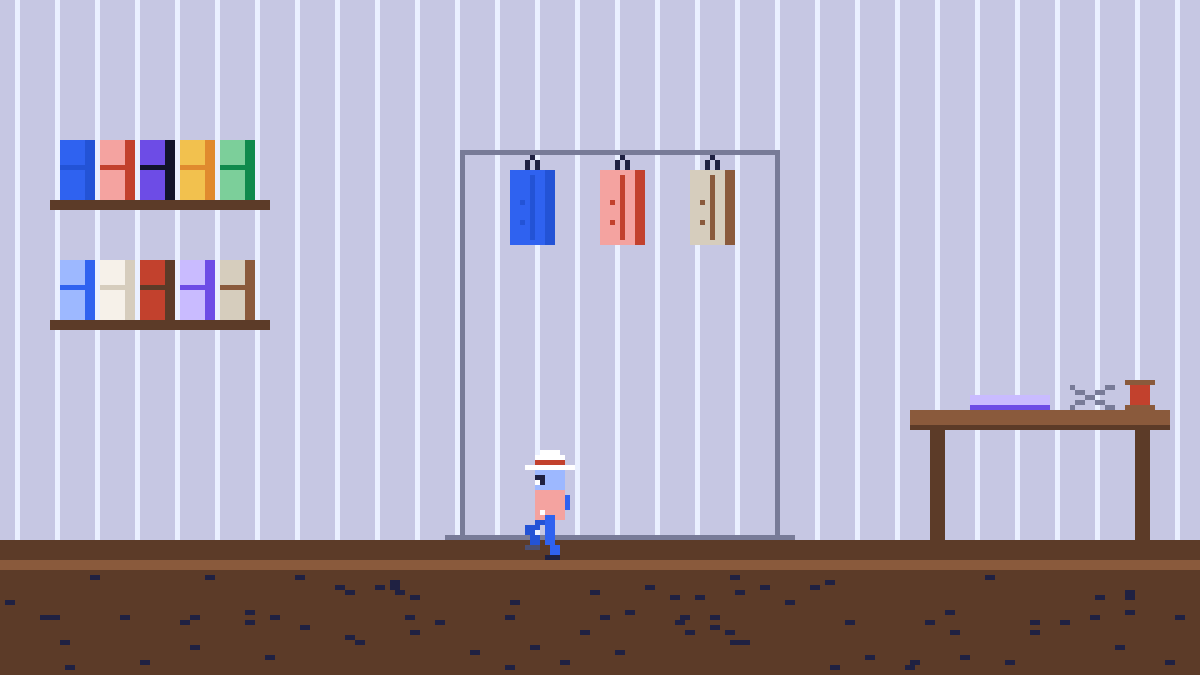
There is one drawing of her. The rule looks up every pixel's colour in the outfit's table of pairs, once, by the colour as it was drawn; the workshop behind her is not given to the rule and keeps its colours.
Also in this lesson 2 things to read up on 3 questions to check yourself
The idea
In pixel art every colour of a figure is a number of the palette. The beekeeper's jacket is cream, 6, with sand, 7, where it is in shade; her trousers are blue, 12, and deep blue, 13, on the far leg. Other clothes are other numbers in the same places. The shape, the shading and every frame of her walk stay as they were drawn.
So the game does not draw her again for each outfit, and not again for every frame of her walk in each outfit. It keeps one drawing and, for each outfit, a short table of pairs. A player sees this as the second player in other colours, as the same enemy in red when it hits harder, as a team in its own colours, or as clothes bought in a shop.
How it works
The rule looks at the number at its own place. If it is 0, nothing was drawn there, and the answer is 0. Otherwise it goes through the pairs of the chosen outfit and compares each pair's first number with the colour as drawn. The pair that starts with it gives the answer, and the rule stops there. If no pair starts with it, the colour stays as drawn: her white eye and her dark boots are in no pair, so they never change.
The table here has four outfits with up to seven pairs each:
- 0 is the picture as drawn: no pairs at all.
- 1 trades the jacket's colours with the trousers': cream becomes blue and blue becomes cream, sand becomes deep blue and deep blue becomes sand.
- 2 gives her a pink jacket, coral where it is in shade, a white hat and a coral band.
- 3 is the night watch: each colour of her clothes one step darker, the same steps as the palette's table of darker colours.
The one slider, outfit, picks the row of the table. In the picture it moves on each time she turns. Only she is given to the rule; the cloth on the shelf and the coats on the rail lie behind it and keep their colours.
What goes wrong
An AI often writes the swap as a row of steps: if the colour is cream, make it blue; if it is blue, make it cream; and so on down the list. Each step works on what the step before left behind. It reads right line by line, and it is how you would do it with "find and replace" in a text. But a colour that one pair has just put in can be caught again by a later pair that starts with it.
Switch the picture to "With the mistake" while she wears outfit 1. Her cream jacket becomes blue at the pair for cream and turns back to cream at the pair for blue, two lines further down; her blue trousers become cream at that same pair. Jacket and trousers end up in the same cream and sand. In outfit 3 the same thing makes her far too dark: her light blue veil goes to blue, then to deep blue, then to night blue, three steps instead of one, and her jacket and hat end up in wood brown.
The mistake hides well. In outfit 2 no colour that comes out of a pair goes into a later one, so it looks exactly like the rule. An AI that tries one outfit like that sees nothing wrong.
Two tests catch it: "two colours that trade places each change once, and not back" asks for cream to become blue and stay blue, and "a colour that one pair puts in is not swapped again by a later pair" asks for one step darker, not three.
The mistake, line by line
- /* Palette swap, with the mistake: the rule goes through the pairs one after another and swaps the
-    colour it holds now, not the colour as it was drawn. A colour that a pair has just put in is
-    swapped again by a later pair that starts with it. Two colours that should trade places both end up
-    as one of them, and a step darker becomes two or three steps darker.
+ /* Palette swap: the same drawn picture in other clothes. A table of pairs says which colour becomes
+    which, and the rule looks up every pixel's colour in it, once, by the colour as it was drawn. One
+    drawing of a figure gives a second player, a stronger enemy, a team's colours or a night watch,
+    without drawing her again.

+    Because each pixel is looked up once, two colours can trade places: the jacket's colour goes to the
+    trousers and the trousers' colour to the jacket, and neither is swapped a second time.
+
     From the course "Shaders for pixel art" on spielerando.com.
     SPDX-License-Identifier: MIT */
…
  }

- /** The rule, wrong: the pairs are applied one after another, each to what the last one left. */
+ /** The rule: the colour as drawn, looked up once in the outfit's pairs. */
  export function shade(x: number, y: number, _tick: number, src: Frame, p: Params = DEFAULTS): number {
    const n = at(src, x, y);
    if (n === 0) return 0; // nothing stays nothing
    const which = Math.min(Math.max(p.outfit, 0), OUTFITS - 1);
-   let color = n;
    for (let i = 0; i < PAIRS; i++) {
      const k = (which * PAIRS + i) * 2;
-     // wrong: compared with the colour as it is now, so a colour just put in is swapped again
-     if (TABLE[k] === color) color = TABLE[k + 1];
+     // compared with the colour as it was drawn: the pair that starts with it gives the answer, and that is all
+     if (TABLE[k] === n) return TABLE[k + 1];
    }
-   return color;
+   return n; // in no pair: as drawn
  }
What the test says about the mistake
✔ outfit 0 leaves every pixel as it was drawn
✖ a colour in the table becomes its partner
    outfit 1: cream jacket to blue
    got 6, expected 12
✔ a colour that is in no pair keeps its own colour
✔ an empty pixel stays empty in every outfit
✖ two colours that trade places each change once, and not back
    cream becomes blue and stays blue
    got 6, expected 12
✖ a colour that one pair puts in is not swapped again by a later pair
    cream one step darker is sand, not wood
    got 20, expected 7
✔ the shape stays, and every pixel of one colour gets the same new colour
7 tests: 4 passed, 3 failed
Tell your AI
Write a palette swap shader for my pixel art sprite: the same drawing in other clothes, by a table of colour pairs.

- Work on whole pixels: no smoothing and no blending. Sample the sprite's texture with nearest filtering, and compare colours exactly.
- Each outfit is a list of pairs: a colour as drawn, and the colour it becomes. My outfits: [for each outfit, its pairs, for example: red becomes green, green becomes red].
- Look up every pixel once, by the colour as it was drawn. The pair that starts with that colour gives the answer, and no later pair may swap it again. Colours in no pair, and empty pixels (alpha 0), stay as they are.
- Which outfit is worn must be a setting I can change from the game's code, and outfit 0 means the colours as drawn.

Before you write the shader, write the same rule as a small plain function. It takes a grid of whole numbers (0 = empty, 1 to N = the colours of my palette), a place and the outfit, and returns the number for that one pixel. Test it: two colours that trade places each change once and not back, a colour that one pair puts in is not swapped again by a later pair, and a colour in no pair stays. Show me the test's output. Then write the shader so that it does exactly what the function does.
The code
Three times the same rule. The first is the one we test; the two shaders are that rule in a shader language, which is what your game runs.
The rule, tested: shader.ts
/* Palette swap: the same drawn picture in other clothes. A table of pairs says which colour becomes
   which, and the rule looks up every pixel's colour in it, once, by the colour as it was drawn. One
   drawing of a figure gives a second player, a stronger enemy, a team's colours or a night watch,
   without drawing her again.

   Because each pixel is looked up once, two colours can trade places: the jacket's colour goes to the
   trousers and the trousers' colour to the jacket, and neither is swapped a second time.

   From the course "Shaders for pixel art" on spielerando.com.
   SPDX-License-Identifier: MIT */

export interface Frame {
  width: number;
  height: number;
  index: Uint8Array;
}

export const DEFAULTS = {
  /** Which clothes: 0 is the picture as drawn, 1 to 3 are the outfits in TABLE. */
  outfit: 1,
};
export type Params = typeof DEFAULTS;

/** How many pairs an outfit has, and how many outfits there are. */
const PAIRS = 7;
const OUTFITS = 4;
/** The outfits, PAIRS pairs each: a colour as drawn, and the colour it becomes. 0, 0 is an unused pair.
    Numbers: 5 white, 6 cream, 7 sand, 8 honey, 9 amber, 10 coral, 11 pink, 12 blue, 13 deep blue,
    14 light blue, 20 wood, 25 night (a shade lighter). */
const TABLE = [
  // 0: as drawn
  0, 0, 0, 0, 0, 0, 0, 0, 0, 0, 0, 0, 0, 0,
  // 1: the jacket and the trousers trade colours
  6, 12, 7, 13, 12, 6, 13, 7, 0, 0, 0, 0, 0, 0,
  // 2: a pink jacket, a white hat, coral trim
  6, 11, 7, 10, 8, 5, 9, 10, 0, 0, 0, 0, 0, 0,
  // 3: the night watch: her clothes one step darker, as in the palette's DARKER table
  6, 7, 7, 20, 14, 12, 12, 13, 13, 25, 8, 9, 9, 20,
];

/** The number at a place of the picture; outside the picture nothing is. */
export function at(src: Frame, x: number, y: number): number {
  if (x < 0 || y < 0 || x >= src.width || y >= src.height) return 0;
  return src.index[y * src.width + x];
}

/** The rule: the colour as drawn, looked up once in the outfit's pairs. */
export function shade(x: number, y: number, _tick: number, src: Frame, p: Params = DEFAULTS): number {
  const n = at(src, x, y);
  if (n === 0) return 0; // nothing stays nothing
  const which = Math.min(Math.max(p.outfit, 0), OUTFITS - 1);
  for (let i = 0; i < PAIRS; i++) {
    const k = (which * PAIRS + i) * 2;
    // compared with the colour as it was drawn: the pair that starts with it gives the answer, and that is all
    if (TABLE[k] === n) return TABLE[k + 1];
  }
  return n; // in no pair: as drawn
}
The same rule as a shader: GLSL
#version 300 es
// A shader the pixel art way: a pixel is a whole number, 0 where nothing is, 1 to 25 for the
// palette's colours. The rule is shade(): it is asked for every pixel and answers with a number.
// Everything outside the marked part is the same for every rule. Put your own palette in PALETTE.
precision highp float;
precision highp int;

uniform sampler2D SRC;   // the picture, sampled without smoothing (nearest)
uniform sampler2D OTHER; // a second picture, where the rule uses one
uniform int TICK;        // the time in ticks, 60 a second, counted by the game

const vec3 PALETTE[26] = vec3[26](
  vec3(0.0),
  vec3(31.0, 33.0, 66.0) / 255.0, // 1: k
  vec3(75.0, 78.0, 112.0) / 255.0, // 2: n
  vec3(120.0, 123.0, 152.0) / 255.0, // 3: m
  vec3(198.0, 199.0, 227.0) / 255.0, // 4: e
  vec3(255.0, 255.0, 255.0) / 255.0, // 5: w
  vec3(246.0, 241.0, 233.0) / 255.0, // 6: c
  vec3(214.0, 205.0, 189.0) / 255.0, // 7: d
  vec3(242.0, 193.0, 78.0) / 255.0, // 8: y
  vec3(224.0, 138.0, 46.0) / 255.0, // 9: o
  vec3(194.0, 65.0, 45.0) / 255.0, // 10: r
  vec3(244.0, 163.0, 160.0) / 255.0, // 11: p
  vec3(47.0, 98.0, 240.0) / 255.0, // 12: b
  vec3(35.0, 83.0, 214.0) / 255.0, // 13: u
  vec3(157.0, 184.0, 255.0) / 255.0, // 14: s
  vec3(234.0, 240.0, 255.0) / 255.0, // 15: a
  vec3(207.0, 224.0, 255.0) / 255.0, // 16: i
  vec3(15.0, 138.0, 76.0) / 255.0, // 17: g
  vec3(124.0, 207.0, 154.0) / 255.0, // 18: l
  vec3(226.0, 244.0, 234.0) / 255.0, // 19: f
  vec3(138.0, 90.0, 60.0) / 255.0, // 20: t
  vec3(92.0, 59.0, 40.0) / 255.0, // 21: h
  vec3(109.0, 76.0, 230.0) / 255.0, // 22: v
  vec3(201.0, 187.0, 255.0) / 255.0, // 23: q
  vec3(18.0, 20.0, 43.0) / 255.0, // 24: x
  vec3(39.0, 43.0, 82.0) / 255.0 // 25: z
);

// Which colour of the palette is this? 0 where nothing is drawn.
int number(vec4 c) {
  if (c.a < 0.5) return 0;
  int best = 1;
  float least = 9.0;
  for (int i = 1; i <= 25; i++) {
    vec3 d = c.rgb - PALETTE[i];
    float away = dot(d, d);
    if (away < least) {
      least = away;
      best = i;
    }
  }
  return best;
}

// The number at a place of the picture; outside the picture nothing is.
int at(ivec2 p) {
  ivec2 size = textureSize(SRC, 0);
  if (p.x < 0 || p.y < 0 || p.x >= size.x || p.y >= size.y) return 0;
  return number(texelFetch(SRC, p, 0));
}

// The same for the second picture.
int otherAt(ivec2 p) {
  ivec2 size = textureSize(OTHER, 0);
  if (p.x < 0 || p.y < 0 || p.x >= size.x || p.y >= size.y) return 0;
  return number(texelFetch(OTHER, p, 0));
}

// a wrapped into 0 .. n-1, also for a below zero (the % sign is not safe there)
int wrap(int a, int n) {
  return a - n * int(floor(float(a) / float(n)));
}

// ---- the rule ----
uniform int outfit; // which clothes: 0 is the picture as drawn, 1 to 3 are the outfits in TABLE

// how many pairs an outfit has, and how many outfits there are
const int PAIRS = 7;
const int OUTFITS = 4;
// the outfits, PAIRS pairs each: a colour as drawn, and the colour it becomes. 0, 0 is an unused pair.
// Numbers: 5 white, 6 cream, 7 sand, 8 honey, 9 amber, 10 coral, 11 pink, 12 blue, 13 deep blue,
// 14 light blue, 20 wood, 25 night (a shade lighter).
const int TABLE[56] = int[56](
  // 0: as drawn
  0, 0, 0, 0, 0, 0, 0, 0, 0, 0, 0, 0, 0, 0,
  // 1: the jacket and the trousers trade colours
  6, 12, 7, 13, 12, 6, 13, 7, 0, 0, 0, 0, 0, 0,
  // 2: a pink jacket, a white hat, coral trim
  6, 11, 7, 10, 8, 5, 9, 10, 0, 0, 0, 0, 0, 0,
  // 3: the night watch: her clothes one step darker, as in the palette's DARKER table
  6, 7, 7, 20, 14, 12, 12, 13, 13, 25, 8, 9, 9, 20
);

// the colour as drawn, looked up once in the outfit's pairs
int shade(ivec2 p) {
  int n = at(p);
  if (n == 0) return 0; // nothing stays nothing
  int which = min(max(outfit, 0), OUTFITS - 1);
  for (int i = 0; i < PAIRS; i++) {
    int k = (which * PAIRS + i) * 2;
    // compared with the colour as it was drawn: the pair that starts with it gives the answer, and that is all
    if (TABLE[k] == n) return TABLE[k + 1];
  }
  return n; // in no pair: as drawn
}
// ---- end of the rule ----

out vec4 FRAGMENT;

void main() {
  // the pixel's place, counted from the top left as in the picture
  ivec2 p = ivec2(int(gl_FragCoord.x), textureSize(SRC, 0).y - 1 - int(gl_FragCoord.y));
  int n = shade(p);
  FRAGMENT = n == 0 ? vec4(0.0) : vec4(PALETTE[n], 1.0);
}
The same rule for Godot 4
shader_type canvas_item;
// A shader the pixel art way: a pixel is a whole number, 0 where nothing is, 1 to 25 for the
// palette's colours. The rule is shade(): it is asked for every pixel and answers with a number.
// Everything outside the marked part is the same for every rule. Put your own palette in PALETTE.
//
// Put this on the sprite, and give it the sprite's own picture once:
//   material.set_shader_parameter("SRC", texture)
uniform sampler2D SRC : filter_nearest;
uniform sampler2D OTHER : filter_nearest; // a second picture, where the rule uses one
// The time in ticks, 60 a second. The game counts it itself: add 1 in the _physics_process of a
// node that pauses with the game, and set it there, so a paused game pauses its shaders:
//   tick += 1
//   material.set_shader_parameter("TICK", tick)
uniform int TICK;

const vec3 PALETTE[26] = vec3[26](
  vec3(0.0),
  vec3(31.0, 33.0, 66.0) / 255.0, // 1: k
  vec3(75.0, 78.0, 112.0) / 255.0, // 2: n
  vec3(120.0, 123.0, 152.0) / 255.0, // 3: m
  vec3(198.0, 199.0, 227.0) / 255.0, // 4: e
  vec3(255.0, 255.0, 255.0) / 255.0, // 5: w
  vec3(246.0, 241.0, 233.0) / 255.0, // 6: c
  vec3(214.0, 205.0, 189.0) / 255.0, // 7: d
  vec3(242.0, 193.0, 78.0) / 255.0, // 8: y
  vec3(224.0, 138.0, 46.0) / 255.0, // 9: o
  vec3(194.0, 65.0, 45.0) / 255.0, // 10: r
  vec3(244.0, 163.0, 160.0) / 255.0, // 11: p
  vec3(47.0, 98.0, 240.0) / 255.0, // 12: b
  vec3(35.0, 83.0, 214.0) / 255.0, // 13: u
  vec3(157.0, 184.0, 255.0) / 255.0, // 14: s
  vec3(234.0, 240.0, 255.0) / 255.0, // 15: a
  vec3(207.0, 224.0, 255.0) / 255.0, // 16: i
  vec3(15.0, 138.0, 76.0) / 255.0, // 17: g
  vec3(124.0, 207.0, 154.0) / 255.0, // 18: l
  vec3(226.0, 244.0, 234.0) / 255.0, // 19: f
  vec3(138.0, 90.0, 60.0) / 255.0, // 20: t
  vec3(92.0, 59.0, 40.0) / 255.0, // 21: h
  vec3(109.0, 76.0, 230.0) / 255.0, // 22: v
  vec3(201.0, 187.0, 255.0) / 255.0, // 23: q
  vec3(18.0, 20.0, 43.0) / 255.0, // 24: x
  vec3(39.0, 43.0, 82.0) / 255.0 // 25: z
);

// Which colour of the palette is this? 0 where nothing is drawn.
int number(vec4 c) {
  if (c.a < 0.5) return 0;
  int best = 1;
  float least = 9.0;
  for (int i = 1; i <= 25; i++) {
    vec3 d = c.rgb - PALETTE[i];
    float away = dot(d, d);
    if (away < least) {
      least = away;
      best = i;
    }
  }
  return best;
}

// The number at a place of the picture; outside the picture nothing is.
int at(ivec2 p) {
  ivec2 size = textureSize(SRC, 0);
  if (p.x < 0 || p.y < 0 || p.x >= size.x || p.y >= size.y) return 0;
  return number(texelFetch(SRC, p, 0));
}

// The same for the second picture.
int otherAt(ivec2 p) {
  ivec2 size = textureSize(OTHER, 0);
  if (p.x < 0 || p.y < 0 || p.x >= size.x || p.y >= size.y) return 0;
  return number(texelFetch(OTHER, p, 0));
}

// a wrapped into 0 .. n-1, also for a below zero (the % sign is not safe there)
int wrap(int a, int n) {
  return a - n * int(floor(float(a) / float(n)));
}

// ---- the rule ----
uniform int outfit; // which clothes: 0 is the picture as drawn, 1 to 3 are the outfits in TABLE

// how many pairs an outfit has, and how many outfits there are
const int PAIRS = 7;
const int OUTFITS = 4;
// the outfits, PAIRS pairs each: a colour as drawn, and the colour it becomes. 0, 0 is an unused pair.
// Numbers: 5 white, 6 cream, 7 sand, 8 honey, 9 amber, 10 coral, 11 pink, 12 blue, 13 deep blue,
// 14 light blue, 20 wood, 25 night (a shade lighter).
const int TABLE[56] = int[56](
  // 0: as drawn
  0, 0, 0, 0, 0, 0, 0, 0, 0, 0, 0, 0, 0, 0,
  // 1: the jacket and the trousers trade colours
  6, 12, 7, 13, 12, 6, 13, 7, 0, 0, 0, 0, 0, 0,
  // 2: a pink jacket, a white hat, coral trim
  6, 11, 7, 10, 8, 5, 9, 10, 0, 0, 0, 0, 0, 0,
  // 3: the night watch: her clothes one step darker, as in the palette's DARKER table
  6, 7, 7, 20, 14, 12, 12, 13, 13, 25, 8, 9, 9, 20
);

// the colour as drawn, looked up once in the outfit's pairs
int shade(ivec2 p) {
  int n = at(p);
  if (n == 0) return 0; // nothing stays nothing
  int which = min(max(outfit, 0), OUTFITS - 1);
  for (int i = 0; i < PAIRS; i++) {
    int k = (which * PAIRS + i) * 2;
    // compared with the colour as it was drawn: the pair that starts with it gives the answer, and that is all
    if (TABLE[k] == n) return TABLE[k + 1];
  }
  return n; // in no pair: as drawn
}
// ---- end of the rule ----

void fragment() {
  ivec2 p = ivec2(UV * vec2(textureSize(SRC, 0)));
  int n = shade(p);
  COLOR = n == 0 ? vec4(0.0) : vec4(PALETTE[n], 1.0);
}
The test: shader.test.ts
import assert from "node:assert/strict";
import { test } from "node:test";
import { DEFAULTS, type Frame, shade } from "./shader.ts";

/** A tiny picture from rows of numbers: 0 is nothing, 1 to 25 are the palette's colours. */
function picture(rows: string[]): Frame {
  const cells = rows.map((row) => row.trim().split(/\s+/).map(Number));
  return { width: cells[0].length, height: cells.length, index: Uint8Array.from(cells.flat()) };
}

// a hat (honey, amber band), a veil (light blue), a jacket (cream, sand in shade), trousers (blue, deep blue)
const SUIT = picture([
  " 0  8  8  0",
  " 9 14 14  9",
  " 6  6  6  7",
  "12  0  0 13",
]);

/** The whole picture in an outfit. */
function whole(outfit: number): number[] {
  const out: number[] = [];
  for (let y = 0; y < SUIT.height; y++) for (let x = 0; x < SUIT.width; x++) out.push(shade(x, y, 0, SUIT, { ...DEFAULTS, outfit }));
  return out;
}

/** The colour that a drawn colour becomes in an outfit, asked at a place where SUIT has it. */
function becomes(color: number, outfit: number): number {
  const i = SUIT.index.indexOf(color);
  assert.ok(i >= 0, `${color} is not in the test picture`);
  return shade(i % SUIT.width, Math.floor(i / SUIT.width), 0, SUIT, { ...DEFAULTS, outfit });
}

test("outfit 0 leaves every pixel as it was drawn", () => {
  assert.deepEqual(whole(0), [...SUIT.index]);
});

test("a colour in the table becomes its partner", () => {
  assert.equal(becomes(6, 1), 12, "outfit 1: cream jacket to blue");
  assert.equal(becomes(6, 2), 11, "outfit 2: cream jacket to pink");
  assert.equal(becomes(8, 2), 5, "outfit 2: honey hat to white");
  assert.equal(becomes(13, 3), 25, "outfit 3: deep blue to night");
});

test("a colour that is in no pair keeps its own colour", () => {
  assert.equal(becomes(8, 1), 8, "outfit 1 leaves the hat");
  assert.equal(becomes(14, 1), 14, "outfit 1 leaves the veil");
  assert.equal(becomes(14, 2), 14, "outfit 2 leaves the veil");
  assert.equal(becomes(12, 2), 12, "outfit 2 leaves the trousers");
});

test("an empty pixel stays empty in every outfit", () => {
  for (let outfit = 0; outfit < 4; outfit++) assert.equal(shade(1, 3, 0, SUIT, { ...DEFAULTS, outfit }), 0, `outfit ${outfit}`);
});

test("two colours that trade places each change once, and not back", () => {
  assert.equal(becomes(6, 1), 12, "cream becomes blue and stays blue");
  assert.equal(becomes(12, 1), 6, "blue becomes cream");
  assert.equal(becomes(7, 1), 13, "sand becomes deep blue and stays deep blue");
  assert.equal(becomes(13, 1), 7, "deep blue becomes sand");
});

test("a colour that one pair puts in is not swapped again by a later pair", () => {
  assert.equal(becomes(6, 3), 7, "cream one step darker is sand, not wood");
  assert.equal(becomes(14, 3), 12, "light blue one step darker is blue, not night");
  assert.equal(becomes(8, 3), 9, "honey one step darker is amber, not wood");
});

test("the shape stays, and every pixel of one colour gets the same new colour", () => {
  for (let outfit = 0; outfit < 4; outfit++) {
    const after = whole(outfit);
    const map = new Map<number, number>();
    after.forEach((n, i) => {
      const was = SUIT.index[i];
      assert.equal(n === 0, was === 0, `outfit ${outfit}, pixel ${i}: drawn before and after, or empty before and after`);
      if (map.has(was)) assert.equal(n, map.get(was), `outfit ${outfit}: two pixels of ${was} came out differently`);
      map.set(was, n);
    });
  }
});
- 7 tests pass on the rule.
- With the mistake put in, 3 of them fail: "a colour in the table becomes its partner", "two colours that trade places each change once, and not back", "a colour that one pair puts in is not swapped again by a later pair".
- The mistake shows in the picture above: switch to "With the mistake".
- The shader ran in a browser (Chrome/158.0.8127.37) on 10 pictures and gave the rule's picture in 324,000 of 324,000 pixels.
Try it
- Move the outfit slider from 0 to 3 while she walks. Her shape and her steps stay exactly the same; only the colours change, and the workshop behind her keeps its own.
- Set outfit 1 and switch between "With the rule" and "With the mistake". With the rule she wears a blue jacket and cream trousers; with the mistake her jacket and her trousers are the same cream and sand.
- Set outfit 2 and switch to "With the mistake": nothing changes. Then set outfit 3: now the mistake is plain to see. This is why the test tries a trade and a chain of steps, not just any outfit.
Read up
Where to go deeper: the pages of ours this lesson builds on, and what others have written about its point.
The same idea outside a shader: a sprite written as rows of letters and a short list that gives each letter its colour, so another list dresses the same drawing in other colours.
Darker and Lighter in Pixel Art: Colour Ramps in a Shader
Where the night watch's colours come from: a table that names each colour's darker and lighter neighbour, how to make one for your own palette, and why counting the palette's numbers down gets it wrong.
Check yourself: three questions
Each answer is checked and explained at once. The questions are part of the quiz, so they count for your Game Coder IQ like any other.
A palette swap dresses the beekeeper in other clothes. What does the rule change in her picture?
Next lesson Outline Shader for Pixel Art: One Pixel Around the Sprite
Give the whole lesson to your AI
The button copies what to tell it together with the tested rule, its test and both shaders, so your AI has everything to build this in your game and to show you that it works.
This is a lesson from the course "Shaders for Pixel Art" on spielerando.com: https://spielerando.com/en/courses/pixel-shaders/palette-swap

Write a palette swap shader for my pixel art sprite: the same drawing in other clothes, by a table of colour pairs.

- Work on whole pixels: no smoothing and no blending. Sample the sprite's texture with nearest filtering, and compare colours exactly.
- Each outfit is a list of pairs: a colour as drawn, and the colour it becomes. My outfits: [for each outfit, its pairs, for example: red becomes green, green becomes red].
- Look up every pixel once, by the colour as it was drawn. The pair that starts with that colour gives the answer, and no later pair may swap it again. Colours in no pair, and empty pixels (alpha 0), stay as they are.
- Which outfit is worn must be a setting I can change from the game's code, and outfit 0 means the colours as drawn.

Before you write the shader, write the same rule as a small plain function. It takes a grid of whole numbers (0 = empty, 1 to N = the colours of my palette), a place and the outfit, and returns the number for that one pixel. Test it: two colours that trade places each change once and not back, a colour that one pair puts in is not swapped again by a later pair, and a colour in no pair stays. Show me the test's output. Then write the shader so that it does exactly what the function does.

The rule, tested (shader.ts):
```ts
/* Palette swap: the same drawn picture in other clothes. A table of pairs says which colour becomes
   which, and the rule looks up every pixel's colour in it, once, by the colour as it was drawn. One
   drawing of a figure gives a second player, a stronger enemy, a team's colours or a night watch,
   without drawing her again.

   Because each pixel is looked up once, two colours can trade places: the jacket's colour goes to the
   trousers and the trousers' colour to the jacket, and neither is swapped a second time.

   From the course "Shaders for pixel art" on spielerando.com.
   SPDX-License-Identifier: MIT */

export interface Frame {
  width: number;
  height: number;
  index: Uint8Array;
}

export const DEFAULTS = {
  /** Which clothes: 0 is the picture as drawn, 1 to 3 are the outfits in TABLE. */
  outfit: 1,
};
export type Params = typeof DEFAULTS;

/** How many pairs an outfit has, and how many outfits there are. */
const PAIRS = 7;
const OUTFITS = 4;
/** The outfits, PAIRS pairs each: a colour as drawn, and the colour it becomes. 0, 0 is an unused pair.
    Numbers: 5 white, 6 cream, 7 sand, 8 honey, 9 amber, 10 coral, 11 pink, 12 blue, 13 deep blue,
    14 light blue, 20 wood, 25 night (a shade lighter). */
const TABLE = [
  // 0: as drawn
  0, 0, 0, 0, 0, 0, 0, 0, 0, 0, 0, 0, 0, 0,
  // 1: the jacket and the trousers trade colours
  6, 12, 7, 13, 12, 6, 13, 7, 0, 0, 0, 0, 0, 0,
  // 2: a pink jacket, a white hat, coral trim
  6, 11, 7, 10, 8, 5, 9, 10, 0, 0, 0, 0, 0, 0,
  // 3: the night watch: her clothes one step darker, as in the palette's DARKER table
  6, 7, 7, 20, 14, 12, 12, 13, 13, 25, 8, 9, 9, 20,
];

/** The number at a place of the picture; outside the picture nothing is. */
export function at(src: Frame, x: number, y: number): number {
  if (x < 0 || y < 0 || x >= src.width || y >= src.height) return 0;
  return src.index[y * src.width + x];
}

/** The rule: the colour as drawn, looked up once in the outfit's pairs. */
export function shade(x: number, y: number, _tick: number, src: Frame, p: Params = DEFAULTS): number {
  const n = at(src, x, y);
  if (n === 0) return 0; // nothing stays nothing
  const which = Math.min(Math.max(p.outfit, 0), OUTFITS - 1);
  for (let i = 0; i < PAIRS; i++) {
    const k = (which * PAIRS + i) * 2;
    // compared with the colour as it was drawn: the pair that starts with it gives the answer, and that is all
    if (TABLE[k] === n) return TABLE[k + 1];
  }
  return n; // in no pair: as drawn
}
```

Its test (shader.test.ts):
```ts
import assert from "node:assert/strict";
import { test } from "node:test";
import { DEFAULTS, type Frame, shade } from "./shader.ts";

/** A tiny picture from rows of numbers: 0 is nothing, 1 to 25 are the palette's colours. */
function picture(rows: string[]): Frame {
  const cells = rows.map((row) => row.trim().split(/\s+/).map(Number));
  return { width: cells[0].length, height: cells.length, index: Uint8Array.from(cells.flat()) };
}

// a hat (honey, amber band), a veil (light blue), a jacket (cream, sand in shade), trousers (blue, deep blue)
const SUIT = picture([
  " 0  8  8  0",
  " 9 14 14  9",
  " 6  6  6  7",
  "12  0  0 13",
]);

/** The whole picture in an outfit. */
function whole(outfit: number): number[] {
  const out: number[] = [];
  for (let y = 0; y < SUIT.height; y++) for (let x = 0; x < SUIT.width; x++) out.push(shade(x, y, 0, SUIT, { ...DEFAULTS, outfit }));
  return out;
}

/** The colour that a drawn colour becomes in an outfit, asked at a place where SUIT has it. */
function becomes(color: number, outfit: number): number {
  const i = SUIT.index.indexOf(color);
  assert.ok(i >= 0, `${color} is not in the test picture`);
  return shade(i % SUIT.width, Math.floor(i / SUIT.width), 0, SUIT, { ...DEFAULTS, outfit });
}

test("outfit 0 leaves every pixel as it was drawn", () => {
  assert.deepEqual(whole(0), [...SUIT.index]);
});

test("a colour in the table becomes its partner", () => {
  assert.equal(becomes(6, 1), 12, "outfit 1: cream jacket to blue");
  assert.equal(becomes(6, 2), 11, "outfit 2: cream jacket to pink");
  assert.equal(becomes(8, 2), 5, "outfit 2: honey hat to white");
  assert.equal(becomes(13, 3), 25, "outfit 3: deep blue to night");
});

test("a colour that is in no pair keeps its own colour", () => {
  assert.equal(becomes(8, 1), 8, "outfit 1 leaves the hat");
  assert.equal(becomes(14, 1), 14, "outfit 1 leaves the veil");
  assert.equal(becomes(14, 2), 14, "outfit 2 leaves the veil");
  assert.equal(becomes(12, 2), 12, "outfit 2 leaves the trousers");
});

test("an empty pixel stays empty in every outfit", () => {
  for (let outfit = 0; outfit < 4; outfit++) assert.equal(shade(1, 3, 0, SUIT, { ...DEFAULTS, outfit }), 0, `outfit ${outfit}`);
});

test("two colours that trade places each change once, and not back", () => {
  assert.equal(becomes(6, 1), 12, "cream becomes blue and stays blue");
  assert.equal(becomes(12, 1), 6, "blue becomes cream");
  assert.equal(becomes(7, 1), 13, "sand becomes deep blue and stays deep blue");
  assert.equal(becomes(13, 1), 7, "deep blue becomes sand");
});

test("a colour that one pair puts in is not swapped again by a later pair", () => {
  assert.equal(becomes(6, 3), 7, "cream one step darker is sand, not wood");
  assert.equal(becomes(14, 3), 12, "light blue one step darker is blue, not night");
  assert.equal(becomes(8, 3), 9, "honey one step darker is amber, not wood");
});

test("the shape stays, and every pixel of one colour gets the same new colour", () => {
  for (let outfit = 0; outfit < 4; outfit++) {
    const after = whole(outfit);
    const map = new Map<number, number>();
    after.forEach((n, i) => {
      const was = SUIT.index[i];
      assert.equal(n === 0, was === 0, `outfit ${outfit}, pixel ${i}: drawn before and after, or empty before and after`);
      if (map.has(was)) assert.equal(n, map.get(was), `outfit ${outfit}: two pixels of ${was} came out differently`);
      map.set(was, n);
    });
  }
});
```

The same rule as a GLSL shader (WebGL 2, OpenGL ES 3.0), checked against the rule pixel for pixel:
```glsl
#version 300 es
// A shader the pixel art way: a pixel is a whole number, 0 where nothing is, 1 to 25 for the
// palette's colours. The rule is shade(): it is asked for every pixel and answers with a number.
// Everything outside the marked part is the same for every rule. Put your own palette in PALETTE.
precision highp float;
precision highp int;

uniform sampler2D SRC;   // the picture, sampled without smoothing (nearest)
uniform sampler2D OTHER; // a second picture, where the rule uses one
uniform int TICK;        // the time in ticks, 60 a second, counted by the game

const vec3 PALETTE[26] = vec3[26](
  vec3(0.0),
  vec3(31.0, 33.0, 66.0) / 255.0, // 1: k
  vec3(75.0, 78.0, 112.0) / 255.0, // 2: n
  vec3(120.0, 123.0, 152.0) / 255.0, // 3: m
  vec3(198.0, 199.0, 227.0) / 255.0, // 4: e
  vec3(255.0, 255.0, 255.0) / 255.0, // 5: w
  vec3(246.0, 241.0, 233.0) / 255.0, // 6: c
  vec3(214.0, 205.0, 189.0) / 255.0, // 7: d
  vec3(242.0, 193.0, 78.0) / 255.0, // 8: y
  vec3(224.0, 138.0, 46.0) / 255.0, // 9: o
  vec3(194.0, 65.0, 45.0) / 255.0, // 10: r
  vec3(244.0, 163.0, 160.0) / 255.0, // 11: p
  vec3(47.0, 98.0, 240.0) / 255.0, // 12: b
  vec3(35.0, 83.0, 214.0) / 255.0, // 13: u
  vec3(157.0, 184.0, 255.0) / 255.0, // 14: s
  vec3(234.0, 240.0, 255.0) / 255.0, // 15: a
  vec3(207.0, 224.0, 255.0) / 255.0, // 16: i
  vec3(15.0, 138.0, 76.0) / 255.0, // 17: g
  vec3(124.0, 207.0, 154.0) / 255.0, // 18: l
  vec3(226.0, 244.0, 234.0) / 255.0, // 19: f
  vec3(138.0, 90.0, 60.0) / 255.0, // 20: t
  vec3(92.0, 59.0, 40.0) / 255.0, // 21: h
  vec3(109.0, 76.0, 230.0) / 255.0, // 22: v
  vec3(201.0, 187.0, 255.0) / 255.0, // 23: q
  vec3(18.0, 20.0, 43.0) / 255.0, // 24: x
  vec3(39.0, 43.0, 82.0) / 255.0 // 25: z
);

// Which colour of the palette is this? 0 where nothing is drawn.
int number(vec4 c) {
  if (c.a < 0.5) return 0;
  int best = 1;
  float least = 9.0;
  for (int i = 1; i <= 25; i++) {
    vec3 d = c.rgb - PALETTE[i];
    float away = dot(d, d);
    if (away < least) {
      least = away;
      best = i;
    }
  }
  return best;
}

// The number at a place of the picture; outside the picture nothing is.
int at(ivec2 p) {
  ivec2 size = textureSize(SRC, 0);
  if (p.x < 0 || p.y < 0 || p.x >= size.x || p.y >= size.y) return 0;
  return number(texelFetch(SRC, p, 0));
}

// The same for the second picture.
int otherAt(ivec2 p) {
  ivec2 size = textureSize(OTHER, 0);
  if (p.x < 0 || p.y < 0 || p.x >= size.x || p.y >= size.y) return 0;
  return number(texelFetch(OTHER, p, 0));
}

// a wrapped into 0 .. n-1, also for a below zero (the % sign is not safe there)
int wrap(int a, int n) {
  return a - n * int(floor(float(a) / float(n)));
}

// ---- the rule ----
uniform int outfit; // which clothes: 0 is the picture as drawn, 1 to 3 are the outfits in TABLE

// how many pairs an outfit has, and how many outfits there are
const int PAIRS = 7;
const int OUTFITS = 4;
// the outfits, PAIRS pairs each: a colour as drawn, and the colour it becomes. 0, 0 is an unused pair.
// Numbers: 5 white, 6 cream, 7 sand, 8 honey, 9 amber, 10 coral, 11 pink, 12 blue, 13 deep blue,
// 14 light blue, 20 wood, 25 night (a shade lighter).
const int TABLE[56] = int[56](
  // 0: as drawn
  0, 0, 0, 0, 0, 0, 0, 0, 0, 0, 0, 0, 0, 0,
  // 1: the jacket and the trousers trade colours
  6, 12, 7, 13, 12, 6, 13, 7, 0, 0, 0, 0, 0, 0,
  // 2: a pink jacket, a white hat, coral trim
  6, 11, 7, 10, 8, 5, 9, 10, 0, 0, 0, 0, 0, 0,
  // 3: the night watch: her clothes one step darker, as in the palette's DARKER table
  6, 7, 7, 20, 14, 12, 12, 13, 13, 25, 8, 9, 9, 20
);

// the colour as drawn, looked up once in the outfit's pairs
int shade(ivec2 p) {
  int n = at(p);
  if (n == 0) return 0; // nothing stays nothing
  int which = min(max(outfit, 0), OUTFITS - 1);
  for (int i = 0; i < PAIRS; i++) {
    int k = (which * PAIRS + i) * 2;
    // compared with the colour as it was drawn: the pair that starts with it gives the answer, and that is all
    if (TABLE[k] == n) return TABLE[k + 1];
  }
  return n; // in no pair: as drawn
}
// ---- end of the rule ----

out vec4 FRAGMENT;

void main() {
  // the pixel's place, counted from the top left as in the picture
  ivec2 p = ivec2(int(gl_FragCoord.x), textureSize(SRC, 0).y - 1 - int(gl_FragCoord.y));
  int n = shade(p);
  FRAGMENT = n == 0 ? vec4(0.0) : vec4(PALETTE[n], 1.0);
}
```

The same rule for Godot 4 (not run by the authors):
```gdshader
shader_type canvas_item;
// A shader the pixel art way: a pixel is a whole number, 0 where nothing is, 1 to 25 for the
// palette's colours. The rule is shade(): it is asked for every pixel and answers with a number.
// Everything outside the marked part is the same for every rule. Put your own palette in PALETTE.
//
// Put this on the sprite, and give it the sprite's own picture once:
//   material.set_shader_parameter("SRC", texture)
uniform sampler2D SRC : filter_nearest;
uniform sampler2D OTHER : filter_nearest; // a second picture, where the rule uses one
// The time in ticks, 60 a second. The game counts it itself: add 1 in the _physics_process of a
// node that pauses with the game, and set it there, so a paused game pauses its shaders:
//   tick += 1
//   material.set_shader_parameter("TICK", tick)
uniform int TICK;

const vec3 PALETTE[26] = vec3[26](
  vec3(0.0),
  vec3(31.0, 33.0, 66.0) / 255.0, // 1: k
  vec3(75.0, 78.0, 112.0) / 255.0, // 2: n
  vec3(120.0, 123.0, 152.0) / 255.0, // 3: m
  vec3(198.0, 199.0, 227.0) / 255.0, // 4: e
  vec3(255.0, 255.0, 255.0) / 255.0, // 5: w
  vec3(246.0, 241.0, 233.0) / 255.0, // 6: c
  vec3(214.0, 205.0, 189.0) / 255.0, // 7: d
  vec3(242.0, 193.0, 78.0) / 255.0, // 8: y
  vec3(224.0, 138.0, 46.0) / 255.0, // 9: o
  vec3(194.0, 65.0, 45.0) / 255.0, // 10: r
  vec3(244.0, 163.0, 160.0) / 255.0, // 11: p
  vec3(47.0, 98.0, 240.0) / 255.0, // 12: b
  vec3(35.0, 83.0, 214.0) / 255.0, // 13: u
  vec3(157.0, 184.0, 255.0) / 255.0, // 14: s
  vec3(234.0, 240.0, 255.0) / 255.0, // 15: a
  vec3(207.0, 224.0, 255.0) / 255.0, // 16: i
  vec3(15.0, 138.0, 76.0) / 255.0, // 17: g
  vec3(124.0, 207.0, 154.0) / 255.0, // 18: l
  vec3(226.0, 244.0, 234.0) / 255.0, // 19: f
  vec3(138.0, 90.0, 60.0) / 255.0, // 20: t
  vec3(92.0, 59.0, 40.0) / 255.0, // 21: h
  vec3(109.0, 76.0, 230.0) / 255.0, // 22: v
  vec3(201.0, 187.0, 255.0) / 255.0, // 23: q
  vec3(18.0, 20.0, 43.0) / 255.0, // 24: x
  vec3(39.0, 43.0, 82.0) / 255.0 // 25: z
);

// Which colour of the palette is this? 0 where nothing is drawn.
int number(vec4 c) {
  if (c.a < 0.5) return 0;
  int best = 1;
  float least = 9.0;
  for (int i = 1; i <= 25; i++) {
    vec3 d = c.rgb - PALETTE[i];
    float away = dot(d, d);
    if (away < least) {
      least = away;
      best = i;
    }
  }
  return best;
}

// The number at a place of the picture; outside the picture nothing is.
int at(ivec2 p) {
  ivec2 size = textureSize(SRC, 0);
  if (p.x < 0 || p.y < 0 || p.x >= size.x || p.y >= size.y) return 0;
  return number(texelFetch(SRC, p, 0));
}

// The same for the second picture.
int otherAt(ivec2 p) {
  ivec2 size = textureSize(OTHER, 0);
  if (p.x < 0 || p.y < 0 || p.x >= size.x || p.y >= size.y) return 0;
  return number(texelFetch(OTHER, p, 0));
}

// a wrapped into 0 .. n-1, also for a below zero (the % sign is not safe there)
int wrap(int a, int n) {
  return a - n * int(floor(float(a) / float(n)));
}

// ---- the rule ----
uniform int outfit; // which clothes: 0 is the picture as drawn, 1 to 3 are the outfits in TABLE

// how many pairs an outfit has, and how many outfits there are
const int PAIRS = 7;
const int OUTFITS = 4;
// the outfits, PAIRS pairs each: a colour as drawn, and the colour it becomes. 0, 0 is an unused pair.
// Numbers: 5 white, 6 cream, 7 sand, 8 honey, 9 amber, 10 coral, 11 pink, 12 blue, 13 deep blue,
// 14 light blue, 20 wood, 25 night (a shade lighter).
const int TABLE[56] = int[56](
  // 0: as drawn
  0, 0, 0, 0, 0, 0, 0, 0, 0, 0, 0, 0, 0, 0,
  // 1: the jacket and the trousers trade colours
  6, 12, 7, 13, 12, 6, 13, 7, 0, 0, 0, 0, 0, 0,
  // 2: a pink jacket, a white hat, coral trim
  6, 11, 7, 10, 8, 5, 9, 10, 0, 0, 0, 0, 0, 0,
  // 3: the night watch: her clothes one step darker, as in the palette's DARKER table
  6, 7, 7, 20, 14, 12, 12, 13, 13, 25, 8, 9, 9, 20
);

// the colour as drawn, looked up once in the outfit's pairs
int shade(ivec2 p) {
  int n = at(p);
  if (n == 0) return 0; // nothing stays nothing
  int which = min(max(outfit, 0), OUTFITS - 1);
  for (int i = 0; i < PAIRS; i++) {
    int k = (which * PAIRS + i) * 2;
    // compared with the colour as it was drawn: the pair that starts with it gives the answer, and that is all
    if (TABLE[k] == n) return TABLE[k + 1];
  }
  return n; // in no pair: as drawn
}
// ---- end of the rule ----

void fragment() {
  ivec2 p = ivec2(UV * vec2(textureSize(SRC, 0)));
  int n = shade(p);
  COLOR = n == 0 ? vec4(0.0) : vec4(PALETTE[n], 1.0);
}
```
How useful was this page?
Nobody has rated this page yet.